

Windows 11 25H2 ISO enters boot loop

malaz

New Member
Jul 14, 2026
2
0
1
Hello everyone,

I am unable to boot the official Windows 11 25H2 x64 ISO on Proxmox.

After starting the VM it displays the Proxmox Logo with "Start boot option" and it loads successfully, after that "Press any key to boot from CD or DVD..." gets displayed.
When I press a key, the prompt disappears, the Proxmox logo appears right after for around 30 seconds, after that it will load successfully again "Start boot option" and then shows the same prompt again (Press any key to boot from CD or DVD...). and the cycle continues in this way...

If I do not press a key, I get:
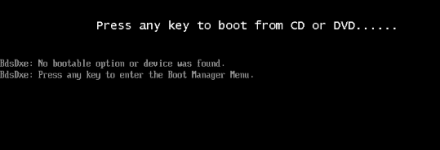
1784039036776.png

The keyboard input is definitely detected, because pressing a key immediately changes the boot behavior.

A Windows Server 2022 ISO boots successfully in the same VM.

The Windows 11 ISO is an official Microsoft ISO
SHA-256 is also correct.

What I already tested:
- OVMF/UEFI
- Secure Boot enabled and disabled
- New EFI disk (Pre-Enrolled Keys enabled and disabled)
- q35 and i440fx
- CPU type host, kvm64 and x86-64-v2-AES
- Windows ISO as IDE and SATA CD-ROM
- SCSI and SATA virtual disks
- New VM created from scratch
- Booting BOOTX64.EFI manually
- Booting cdboot_noprompt.efi manually (Starting BOOTX64.EFI or cdboot_noprompt.efi manually only causes a brief black screen and returns to the EFI file browser.)
- Only the Windows ISO enabled in the boot order (with the ISO being set as ide0)
- Direct keyboard input through qm sendkey (didn´t seem to work)

Current VM configuration:
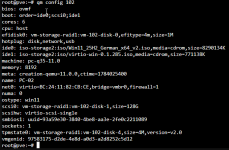
1784040062986.png

I already found a couple if people who had the same issues but there were no clear solutions it looked like it worked somehow for them.

I am ready to test more suggestions. I may have already tried some of them, but I can test them again if needed.

Thank you for your help. I look forward to your replies.
 
A few things I don't see in your test list:

1) Try an older machine type. You're on pc-q35-11.0 which is very fresh. Try dropping to pc-q35-9.2+pve1 (or even 8.2) and see if the loop goes away. Recent q35 versions changed some IDE/OVMF emulation details and there are a couple of Windows bootloader regressions floating around.

qm set 102 --machine pc-q35-9.2+pve1

2) Where is the ISO stored? If iso-storage2 is a network share (NFS/CIFS/etc.), copy the ISO to local storage and mount it from there. UEFI bootloaders on large ISOs (25H2 is ~8GB) over network storage can time out during the initial payload load without surfacing an error — you just get the loop.

3) Test with a different ISO. Try the English 25H2 image, or an older Win11 24H2 image if you have one lying around. If English 25H2 works and German 25H2 doesn't, something's off with that specific image (even if SHA matches Microsoft's).

4) In the OVMF boot menu (Esc during early boot), select the CD as a one-time boot manually instead of going through the boot order. That bypasses some of the OVMF boot manager logic and sometimes works around exactly this loop.

If none of the above helps, worth reporting on the pve-devel mailing list — this feels like a real regression rather than a config issue, given how many things you've already ruled out.
 
  • Like
Reactions: malaz and news
I created a test VM and had no issues using the defaults presented by PVE 9.2.3. Here are the major differences from your setup:

cpu: x86-64-v2-AES
machine: pc-q35-11.0+pve1
Win11_25H2_English_x64.iso

Update: tested using English v2 ISO, German v2 ISO, host, pq-q35-11.0, and various other combinations of settings and still didn't have the issue. My host CPU is an older Xeon E3-1275 v5.
 
Last edited:
  • Like
Reactions: malaz
Good isolation test. Now the failing config differs from the working one in three places — CPU, machine type, and ISO — so at least one of those is the culprit. Easiest way to nail it down is to change one thing at a time on the failing VM:

1) First, try the English ISO on the broken VM. If it boots, the German v2 image is the problem (SHA matching Microsoft doesn't guarantee the release isn' buggy — the "v2" suffix means MS already re-released it once).

2) If English still fails, align the machine type to what the working VM has:

qm set 102 --machine pc-q35-11.0+pve1

pc-q35-11.0 and pc-q35-11.0+pve1 are actually different machine types — the +pve1 suffix means PVE patches are applied, and it's what PVE 9.2.3 assigns to new VMs by default. Yours is on the naked upstream one, which suggests the VM was created earlier and never migrated forward.

3) Only if both above still fail, switch CPU from host to x86-64-v2-AES.

CPU last because host is normally the more capable option and shouldn't cause boot loops on its own — it's the least likely of the three.
 
  • Like
Reactions: malaz
There was bug in PVE 9.0 with ISO uploaded to ZFS.
 
  • Like
Reactions: malaz
Hi everyone,

thank you to everyone who took the time to read my post and reply. I really appreciate your help and suggestions.

I completely forgot to mention an important detail: my Proxmox host uses two AMD Opteron 6174 CPUs. These processors were released on March 29, 2010 (:

I tested x86-64-v2-AES, but the VM did not start at all. Proxmox reported that the host CPU was missing the required features SSSE3, SSE4.1, SSE4.2, and AES. I should have known my own hardware better.

After trying many different VM configuration, I decided to test older Windows 11 ISO versions.

My results were:
Windows 11 25H2 German: boot loop.
Windows 11 25H2 English: boot loop.
Windows 11 24H2: boot loop.
Windows 11 23H2: boot loop.
Windows 11 22H2: boots and installs normally.

Windows 11 22H2 started with this configuration:
bios: ovmf
boot: order=scsi0;ide0;ide1;net0
cores: 4
cpu: host
efidisk0: vm-storage-raid1:vm-102-disk-0,efitype=4m,ms-cert=2023k,pre-enrolled-keys=1,size=1M
hotplug: disk,network,usb
ide0: iso-storage2:iso/Win11_22H2_German_x64v1(2).iso,media=cdrom,size=5426116K
ide1: iso-storage2:iso/virtio-win-0.1.285.iso,media=cdrom,size=771138K
machine: pc-q35-9.2
memory: 8192
meta: creation-qemu=11.0.0,ctime=1784025400
name: PC-02
net0: e1000=BC:24:11:82:CB:CE,bridge=vmbr0,firewall=1
numa: 0
ostype: win10
scsi0: vm-storage-raid1:vm-102-disk-1,size=128G
scsihw: virtio-scsi-single
smbios1: uuid=93a59e30-3840-4be8-aa3e-2fe0c2211089
sockets: 1
tpmstate0: vm-storage-raid1:vm-102-disk-2,size=4M,version=v2.0
vmgenid: 97583175-d2de-4e8d-a0d3-a2d8252c5d12


My next step is to create a snapshot of the working Windows 11 22H2 VM and then try an in-place upgrade to Windows 11 25H2.

Do you think this upgrade is technically possible on this old CPU, even though the 23H2, 24H2 and 25H2 installation media do not boot? Could the upgrade complete successfully because it starts from the already running 22H2 system, or is it likely to fail after the first reboot?
 
This is not possible on the AMD Opteron 6174.

To run Windows 11, you must use a CPU that meets the requirements for Windows 11.

* It’s certainly impossible for it to run on a CPU that lacks POPCNT and XSAVE.

Of course, there are some older CPUs that can be made to work by workarounds, but even using those is not recommended.

* I think Windows 11 22H2 will be the last one.
 
Last edited:
  • Like
Reactions: _gabriel