

Hello everyone,
I am unable to boot the official Windows 11 25H2 x64 ISO on Proxmox.
After starting the VM it displays the Proxmox Logo with "Start boot option" and it loads successfully, after that "Press any key to boot from CD or DVD..." gets displayed.
When I press a key, the prompt disappears, the Proxmox logo appears right after for around 30 seconds, after that it will load successfully again "Start boot option" and then shows the same prompt again (Press any key to boot from CD or DVD...). and the cycle continues in this way...
If I do not press a key, I get:
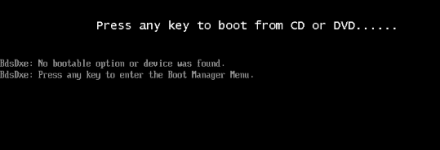
The keyboard input is definitely detected, because pressing a key immediately changes the boot behavior.
A Windows Server 2022 ISO boots successfully in the same VM.
The Windows 11 ISO is an official Microsoft ISO
SHA-256 is also correct.
What I already tested:
- OVMF/UEFI
- Secure Boot enabled and disabled
- New EFI disk (Pre-Enrolled Keys enabled and disabled)
- q35 and i440fx
- CPU type host, kvm64 and x86-64-v2-AES
- Windows ISO as IDE and SATA CD-ROM
- SCSI and SATA virtual disks
- New VM created from scratch
- Booting BOOTX64.EFI manually
- Booting cdboot_noprompt.efi manually (Starting BOOTX64.EFI or cdboot_noprompt.efi manually only causes a brief black screen and returns to the EFI file browser.)
- Only the Windows ISO enabled in the boot order (with the ISO being set as ide0)
- Direct keyboard input through qm sendkey (didn´t seem to work)
Current VM configuration:
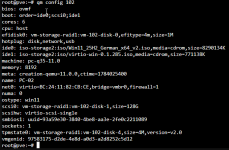
I already found a couple if people who had the same issues but there were no clear solutions it looked like it worked somehow for them.
I am ready to test more suggestions. I may have already tried some of them, but I can test them again if needed.
Thank you for your help. I look forward to your replies.
I am unable to boot the official Windows 11 25H2 x64 ISO on Proxmox.
After starting the VM it displays the Proxmox Logo with "Start boot option" and it loads successfully, after that "Press any key to boot from CD or DVD..." gets displayed.
When I press a key, the prompt disappears, the Proxmox logo appears right after for around 30 seconds, after that it will load successfully again "Start boot option" and then shows the same prompt again (Press any key to boot from CD or DVD...). and the cycle continues in this way...
If I do not press a key, I get:
The keyboard input is definitely detected, because pressing a key immediately changes the boot behavior.
A Windows Server 2022 ISO boots successfully in the same VM.
The Windows 11 ISO is an official Microsoft ISO
SHA-256 is also correct.
What I already tested:
- OVMF/UEFI
- Secure Boot enabled and disabled
- New EFI disk (Pre-Enrolled Keys enabled and disabled)
- q35 and i440fx
- CPU type host, kvm64 and x86-64-v2-AES
- Windows ISO as IDE and SATA CD-ROM
- SCSI and SATA virtual disks
- New VM created from scratch
- Booting BOOTX64.EFI manually
- Booting cdboot_noprompt.efi manually (Starting BOOTX64.EFI or cdboot_noprompt.efi manually only causes a brief black screen and returns to the EFI file browser.)
- Only the Windows ISO enabled in the boot order (with the ISO being set as ide0)
- Direct keyboard input through qm sendkey (didn´t seem to work)
Current VM configuration:
I already found a couple if people who had the same issues but there were no clear solutions it looked like it worked somehow for them.
I am ready to test more suggestions. I may have already tried some of them, but I can test them again if needed.
Thank you for your help. I look forward to your replies.


