

For the past few weeks, I’ve been experiencing a recurring issue with one of our VMs during backup:
- The backup fails on a specific VM, and afterward, the filesystem on the VM switches to read-only mode (screenshot available).
- The CPU usage then spikes to 100% until I force a shutdown.
- This has happened 5 times on the same VM over the past month, and once on a different VM.
- The affected filesystem isn’t always the same—it can be sdb1 or sda1.
- The VM’s filesystem is ext4, and the disks are stored on Ceph RBD.
- Backups are performed on a remote Proxmox Backup Server (PBS).
- After shutting down, I must run fsck /dev/sdb1, which corrects errors.
- Only then can I restart the VM successfully.
Everything had been working smoothly for months before this issue first appeared about a month ago.
I got a Proxmox + Ceph cluster on 3 nodes with 10 VM
On VM journalctl excluded ssh and CRON logs.
(no more logs after Jan 15 01:03 unless "sshd" and "CRON" and no more logs at all after Jan 15 01:05:04 )
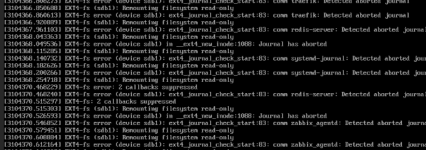
I link to this post but I'm not sur this is the same issue https://forum.proxmox.com/threads/filesystem-in-vm-has-been-corrupted-after-backup-failed.145495/
- The backup fails on a specific VM, and afterward, the filesystem on the VM switches to read-only mode (screenshot available).
- The CPU usage then spikes to 100% until I force a shutdown.
- This has happened 5 times on the same VM over the past month, and once on a different VM.
- The affected filesystem isn’t always the same—it can be sdb1 or sda1.
- The VM’s filesystem is ext4, and the disks are stored on Ceph RBD.
- Backups are performed on a remote Proxmox Backup Server (PBS).
- After shutting down, I must run fsck /dev/sdb1, which corrects errors.
- Only then can I restart the VM successfully.
Everything had been working smoothly for months before this issue first appeared about a month ago.
I got a Proxmox + Ceph cluster on 3 nodes with 10 VM
Bash:
proxmox-ve: 8.4.0 (running kernel: 6.8.12-16-pve)
pve-manager: 8.4.14 (running version: 8.4.14/b502d23c55afcba1)
proxmox-kernel-helper: 8.1.4
proxmox-kernel-6.8: 6.8.12-16
proxmox-kernel-6.8.12-16-pve-signed: 6.8.12-16
proxmox-kernel-6.8.12-11-pve-signed: 6.8.12-11
proxmox-kernel-6.8.12-8-pve-signed: 6.8.12-8
proxmox-kernel-6.8.12-5-pve-signed: 6.8.12-5
proxmox-kernel-6.8.12-4-pve-signed: 6.8.12-4
ceph: 19.2.3-1~bpo12+1
ceph-fuse: 19.2.3-1~bpo12+1
corosync: 3.1.9-pve1
criu: 3.17.1-2+deb12u2
glusterfs-client: 10.3-5
ifupdown2: 3.2.0-1+pmx11
ksm-control-daemon: 1.5-1
libjs-extjs: 7.0.0-5
libknet1: 1.30-pve2
libproxmox-acme-perl: 1.6.0
libproxmox-backup-qemu0: 1.5.2
libproxmox-rs-perl: 0.3.5
libpve-access-control: 8.2.2
libpve-apiclient-perl: 3.3.2
libpve-cluster-api-perl: 8.1.2
libpve-cluster-perl: 8.1.2
libpve-common-perl: 8.3.4
libpve-guest-common-perl: 5.2.2
libpve-http-server-perl: 5.2.2
libpve-network-perl: 0.11.2
libpve-rs-perl: 0.9.4
libpve-storage-perl: 8.3.7
libspice-server1: 0.15.1-1
lvm2: 2.03.16-2
lxc-pve: 6.0.0-1
lxcfs: 6.0.0-pve2
novnc-pve: 1.6.0-2
proxmox-backup-client: 3.4.7-1
proxmox-backup-file-restore: 3.4.7-1
proxmox-backup-restore-image: 0.7.0
proxmox-firewall: 0.7.1
proxmox-kernel-helper: 8.1.4
proxmox-mail-forward: 0.3.3
proxmox-mini-journalreader: 1.5
proxmox-offline-mirror-helper: 0.6.8
proxmox-widget-toolkit: 4.3.13
pve-cluster: 8.1.2
pve-container: 5.3.3
pve-docs: 8.4.1
pve-edk2-firmware: 4.2025.02-4~bpo12+1
pve-esxi-import-tools: 0.7.4
pve-firewall: 5.1.2
pve-firmware: 3.16-3
pve-ha-manager: 4.0.7
pve-i18n: 3.4.5
pve-qemu-kvm: 9.2.0-7
pve-xtermjs: 5.5.0-2
qemu-server: 8.4.4
smartmontools: 7.3-pve1
spiceterm: 3.3.1
swtpm: 0.8.0+pve1
vncterm: 1.8.1
zfsutils-linux: 2.2.8-pve1
Bash:
journalctl -u pvescheduler -S "2026-01-15 00:55:00" -U "2026-01-15 02:10:00"
Jan 15 01:00:08 delta pvescheduler[1574110]: <root@pam> starting task UPID:delta:001804DF:2021C25A:69682E08:vzdump::root@pam:
Jan 15 01:00:09 delta pvescheduler[1574111]: INFO: starting new backup job: vzdump --mode snapshot --notes-template '{{cluster}}, {{node}}, {{vmid}} {{guestname}}' --all 1 --quiet 1 --exclude 9109,666,10000,12110,102 --fleecing 0 --storage PBS-ikj
Jan 15 01:00:09 delta pvescheduler[1574111]: INFO: Starting Backup of VM 101 (qemu)
Jan 15 01:03:04 delta pvescheduler[1574111]: VM 101 qmp command failed - VM 101 qmp command 'backup' failed - got timeout
Jan 15 01:05:13 delta pvescheduler[1574111]: ERROR: Backup of VM 101 failed - VM 101 qmp command 'backup' failed - got timeout
Jan 15 01:05:13 delta pvescheduler[1574111]: INFO: Starting Backup of VM 110 (qemu)
Jan 15 01:51:41 delta pvescheduler[1574111]: INFO: Finished Backup of VM 110 (00:46:28)
Jan 15 01:51:42 delta pvescheduler[1574111]: INFO: Backup job finished with errors
Jan 15 01:51:42 delta perl[1574111]: notified via target `mail-to-root`
Jan 15 01:51:42 delta pvescheduler[1574111]: job errors
On VM journalctl excluded ssh and CRON logs.
(no more logs after Jan 15 01:03 unless "sshd" and "CRON" and no more logs at all after Jan 15 01:05:04 )
Bash:
journalctl -S "2026-01-15 01:00:00" -U "2026-01-15 02:10:00" -x |grep -vE "(sshd| CRON\[)"
Jan 15 01:00:57 VMhost qemu-ga[639009]: info: guest-ping called
Jan 15 01:00:57 VMhost qemu-ga[639009]: info: guest-fsfreeze called
Jan 15 01:03:04 VMhost systemd-journald[1595318]: Journal started
░░ Subject: The journal has been started
░░ Defined-By: systemd
░░ Support: https://www.debian.org/support
░░
░░ The system journal process has started up, opened the journal
░░ files for writing and is now ready to process requests.
Jan 15 01:03:04 VMhost systemd-journald[1595318]: System Journal (/var/log/journal/202f5ca57ed9d13be29545708c0406a1) is 2.4G, max 4.0G, 1.5G free.
░░ Subject: Disk space used by the journal
░░ Defined-By: systemd
░░ Support: https://www.debian.org/support
░░
░░ System Journal (/var/log/journal/202f5ca57ed9d13be29545708c0406a1) is currently using 2.4G.
░░ Maximum allowed usage is set to 4.0G.
░░ Leaving at least 4.0G free (of currently available 88.2G of disk space).
░░ Enforced usage limit is thus 4.0G, of which 1.5G are still available.
░░
░░ The limits controlling how much disk space is used by the journal may
░░ be configured with SystemMaxUse=, SystemKeepFree=, SystemMaxFileSize=,
░░ RuntimeMaxUse=, RuntimeKeepFree=, RuntimeMaxFileSize= settings in
░░ /etc/systemd/journald.conf. See journald.conf(5) for details.
Jan 15 01:03:04 VMhost systemd[1]: systemd-journald.service: Main process exited, code=killed, status=6/ABRT
Jan 15 01:03:04 VMhost systemd[1]: systemd-journald.service: Failed with result 'watchdog'.
Jan 15 01:03:04 VMhost systemd[1]: systemd-journald.service: Consumed 2min 45.985s CPU time.
Jan 15 01:03:04 VMhost systemd[1]: systemd-journald.service: Scheduled restart job, restart counter is at 2.
Jan 15 01:03:04 VMhost systemd[1]: Stopped systemd-journald.service - Journal Service.
Jan 15 01:03:04 VMhost systemd[1]: systemd-journald.service: Consumed 2min 45.985s CPU time.
Jan 15 01:03:04 VMhost systemd[1]: Starting systemd-journald.service - Journal Service...
Jan 15 01:03:04 VMhost systemd-journald[1595318]: File /var/log/journal/202f5ca57ed9d13be29545708c0406a1/system.journal corrupted or uncleanly shut down, renaming and replacing.
Jan 15 01:03:04 VMhost containerd[671]: time="2026-01-15T01:03:04.416791999+01:00" level=error msg="ttrpc: received message on inactive stream" stream=579681
Jan 15 01:03:04 VMhost containerd[671]: time="2026-01-15T01:03:04.422331783+01:00" level=error msg="ttrpc: received message on inactive stream" stream=58133
Jan 15 01:03:04 VMhost containerd[671]: time="2026-01-15T01:03:04.447674807+01:00" level=error msg="ttrpc: received message on inactive stream" stream=579679
Jan 15 01:03:04 VMhost containerd[671]: time="2026-01-15T01:03:04.455177718+01:00" level=error msg="ttrpc: received message on inactive stream" stream=579687
Jan 15 01:03:04 VMhost systemd[1]: Started systemd-journald.service - Journal Service.
Jan 15 01:03:04 VMhost dockerd[904]: time="2026-01-15T01:01:35.414055940+01:00" level=warning msg="Health check for container b66feee32859b3ff34e17859db381b3517d6c01ba194146fbbeba1620644ffdd error: timed out starting health check for container b66feee32859b3ff34e17859db381b3517d6c01ba194146fbbeba1620644ffdd"
Jan 15 01:03:04 VMhost dockerd[904]: time="2026-01-15T01:01:35.448470968+01:00" level=error msg="copy stream failed" error="reading from a closed fifo" stream=stderr
Jan 15 01:03:04 VMhost dockerd[904]: time="2026-01-15T01:01:35.448491068+01:00" level=error msg="copy stream failed" error="reading from a closed fifo" stream=stdout
Jan 15 01:03:04 VMhost dockerd[904]: time="2026-01-15T01:02:35.422031759+01:00" level=warning msg="Health check for container b66feee32859b3ff34e17859db381b3517d6c01ba194146fbbeba1620644ffdd error: timed out starting health check for container b66feee32859b3ff34e17859db381b3517d6c01ba194146fbbeba1620644ffdd"
Jan 15 01:03:04 VMhost dockerd[904]: time="2026-01-15T01:02:35.422588740+01:00" level=error msg="copy stream failed" error="reading from a closed fifo" stream=stderr
Jan 15 01:03:04 VMhost dockerd[904]: time="2026-01-15T01:02:35.422649034+01:00" level=error msg="copy stream failed" error="reading from a closed fifo" stream=stdout
Jan 15 01:03:04 VMhost dockerd[904]: time="2026-01-15T01:02:41.685560193+01:00" level=warning msg="Health check for container 5bea13dc207e72a4924be81c8966c75000b94ce170fab898efc2d307524c5be1 error: timed out starting health check for container 5bea13dc207e72a4924be81c8966c75000b94ce170fab898efc2d307524c5be1"
Jan 15 01:03:04 VMhost dockerd[904]: time="2026-01-15T01:02:41.686130377+01:00" level=error msg="copy stream failed" error="reading from a closed fifo" stream=stderr
Jan 15 01:03:04 VMhost dockerd[904]: time="2026-01-15T01:02:41.686183241+01:00" level=error msg="copy stream failed" error="reading from a closed fifo" stream=stdout
Jan 15 01:03:01 VMhost systemd[1]: systemd-journald.service: Watchdog timeout (limit 3min)!
Jan 15 01:03:01 VMhost systemd[1]: systemd-journald.service: Killing process 3710304 (systemd-journal) with signal SIGABRT.
I link to this post but I'm not sur this is the same issue https://forum.proxmox.com/threads/filesystem-in-vm-has-been-corrupted-after-backup-failed.145495/
- Has anyone encountered a similar issue?
- Could this be related to Ceph, ext4, or the backup process itself?
- Any suggestions for troubleshooting or resolving this?