Veeam Backup Error virt-win 0.1.302

pingus

Member
Apr 20, 2023
5
2
8
Just FYI. I hope this helps someone.

We use Veeam to backup our servers. With virt-win 0.1.302 we are not anymore able to backup our server:

Failed to perform backup: Failed to prepare disks for backup: Backup job failed.
Failed to enumerate paths to shadow volumes.
Original volume name is not specified for the shadow ( shadow volume id: '{00000000-0000-0000-0000-000000000000}').\nUnable to unfreeze guest vm

I got this information from Veeam Support.

Logs:
Line 3234: [19.10.2026 14:02:58.552] <558> Error (1) Original volume name is not specified for the shadow ( shadow volume id: '{00000000-0000-0000-0000-000000000000}'). (System.Exception)
Line 3242: [19.10.2026 14:02:58.553] <558> Error (1) Original volume name is not specified for the shadow ( shadow volume id: '{00000000-0000-0000-0000-000000000000}'). (System.Exception)

Zu dieser Problematik habe ich internen KB Artikel gefunden.

Environment
VBR v13

Veeam Plug-in for Proxmox VE / Veeam Plug-in for Oracle Virtualization / Veeam Plug-in for HPE VME

Backup job with guest processing enabled

Windows VM

QEMU Guest Agent / QEMU Guest Agent VSS Provider 110.2.3

Cause

QEMU agents starting from version 110.2.1‑1 (currently versions 110.2.1‑1 and 110.2.3‑2) got an update with known error in which instead of returning "VSS_E_OBJECT_NOT_FOUND" it returns "S_OK" with empty structure.

The QEMU Guest Agent VSS Provider is registered in the guest OS as a software VSS provider. Windows uses this provider during VSS snapshot creation, including snapshots requested by Application-Aware Processing. In this case, the provider returns a shadow copy without the original volume name, causing Veeam guest processing to fail when mapping the shadow copy back to the source volume.

"Failed to enumerate paths to shadow volumes."

"Original volume name is not specified for the shadow (shadow volume id: '{00000000-0000-0000-0000-000000000000}')."

The issue is resolved by using the previous QEMU Guest Agent version from December 2025. Removing the QEMU Guest Agent VSS Provider also allows the backup to complete, but this is not a recommended permanent solution because it affects Proxmox guest VSS functionality.

Resolution

1. On each affected Windows VM, downgrade QEMU Guest Agent from version 110.2.3 to the previous version from December 2025.
- Use the QEMU Guest Agent installer package provided by your Proxmox/VirtIO distribution source.
- Reboot the VM after the downgrade.
- Note: This change requires local administrator permissions in the guest OS and should be tested during a maintenance window.
2. Verify that the QEMU Guest Agent is installed and enabled according to Proxmox requirements:
- Proxmox host configuration: https://pve.proxmox.com/wiki/Qemu-guest-agent#Windows:~:text=Installation-,Host,-You have to
- Windows guest installation: https://pve.proxmox.com/wiki/Qemu-g...xt=reboot the guest.-,Windows,-First you have
3. On the affected Windows VM, verify the QEMU Guest Agent VSS Provider setting:
- Open Registry Editor as Administrator.
- Go to `HKLM\SYSTEM\CurrentControlSet\Services\QEMU Guest Agent VSS Provider`.
- Set `VssOption` as `REG_DWORD` with value `5`.
- Reboot the VM.
- Proxmox reference: https://pve.proxmox.com/wiki/VM_Backup_Consistency
- Note: QEMU Guest Agent updates can reset this registry value.

4. Rerun the backup job with Application-Aware Processing enabled.

5. Workaround only: If the downgrade cannot be performed immediately, temporarily unregister the QEMU Guest Agent VSS Provider inside the affected Windows VM:
- Open an elevated Command Prompt.
- Run: `qemu-ga.exe -s vss-uninstall`
- Confirm removal with: `vssadmin list providers`
- Rerun the backup job with Application-Aware Processing enabled.
- To restore the provider, run: `qemu-ga.exe -s vss-install`
- Warning: Do not use this as a permanent fix unless you accept the impact to Proxmox features that rely on the QEMU Guest Agent VSS Provider.

Some more information:

https://github.com/virtio-win/kvm-guest-drivers-windows/issues/1678
https://gitlab.com/qemu-project/qemu/-/work_items/4584


At the time this post was added, there was no new virtio-win version available: https://fedorapeople.org/groups/virt/virtio-win/direct-downloads/archive-virtio/?C=M;O=D
 
agent: 1
boot: order=scsi0;ide0;net0
cores: 2
cpu: x86-64-v2-AES
machine: pc-i440fx-11.0+pve2
memory: 8192
meta: creation-qemu=11.0.3,ctime=1793276135
name: server
net0: virtio=xx:xx:xx:xx,bridge=VLAN100,firewall=1
numa: 0
onboot: 1
ostype: win11
scsi0: storage-lvm-04:vm-160-disk-0.qcow2,discard=on,iothread=1,size=60G,ssd=1
scsihw: virtio-scsi-single
sockets: 2

Removed some ID's, MAC, etc
 
Hello,

We have several servers that we are going to upgrade to Windows Server 2025, but we currently have virtio-win-0.1.285 installed

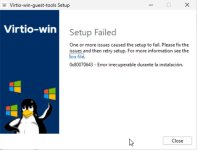
Will it be possible to downgrade to virtio-win-0.1.271 as advised, or will we encounter issues such as error 0x80070643?

Is the latest version, virtio-win-0.1.302, stable and does it fix the bugs mentioned in version 0.1.285? Do you recommend it for production systems?

Thank you.
 
On the wiki page linked above, “As of 2026-09-10, we are currently testing virtio-win 0.1.302. We are not aware of issues with this version, but since this version is relatively new, we cannot recommend it yet for production environments.”

Have not tried downgrading. From what I’ve read 302 does fix the read error bug in 285.
 
  • Like
Reactions: jgarden
agent: 1
boot: order=scsi0;ide0;net0
cores: 2
cpu: x86-64-v2-AES
machine: pc-i440fx-11.0+pve2
memory: 8192
meta: creation-qemu=11.0.3,ctime=1793276135
name: server
net0: virtio=xx:xx:xx:xx,bridge=VLAN100,firewall=1
numa: 0
onboot: 1
ostype: win11
scsi0: storage-lvm-04:vm-160-disk-0.qcow2,discard=on,iothread=1,size=60G,ssd=1
scsihw: virtio-scsi-single
sockets: 2

Removed some ID's, MAC, etc
Your configuration looks good at a glance. I am curious if this is more of a Veeam issue and how their software does what it needs to. I'll do some digging and see what I can find.

While likely not related to your issue at hand, the Machine type [0] pc-i440fx is generaly considered a default for compatibility reasons as it contains legacy chipset information. Switching to the Q35 type may have some performance gains. It could be worth trying in a Lab or with a demo VM

[0] https://pve.proxmox.com/wiki/Qemu/KVM_Virtual_Machines#qm_virtual_machines_settings
 
Last edited:
  • Like
Reactions: pingus
keep drivers v302
uninstalling Qemu Guest Agent then install from previous virtio version is enough. ( qemu-ga-x86_64.msi )
if differential simple SQL backup is used, to not break the LSN chain, don't forget to re-set VssOption to 5 in "HKLM\SYSTEM\CurrentControlSet\Services\QEMU Guest Agent VSS Provider"
 
  • Like
Reactions: pingus
I could remove Qemu Guest Agent. When I install 271 or 285 Version (Guest Agent only/from ISO), I get Guest Agent not running. Shutdown/Start did not help
 
I completely downgraded to 271, driver and tools. Guest agent is running now. Veeam Backup is working too. Thank you also for the side hints!
 
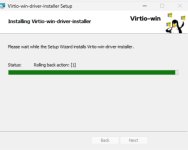
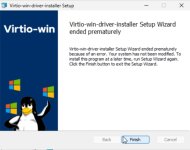
Hello. Practically everyone recommends installing version 271, but how do we do that on Windows Server 2025? We’re getting an installation error and can’t get it to work.
 

Attachments

  • Captura_933.jpg
    Captura_933.jpg
    36.3 KB · Views: 0
  • Captura_934.jpg
    Captura_934.jpg
    66.3 KB · Views: 0
  • Captura_935.jpg
    Captura_935.jpg
    51.8 KB · Views: 0
  • Captura_936.jpg
    Captura_936.jpg
    720.9 KB · Views: 0
  • Captura_937.jpg
    Captura_937.jpg
    646.2 KB · Views: 0
  • Captura_938.jpg
    Captura_938.jpg
    662.9 KB · Views: 0
  • Captura_939.jpg
    Captura_939.jpg
    633.5 KB · Views: 0
  • Captura_940.jpg
    Captura_940.jpg
    648.8 KB · Views: 0
Hello. Practically everyone recommends installing version 271, but how do we do that on Windows Server 2025? We’re getting an installation error and can’t get it to work.

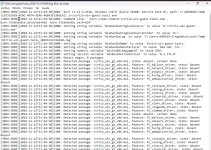
Could you post some lines from the log the installer creates? It's found at: %TEMP%\Virtio-win-guest-tools_20261112114450_000_virtio_win_gt_x64.msi.log

In the log file, search for "Return value 3" and send the ~30 lines above it. NOTE: Check over the lines you're sending to ensure there is no sensitive info contained in it.

Also, is this a test VM or a production server you're trying this on? Is version 285 currently on it?
 
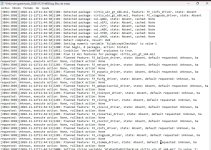
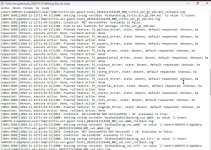
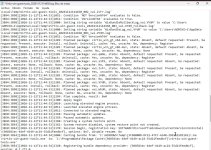
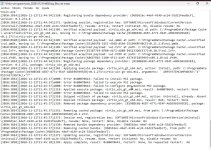
We have attached part of the log.

This is a virtual machine currently undergoing testing. We had version 285 installed, which we uninstalled in order to install version 271, as recommended for Windows Server 2025. It was whilst installing version 271 that we encountered the error.


Code:
MSI (s) (98:64) [11:45:17:872]: Re-applying security from existing file.
MSI (s) (98:64) [11:45:17:874]: Verifying accessibility of file: vioscsi.sys
MSI (s) (98:64) [11:45:17:874]: Note: 1: 2318 2:
MSI (s) (98:64) [11:45:17:876]: Executing op: SetTargetFolder(Folder=C:\Program Files\Virtio-Win\Vioserial\)
MSI (s) (98:64) [11:45:17:876]: Executing op: SetSourceFolder(Folder=1\bw-m_mfp\5wbf85qt\|Virtio-Win\Vioserial\)
MSI (s) (98:64) [11:45:17:876]: Executing op: SetCompanionParent(ParentPath=C:\Program Files\Virtio-Win\Vioserial\,ParentName=vioser.inf,,)
MSI (s) (98:64) [11:45:17:876]: Executing op: FileCopy(SourceName=vioser.cat,SourceCabKey=FILE_vioser_2k25_amd64.cat,DestName=vioser.cat,Attributes=512,FileSize=12066,PerTick=65536,,VerifyMedia=1,,,,,CheckCRC=0,Version=FILE_vioser_2k25_amd64.inf,,InstallMode=58982400,,,,,,,)
MSI (s) (98:64) [11:45:17:877]: File: C:\Program Files\Virtio-Win\Vioserial\vioser.cat;    To be installed;    Won't patch;    No existing file
MSI (s) (98:64) [11:45:17:877]: Source for file 'FILE_vioser_2k25_amd64.cat' is compressed
1: vioser.cat 2:  3:  4:  5:  6: 12066 7:  8:  9: C:\Program Files\Virtio-Win\Vioserial\
MSI (s) (98:64) [11:45:17:880]: Executing op: FileCopy(SourceName=vioser.inf,SourceCabKey=FILE_vioser_2k25_amd64.inf,DestName=vioser.inf,Attributes=512,FileSize=2623,PerTick=65536,,VerifyMedia=1,,,,,CheckCRC=0,,,InstallMode=58982400,HashOptions=0,HashPart1=106101175,HashPart2=-174285771,HashPart3=-977026312,HashPart4=967004746,,)
MSI (s) (98:64) [11:45:17:880]: File: C:\Program Files\Virtio-Win\Vioserial\vioser.inf;    To be installed;    Won't patch;    No existing file
MSI (s) (98:64) [11:45:17:880]: Source for file 'FILE_vioser_2k25_amd64.inf' is compressed
1: vioser.inf 2:  3:  4:  5:  6: 2623 7:  8:  9: C:\Program Files\Virtio-Win\Vioserial\
MSI (s) (98:64) [11:45:17:882]: Executing op: SetCompanionParent(ParentPath=C:\Program Files\Virtio-Win\Vioserial\,ParentName=vioser.inf,,)
MSI (s) (98:64) [11:45:17:882]: Executing op: FileCopy(SourceName=vioser.sys,SourceCabKey=FILE_vioser_2k25_amd64.sys,DestName=vioser.sys,Attributes=512,FileSize=92312,PerTick=65536,,VerifyMedia=1,,,,,CheckCRC=0,Version=FILE_vioser_2k25_amd64.inf,Language=0,InstallMode=58982400,,,,,,,)
MSI (s) (98:64) [11:45:17:887]: File: C:\Program Files\Virtio-Win\Vioserial\vioser.sys;    Overwrite;    Won't patch;    Existing file is unversioned and unmodified - no source file hash provided to compare    (Checked using version of companion: C:\Program Files\Virtio-Win\Vioserial\vioser.inf)
MSI (s) (98:64) [11:45:17:887]: Source for file 'FILE_vioser_2k25_amd64.sys' is compressed
1: vioser.sys 2:  3:  4:  5:  6: 92312 7:  8:  9: C:\Program Files\Virtio-Win\Vioserial\
MSI (s) (98:64) [11:45:17:890]: Executing op: SetTargetFolder(Folder=C:\Program Files\Virtio-Win\Viostor\)
MSI (s) (98:64) [11:45:17:890]: Executing op: SetSourceFolder(Folder=1\bw-m_mfp\Viostor\|Virtio-Win\Viostor\)
MSI (s) (98:64) [11:45:17:890]: Executing op: SetCompanionParent(ParentPath=C:\Program Files\Virtio-Win\Viostor\,ParentName=viostor.inf,,)
MSI (s) (98:64) [11:45:17:890]: Executing op: FileCopy(SourceName=viostor.cat,SourceCabKey=FILE_viostor_2k25_amd64.cat,DestName=viostor.cat,Attributes=512,FileSize=12071,PerTick=65536,,VerifyMedia=1,,,,,CheckCRC=0,Version=FILE_viostor_2k25_amd64.inf,,InstallMode=58982400,,,,,,,)
MSI (s) (98:64) [11:45:17:890]: File: C:\Program Files\Virtio-Win\Viostor\viostor.cat;    Overwrite;    Won't patch;    Existing file is unversioned and unmodified - no source file hash provided to compare    (Checked using version of companion: C:\Program Files\Virtio-Win\Viostor\viostor.inf)
MSI (s) (98:64) [11:45:17:890]: Source for file 'FILE_viostor_2k25_amd64.cat' is compressed
1: viostor.cat 2:  3:  4:  5:  6: 12071 7:  8:  9: C:\Program Files\Virtio-Win\Viostor\
MSI (s) (98:64) [11:45:17:892]: Re-applying security from existing file.
MSI (s) (98:64) [11:45:17:893]: Verifying accessibility of file: viostor.cat
MSI (s) (98:64) [11:45:17:893]: Note: 1: 2318 2:
MSI (s) (98:64) [11:45:17:895]: Executing op: FileCopy(SourceName=viostor.inf,SourceCabKey=FILE_viostor_2k25_amd64.inf,DestName=viostor.inf,Attributes=512,FileSize=2997,PerTick=65536,,VerifyMedia=1,,,,,CheckCRC=0,,,InstallMode=58982400,HashOptions=0,HashPart1=1539964016,HashPart2=1673117927,HashPart3=-981407413,HashPart4=-1894667603,,)
MSI (s) (98:64) [11:45:17:895]: File: C:\Program Files\Virtio-Win\Viostor\viostor.inf;    Overwrite;    Won't patch;    Existing file is unversioned and unmodified - hash doesn't match source file
MSI (s) (98:64) [11:45:17:895]: Source for file 'FILE_viostor_2k25_amd64.inf' is compressed
1: viostor.inf 2:  3:  4:  5:  6: 2997 7:  8:  9: C:\Program Files\Virtio-Win\Viostor\
MSI (s) (98:64) [11:45:17:895]: Re-applying security from existing file.
MSI (s) (98:64) [11:45:17:897]: Verifying accessibility of file: viostor.inf
MSI (s) (98:64) [11:45:17:898]: Note: 1: 2318 2:
MSI (s) (98:64) [11:45:17:899]: Executing op: SetCompanionParent(ParentPath=C:\Program Files\Virtio-Win\Viostor\,ParentName=viostor.inf,,)
MSI (s) (98:64) [11:45:17:899]: Executing op: FileCopy(SourceName=viostor.sys,SourceCabKey=FILE_viostor_2k25_amd64.sys,DestName=viostor.sys,Attributes=512,FileSize=64664,PerTick=65536,,VerifyMedia=1,,,,,CheckCRC=0,Version=FILE_viostor_2k25_amd64.inf,Language=0,InstallMode=58982400,,,,,,,)
MSI (s) (98:64) [11:45:17:902]: File: C:\Program Files\Virtio-Win\Viostor\viostor.sys;    Overwrite;    Won't patch;    Existing file is unversioned and unmodified - no source file hash provided to compare    (Checked using version of companion: C:\Program Files\Virtio-Win\Viostor\viostor.inf)
MSI (s) (98:64) [11:45:17:902]: Source for file 'FILE_viostor_2k25_amd64.sys' is compressed
1: viostor.sys 2:  3:  4:  5:  6: 64664 7:  8:  9: C:\Program Files\Virtio-Win\Viostor\
MSI (s) (98:64) [11:45:17:903]: Re-applying security from existing file.
MSI (s) (98:64) [11:45:17:904]: Verifying accessibility of file: viostor.sys
MSI (s) (98:64) [11:45:17:905]: Note: 1: 2318 2:
MSI (s) (98:64) [11:45:17:906]: Executing op: SetTargetFolder(Folder=C:\Program Files\Virtio-Win\VioFS\)
MSI (s) (98:64) [11:45:17:906]: Executing op: SetSourceFolder(Folder=1\bw-m_mfp\VioFS\|Virtio-Win\VioFS\)
MSI (s) (98:64) [11:45:17:907]: Executing op: FileCopy(SourceName=virtiofs.exe,SourceCabKey=FILE_virtiofs_2k25_amd64,DestName=virtiofs.exe,Attributes=512,FileSize=240280,PerTick=65536,,VerifyMedia=1,,,,,CheckCRC=0,,,InstallMode=58982400,HashOptions=0,HashPart1=-1376919772,HashPart2=-422822954,HashPart3=1665688972,HashPart4=-1853822856,,)
MSI (s) (98:64) [11:45:17:907]: File: C:\Program Files\Virtio-Win\VioFS\virtiofs.exe;    To be installed;    Won't patch;    No existing file
MSI (s) (98:64) [11:45:17:907]: Source for file 'FILE_virtiofs_2k25_amd64' is compressed
1: virtiofs.exe 2:  3:  4:  5:  6: 240280 7:  8:  9: C:\Program Files\Virtio-Win\VioFS\
MSI(s) (98:64) [11:45:17:911]: Ejecutando op: SetTargetFolder(Folder=C:\Program Files\Virtio-Win\Network\)
MSI(s) (98:64) [11:45:17:911]: Ejecutando op: SetSourceFolder(Folder=1\bw-m_mfp\Network\|Virtio-Win\Network\)
MSI(s) (98:64) [11:45:17:911]: Ejecutando op: FileCopy(SourceName=qc2ndtlw.txt|virtio-win_license.txt,SourceCabKey=virtio_win_license.txt,DestName=virtio-win_license.txt,Attributes=512,FileSize=1598,PerTick=65536,VerifyMedia=1,,,,,CheckCRC=0,,,InstallMode=58982400,HashOptions=0,HashPart1=-911436832,HashPart2=348325061,HashPart3=-892140989,HashPart4=-1794663077,,)
MSI(s) (98:64) [11:45:17:912]: Archivo: C:\Program Files\Virtio-Win\Network\virtio-win_license.txt; Por instalar; No se parcheará; No hay archivo existente
MSI(s) (98:64) [11:45:17:912]: La fuente del archivo 'virtio_win_license.txt' está comprimida
1: virtio-win_license.txt 2: 3: 4: 5: 6: 1598 7: 8: 9: C:\Archivos de programa\Virtio-Win\Network\
MSI(s) (98:64) [11:45:17:922]: Ejecutando op: CacheSizeFlush(,)
MSI(s) (98:64) [11:45:17:922]: Ejecutando op: ActionStart(Name=RollbackInstall,Description=Regresando la instalación de controladores Windows Virtio-Win.,)
Acción 11:45:17: RollbackInstall. Retroceder en la instalación de controladores Windows Virtio-Win.
MSI(s) (98:64) [11:45:17:925]: Ejecutando op: CustomActionSchedule(Action=RollbackInstall,ActionType=3329,Source=BinaryData,Target=UninstallPackages,CustomActionData=C:\Program Files\Virtio-Win\Balloon\balloon.inf0C:\Program Files\Virtio-Win\Fwcfg\fwcfg.inf0C:\Program Files\Virtio-Win\Network\netkvm.inf0C:\Program Files\Virtio-Win\Pvpanic\pvpanic.inf0C:\Archivos de programa\Virtio-Win\VioFS\viofs.inf0C:\Archivos de programa\Virtio-Win\Viogpudo\viogpudo.inf0C:\Archivos de programa\Virtio-Win\Vioinput\vioinput.inf0C:\Archivos de programa\Virtio-Win\Viomem\viomem.inf0C:\Archivos de programa\Virtio-Win\Viorng\viorng.inf0C:\Archivos de programa\Virtio-Win\Vioscsi\vioscsi.inf3C:\Archivos de programa\Virtio-Win\Vioserial\vioser.inf0C:\Archivos de programa\Virtio-Win\Viostor\viostor.inf3)
MSI(s) (98:64) [11:45:17:929]: Ejecutando op: ActionStart(Name=InstallDriverPackages,Description=Instalación de controladores Windows Virtio-Win.,)
Acción 11:45:17: Instalar paquetes de controladores. Instalación de controladores Windows Virtio-Win.
MSI(s) (98:64) [11:45:17:931]: Ejecutando op: CustomActionSchedule(Action=InstallDriverPackages,ActionType=3073,Source=BinaryData,Target=InstallPackages,CustomActionData=C:\Program Files\Virtio-Win\Balloon\balloon.inf0C:\Program Files\Virtio-Win\Fwcfg\fwcfg.inf0C:\Program Files\Virtio-Win\Network\netkvm.inf0C:\Program Files\Virtio-Win\Pvpanic\pvpanic.inf0C:\Archivos de programa\Virtio-Win\VioFS\viofs.inf0C:\Archivos de programa\Virtio-Win\Viogpudo\viogpudo.inf0C:\Archivos de programa\Virtio-Win\Vioinput\vioinput.inf0C:\Archivos de programa\Virtio-Win\Viomem\viomem.inf0C:\Archivos de programa\Virtio-Win\Viorng\viorng.inf0C:\Archivos de programa\Virtio-Win\Vioscsi\vioscsi.inf3C:\Archivos de programa\Virtio-Win\Vioserial\vioser.inf0C:\Archivos de programa\Virtio-Win\Viostor\viostor.inf3)
MSI(s) (98:48) [11:45:17:937]: Invocación de acción personalizada remota. DLL: C:\WINDOWS\Installer\MSID928.tmp, Punto de entrada: Instalar paquetes
MSI(s) (98:0C) [11:45:17:937]: Generando cookie aleatoria.
MSI(s) (98:0C) [11:45:17:939]: Se creó un servidor de acciones personalizado con PID 13372 (0x343C).
MSI(s) (98:B4) [11:45:17:966]: Funcionando como un servicio.
MSI(s) (98:A0) [11:45:17:977]: Hola, soy su servidor de acción personalizado elevado de 64 bits no reasignado.
InstallPackages: Inicializado.
InstallPackages: Datos de acción personalizados = 'C:\Archivos de programa\Virtio-Win\Balloon\balloon.inf€0€C:\Archivos de programa\Virtio-Win\Fwcfg\fwcfg.inf€0€C:\Archivos de programa\Virtio-Win\Network\netkvm.inf€0€C:\Archivos de programa\Virtio-Win\Pvpanic\pvpanic.inf€0€C:\Archivos de programa\Virtio-Win\VioFS\viofs.inf€0€C:\Archivos de programa\Virtio-Win\Viogpudo\viogpudo.inf€0€C:\Archivos de programa\Virtio-Win\Vioinput\vioinput.inf€0€C:\Archivos de programa\Virtio-Win\Viomem\viomem.inf€0€C:\Archivos de programa\Virtio-Win\Viorng\viorng.inf€0€C:\Archivos de programa\Virtio-Win\Vioscsi\vioscsi.inf€3€C:\Archivos de programa\Virtio-Win\Vioserial\vioser.inf€0€C:\Archivos de programa\Virtio-Win\Viostor\viostor.inf€3'.
InstallPackages: Instalador de Virtio-Win Instalar nombre de archivo = C:\Archivos de programa\Virtio-Win\Balloon\balloon.inf

InstallPackages: Instalador de Virtio-Win Instalar nombre de archivo = C:\Archivos de programa\Virtio-Win\Fwcfg\fwcfg.inf
 
Last edited:
We have attached part of the log.

This is a virtual machine currently undergoing testing. We had version 285 installed, which we uninstalled in order to install version 271, as recommended for Windows Server 2025. It was whilst installing version 271 that we encountered the error.
It looks like the .285 uninstall didn't remove everything. Try a reboot if you haven't yet.

If that doesn't fix it, you may have to remove the leftovers manually with pnputil [1].

[1] https://learn.microsoft.com/en-us/windows-server/administration/windows-commands/pnputil
 
At this time I can only point out that as can be read on that page you have also linked
As of 2026-09-10, we are currently testing virtio-win 0.1.302. We are not aware of issues with this version, but since this version is relatively new, we cannot recommend it yet for production environments.

Testing is still on going.