I keep getting this error message when booting and cannot boot into recovery:
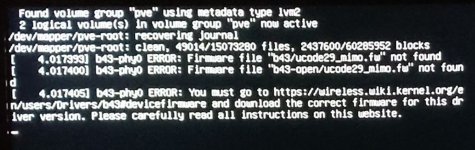
Found volume group "pve" using metadata type lvm2
2 logical volume (s) in volume group "pve" now active /dev/mapper/pve-root: recovering journal
/dev/mapper/pve-root: clean, 49014/15073280 files, 2437600/60285952 blocks
[ 4.017393] b43-phyo ERROR: Firmware file "b43/ucode29_mimo.fw" not found
[ 4.017400] b43-phyo ERROR: Firmware file "b43-open/ucode29_mimo.fw" not found
[ 4.017405] b43-phyo ERROR: You must go to https://wireless.wiki.kernel.org/en/users/Drivers/b43#devicefirmware and download the correct firmware for this dr iver version. Please carefully read all instructions on this website.
Found volume group "pve" using metadata type lvm2
2 logical volume (s) in volume group "pve" now active /dev/mapper/pve-root: recovering journal
/dev/mapper/pve-root: clean, 49014/15073280 files, 2437600/60285952 blocks
[ 4.017393] b43-phyo ERROR: Firmware file "b43/ucode29_mimo.fw" not found
[ 4.017400] b43-phyo ERROR: Firmware file "b43-open/ucode29_mimo.fw" not found
[ 4.017405] b43-phyo ERROR: You must go to https://wireless.wiki.kernel.org/en/users/Drivers/b43#devicefirmware and download the correct firmware for this dr iver version. Please carefully read all instructions on this website.