

[TUTORIAL] Tutorial: Unprivileged LXCs - Mount CIFS shares

Thanks, op. This worked great.

Proxmox -> LXC Debian 13 running docker -> Immich container
The Immich container is using an encrypted smb-shared TrueNAS Scale dataset dedicated to Immich, with the Immich container as the only user with access.

Photos are backing up now. Looks like it worked. :)

One thing to note (thanks to Immich's docs!) is that I had to go to my NAS and set my ACL mode to Passthrough in my dataset. Before that, Immich would fail its startup checks and not load.
I am doing the same with immich, but got a Problem. The share is accessible via cli and user root. But not with immich. No read permission. Can you give me a hint?
There is no user "immich" to authorize to tha share.
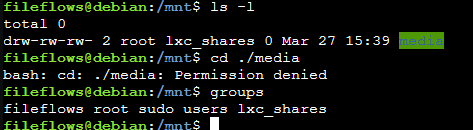
 
I am doing the same with immich, but got a Problem. The share is accessible via cli and user root. But not with immich. No read permission. Can you give me a hint?
There is no user "immich" to authorize to tha share.
Answering my own post..
The solution was to modificate the entry in fstab.
The share has to be mounted with
Code:
uid=999,gid=991
 
Answering my own post..
The solution was to modificate the entry in fstab.
The share has to be mounted with
Code:
uid=999,gid=991
I went a different route.

There is no user "immich" to authorize to tha share.

I created user immich (uid 3003) on TrueNAS. I gave that user sole access to the Immich SMB share.

Then on Proxmox, my fstab has

Code:
# Mount CIFS share on demand with rwx permissions for use in LXCs (manually added)
//192.168.[my_nas]/immich/ /mnt/lxc_shares/nas_immich_rwx cifs _netdev,x-systemd.automount,noatime,uid=100000,gid=110000,dir_mode=0770,file_mode=0770,user=immich,pass=[immich_user_login_on_truenas] 0 0

Immich docker runs as root on the LXC, which translates to uid 100000 on Proxmox host. The fstab converts that to the immich user on TrueNAS when accessing the share.
 
before everything worked. I don't know the cause but now with large files it gives me an error:

rsync error: error in file IO (code 11) at receiver.c(381) [receiver=3.4.1]
1.048.412.160 14% 23,96MB/s 0:04:03
rsync: [sender] write error: Broken pipe (32)

I the only one who has had this problem?
for small files it works The container has been upgraded to Debian 13
 
It sounds like you’re running out of storage space.

with df -h I see that I have 38gb free on the container and 1.7tb on the nas.

Code:
df -h
File system                       Dim. Usati Dispon. Uso% Montato su
/dev/mapper/pve-vm--116--disk--2   49G  9,2G     38G  20% /
//192.168.1.18/jellyfin           3,6T  2,0T    1,7T  54% /mnt/jellyfin
none                              492K  4,0K    488K   1% /dev
udev                              7,8G     0    7,8G   0% /dev/tty
tmpfs                             7,8G     0    7,8G   0% /dev/shm
tmpfs                             3,2G  104K    3,2G   1% /run
tmpfs                             7,8G     0    7,8G   0% /tmp
tmpfs                             5,0M     0    5,0M   0% /run/lock
tmpfs                             1,6G  8,0K    1,6G   1% /run/user/1000
 
Last edited:
I am doing the same with immich, but got a Problem. The share is accessible via cli and user root. But not with immich. No read permission. Can you give me a hint?
There is no user "immich" to authorize to tha share.
Can you confirm that you have done these steps in the container?
created the group:
Code:
sudo groupadd -g 10000 lxc_shares
Added to the group the user of immich:
Code:
sudo usermod -aG lxc_shares immich_user
given permissions to the folder to use that group:
Code:
sudo chown -R root:lxc_shares your_directory

I don't use IMMICH, and I've never configured it. so I can't help you any further.