Hi
I'm running a Proxmox VE 8.2.7. server and just now joined a cluster. The VM configs all disappeared. I couldn't find the old config files in both /etc/pve/qemu-server and /etc/pve/nodes/server2/qemu-server. I have previously used Proxmox Backup Server 3.4.0 and was hoping to be able to re-install it (the PBS VM also disappeared because it was in the same PVE).
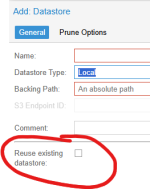
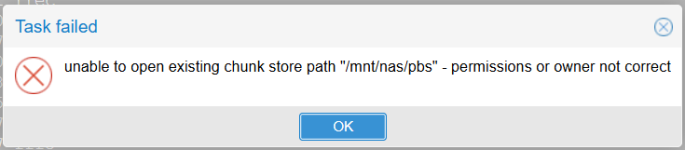
The datastore of the PBS was on my shared folder in NAS. When I re-installed the PBS and added the previously used data store, it said "Datastore not empty". What is the best solution to restoring all the VM configs?
Is there any hidden config files (made prior to joining cluster) stored somewhere else? Or the last resort is to backup from the previous Datastore. And somehow the Datastore directory is a bit messed up, but i still have the /ns/(node name/vm/ .... etc. So is it possible to backup from that folder? Thank you
I'm running a Proxmox VE 8.2.7. server and just now joined a cluster. The VM configs all disappeared. I couldn't find the old config files in both /etc/pve/qemu-server and /etc/pve/nodes/server2/qemu-server. I have previously used Proxmox Backup Server 3.4.0 and was hoping to be able to re-install it (the PBS VM also disappeared because it was in the same PVE).
The datastore of the PBS was on my shared folder in NAS. When I re-installed the PBS and added the previously used data store, it said "Datastore not empty". What is the best solution to restoring all the VM configs?
Is there any hidden config files (made prior to joining cluster) stored somewhere else? Or the last resort is to backup from the previous Datastore. And somehow the Datastore directory is a bit messed up, but i still have the /ns/(node name/vm/ .... etc. So is it possible to backup from that folder? Thank you