

[suggestion] Folders for VMS

flourodbs

New Member
Sep 21, 2022
3
3
1
Hi,

my suggestion is to have the possibility the create Folders, like on VMWare or even Active directory, to organize the VMS eg:

proxmox-1/
├─ development/
│ ├─ project-1/
│ │ ├─ vm1
│ │ ├─ vm2
├─ production/
│ ├─ project-1/
│ │ ├─ vm1


instead of the current one:

proxmox-1/
├─ vm1-project-1-production
├─ vm1-project-1-development

the folders would help too on backup, eg: with the folder tree above we only would like to backup production, so we select the folder production and it would only backup vms inside the folder instead of selection one by one and everytime we add a new add a new vm add on the backup list.


Edit: Might aswell add that instead of the tree starting on the servers, it should start on datacenter (like it is now) and inside the datacenter should be the servers and storages. Instead of vms going inside the servers it should start the created folders and inside the vm a field with information on which server are the resources allocated.
 
Last edited:
instead of the current one:

proxmox-1/
├─ vm1-project-1-production
├─ vm1-project-1-development
The current setup is more like:

Code:
datacenter/
|-- production
|   |-- project-1-vm-1
|   |-- project-1-vm-2
|-- development
|   |-- project-1-vm-1
|   |-- project-1-vm-2

or

Code:
datacenter/
|-- project-1-production
|   |-- vm-1
|   |-- vm-2
|-- project-1-development
|   |-- vm-1
|   |-- vm-2

with pools, but in general, I see your point and it is a good suggestion.
 
The current setup is more like:

Code:
datacenter/
|-- production
|   |-- project-1-vm-1
|   |-- project-1-vm-2
|-- development
|   |-- project-1-vm-1
|   |-- project-1-vm-2

or

Code:
datacenter/
|-- project-1-production
|   |-- vm-1
|   |-- vm-2
|-- project-1-development
|   |-- vm-1
|   |-- vm-2

with pools, but in general, I see your point and it is a good suggestion.
I don't use pools on my setup so mine is just the vms all together. What's the benefits for using pools? I don't see a good enough benefit to use them.
 
I don't use pools on my setup so mine is just the vms all together. What's the benefits for using pools? I don't see a good enough benefit to use them.
Is more organization not enough? Normally you can also set permissions based on pools, so that you project 1 members just see their project 1 pool.
 
Is more organization not enough? Normally you can also set permissions based on pools, so that you project 1 members just see their project 1 pool.
I mean it can work but imagine the following scenario: you are in a group of companies and every company has a project that requires 2 servers.

For that scenario I would rather have:
company-1 > Project-1 > vms
company-2 > project-1 > vms

instead of:
company-1-project-1 > vms
company-2-project-1 > vms
 
I mean it can work but imagine the following scenario: you are in a group of companies and every company has a project that requires 2 servers.

For that scenario I would rather have:
company-1 > Project-1 > vms
company-2 > project-1 > vms

instead of:
company-1-project-1 > vms
company-2-project-1 > vms
I am interested in this characteristic. I'm a teacher of computer science. I prepare different virtual machines for every topic. Then, If a student get lost, he can follow next topic using a clone of a virtual machine of that topic. If not, student begins to accumulate delays. Then, I need to organize my different states of virtual machines by subject and topics. It is similar as laboratories of Cisco or AWS when you follow a course. Thanks.
 
We manage 40+ hosts, around 2,000 VMs, and 10 access roles. Everything is running smoothly on "the-platform-Which-Must-Not-Be-Named". How would we approach this if not by using subfolder/pool functionality or something similar? To me, it looks like an enormous manual management effort
 
Then use pools ;) We use it since we adopted PVE in 2015.
Hi,
but pools seems to be a flat architecture? like
Code:
datacenter-cluster
|-- businessunitA - system 1 - production-vms
|-- businessunitA - system 1 - dev-vms
|-- businessunitA - system 2 - production-vms
|-- businessunitB - system 1 - production-vms
|-- businessunitB - system 1 - dev-vms
|-- businessunitB - system 2 - production-vms

We are PoC-ing Proxmox for quite large installations (because Broadcom sickens us with their VCF-or-nothing strategy) with multiple business units and their systemes where VMs needed to be organized in a structure, (in this example "system" is not a single VM, its the group of VMs dedicated for an IT-System f.e. "Mail System" or "VDI system", which contains all VMs which are dedicated to Mail System) f.e.
Code:
datacenter-cluster
|- businessunitA (with permissions for BU B admins)
|-- system 1 (with permissions for s1 admins)
|--- s1 production-vms
|--- s1 dev-vms
|-- system 2 (with permissions for s2 admins)
|--- s2 production-vms
|--- s2 dev-vms
|- businessunitB (with permissions for BU B admins)
|-- system 3 (with permissions for s3 admins)
|--- s3 production-vms
|--- s3 dev-vms
|--- s3 deploy-vms
|-- system 4 (with permissions for s4 admins)
|--- s4 production-vms
|--- s4 dev-vms
If you have several Business Units and each of these has a lot of IT Systems, in a flat tree we would have some hundred pools, where you would have to configure permissions for all of them?

In a tree you could give BU admins permissions to their BU and all it systems would inherit these permissions and you could add additional permissions to sub trees. Is that possible somehow? (We are currently testing on Cluster level and did not check Proxmox Datacenter Manager yet.)

edit: I just found the notes about nested pools and will try this. Should be working for an BU / System / Subtype - Poolstructure:
"Access control

  • Support nested pools up to a nesting depth of 3 levels for greater flexibility in structuring VMs and containers (issue 1148).Pool names can now contain at most two slashes (allowing to structure them as parent/child/grandchild).Permissions are inherited along the path according to the usual inheritance rules."
But according to https://forum.proxmox.com/threads/nested-pools.128162/ there are still some practical issues with it.
 
Last edited:
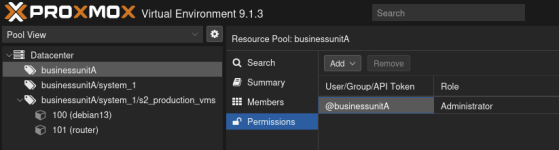
Since 8.1 there is a three-level pool possible in the backend, yet not visible as such in the frontend as a nested setup yet it works. It is described in [1] and also in [2].

I tried to replicate a simple setup and it worked:

1766061132073.png

There is a user businessunitA_user1 that has admin priviledges on businessunitA and therefore also on the sub-pools, yet it's also not shown in the UI as the permission, yet the VMs "below" are shown. This should be one possible solution to fullfill your requirement.

[1] https://bugzilla.proxmox.com/show_bug.cgi?id=1148
[2] https://forum.proxmox.com/threads/resource-pool-inside-resource-pool.174859/
 
  • Like
Reactions: Atkatla
Hi, thanks, i created such Nested Pools in my test environment and permissions works like you said. I know the bu admins will complain about missing their expandable folders from vcenter and pool view will be a long list, but working permission inheritance is more important. So it is a solution for now.
 
Last edited: