Starting LXC Container with bind mount changes the owner of that mount on the filesystem

smacz

Active Member
May 19, 2018
3
0
41
35
Hello all,

I have the following configuration (and similar like it) for a lot of my LXC containers:
Code:
./209.conf:mp0: /mnt/glusterfs/hub-volume/andrewcz-org/firefly-importer_uploads,mp=/var/lib/firefly-importer/data/storage/uploads
./209.conf:mp1: /mnt/glusterfs/hub-volume/andrewcz-org/firefly-importer_configurations,mp=/var/lib/firefly-importer/data/storage/configurations

They are on a glusterfs share (yes, I know it's deprecated, don't come at me about it - I'm not using it as an integration, just standalone shared filesystem), with permissions of a user somewhere in the 10000+ range because of remapping, so that it will match the uid of the user inside of the container.

Code:
root@hub-proxmini02:/etc/pve/lxc# ls -l /mnt/glusterfs/hub-volume/andrewcz-org/firefly-importer_configurations -a
total 8
drwxr-xr-x  2 109014 109014 4096 Dec 21 14:30 .

However, whenever I start up a container with a mountpoint like this, the permission of ONLY the top-level directory gets changed to 10000.

Is that by design somewhere, or is there something about my mount point configuration that's missing?

This is really throwing me off, as I am having to re-set permissions every time that I stop/start a container.
 
I'm not quiet sure I understood your question, if I didn't please correct me. If by top-level directory you mean firefly-importer_uploads in /mnt/glusterfs/hub-volume/andrewcz-org/firefly-importer_uploads. And every other parent directory keeps it's owner, ie after starting the container the permissions of your directory tree look like this:

Code:
$ find /mnt/glusterfs/ -maxdepth 3 -printf '%U:%G %n\n'
0:0 /mnt/glusterfs
0:0 /mnt/glusterfs/hub-volume
0:0 /mnt/glusterfs/hub-volume/andrewcz-org
100000:100000 /mnt/glusterfs/hub-volume/andrewcz-org/firefly-importer_uploads
100000:100000 /mnt/glusterfs/hub-volume/andrewcz-org/firefly-importer_configurations

then yes, that is expected behavior. Since you are only mounting the directory /mnt/glusterfs/hub-volume/andrewcz-org/firefly-importer_uploads into the container, and not it's parent /mnt/glusterfs/hub-volume/andrewcz-org.
 
Hi!

This error should be resolved with pve-container version 6.1.1 available on the pve-test repository.
 
It looks like I am having the same issue with only the top level directory being changed when the container restarts. I have a bind mount from my host to a turnkey-fs container running a samba share. The permissions for everything other than the top folder of the mount remain unchanged.

Code:
root@beelink:~# pveversion --verbose
proxmox-ve: 9.1.0 (running kernel: 6.17.9-1-pve)
................
pve-container: 6.1.1
................

Output of ls -la from the affected folder:
Code:
root@beelink:/datatank/timemachine/subvol-113-disk-0# ls -la
total 58
drwxr-xr-x  3 100000 100000  3 Feb 20 06:41  .
drwxr-xr-x  3 root   root    3 Feb 11 14:17  ..
drwxr-xr-x+ 4 101003 100100 13 Feb 20 06:46 'MacBook Pro.sparsebundle'

I can manually change the ownership of subvol-113-disk-0 to the needed 101003:100100, but each time the container reboots the permissions change back to 100000:100000. If you need more information or logs, please let me know.
 
Last edited:
It looks like I am having the same issue with only the top level directory being changed when the container restarts. I have a bind mount from my host to a turnkey-fs container running a samba share. The permissions for everything other than the top folder of the mount remain unchanged.
Could you try upgrading to pve-container version 6.1.2, which is currently available on the pve-no-subscription repo? This makes the attribute preservation code opt-in via the "Keep attributes" flag on mountpoints and should resolve this issue entirely.
 
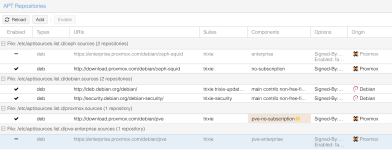
I currently have the pve-no-subscription repo enabled, but no dice on upgrading to pve-container version 6.1.2.

1771849455400.png


Here is my result from running apt policy for the package:

root@beelink:~# apt policy pve-container
pve-container:
Installed: 6.1.1
Candidate: 6.1.1
Version table:
*** 6.1.1 500
500 http://download.proxmox.com/debian/pve trixie/pve-no-subscription amd64 Packages
100 /var/lib/dpkg/status
6.1.0 500
500 http://download.proxmox.com/debian/pve trixie/pve-no-subscription amd64 Packages
......


Please let me know if I need to change my config to get 6.1.2. Otherwise, I will wait patiently for that update to become available on the pve-no-subscription branch. I'm runnning this in a homelab and can the folder's ownership after any restarts to get things running again. Just wanted to make sure it was known that I was still seeing the issue in pve-container 6.1.1.


Thank you for your time.
 
Please let me know if I need to change my config to get 6.1.2.

I'm sorry, the pve-container package in version 6.1.2 is still in the trixie/pve-test repo as of now, if you want to try the new version to fix the issue.
 
Looks like pve-container 6.1.2 moved to the main branch. I updated my pve host, restarted it, and can confirm the file permissions no longer reset to root or 100000 on reboot. Thank you for the help and for solving this issue.