SSD ZFS Pool keeps increasing in usage space

May 12, 2023
17
1
8
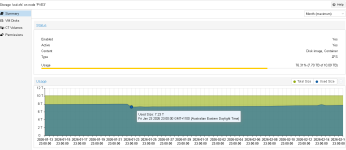
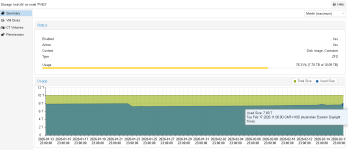
I have a 3 node cluster with a SSD ZFS pool that keeps increasing in size.
Each server has 24 SSD drives in a ZFS raid.
The 'autotrim' setting is set to on for each server node.
The two attachment show the space being slowly used up on the server node.
All disks on VMs on all server nodes have 'discard' set to 'on'.

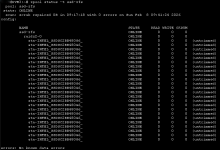
I also ran the command 'zpool status -t ssd-zfs' and get the result from the 'PVE3 SSD-ZFS Status' image. This says 'untrimmed'.
It is the same on PVE2, But PVE1 says 'trim unsupported' instead.

Can anyone help me with why this is happening.
 

Attachments

  • PVE3 SSD-ZFS SPACE 17-02-2026.png
    PVE3 SSD-ZFS SPACE 17-02-2026.png
    26.8 KB · Views: 20
  • PVE3 SSD-ZFS SPACE 23-01-2026.png
    PVE3 SSD-ZFS SPACE 23-01-2026.png
    28.5 KB · Views: 20
  • PVE3 SSD-ZFS Status.png
    PVE3 SSD-ZFS Status.png
    25.8 KB · Views: 20
You would have to provide a lot more information than what you posted here. Otherwise we have to make educated guesses ;)

I have a 3 node cluster
So just cluster, no HA?

Each server has 24 SSD drives in a ZFS raid.
So you use ZFS and VMs use local RAW drives on ZFS?
There are a few problems with that.

Short:
A: Don't use RAIDZ for VM! Use mirror instead.
B: Don't put data into VMs!

Long:
A: RAW ZFS drives use by default 16k volblock storage. Pool geometry will not work out for you. You expect to get 22/24*100=91.667% storage efficiency.
In reality you get 66.66%. Your 16k volblock can't make use of the wide pool. Each stripe will have four 4k data blocks and two 4k parity blocks. That is only 66.66%. For an even longer explanation see this: https://github.com/jameskimmel/opinions_about_tech_stuff/blob/main/ZFS/The problem with RAIDZ.md#the-problem-with-raidz-or-why-you-probably-wont-get-the-storage-efficiency-you-think-you-will-get but TLDR is use mirrors for Proxmox not RAIDZ.

B: Volblocksize from above is one thing, but huge VM disks with data also suck to backup and move. Instead offload the data out of VMs. But it into smb or nfs shares or create a dataset on Proxmox and access it over VirtioFS. That is not easy to manage for beginners. I get an all in one machine sounds great on paper, but Proxmox is a great hypervisor, not so great NAS. While TrueNAS is a great NAS, not so great hypervisor. Unless you really know what you are doing, I recommend to start with two systems.

Now to get back to your problem :)
My guess is this has nothing to do with TRIM, but with problem A.
The mean part about ZFS is, that it will not show you the problem A.
AFAIK ZFS calculates the available storage based on the default 128k record.
So when you put a 1TB VM disk on your pool, you expect it to use 1TB of your storage, right?
Well that is not what will happen. Because you don't get the expected 91.667% storage efficiency, but 66%.
So instead, the 1TB VM RAW disk will not only use 1TB but roughly 1.4TB.

Expected: 1/91.66*100=1.091TB of raw space
Reality with 16k volblock size: 1/66*100=1.515TB of raw space
1.515/100*91.66=1.389TB usage on your disk.

I am at my first coffee, so take my math with a buttload of salt :)
 
Last edited:
Last edited:
  • Like
Reactions: Johannes S and UdoB
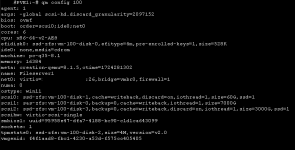
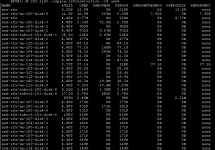
Here screenshots of the commands you suggested running
 

Attachments

  • Screenshot 2026-02-18 091205.png
    Screenshot 2026-02-18 091205.png
    16.2 KB · Views: 10
  • Screenshot 2026-02-18 091247.png
    Screenshot 2026-02-18 091247.png
    29.1 KB · Views: 10
It's not related to the space increasing. It makes investigating it easier/less confusing though.
 
I only answered your question. I explained that this setting does not change the need for discard in my first post's link.
 
Last edited:
  • Like
Reactions: Johannes S
This is not the issue I need solving. I need to know why my SSD storage is being used up.
I gave you one possible answer, but you choose to ignore it.

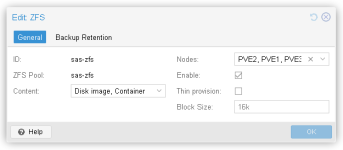
As a funny coincidence you answered one of my questions by posting this picture; your volblocksize is 16k.
So my theory was right.
Long:
A: RAW ZFS drives use by default 16k volblock storage. Pool geometry will not work out for you. You expect to get 22/24*100=91.667% storage efficiency.
In reality you get 66.66%. Your 16k volblock can't make use of the wide pool. Each stripe will have four 4k data blocks and two 4k parity blocks. That is only 66.66%. For an even longer explanation see this: https://github.com/jameskimmel/opinions_about_tech_stuff/blob/main/ZFS/The problem with RAIDZ.md#the-problem-with-raidz-or-why-you-probably-wont-get-the-storage-efficiency-you-think-you-will-get but TLDR is use mirrors for Proxmox not RAIDZ.
So again, every 1TB VM disk will not only use 1TB but roughly 1.4TB.

To prevent this you have multiple options:

- Use mirrors instead of RAIDZ
- change volblocksize to 64k, export and reimport, potentially suffer from horrible read and write amplification and fragmentation
- offload data from VMs into datasets
 
Last edited:
  • Like
Reactions: Johannes S
I'm trying to wrap my head around this.
Let me try a different way.
Imagine how you write stuff.
You have 16k volblockstorage.
So proxmox offers 16k blocks to the VM.
Now your VM fills one such block.
We assume that the data is totally incompressible, wo we really have to write 16k.
How would that look from a storage perspective?

disk1disk2disk3disk4disk5disk6disk7disk8disk9disk10
4k parity4k parity4k data4k data4k data4k data

See you only made use of 6 disks. That is why your storage efficiency is 4 / 6*100=66.667%.


Ok, what if that 16k block can be compressed to 4k?
disk1disk2disk3disk4disk5disk6disk7disk8disk9disk10
4k parity4k parity4k data
We only used 3 disks. That is why your storage efficiency is 1 / 3*100=33.333.
That is the same as a 3 way mirror!

And ZFS will not show any of this directly!

Pool usage will just grow 1.4TB if you write 1TB of not compressable 16k blocks onto it.

You think that your storage efficiency is 22/24*100=91.667%. But it is not! It is 66.667%.

And ZFS will assume you write 128k records onto it and because of that show you that you have 10TB of storage.
Which is true, you do in fact have 10TB of storage.
But you won't be able to put 10TB of 16k writes onto it, let alone 4k writes.

Assuming you only have 16k volblocks that are not compressed,
you get 24 drives / 6 * 4 * 480 = 7.68TB usable storage for VM disks. Despite ZFS showing you that you have 10TB.

This is why there are simple rules to follow if you want a good time with Proxmox and ZFS:
- Don't put files into blockstorage
- Don't put blockstorage on RAIDZ! Use mirrors instead.

Does that explain why SSD ZFS pool keeps increasing in size?
If you do nothing? No.
If you doing any writes? Yes.
So my guess is that you start to fill your VMs and they grow faster than expected, because of storage efficiency.
 
Last edited:
Ah ok. I'll be more careful going forward about what stuff I put on our SSD pool, at least until we can reconfigure the servers.
Thank you for your patience with explaining this all to me.
 
No worries.
IMHO the IT world is complicated enough. So I like to keep stuff K.I.S.S.

In your situation I would either
A: change RAIDZ to a 3 way mirror, get another TrueNAS system with HDDs as ZFS storage system and put files on NFS/SMB shares from there.
B: Add a few HDDs to your Proxmox, create a dataset and access data over VirtioFS.

A is probably a little bit more complex to setup and you have an additional dependency. On the other hand, health status, Snapshots, Replication Tasks, S3 Backups and so on are a lot easier on A than on B.
Also I don't know if VirtioFS is production ready yet.

Best of luck. And remember, always run tests before putting into production!