Running Cisco UC Appliances In Proxmox (i.e., CUCM, CUCS, Expressway, IM&P, CMS, CSR1000v)

Hi,
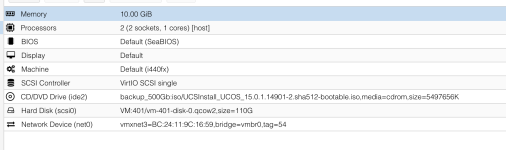
the 1 core only report is because cisco uses this to get the CPU count:

Code:
sudo dmidecode | sed -n '/Processor Information/,/Status:/ p' |grep Status | grep -vc 'Unpopulated'

For me this is the amount of sockets and not Cores. So, if you give the system 2 sockets with 1 core each instead of 1 socket with two cores, you get 2 vCPU shown.
I could not see a difference in performance. The second Core is used for sure in both configs.

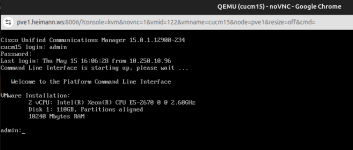
Oh, before you ask dmidecode always reports 2000 MHz for KVM CPUs - no matter the real freq. seems hardcoded.
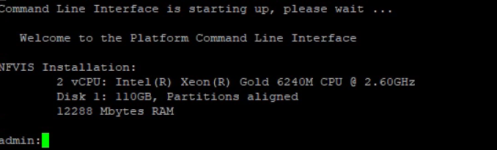
Weird, I took the opportunity to test, and now I get the right frequency within proxmox:
1747318609674.png
 
Last edited:
On the issue with us migrating to Q35 and getting dumped to a dracut shell with no disks I managed to fix it by doing surgery on the rootfs (this thread has given me a lot more confidence lmao).

Tl;dr:
  1. Boot live linux environment from CD on the same machine (Arch worked for me)
  2. Mount the various UCOS partitions in the correct places (there is a chance you may need to swap 1 and 2):
    1. Partition 1 on `/mnt`
    2. Partition 2 on `/mnt/partB`
    3. Partition 3 on `/mnt/grub`
    4. Partition 6 on `/mnt/common`
  3. `arch-chroot /mnt` - this is effectively `chroot` with some extra steps built in
  4. `dracut -f --kver KVER` where `KVER` is the latest directory name in `/usr/lib/modules`
  5. `grub2-mkconfig -o /boot/grub2/grub.cfg`

Exit and reboot.
 
Last edited:
On the issue with us migrating to Q35 and getting dumped to a dracut shell with no disks I managed to fix it by doing surgery on the rootfs (this thread has given me a lot more confidence lmao).

Tl;dr:
  1. Boot live linux environment from CD on the same machine (Arch worked for me)
  2. Mount the various UCOS partitions in the correct places:
    1. Partition 1 on `/mnt`
    2. Partition 2 on `/mnt/partB`
    3. Partition 3 on `/mnt/grub`
    4. Partition 4 on `/mnt/common`
  3. `arch-chroot /mnt` - this is effectively `chroot` with some extra steps built in
  4. `dracut -f --kver KVER` where `KVER` is the latest directory name in `/usr/lib/modules`
  5. `grub2-mkconfig -o /boot/grub2/grub.cfg`

Exit and reboot.
I think common is partition 6, 4 is the extended partition "cage" and 5 is swap...
And root and PartB depend on weather the system did a switch version before or not, so you can e.g. look at the timestamps there to see which one is the "current" active root partition.
 
Hi there,

I'd like to share the the info I gathered during my 10+ years now of running my CUCM on KVM (ubuntu before and now proxmox).

If you want to use the included (but not officially supported) KVM scripts:

1) For hardware detection scripts, you need "Cisco/hssi/server_implementation/KVM/QEMU/shared/bin/api_implementation.sh". There is a "api_implementation.sh.proposed" which after a rename didn't work for me. So I took the one from RHEV (from Cisco/hssi/server_implementation/KVM/RHEV/shared/bin/api_implementation.sh") and copied it to "Cisco/hssi/server_implementation/KVM/QEMU/shared/bin/api_implementation.sh".

2) I configured the VM with 10GB of RAM as suggested by Cisco Virtualization guidelines. The hwdetect.sh from cisco needs dmidetect to report RAM in MB and not GB. If you configure 10240 MB RAM in proxmox (10GB) it reports 10 GB - which throws an error. If you make it 10000 MB, it works.

3) For the hardware support scripts you have to change the file "Cisco/install/conf/callmanager_product.conf".
There's a "<server_models>" section and it contains this line:

Code:
VAL,   VMware,     *,      *,    *,    110,     *,      *,    0,      *

The VMware must be changed to "*", so that it is like this:
Code:
VAL,        *,     *,      *,    *,    110,     *,      *,    0,      *

Do not use TAB, use spaces.


I also found a way how to fool the hardware-detect scripts by Cisco and let them think it's running in a VMWare VM. This way, there's no need to modify the stock ISO.

In Proxmox, create a VM with the following settings:
- BIOS (not UEFI),
- machine type q35 (didn verify if the old i440fx would also work, but q35 is newer/better)
- virtio SCSI controller for best performance and the harddisk as scsi0 - NOT virtio0
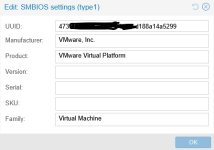
- in options in Proxmox, go to the SMBIOS settings (type1) and set Manufacturer to VMware and Version to 6.100:
View attachment 85330

Then you can install as usual and will be able to make it through setup:
View attachment 85332

I've integrated qemu guest tools, but that is another story, write me if interested...
Thank you so much for the tip! On the qemu guest tools, how did you get it install? Did you end up getting root level access to UCOS and then install the guest agent package manually?
 
Thank you so much for the tip! On the qemu guest tools, how did you get it install? Did you end up getting root level access to UCOS and then install the guest agent package manually?
That is possible, but I went another way (and edited the CUCM15 ISO file):

1) in the file "Cisco/hssi/server_implementation/VMWARE/shared/bin/install_pool.meta" scoll down and modify as follows:

before:
Code:
100    pre-reboot    migrateVMwareTools.sh
200    post-reboot   platform-scsi-watchdog-1.0.0.0-1.x86_64.rpm
after:
Code:
100    pre-reboot    migrateVMwareTools.sh
101    pre-reboot    qemu-guest-agent-6.2.0-53.module_el8.10.0+3906+b8f20084.2.x86_64.rpm
200    post-reboot   platform-scsi-watchdog-1.0.0.0-1.x86_64.rpm

2) download AlmaLinux Qemu-Guest-Tools into the folder "/Cisco/hssi/install_pool" on the DVD.

Code:
wget https://rpmfind.net/linux/almalinux/8.10/AppStream/x86_64/os/Packages/qemu-guest-agent-6.2.0-53.module_el8.10.0+3906+b8f20084.2.x86_64.rpm

3) enjoy ;)

This way, the installer takes care and installs the qemu-guest tools for you.
 
  • Like
Reactions: isakmp
That is possible, but I went another way (and edited the CUCM15 ISO file):

1) in the file "Cisco/hssi/server_implementation/VMWARE/shared/bin/install_pool.meta" scoll down and modify as follows:

before:
Code:
100    pre-reboot    migrateVMwareTools.sh
200    post-reboot   platform-scsi-watchdog-1.0.0.0-1.x86_64.rpm
after:
Code:
100    pre-reboot    migrateVMwareTools.sh
101    pre-reboot    qemu-guest-agent-6.2.0-53.module_el8.10.0+3906+b8f20084.2.x86_64.rpm
200    post-reboot   platform-scsi-watchdog-1.0.0.0-1.x86_64.rpm

2) download AlmaLinux Qemu-Guest-Tools into the folder "/Cisco/hssi/install_pool" on the DVD.

Code:
wget https://rpmfind.net/linux/almalinux/8.10/AppStream/x86_64/os/Packages/qemu-guest-agent-6.2.0-53.module_el8.10.0+3906+b8f20084.2.x86_64.rpm

3) enjoy ;)

This way, the installer takes care and installs the qemu-guest tools for you.
Learned alot!!! Thank you for tip!
 
Hello, it helped me to install CUCM 14 on proxmox but problem is the update. The checksum of iso image is checked before running the update and process is stoped because the bad checksum. Does anyone has any advise?
...I tried this
Code:
https://www.eve-ng.net/index.php/documentation/howtos/cisco-cucm/
Upgrade process ends with this error:
Code:
Bad not found in search path, /mnt/source/Cisco/hssi/install_pool
    Failed to populate RPM archive with hardware RPMs

...SOLVED
I used advice from Highman at page 2 of this thread with little bit modification. After that I was able to install CUCM from original ISO image, the same for upgrade image. It is completely emulating vmware I think
VM > Options > SMBIOS
111.jpg
 
Last edited:
Hello, it helped me to install CUCM 14 on proxmox but problem is the update. The checksum of iso image is checked before running the update and process is stoped because the bad checksum. Does anyone has any advise?
...I tried this
Code:
https://www.eve-ng.net/index.php/documentation/howtos/cisco-cucm/
Upgrade process ends with this error:
Code:
Bad not found in search path, /mnt/source/Cisco/hssi/install_pool
    Failed to populate RPM archive with hardware RPMs

...SOLVED
I used advice from Highman at page 2 of this thread with little bit modification. After that I was able to install CUCM from original ISO image, the same for upgrade image. It is completely emulating vmware I think
VM > Options > SMBIOS
View attachment 91905

Hey guys, same issue different solutions in this topic.

What really helped, was this SMBIOS-setting, to keep my CUCM 15SU4 iso (normal iso, just made bootable) running.
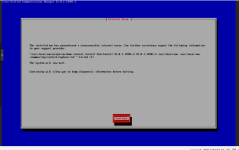
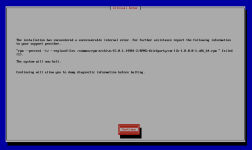
the installation is so far, that i end in the post-installation tasks on the disk, but everytime i receive this issue

1780385968624.png

any ideas how to get those files? after i press continue, connection gets disconnected and vm is shutting down
 
Hey guys, same issue different solutions in this topic.

What really helped, was this SMBIOS-setting, to keep my CUCM 15SU4 iso (normal iso, just made bootable) running.
the installation is so far, that i end in the post-installation tasks on the disk, but everytime i receive this issue

View attachment 98132

any ideas how to get those files? after i press continue, connection gets disconnected and vm is shutting down
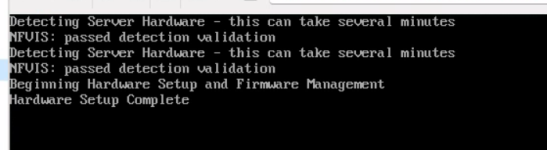
Since 15 su4 Cisco has implemented their own kvm support called nfvis. To get this detected in Proxmox there is no iso change or other trick from this thread needed but one thing: put Red Hat in the Vendor String in SMBios settings. That's it

Actually I'd suggest everybody to move to that nfvis version and away from fake vmware on proxmox to avoid issues with vmware version detection and vmware tools removal etc. - these scripts will obviously fail on proxmox and need more modifications on disk or iso.
 
Fast answer, thanks, and i will do.

No trick or change, just Red Had in SMBios and it will appear as NFVIS, awesome
1780393574780.png

just asking, CUCM 15 is running on ALMA, does this vendor info "matter"? or is it just for keep it running?

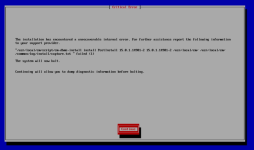
But i still receive this error, so i will check the post install script.
1780394098335.png
 
Hey guys, same issue different solutions in this topic.

What really helped, was this SMBIOS-setting, to keep my CUCM 15SU4 iso (normal iso, just made bootable) running.
the installation is so far, that i end in the post-installation tasks on the disk, but everytime i receive this issue

View attachment 98132

any ideas how to get those files? after i press continue, connection gets disconnected and vm is shutting down
Since 15 su4 Cisco has implemented their own kvm support called nfvis. To get this detected in Proxmox there is no iso change or other trick from this thread needed but one thing: put Ref Hat in the Vendor String in SMBios settings. That's it

Actually I'd suggest everybody to move to that nfvis version and away from fake vmware on proxmox to avoid issues with vmware version detection and vmware tools removal etc. - these scripts will obviously fail on proxmox and need more modifications on disk or iso
Fast answer, thanks, and i will do.

No trick or change, just Red Had in SMBios and it will appear as NFVIS, awesome
View attachment 98136

just asking, CUCM 15 is running on ALMA, does this vendor info "matter"? or is it just for keep it running?

But i still receive this error, so i will check the post install script.
View attachment 98137
The Vendor Info is to satisfy the hardware detection scripts for kvm. They verify the vendor as Cisco(I think) or Red Hat.

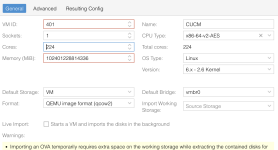
The error you get is strange. Double check your cpu cores and memory amount if you didn't create the vm from ova.

Also verify if the cpu type is not set to something ancient. I think since 15, CUCM actually uses avx so this must be supported in the virtual CPU as well.
 
Since 15 su4 Cisco has implemented their own kvm support called nfvis. To get this detected in Proxmox there is no iso change or other trick from this thread needed but one thing: put Ref Hat in the Vendor String in SMBios settings. That's it

Actually I'd suggest everybody to move to that nfvis version and away from fake vmware on proxmox to avoid issues with vmware version detection and vmware tools removal etc. - these scripts will obviously fail on proxmox and need more modifications on disk or iso

The Vendor Info is to satisfy the hardware detection scripts for kvm. They verify the vendor as Cisco(I think) or Red Hat.

The error you get is strange. Double check your cpu cores and memory amount if you didn't create the vm from ova.

Also verify if the cpu type is not set to something ancient. I think since 15, CUCM actually uses avx so this must be supported in the virtual CPU as well.
Made ova import by using newest ova from cisco and followed ome of them
https://forum.proxmox.com/threads/import-ova-or-virtual-image.114095/

CPU is set to host, becaue i use Intel Xeon Gold 6240, it has multiple avx512 flags in lscpu output
and finally
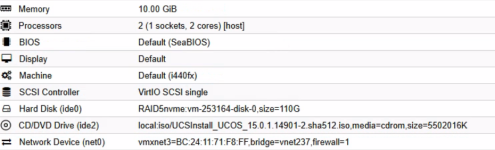
1780401777731.png

Summary:

1780402018212.png

- HW requirements should be fulfilled as required from cisco or set emulated, but this "could"
- ISO, just bootable, not patched or modified
- VM > Options > SMBios Manufacturer set to "Red Hat"

Done! THX to @Highman