Restore - how to and what's required?

cdsJerry

Renowned Member
Sep 12, 2011
222
9
83
I have a Proxmox 1.9 system with a Windows 2008 VM running on it in KVM mode. I thought I'd familiarize myself with the restore process so I'm not in too much of a panic when the time comes that it's needed. Assuming a hardware failure I'd like to be able to restore the VM and get it up and running as quickly as possible. I'm backing up to an NFS share using vzdump.

Now for the questions: If I'm running a VM in 64 bit mode can I restore that to a machine running in only 32 bit mode for Proxmox? If I go to create a new VM it says the processor does not support a KVM, so what would happen if I was trying to restore a KVM VM from the other machine? My guess is I need to buy new hardware in order to to the restore.

I see in the Wiki that I'm supposed to copy the backup file to the local drive. I can't browse to it in some way to do a restore. Indeed there is no restore anywhere on any menu that I've been able to find. The Wiki says to do it via a command prompt but it doesn't say how to copy the file from the NFS to the local drive. I can browse over and look at it, but I can't move it and without a restore option on the menu, I can't restore it from there either.

I know this may seem obvious but since we're in a virtual world, nothing may be what it seems. I need 64 bit processors to run a 64 bit VM? I need to restore a VM from a command line and not via the GUI?
 
I have a Proxmox 1.9 system with a Windows 2008 VM running on it in KVM mode. I thought I'd familiarize myself with the restore process so I'm not in too much of a panic when the time comes that it's needed. Assuming a hardware failure I'd like to be able to restore the VM and get it up and running as quickly as possible. I'm backing up to an NFS share using vzdump.

Now for the questions: If I'm running a VM in 64 bit mode can I restore that to a machine running in only 32 bit mode for Proxmox?
You can restored it, but not starting... 32bit-pve is only an (unsupported) hack for openvz (and of course only 32bit-VMs).
If I go to create a new VM it says the processor does not support a KVM, so what would happen if I was trying to restore a KVM VM from the other machine? My guess is I need to buy new hardware in order to to the restore.
Yes, you must have hardware from the last three years - if you have 64bit without hw-virtualization a kvm-VM is so slow, that you can't work with it.
I see in the Wiki that I'm supposed to copy the backup file to the local drive. I can't browse to it in some way to do a restore. Indeed there is no restore anywhere on any menu that I've been able to find. The Wiki says to do it via a command prompt but it doesn't say how to copy the file from the NFS to the local drive. I can browse over and look at it, but I can't move it and without a restore option on the menu, I can't restore it from there either.
Why you want to copy the file - just mount the nfs-share and start the restore. If you want to copy, use scp or ftp... normal linux tools.
I know this may seem obvious but since we're in a virtual world, nothing may be what it seems. I need 64 bit processors to run a 64 bit VM? I need to restore a VM from a command line and not via the GUI?
the command line is not evil - you can do much more and faster than with an gui...

Udo
 
The command line is not evil, but I'm new to Linux and therefore don't know any commands. Back in the day I knew DOS but that was a long time ago. I need to learn.

OK, so I need to get new hardware to keep around in case I need to restore. I'll have to go buy it.

One thing you said... why copy the file, just mount the share and restore it. I can't do that. I did mount the share, but there's nowhere to restore it. There's no restore on the menu anywhere that I've been able to find, and the WIKI says to copy it to the local drive and THEN run a command line restore.

It's sorta a moot point until I get the other hardware set up which is admittedly a low priority since everything is working at the current time... which is a good thing.
 
...
One thing you said... why copy the file, just mount the share and restore it. I can't do that. I did mount the share, but there's nowhere to restore it. There's no restore on the menu anywhere that I've been able to find, and the WIKI says to copy it to the local drive and THEN run a command line restore.
...
Hi,
this must be done on the cli - e.g. your new box has 192.168.100.100 and your nfs-host has 192.168.100.200 you can do something like this:
Code:
# on new pve-host
mkdir /restore
mount 192.168.100.200:/export/pve-backup /restore
qmrestore --storage local /restore/vzdump-qemu-101-2011_11_19-07_00_02.tgz 101
qm start 101
and if your networkconfig are right, your vm is up and running.

Udo
 
Doing a practice restore so when things go bad, perhaps they won't go AS bad. Still wishing there was a restore on the GUI as a backup isn't of much value without the ability to restore from that backup.

Logged onto Proxmox2 (new box) running 1.9 created from the ISO.
#mkdir /restore no error so I guess it worked.
mount 192.168.xxx.xxx:/export/mnt/pools/A/AO/Backups/vzdump-qemu-101-2011_12_12-02_00_02.tar where xxx.xxx is the current IP of my NFS Error mount.nfs:192.168.xxx.xxx:/export/Backups failed. Reason given by server: Permission denied.

I HAVE configured the NFS storage share under Storage and Enabled it. Does that make it easier somehow to do the restore? If I go into the GUI and click Storage->Iomega I do see my backup file. There's just no command in the GUI to restore it to this new machine. I still think this basic function should be in the GUI.
 
Doing a practice restore so when things go bad, perhaps they won't go AS bad. Still wishing there was a restore on the GUI as a backup isn't of much value without the ability to restore from that backup.

Logged onto Proxmox2 (new box) running 1.9 created from the ISO.
#mkdir /restore no error so I guess it worked.
mount 192.168.xxx.xxx:/export/mnt/pools/A/AO/Backups/vzdump-qemu-101-2011_12_12-02_00_02.tar where xxx.xxx is the current IP of my NFS Error mount.nfs:192.168.xxx.xxx:/export/Backups failed. Reason given by server: Permission denied.

I HAVE configured the NFS storage share under Storage and Enabled it. Does that make it easier somehow to do the restore? If I go into the GUI and click Storage->Iomega I do see my backup file. There's just no command in the GUI to restore it to this new machine. I still think this basic function should be in the GUI.
Hi,
if you see the content in the gui, the nfs-share must be allready mounted.
Do you see the filesystem if you type "mount"?
BTW. you must mount the exported path not the whole path with backup-file.

Udo
 
Will I be able to restore a 1.9 backup with 2.0? Since I'm just trying to do a practice run at this point, perhaps I should install 2.0 on the test machine and give it a try. I'm not really testing the Beta 2.0 as much as I am trying to learn how to do things before it's a crisis.

Just wondering... if this WAS a crisis.. is there paid support available where someone could remotely help me get the VMs on a new machine as quickly as possible?
 
If I just type mount at the prompt I get a screen full of stuff, paths, etc. that don't mean anything to me. The last line reads "192.168.xxx.xxx:/mnt/pools/A/AO/Backups on /mnt/pve/Iomega type of nfs (rw,addr=192.168.xxx.xxx)" So I take it from that last line that it must have the NFS share mounted.

So I attempted the qmrestore --storage local /restore/vzdump-qemu-101-2011_12_12-02_00_02.tar command again (tried both .tar and the .tgz from the earlier response) and it just comes back with usage: /usr /sbin/qmrestore [opitons] <archive> <VMID>
 
Last edited:
If I just type mount at the prompt I get a screen full of stuff, paths, etc. that don't mean anything to me. The last line reads "192.168.xxx.xxx:/mnt/pools/A/AO/Backups on /mnt/pve/Iomega type of nfs (rw,addr=192.168.xxx.xxx)" So I take it from that last line that it must have the NFS share mounted.

So I attempted the qmrestore --storage local /restore/vzdump-qemu-101-2011_12_12-02_00)02.tar command again (tried both .tar and the .tgz from the earlier response) and it just comes back with usage: /usr /sbin/qmrestore [opitons] <archive> <VMID>
Hi,
mount say that the nfs-share is mounted to /mnt/pve/Iomega
So look at this directory:
Code:
ls /mnt/pve/Iomega
#
# or if you use subdirs (and search for vm 101)
find /mnt/pve/Iomega -name "*101*"
And than something like this:
Code:
qmrestore --storage local /mnt/pve/Iomega/vzdump-qemu-101-2011_12_10-07_00_02.tgz 150
150 is in this case the VMID for the new VM.

Udo
 
Made some progress but still not what I expected. It seemed to be doing the restore this time but nothing is happening now, and it still doesn't show a VM on the box.

Info: restore QemuServerbackup' /mnt /pve/ Iomega /vzdump-qemu-101-2011_12_12-02_02.tar using ID150
Info: extracting 'qemu-server.conf' from archive
Info: extracting 'vm-disk-ideO.raw' from archive
Info: ' Formatting '/var/lib/vz/images/150/vm-150-disk-1.raw', fmt=raw size = 37268
Info: new volume ID is' local: 150/vm-150-disk-1.raw
Info: restore data to '/var/lib/vz/images/150/vm-150-disk-1.raw ' (322122547200 bytes)

and then nothing. It just sits there and the GUI still doesn't show any VMs on the box. Is it time to wipe the drive and try the 2.0 Beta?

Jerry
 
Made some progress but still not what I expected. It seemed to be doing the restore this time but nothing is happening now, and it still doesn't show a VM on the box.

Info: restore QemuServerbackup' /mnt /pve/ Iomega /vzdump-qemu-101-2011_12_12-02_02.tar using ID150
Info: extracting 'qemu-server.conf' from archive
Info: extracting 'vm-disk-ideO.raw' from archive
Info: ' Formatting '/var/lib/vz/images/150/vm-150-disk-1.raw', fmt=raw size = 37268
Info: new volume ID is' local: 150/vm-150-disk-1.raw
Info: restore data to '/var/lib/vz/images/150/vm-150-disk-1.raw ' (322122547200 bytes)

and then nothing. It just sits there and the GUI still doesn't show any VMs on the box. Is it time to wipe the drive and try the 2.0 Beta?

Jerry
Hi,
look in "/etc/qemu-server" - there must be a config 150.conf. Isn't it? Or is your backup from a pve2.0-node? Then is the path different.
In this case the config is in /etc/pve/qemu-server - simple move the config to the right place and change the syntax (the network-settings changed):
old -> new
Code:
vlan0: e1000=BE:19:E2:BD:21:99         net0: e1000=BE:19:E2:BD:21:99,bridge=vmbr0

Udo
 
I guess I don't know how to do that. There's no file editor in the GUI and at the prompts I thought I'd be doing a cd/etc/qemu-server but it just says there's no such directory. Same thing for cd/etc My lack of Linix makes me not very helpful when you step outside the GUI.

I did reboot the machine and when it came back up after the reboot it now has a VM 150 so perhaps a reboot is required after the restore?

I may wipe the machine and install Beta 2 just to see if the process is easier.
 
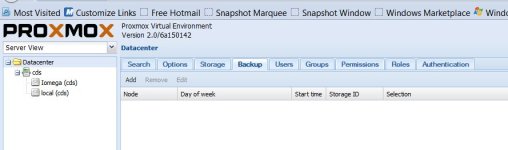
Ok. I'm running Beta2.0/6a150142 now and I have the NFS share listed under Storage. I still don't' see a restore tab anywhere. I see a backup tab, but no restore.

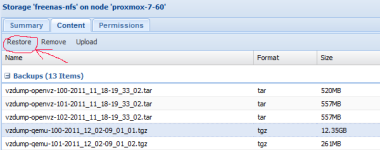
If I click on the Content tab for the Iomega storage I see a Restore tab that's grayed out. Is that where I'm supposed to restore from (assuming it was reading the drive, which it's not).
 
beta2 is outdated, upgrade.

pve2-restore.png
 
Oh. Just grabbed it yesterday and did the aptitude upgrades today. I guess I'm not fast enough. I guess it's version 2, beta3. I posted wrong. Sorry. The GUI says it's Beta2.0/6a150142 but the download page calls it beta3, version 2
 
OK, so that is the restore tab I'm looking for, under the storage device and not under the backup tab or on a restore tab. Not intuitive, but that's the one I mentioned earlier. I selected the Content tab and attempted to Upload a VZDump backup file from my version 1.9 machine. I select the file and it starts the upload but after about 200MB it comes up with an "Error 0 occurred while receiving the document" and aborts. Attempted again using a different local storage area but get the same error.

Is it because 1.9 VZDump files aren't compatible or is there some other problem?
 
OK, so that is the restore tab I'm looking for, under the storage device and not under the backup tab or on a restore tab. Not intuitive, but that's the one I mentioned earlier.

Well, there is a restore button near the backup button in the backup tab (not sure what you miss?).

I selected the Content tab and attempted to Upload a VZDump backup file from my version 1.9 machine. I select the file and it starts the upload but after about 200MB it comes up with an "Error 0 occurred while receiving the document" and aborts. Attempted again using a different local storage area but get the same error.

Seems to be a browser related bug - what browser/version do you use?
 
When I click the Backup tab at the top there is no restore button to be seen.proxmox.JPG

I'm using Firefox 8.0 pulling from both the NFS and from my local HDD both with the same Error 0 message. Based on your comment I tried doing the same thing in IE and had different results so at least some of it must be browser related. With IE9 I didn't get an error, but the file doesn't show up when it's done either. The content page is empty. Is that because of the file extensions?