

I'm trying to setup replication between two nodes to have a copy on each node as well as backups in PBS and TrueNAS. I have setup PBS and will do TruNAS later.
I currently have both nodes setup with ZFS pools though they do have vastly different configurations. Each node has it own local ZFS and vm share [node#-vms]. These are created from their respective ZFS pools named vm-storage#. I have also added the respective storage's and pools to Datacenter so that they can be seen/recognized by the cluster. When adding vm-storage# and node#-vms I assigned them to there respective node that they are installed on.
Is there something I'm not understanding about replication or do I need to have completely identical nodes and configurations. For now im shutting everything down and going to eat ice cream my head hurts .
.
Datacenter Storage List:

Storage Config:
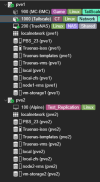
Node 1:

Node 2:

Log Output:
2025-04-27 14:18:00 100-0: start replication job
2025-04-27 14:18:00 100-0: guest => VM 100, running => 0
2025-04-27 14:18:00 100-0: volumes => vm-storage2:vm-100-disk-0
2025-04-27 14:18:01 100-0: (remote_prepare_local_job) storage 'vm-storage2' is not available on node 'pve1'
2025-04-27 14:18:01 100-0: end replication job with error: command '/usr/bin/ssh -e none -o 'BatchMode=yes' -o 'HostKeyAlias=pve1' -o 'UserKnownHostsFile=/etc/pve/nodes/pve1/ssh_known_hosts' -o 'GlobalKnownHostsFile=none' root@192.168.88.20 -- pvesr prepare-local-job 100-0 vm-storage2:vm-100-disk-0 --last_sync 0' failed: exit code 255
I currently have both nodes setup with ZFS pools though they do have vastly different configurations. Each node has it own local ZFS and vm share [node#-vms]. These are created from their respective ZFS pools named vm-storage#. I have also added the respective storage's and pools to Datacenter so that they can be seen/recognized by the cluster. When adding vm-storage# and node#-vms I assigned them to there respective node that they are installed on.
Is there something I'm not understanding about replication or do I need to have completely identical nodes and configurations. For now im shutting everything down and going to eat ice cream my head hurts
.Datacenter Storage List:
Storage Config:
Node 1:
Node 2:
Log Output:
2025-04-27 14:18:00 100-0: start replication job
2025-04-27 14:18:00 100-0: guest => VM 100, running => 0
2025-04-27 14:18:00 100-0: volumes => vm-storage2:vm-100-disk-0
2025-04-27 14:18:01 100-0: (remote_prepare_local_job) storage 'vm-storage2' is not available on node 'pve1'
2025-04-27 14:18:01 100-0: end replication job with error: command '/usr/bin/ssh -e none -o 'BatchMode=yes' -o 'HostKeyAlias=pve1' -o 'UserKnownHostsFile=/etc/pve/nodes/pve1/ssh_known_hosts' -o 'GlobalKnownHostsFile=none' root@192.168.88.20 -- pvesr prepare-local-job 100-0 vm-storage2:vm-100-disk-0 --last_sync 0' failed: exit code 255
Last edited:
