

On PVE 9.1.4, I'm trying to pass a Z-wave USB dongle to a QEMU VM (Ubuntu 25.04):
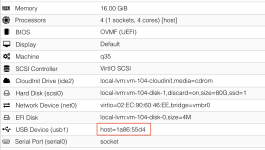
The device is seen by both the host and VM, via
Host:
VM:
Neither the host or VM has symlinks at
This dongle was attached to a separate LXC, however, I've removed the mount entry, shutdown the LXC, and rebooted. I just need to pass this stick through so it can be referenced by path in the VM. Ideas?
The device is seen by both the host and VM, via
lsusb :Host:
Code:
Bus 001 Device 001: ID 1d6b:0002 Linux Foundation 2.0 root hub
Bus 002 Device 001: ID 1d6b:0003 Linux Foundation 3.0 root hub
Bus 003 Device 001: ID 1d6b:0002 Linux Foundation 2.0 root hub
Bus 003 Device 002: ID 2109:2812 VIA Labs, Inc. VL812 Hub
Bus 003 Device 003: ID 1a86:55d4 QinHeng Electronics 800 Z-Wave Stick
Bus 003 Device 004: ID 2109:2812 VIA Labs, Inc. VL812 Hub
Bus 003 Device 005: ID 05e3:0610 Genesys Logic, Inc. Hub
Bus 003 Device 006: ID 0bda:2838 Realtek Semiconductor Corp. RTL2838 DVB-T
Bus 003 Device 007: ID 051d:0002 American Power Conversion Uninterruptible Power Supply
Bus 004 Device 001: ID 1d6b:0003 Linux Foundation 3.0 root hub
Bus 004 Device 002: ID 2109:0812 VIA Labs, Inc. VL812 Hub
Bus 004 Device 003: ID 0bda:8156 Realtek Semiconductor Corp. USB 10/100/1G/2.5G LAN
Bus 004 Device 004: ID 2109:0812 VIA Labs, Inc. VL812 Hub
Bus 004 Device 005: ID 152d:0578 JMicron Technology Corp. / JMicron USA Technology Corp. JMS578 SATA 6Gb/s
VM:
Code:
Bus 001 Device 001: ID 1d6b:0001 Linux Foundation 1.1 root hub
Bus 002 Device 001: ID 1d6b:0002 Linux Foundation 2.0 root hub
Bus 003 Device 001: ID 1d6b:0002 Linux Foundation 2.0 root hub
Bus 004 Device 001: ID 1d6b:0001 Linux Foundation 1.1 root hub
Bus 005 Device 001: ID 1d6b:0001 Linux Foundation 1.1 root hub
Bus 006 Device 001: ID 1d6b:0001 Linux Foundation 1.1 root hub
Bus 007 Device 001: ID 1d6b:0001 Linux Foundation 1.1 root hub
Bus 008 Device 001: ID 1d6b:0001 Linux Foundation 1.1 root hub
Bus 009 Device 001: ID 1d6b:0002 Linux Foundation 2.0 root hub
Bus 009 Device 002: ID 1a86:55d4 QinHeng Electronics 800 Z-Wave Stick
Bus 010 Device 001: ID 1d6b:0003 Linux Foundation 3.0 root hub
Neither the host or VM has symlinks at
/dev/serial/by-id and neither have any ttyUSB devices.This dongle was attached to a separate LXC, however, I've removed the mount entry, shutdown the LXC, and rebooted. I just need to pass this stick through so it can be referenced by path in the VM. Ideas?
Last edited:

