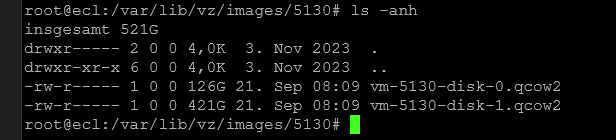
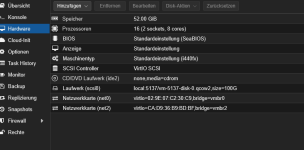
qcow2 file is bigger as hdd config

informant

Renowned Member
Jan 31, 2012
843
12
83
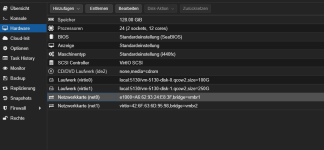
Hi all, a small question, my qcow2 files are bigger as i have set in configuration, most 1-75-2x bigger as configured. no snapshots are available in this. fallocate -d vm.qcow2 i have done already, same issue. what is the problem, why files are bigger as in configuration. how can i solve it? any ideas here?
i mean it was old crap but qemu-img convert -O qcow2 vm-5137-disk-0.qcow2 vm-5137-disk-0_clean.qcow2 dont help too. need other way.
regards

example screens in attachment!
 

Attachments

  • 1789975240789.png
    1789975240789.png
    33.3 KB · Views: 14
  • 1789975248861.png
    1789975248861.png
    11.4 KB · Views: 14
  • 1789975285153.png
    1789975285153.png
    28.8 KB · Views: 14
  • 1789975346997.png
    1789975346997.png
    6.7 KB · Views: 13
Hi,
what does qemu-img info --output=json /path/to/your/volume.qcow2 show? What about qm rescan?
 
hi here of a exsample:
qemu-img info --output=json vm-5130-disk-1.qcow2
{
"children": [
{
"name": "file",
"info": {
"children": [
],
"virtual-size": 452044718080,
"filename": "vm-5130-disk-1.qcow2",
"format": "file",
"actual-size": 259927232512,
"format-specific": {
"type": "file",
"data": {
}
},
"dirty-flag": false
}
}
],
"virtual-size": 268435456000,
"filename": "vm-5130-disk-1.qcow2",
"cluster-size": 65536,
"format": "qcow2",
"actual-size": 259927232512,
"format-specific": {
"type": "qcow2",
"data": {
"compat": "1.1",
"compression-type": "zlib",
"lazy-refcounts": false,
"refcount-bits": 16,
"corrupt": false,
"extended-l2": false
}
},
"dirty-flag": false
}
 
The qcow2 has "virtual-size": 268435456000, so it's a bit strange that the convert operation does not produce a smaller image. Could you also share the output of qemu-img info for the resulting disk of the convert operation? What kind of filesystem is in use, check with e.g. findmnt -T /var/lib/vz/? What does du -ch /var/lib/vz/images show?
 
hi, shure i can., here informations:
qemu-img info vm-5130-disk-1.qcow2
image: vm-5130-disk-1.qcow2
file format: qcow2
virtual size: 250 GiB (268435456000 bytes)
disk size: 242 GiB
cluster_size: 65536
Format specific information:
compat: 1.1
compression type: zlib
lazy refcounts: false
refcount bits: 16
corrupt: false
extended l2: false
Child node '/file':
filename: vm-5130-disk-1.qcow2
protocol type: file
file length: 421 GiB (452044718080 bytes)
disk size: 242 GiB

du -ch /var/lib/vz/images
337G /var/lib/vz/images/5130
84G /var/lib/vz/images/4151
101G /var/lib/vz/images/5137
71G /var/lib/vz/images/5132
591G /var/lib/vz/images
591G insgesamt

findmnt -T /var/lib/vz/
TARGET SOURCE FSTYPE OPTIONS
/var/lib/vz /dev/mapper/pve-data ext4 rw,relatime,stripe=128
 
That 242 GiB on a 250 GiB virtual disk, with convert not shrinking anything, is the classic "allocated but never released" pattern. Discard enabled in the GUI only opens the UNMAP path from the guest to the image file - it does not free anything by itself. The guest has to actually issue discard/TRIM commands.

So two things worth checking on the running guest:

For a Linux guest, run fstrim -av once manually and watch the qcow2 file size. If it shrinks immediately, the problem was simply that fstrim.timer is not enabled or the filesystem is not mounted with discard=async. After that, du -ch /var/lib/vz/images before and after tells you exactly how much was never released.

For a Windows guest, TRIM also needs to run inside the guest - Optimize-Volume -DriveLetter C -ReTrim does it on demand. NTFS deletes often sit in a pending-until-trim state, which matches what you are seeing.

A few extra notes from my own machines:

- qemu-img convert only writes allocated clusters. If the guest filesystem still holds the blocks as "used" (deleted but not trimmed), the copy comes out just as fat. That is why your convert produced the same size.
- virt-sparsify works, but needs free space roughly the size of the image next to it and the VM must be powered off. I treat it as the last resort after fstrim.
- On LVM-thin or ZFS backends you would see different behavior, but on a directory-based /var/lib/vz with qcow2, guest-side fstrim is the usual fix.

Quick sanity test: inside the guest, fill a file with zeros, delete it, run fstrim, then compare the file size again. If nothing shrinks, post the output of qemu-img map --output=json - that shows whether the clusters are actually allocated or just zero-holed.