

Hi everyone,
I'm testing Proxmox RBAC with pools + groups so that VPN users can create and manage their own VMs inside a specific project pool only.
As part of this, I'm building a framework called "Zelogx MSL Setup" (Multiverse Secure Lab Setup) on top of Proxmox VE + Pritunl to provide
isolated multi-project dev environments.
During pool-based RBAC testing I ran into a strange GUI-only error when deleting VMs, and I'd like to confirm whether this is expected,
a known quirk, or a small UI bug.
---
- Proxmox VE: 9.0.11 (single node)
- Auth realm: `pve` (Proxmox VE authentication server, no LDAP/AD)
- SDN:
- SDN zone: `devpj`
- VNet: `vnetpj01` (project network for PJ01)
---
- Project-specific pool (`pj01`) for one dev project
- Group `Pj01Admins` is the admin group for that project
- User `pj01admin@pve`:
- member of `Pj01Admins`
- should be able to:
- create/manage/delete VMs only inside pool `pj01`
- not see/touch other project resources
- VPN users connect (via Pritunl) and use this `pj01admin@pve` account to manage only their project VMs.
---
`Datacenter → Permissions → Pool → Create`
- Name: `pj01`
(We want one pool per project like PJ01, PJ02, … so that
each project can be isolated. Using a single global pool for all projects
would let admins of one project see all others.)
#### 2. Create group
`Datacenter → Permissions → Groups → Create`
- Name: `Pj01Admins`
#### 3. Create user
`Datacenter → Permissions → Users → Create`
- User name: `pj01admin`
- Realm: `Proxmox VE authentication server (pve)`
- Group: `Pj01Admins`
So now `pj01admin@pve` ∈ `Pj01Admins`.
#### 4. Grant group permissions on the pool
`Datacenter → Permissions → Add → Group Permission`
- Path: `/pool/pj01`
- Group: `Pj01Admins`
- Role: `PVEAdmin`
- Propagate: enabled
(Conceptually: “give Pj01Admins full control over anything in this pool”.)
#### 5. Add resources to the pool
Without this, `pj01admin` cannot create VMs, because they will not see any storage or usable resources.
From `Datacenter → pj01 → Members → Add`:
- Add Virtual Machine(s) (if you already have some test VMs)
- Not strictly required if you only test with newly created VMs.
- Add Storages needed for VM creation:
- VM disk storage
- ISO image storage (for installation media)
- local storage for EFI/system disk if needed
(If these storages are not added to the pool, `pj01admin` will not see any storage on the VM creation wizard and effectively cannot create VMs.)
#### 6. SDN / network permissions for the project
To allow the user to attach NICs to the project VNet:
`Datacenter → Permissions → Add → Group Permission`
- Path: `/sdn/zone/devpj/vnetpj01`
- Group: `Pj01Admins`
- Role: `PVEAdmin` (or another appropriate SDN role)
Note: `vnetpj01` does not appear in the tree UI, but the path `/sdn/zone/devpj/vnetpj01` can be entered manually and works.
---
1. **Create a new VM in pool `pj01`:**
- Log in as `pj01admin@pve` (pve realm).
- Create VM 101 (for example).
- In the wizard, select:
- Pool: `pj01`
- Storage: one of the storages assigned to the pool
- Network: SDN `vnetpj01` (from the SDN zone `devpj`)
- The VM is created successfully and appears under pool `pj01`.
2. **Delete the VM as `pj01admin@pve`:**
- Log back in as `pj01admin@pve`.
- Select VM 101 → `More` → `Remove` → confirm.
- The VM is removed from the tree.
---
### What actually happens
- The **delete task succeeds**:
From `system log` on the node (PVE 9.0.11):
- Task log shows OK.
- The VM really is gone (no 101.conf in /etc/pve/qemu-server).
- There is no related error in the syslog or task log.
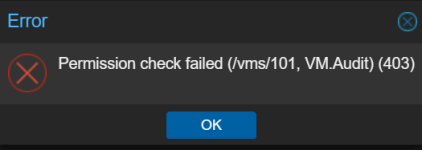
- However, right after the delete, the GUI shows a popup error: Permission check failed (/vms/101, VM.Audit) (403)
- This appears only in the web GUI as a small error popup.
- I do not see this message in journalctl or the task log.
- I also tested:
- With explicit ACL on /vms/101 (Pj01Admins, PVEAdmin)
- Without explicit ACL on /vms/101 (pool-only ACL)
→ The GUI popup is the same in both cases.
So the actual delete operation is fine, but the GUI still tries to do some permission check on /vms/101 afterwards and shows a VM.Audit 403 popup, even though the VM is already destroyed.
1. For this pool-based RBAC setup on PVE 9.0.11, what would be the recommended way to avoid this GUI error popup when a project admin deletes a VM inside their own pool?
- Is there some minimal additional permission I should grant (e.g. on `/vms` or `/nodes`) so that the GUI does not try to access `/vms/101` in a way that triggers `VM.Audit` 403?
- Or is there a different/better path you would suggest for this scenario?
The delete operation itself is working fine; I’d just like to understand if my RBAC design is missing some piece that causes this harmless but confusing GUI message.
2. More generally, is there a **recommended pattern** for this use case?
- One project pool per dev project (e.g. `pj01`)
- Group `Pj01Admins` as “project admins”
- Users allowed to create/manage/delete only VMs in that pool
- Without granting them broad `/vms` or `/nodes` permissions
In particular, I’d like to avoid giving them full access under `/vms` just to hide a cosmetic GUI error, because the long-term goal is a multi-project / multi-tenant dev lab.
If needed, I can provide:
pveum acl list (with sensitive info redacted) Additional screenshots or exact GUI popup message.
Thanks in advance for any hints or confirmation!.
I'm testing Proxmox RBAC with pools + groups so that VPN users can create and manage their own VMs inside a specific project pool only.
As part of this, I'm building a framework called "Zelogx MSL Setup" (Multiverse Secure Lab Setup) on top of Proxmox VE + Pritunl to provide
isolated multi-project dev environments.
During pool-based RBAC testing I ran into a strange GUI-only error when deleting VMs, and I'd like to confirm whether this is expected,
a known quirk, or a small UI bug.
---
Environment
- Proxmox VE: 9.0.11 (single node)
- Auth realm: `pve` (Proxmox VE authentication server, no LDAP/AD)
- SDN:
- SDN zone: `devpj`
- VNet: `vnetpj01` (project network for PJ01)
---
Goal / Use case
- Project-specific pool (`pj01`) for one dev project
- Group `Pj01Admins` is the admin group for that project
- User `pj01admin@pve`:
- member of `Pj01Admins`
- should be able to:
- create/manage/delete VMs only inside pool `pj01`
- not see/touch other project resources
- VPN users connect (via Pritunl) and use this `pj01admin@pve` account to manage only their project VMs.
---
#### 1. Create poolACL / RBAC setup (step-by-step)
`Datacenter → Permissions → Pool → Create`
- Name: `pj01`
(We want one pool per project like PJ01, PJ02, … so that
each project can be isolated. Using a single global pool for all projects
would let admins of one project see all others.)
#### 2. Create group
`Datacenter → Permissions → Groups → Create`
- Name: `Pj01Admins`
#### 3. Create user
`Datacenter → Permissions → Users → Create`
- User name: `pj01admin`
- Realm: `Proxmox VE authentication server (pve)`
- Group: `Pj01Admins`
So now `pj01admin@pve` ∈ `Pj01Admins`.
#### 4. Grant group permissions on the pool
`Datacenter → Permissions → Add → Group Permission`
- Path: `/pool/pj01`
- Group: `Pj01Admins`
- Role: `PVEAdmin`
- Propagate: enabled
(Conceptually: “give Pj01Admins full control over anything in this pool”.)
#### 5. Add resources to the pool
Without this, `pj01admin` cannot create VMs, because they will not see any storage or usable resources.
From `Datacenter → pj01 → Members → Add`:
- Add Virtual Machine(s) (if you already have some test VMs)
- Not strictly required if you only test with newly created VMs.
- Add Storages needed for VM creation:
- VM disk storage
- ISO image storage (for installation media)
- local storage for EFI/system disk if needed
(If these storages are not added to the pool, `pj01admin` will not see any storage on the VM creation wizard and effectively cannot create VMs.)
#### 6. SDN / network permissions for the project
To allow the user to attach NICs to the project VNet:
`Datacenter → Permissions → Add → Group Permission`
- Path: `/sdn/zone/devpj/vnetpj01`
- Group: `Pj01Admins`
- Role: `PVEAdmin` (or another appropriate SDN role)
Note: `vnetpj01` does not appear in the tree UI, but the path `/sdn/zone/devpj/vnetpj01` can be entered manually and works.
---
Now log in as `pj01admin@pve` and do the following:Reproduce procedure
1. **Create a new VM in pool `pj01`:**
- Log in as `pj01admin@pve` (pve realm).
- Create VM 101 (for example).
- In the wizard, select:
- Pool: `pj01`
- Storage: one of the storages assigned to the pool
- Network: SDN `vnetpj01` (from the SDN zone `devpj`)
- The VM is created successfully and appears under pool `pj01`.
2. **Delete the VM as `pj01admin@pve`:**
- Log back in as `pj01admin@pve`.
- Select VM 101 → `More` → `Remove` → confirm.
- The VM is removed from the tree.
---
### What actually happens
- The **delete task succeeds**:
From `system log` on the node (PVE 9.0.11):
Dec 20 11:01:14 pve1 pvedaemon[1840689]: <pj01admin@pve> starting task UPID:pve1:002054B6:20FA117D:6946036A:qmdestroy:101:pj01admin@pve: Dec 20 11:01:14 pve1 pvedaemon[2118838]: destroy VM 101: UPID:pve1:002054B6:20FA117D:6946036A:qmdestroy:101:pj01admin@pve: Dec 20 11:01:14 pve1 pvedaemon[1840689]: <pj01admin@pve> end task UPID:pve1:002054B6:20FA117D:6946036A:qmdestroy:101:pj01admin@pve: OK Dec 20 11:01:41 pve1 pvedaemon[2116539]: <root@pam> successful auth for user 'pj01admin@pve'- Task log shows OK.
- The VM really is gone (no 101.conf in /etc/pve/qemu-server).
- There is no related error in the syslog or task log.
- However, right after the delete, the GUI shows a popup error: Permission check failed (/vms/101, VM.Audit) (403)
- This appears only in the web GUI as a small error popup.
- I do not see this message in journalctl or the task log.
- I also tested:
- With explicit ACL on /vms/101 (Pj01Admins, PVEAdmin)
- Without explicit ACL on /vms/101 (pool-only ACL)
→ The GUI popup is the same in both cases.
So the actual delete operation is fine, but the GUI still tries to do some permission check on /vms/101 afterwards and shows a VM.Audit 403 popup, even though the VM is already destroyed.
Questions
1. For this pool-based RBAC setup on PVE 9.0.11, what would be the recommended way to avoid this GUI error popup when a project admin deletes a VM inside their own pool?
- Is there some minimal additional permission I should grant (e.g. on `/vms` or `/nodes`) so that the GUI does not try to access `/vms/101` in a way that triggers `VM.Audit` 403?
- Or is there a different/better path you would suggest for this scenario?
The delete operation itself is working fine; I’d just like to understand if my RBAC design is missing some piece that causes this harmless but confusing GUI message.
2. More generally, is there a **recommended pattern** for this use case?
- One project pool per dev project (e.g. `pj01`)
- Group `Pj01Admins` as “project admins”
- Users allowed to create/manage/delete only VMs in that pool
- Without granting them broad `/vms` or `/nodes` permissions
In particular, I’d like to avoid giving them full access under `/vms` just to hide a cosmetic GUI error, because the long-term goal is a multi-project / multi-tenant dev lab.
If needed, I can provide:
pveum acl list (with sensitive info redacted) Additional screenshots or exact GUI popup message.
Thanks in advance for any hints or confirmation!.
