Proxmox Virtual Environment 9.0 released!

I found that it seems to be my issue reported on Oracle forum here . Solution is to manually restart o2cb service and remount filesystems:

Code:
systemctl restart o2cb.service

I can add this to cron temporary but it it's rather lame solution. I would like to fix this before upgrading the rest of nodes. Please help.

===UPDATE===
Problem solved (enable services to get it working)

I seem to hit the same issue in this issue

I enabled `o2cb.service` already but it didn't help in my case. Did you enable other services as well? thanks for sharing
 
I read this :
Code:
WARN: systemd-boot package installed on legacy-boot system is not necessary, consider removing it
INFO: Check for dkms modules...

I will ran this :
root@pve5:~# proxmox-boot-tool status


Re-executing '/usr/sbin/proxmox-boot-tool' in new private mount namespace..


System currently booted with legacy bios


DBC0-B6F8 is configured with: grub (versions: 6.8.12-14-pve, 6.8.12-15-pve)


root@pve5:~#

Code:
apt remove systemd-boot
update-grub
This operation is good or not ?
 
I have one question, did anybody notice a problem with PVE9 and kernel 4.4 VMs? I need to find evidence,but it seems that there is some problem with qemu-guest-agent and 4.4 kernel and pve9 where this machines locks and just gets unresponsive.
 
I finally logged into the mobile interface for VE 9. I'd like to give a massive kudos to the folks working on that. It is a really great improvement over the VE 9 mobile interface. Thanks!
 
  • Like
Reactions: pxmxfan
Is the overall consensus that 9.0 is reasonably solid? is 9.1 coming soon? I normally wouldnt move to a x.0 release but after needing a new chassis for my newest proxmox machine, its an opportunity to do some software updates.
 
Hi,

pve8to9 suggests to remove `systemd-boot` package, but my root is on a ZFS mirror. BIOS is set to "UEFI and Legacy Boot" and apparantly legacy boot is used.

Code:
# proxmox-boot-tool status
Re-executing '/usr/sbin/proxmox-boot-tool' in new private mount namespace..
System currently booted with legacy bios
B7A1-2FB3 is configured with: grub (versions: 6.5.13-6-pve, 6.8.12-11-pve, 6.8.12-13-pve, 6.8.12-8-pve)
B7A3-6204 is configured with: grub (versions: 6.5.13-6-pve, 6.8.12-11-pve, 6.8.12-13-pve, 6.8.12-8-pve)

What's the problem with legacy boot and root on ZFS?
Since no one answered, the problem I am aware of is that grub doesnt support all ZFS flags so you have to be careful which features you enabled on the boot pool.

For the systemd-boot package, I had a quick look for you, the advice is basically if you didnt install it manually for a specific reason it is probably safe to remove.

 
Since no one answered, the problem I am aware of is that grub doesnt support all ZFS flags so you have to be careful which features you enabled on the boot pool.
Note that this was one of the major reasons to use proxmox-boot-tool with a dedicated vFAT partition for GRUB to load the kernel and initrd from not only for EFI (where it's necessary anyway), but also for legacy BIOS boots.
As FAT is a much simpler FS that won't get any new features added, and so it's support in GRUB is very mature.

That's done since the Proxmox VE 6.4-1 ISO (released in April 2021) and there's documentation for how to switch over to that boot method, e.g. if you set up a ZFS on root installation using legacy BIOS with an ISO older than the 6.4 one:
https://pve.proxmox.com/wiki/ZFS:_Switch_Legacy-Boot_to_Proxmox_Boot_Tool

systemd-boot basically can always be removed and the pve8to9 upgrade checklist tool should correctly output the rare cases when systemd-boot-efi and systemd-boot-tools really are required.
 
Last edited:
  • Like
Reactions: chrcoluk
I updated one node in our cluster from 8 to 9 last Friday and there was a problem with booting after upgrade. I need to reinstall EFI booting files.

To fix it:
1) boot from PVE install image and use grub option "Rescue boot"
2) mount grub EFI partition
Code:
mount /dev/<device>p2 /boot/efi/
3) reinstall grub packages (may not be necessary)
Code:
apt-get install --reinstall grub-efi-amd64-bin grub-efi-amd64-signed grub-efi-amd64-unsigned grub-efi-amd64
4) reinstall grub into EFI partition
Code:
grub-install /dev/<device>p2

Nothing special, but count with this possibility before upgrade.
 
Olá!

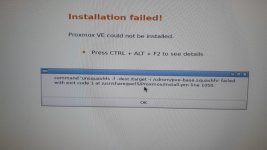
Estou com o seguinte erro ao tentar instalar o PVE 9:
command 'unsquashfs -f-dest/target -i/cdrom/pve-base.squashfs' failed with exit code 1 at /usr/share/perl5/Proxmox/Install.pm line 1050.

Logo após passar pelo Summary

Que devo fazer?
-------------------------------------
Hello!

I'm getting the following error when trying to install PVE 9:
command 'unsquashfs -f-dest/target -i/cdrom/pve-base.squashfs' failed with exit code 1 at /usr/share/perl5/Proxmox/Install.pm line 1050.

Right after going through the Summary

What should I do?
 

Attachments

  • Imagem do WhatsApp de 2025-09-24.jpg
    Imagem do WhatsApp de 2025-09-24.jpg
    172.1 KB · Views: 23
I'm getting the following error when trying to install PVE 9:
command 'unsquashfs -f-dest/target -i/cdrom/pve-base.squashfs' failed with exit code 1 at /usr/share/perl5/Proxmox/Install.pm line 1050.

Right after going through the Summary

What should I do?
This looks like something went wrong with the installation medium.

Verify that the ISO you downloaded is correct, and that it is copied correctly to the install medium: https://pve.proxmox.com/pve-docs/pve-admin-guide.html#installation_prepare_media
 
I've upgraded just fine, but my system would not boot correctly under new kernel 6.14.8-2-pve. Recovery mode showed many errors regarding PCI, so I though that `pci_aspm=off` was missing for the new kernel, but it was there, despite it it would not boot. Kernel 6.8.12-13-pve booted just fine, so I've pinned it.
Resolved! I've added option `libata.force=nolpm` and it booted correctly under 6.14.11-3-pve kernel :)
 
  • Like
Reactions: templar and aaron
Hey. I recently updated to PVE 9.0.10 (kernel 6.14.11-3-pve) and got one complete freeze yesterday and one today. Cannot see anything in the logs (journalctl). Today after realizing the Proxmox host is frozen (SSH returning "No route to host") I connected HDMI cable to the NUC and saw the proxmox TTY login screen but no reactions to keyboard.
CPU: Intel(R) Core(TM) Ultra 7 255H

Any idea how to debug it - what is it caused by? Could it be the new kernel?
 
Last edited:
Please note that the documentation contains a small error.
This document (on the Downloads page)
https://www.proxmox.com/en/download.../documentation/proxmox-ve-admin-guide-for-9-x

FAQ section, question 12 (upgrade to major release), on page 444:
The text "Upgrade from Proxmox VE 8 to 9 has the link (in the PDF) https://pve.proxmox.com/wiki/Upgrade_from_7_to_8

Fortunately one can easily rewrite the URL https://pve.proxmox.com/wiki/Upgrade_from_8_to_9

Possible this may affect the HTML help inside the ISO as well.

Thank you.
 
Please note that the documentation contains a small error.
This document (on the Downloads page)
https://www.proxmox.com/en/download.../documentation/proxmox-ve-admin-guide-for-9-x

FAQ section, question 12 (upgrade to major release), on page 444:
The text "Upgrade from Proxmox VE 8 to 9 has the link (in the PDF) https://pve.proxmox.com/wiki/Upgrade_from_7_to_8

Fortunately one can easily rewrite the URL https://pve.proxmox.com/wiki/Upgrade_from_8_to_9

Possible this may affect the HTML help inside the ISO as well.

Thank you.
Thanks for reporting this! I pushed a fix in git, should get fixed with the next pve-docs version bump, after which we can update this PDF.

https://git.proxmox.com/?p=pve-docs.git;a=commitdiff;h=2ea33b854ee6f0473baf7fbc6ac71c75db0801c5
 
@t.lamprecht please update 8to9 instructions to clearly indicate to NOT UPGRADE if your are running mellanox/nvidia networking. They do not support debian 13, and you will wind up with a broken system, requiring a fresh install (if running vendor drivers).
 
  • Like
Reactions: nevusZ
Successfully upgraded 14 physical hosts and 5 virtual hosts. :D

One particular host had some custom built drivers for 5G modem and a custom firmware networking smart card, but after recompiling drivers for new kernel, all done.

Impressed with you guys, Proxmox upgrades sure have come a long way, nearly point-n-click.

My testlab hardware across the board from Intel to AMD Epycs is configured with all kinds of customized scripts etc such as mellanox nics with custom drivers, gpu/storage virtual functions/sr-iov, nested virtualisation, nvme sr-iov etc...... was glad the upgrade only cost me a couple cans of cola with some retrosynth tunez in the background.

Holding the flag high for free homelab software, thank you soooo much. :)
 
Last edited:
  • Like
Reactions: gfngfn256