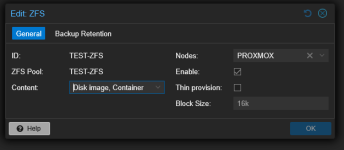
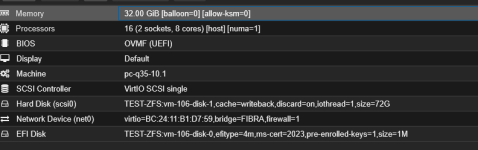
Proxmox VE 9.1.1 – Windows Server / SQL Server issues
- Thread starter tigro11
- Start date
You are using an out of date browser. It may not display this or other websites correctly.
You should upgrade or use an alternative browser.
You should upgrade or use an alternative browser.
no, changing FS ( zfs / Lvmthin / btrfs) implies formatting.can i convert to Lvmthin without moving all the vms?
perfect,no, changing FS ( zfs / Lvmthin / btrfs) implies formatting.
Thanks
of course.
it's not really a migrate.
perfect, so I make a backup of the VMs on a NAS, recreate the LVMthin filesystem and then restore the VMs on the new filesystem, right?
we can't confirm each step neither detail each step.
backup as safety , always.
but restore can be skipped :
from Node \ Shell , you can
then "Wipe disk" from PVE UI \ Node \ Disks , the correct disk /!\ , then "Create Thinpool" from Node \ Disks \ Lvm-thin
then moving SQL vdisk to new Storage.
backup as safety , always.
but restore can be skipped :
from Node \ Shell , you can
zpool detach one 1.8TB , this breaks ZFS mirror , but will continue to work , no interruption.then "Wipe disk" from PVE UI \ Node \ Disks , the correct disk /!\ , then "Create Thinpool" from Node \ Disks \ Lvm-thin
then moving SQL vdisk to new Storage.
Hi,
I have exactly the same issue, and my setup is close to your and I also use zfs. Fresh Proxmox 9.1.1 installation, with VMs migrated from ESXi 8, where everything was working perfectly.
My VMs are two Windows Server 2019 machines (one RDS, one database server), fully up to date and optimized for Proxmox.
After a few hours of use, users report a minimum 10-second latency that appeared after the migration, directly inside the application — whether accessed via RDS or directly on the database server.
We did not have this latency before, so it clearly comes from Proxmox. After many unsuccessful tests, here is what I ended up doing:
Hopefully this can help you
PS: I should have expected Proxmox 9 to be unstable with Windows. For example, when uploading a Windows ISO via the web interface, the file gets corrupted — I had to upload it via SSH instead.
PS2: This post was corrected and rewritten with ChatGPT.
I have exactly the same issue, and my setup is close to your and I also use zfs. Fresh Proxmox 9.1.1 installation, with VMs migrated from ESXi 8, where everything was working perfectly.
My VMs are two Windows Server 2019 machines (one RDS, one database server), fully up to date and optimized for Proxmox.
After a few hours of use, users report a minimum 10-second latency that appeared after the migration, directly inside the application — whether accessed via RDS or directly on the database server.
We did not have this latency before, so it clearly comes from Proxmox. After many unsuccessful tests, here is what I ended up doing:
- Downgraded VirtIO drivers from 285 to 271
- Downgraded QEMU from 10.1 to 9.2
- Downgraded Proxmox by reinstalling from 9.1.1 to 8.4.16
Hopefully this can help you
PS: I should have expected Proxmox 9 to be unstable with Windows. For example, when uploading a Windows ISO via the web interface, the file gets corrupted — I had to upload it via SSH instead.
PS2: This post was corrected and rewritten with ChatGPT.
Last edited:


What CPU emulation did you use? There are plenty of threads about not using "host" and/or discussing CPU virtualization flags at least in newer Windows versions, for example thread https://forum.proxmox.com/threads/e...nce-10-gbit-virtio-speeds.179064/#post-830582
I used x86-64-v2-AES then host (XEON GOLD 5515+)What CPU emulation did you use? There are plenty of threads about not using "host" and/or discussing CPU virtualization flags at least in newer Windows versions, for example thread https://forum.proxmox.com/threads/esxi-→-proxmox-migration-host-cpu-vs-x86-64-v4-aes-performance-10-gbit-virtio-speeds.179064/#post-830582
This setting didn't improve sql response time but I keept "host" as setting
We are considering migrating from VMware to Proxmox VE, and we are a very heavy SQL Server 2019 & 2022 on Windows shop. So this thread alarms me. Are most people NOT having performance issues with this stack? Should we download the VE 8.x version instead?
Edit: We will be using a 16Gb FC IBM Flash Storage SAN for VM storage.
Edit: We will be using a 16Gb FC IBM Flash Storage SAN for VM storage.
Last edited:
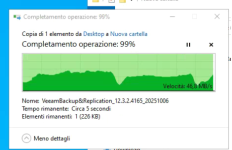
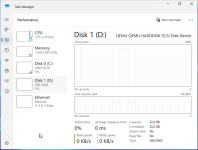
Good morning, I wanted to update you on the tests I've done with the LVM-Thin filesystem. At first glance, I found it very slow when transferring 10GB files from one folder to another on the same disk. However, I created a disk with a ZFS filesystem and found that the transfer speed is much faster, except that instead of a linear transfer, it freezes briefly and then restarts. I also noticed that the server is stuck on other commands. For the next test, I wanted to create RAID 1 from the server and not from ZFS to see if the performance is better.
If you have any suggestions on how to get out of this rather unpleasant situation, I've attached a screenshot of a 15GB file transfer.
Any suggestions are welcome.
Thanks
If you have any suggestions on how to get out of this rather unpleasant situation, I've attached a screenshot of a 15GB file transfer.
Any suggestions are welcome.
Thanks
Attachments
Hi,
Very interested in this cause SQL server is used a lot.
If I understand your problem correctly; You have an old VMWare server that is faster than your newer server where you are using PVE 9.1?
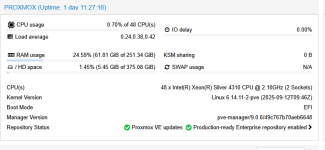
Can you provide specs from both servers; CPU, storage configuration/layout, memory, ... the more details the better.
If your VMWare server has a RAID controller whats its configuration? write through or write back? that could be a major difference for example.
Also how are you testing the SQL performance, direct queries on the SQL server or another way ?
Does the current server you are using have enough resources / headroom to work? if not any hypervisor would become sluggish.
Did you already tried to align recordsizes? (8K pages for SQL server if i looked this up correctly), you could test this by adding a new virtual disk and changing it's recordsize/volblocksize before doing anything with it... then continue in your OS, move DB data over and test.
Very interested in this cause SQL server is used a lot.
If I understand your problem correctly; You have an old VMWare server that is faster than your newer server where you are using PVE 9.1?
Can you provide specs from both servers; CPU, storage configuration/layout, memory, ... the more details the better.
If your VMWare server has a RAID controller whats its configuration? write through or write back? that could be a major difference for example.
Also how are you testing the SQL performance, direct queries on the SQL server or another way ?
Does the current server you are using have enough resources / headroom to work? if not any hypervisor would become sluggish.
Did you already tried to align recordsizes? (8K pages for SQL server if i looked this up correctly), you could test this by adding a new virtual disk and changing it's recordsize/volblocksize before doing anything with it... then continue in your OS, move DB data over and test.
Last edited:

thats a completely normal behavior for windows. It happens to me on a desktop- explorer really likes to cross all the t's and dot all the i's. if you want faster file copy use a different tool (eg, robocopy.) Not sure if that relates to the initial topic, but this behavior is not at all relevant to sql performance.At first glance, I found it very slow when transferring 10GB files from one folder to another on the same disk.
ZFS ARC works best with a ZFS filesystem. Since you're using it as a zvol with NTFS on it, its not aware of the content leading to this sort of behavior. try reading from a non zfs source and write TO a zfs source, and the behavior will be much more consistent.I created a disk with a ZFS filesystem and found that the transfer speed is much faster, except that instead of a linear transfer, it freezes briefly and then restarts
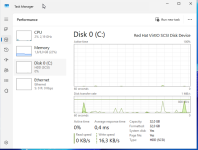
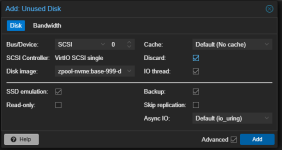
In your initial post there is a screenshot of the new server; you are not using VirtIO, I quickly deployed a W2K25 install configured with VirtIO for everything while yours display SSD (SAS) for the disk:
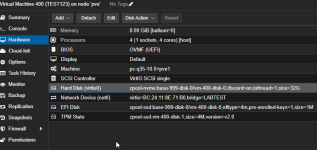
I am pretty sure you are using the following settings (this is from my own environment):
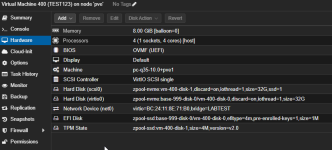
I'm using version:

This "could" cause a performance hit, while i don't think this is the main issue it is always good to use virtio when you can.
I really think you should align the virtual disk volblocksize/recordsize for that specific application (SQL Server) on ZFS level and also in your OS I think this can make a huge difference.
ZFS documentation (though no direct mention of MS SQL server)
https://openzfs.github.io/openzfs-docs/Performance and Tuning/Workload Tuning.html#innodb
Also take a look at:
https://<your-pve-ip>:8006/pve-docs/chapter-qm.html#qm_hard_disk
I am pretty sure you are using the following settings (this is from my own environment):
I'm using version:
This "could" cause a performance hit, while i don't think this is the main issue it is always good to use virtio when you can.
I really think you should align the virtual disk volblocksize/recordsize for that specific application (SQL Server) on ZFS level and also in your OS I think this can make a huge difference.
ZFS documentation (though no direct mention of MS SQL server)
https://openzfs.github.io/openzfs-docs/Performance and Tuning/Workload Tuning.html#innodb
Also take a look at:
https://<your-pve-ip>:8006/pve-docs/chapter-qm.html#qm_hard_disk
Attachments
Last edited:
Try your SQL under Lvmthin during a week, to exclude ZFS or not.
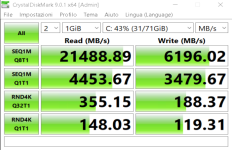
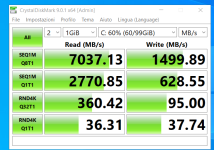
CDM benchmark show Fujitsu on ESXi is slower than Dell on PVE.
CDM benchmark show Fujitsu on ESXi is slower than Dell on PVE.