I know this is an old thread, but it may still help others landing here. I ran into the same or a very similar issue this morning installing PBS 4.2 on an old Lenovo H30-00 (Celeron J1900, BIOS from 2014).
Please note this is not an official or supported procedure, just a hack that got my machine booting.
Warning: part 2 writes directly to the disk's MBR. Using the wrong device or offset can corrupt the partition table or leave the disk unbootable. Only do this on a fresh install or with a backup, and at your own risk.
UEFI mode failed with the same "failed to prepare EFI boot using Grub" error at the end of the installation:

Switching to legacy/CSM mode avoided that error, but this
BIOS only legacy-boots a GPT disk whose protective MBR entry is marked active, which it isn't by default. Both the ISO and the installed disk are GPT, so the fix has two parts.
Part 1: USB boot stick, before installing
In legacy mode the BIOS ignored the stick and fell through to PXE. From another Linux machine, mark the stick's protective MBR active. Replace X with proper block device name/character of your system:
Code:
parted /dev/sdX disk_set pmbr_boot on
After this fix the stick booted and the installation completed without errors. However, the freshly installed backup server then failed to boot ("Reboot and Select proper Boot device"), hence part 2.
Part 2: hard drive, after the installation
The installed disk had the same problem, so it needed the same treatment. Boot the stick into Advanced Options → Terminal UI, Debug Mode, and set the flag by hand at the shell. Note, at this point the parted command is not available so we resort to dd command instead. This writes to the disk, so double-check the device, and make sure the first command shows
ee as the 5th byte(
Reference):
Code:
dd if=/dev/sdX bs=1 skip=446 count=16 2>/dev/null | od -An -tx1
printf '\200' | dd of=/dev/sdX bs=1 seek=446 count=1 conv=notrunc
sync
Do not forget the sync command at the end! To confirm, run the read command again:
Code:
dd if=/dev/sdX bs=1 skip=446 count=16 2>/dev/null | od -An -tx1
The first byte should now be
80 instead of
00, with
ee still the 5th byte (e.g. 80 00 02 00 ee ...).
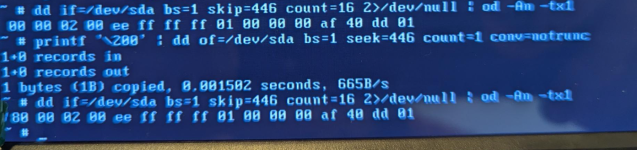
Then remove the stick and reboot. The server should boot from the hard drive, and the PBS dashboard should show "Boot Mode: Legacy BIOS".
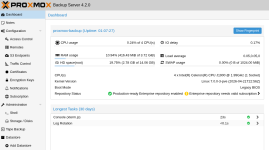
Hope this helps..
Lubos




