proxmox ve 8.2-2 bootloader setup errors

maui-b

New Member
Oct 22, 2024
3
1
3
Good day everyone. I am new to virtualization (can use VMWare, Hyper-V, VirtualBox etc. though) and want to start experimenting with bare metal virtualization. I have a very old extra PC (Lenovo E50-00) with "entry level" hardware, Celeron CPU, 4GB RAM and 500GB mechanical HDD. I dont know if the HDD or CPU is causing the error, but during the installation at 99%, I get the "failed to prepare EFI boot using Grub on '/dev/sda2': unable to install the EFI boot loader on '/dev/sda'" error. I have searched on forums for solutions but the ones I found does not solve the issue. Before I tried installing Proxmox, I did had Windows 10 on the PC and I figured Proxmox will work because it is Linux based and Linux is not resource "hungry".

Is there someone that can point me in the right direction to solve the error? If I need to provide more details, I will gladly do so.

Thanks in advance.
 
given that this is over 10 year old hardware - maybe its UEFI support is buggy? you could try disabling EFI boot in the system firmware and installing in legacy/CSM mode..
 
given that this is over 10 year old hardware - maybe its UEFI support is buggy? you could try disabling EFI boot in the system firmware and installing in legacy/CSM mode..
Thanks for the reply. I tried installing it in legacy/csm mode but no avail. I actually got my proxmox up and running by booting from the flashdrive again after installation and selected recovery boot/repair boot. After proxmox started completely, I logged in into the web browser and installed grub from the shell. I dont know if this solved the issue, haven't restarted the server yet without the flash to test. I will let you know
 
Thanks for the reply. I tried installing it in legacy/csm mode but no avail. I actually got my proxmox up and running by booting from the flashdrive again after installation and selected recovery boot/repair boot. After proxmox started completely, I logged in into the web browser and installed grub from the shell. I dont know if this solved the issue, haven't restarted the server yet without the flash to test. I will let you know
So it looks like solved the issue by manually installing grub. I boot into proxmox ve perfectly without issues
 
  • Like
Reactions: fabian
Hallo zusammen, da ich langsam am verzweifeln bin, hoffe ich mit euerer Hilfe mein Problem lösen zu können.
Vor 1 Jahr bin ich auf Proxmox aufmerksam geworden und PVE auf einem NUC (Intel) installiert. Seitdem bin
ich begeisterter Anwender, ein tolles System. Nun gehen die Ressourcen zu Neige, weshalb ich mir zwei neue neue
Rechner zusammengebaut habe. Alle Komponenten wie Gehäuse, Motherboard, SSD, CPU und RAM sind neu. Sterben
Vorfreude der Installation fand jäh ihr Ende, die Installation bleibt einfach hängen. Auf dem Display
erscheint folgender Text und es tut sich nichts mehr, es ist die selbe Meldung auf beiden Rechnern.
Daher gehe ich davon aus, dass es etwas grundsätzliches ist.

Willkommen beim Proxmox Backup Server 3.2. Installationsprogramm
Start der Ersteinrichtung
Mounten des Proc-Dateisystems
Mounten des sys-Dateisystems
boot-Befehlszeile: BOOT_Image=/boot/linux26 ro ramdisk_size=16777216 rw quiet splash=silent
Treiber werden geladen: nvidiafb ahci nvme vmd wmi intel_pmc_core pinctrl_alderlake mac_hid acpi_pad video acpi_tad
spi_intel_pci xhci_pci i2C_i801 intel_vsec acpi_cpufreq rtc_cmos pcsspkr intel_cstate rapl
aesni_intel sha1_ssse3 sha256_ssse3 ghash_clmulni_intel polyval_clmulni crc32_pclmul kvm_intel
intel_powerclamp x86_pkg_temp_thermal intel_tcc_cooling intel_uncore_frequecy intel_rapl_common

_

Hardware Proxmox VE
Mainboard: GIGABYTE C246M WU4 Rel. 1.1 (Server/Workstation)
Prozessor: Intel Core i7-9700K
Arbeitsspeicher: Kingston FURY Beast 128 GB
1. BOOT-SSD: M.2-SSD mit 2 TB
Seagate SATA: 16 TB (NAS für 24/7 betrieb)

Hardware Proxmox Backup Server
Hauptplatine: ASUS PRIME B760-PLUS D4
CPU: Intel Core i9-13900KF 24 Kerne (8 P-Cores und 16 E-Cores) 36 MB Cache
Arbeitsspeicher: Kingston FURY Beast 32 GB
1. BOOT-SSD: M.2-SSD 1 TB
Seagate SATA: 16 TB (NAS für 24/7 betrieb)

Hat jemand ein ähnliches Problem bzw. ein solches beheben können? Für jeden Tipp bin ich sehr dankbar und froh.

Besten Dank im Voraus
 
das klingt nach einem sehr anderen problem.. probier mal "quiet" wegzumachen im bootloader menü ("e" druecken, dann editieren, dann f10), vielleicht siehst du dann mehr - ich vermute es wird ein problem mit der grafikkarte sein..

sonst ist ueber Debian bookworm installieren auch eine option:

https://pve.proxmox.com/wiki/Install_Proxmox_VE_on_Debian_12_Bookworm
 
Vielen Dank für deine Rückmeldung. Ich habe das "quiet" entfernt und habe mich durch die lange Liste durchgearbeitet. Ein Eintrag ist auffällig
"ima: Keine Architekturrichtlinien gefunden", kann jedoch nicht beurteilen, ob es damit zusammenhängt.
Werde nun versuchen über den Weg, Debian zuerst installieren und dann Proxmox draufsetzen.

VG
 
vielleicht koenntest du ein foto / screenshot der "langen liste" posten? ;)
 
Hallo Fabian, ein ganz großes Dankeschön. Dein Tipp, zunächst den Debian zu installieren, hat funktioniert.
Nach der "manuellen" Proxmox Installation steht PVE nun jungfräulich da, den Debian Kernel habe ich anschließend gelöscht.
Die ersten Tests waren erfolgreich, konnte keinerlei Abweichungen feststellen. Dein Ansatz, es könnte etwas mit der
Grafikkarte zu tun haben, wurde durch einen Eintrag im Logfile bestätigt "Possible missing Firmware in /lib/Firmware/nvidia/tu***".
Nun bin ich dabei den PVB aufzusetzen, hast du zufällig einen Link der, ähnlich wie bei PVE, die manuelle Installation beschreibt.
Falls nicht, kein Thema, bin gewohnt mich durchzubeißen :)
 
I know this is an old thread, but it may still help others landing here. I ran into the same or a very similar issue this morning installing PBS 4.2 on an old Lenovo H30-00 (Celeron J1900, BIOS from 2014).

Please note this is not an official or supported procedure, just a hack that got my machine booting.

Warning:
part 2 writes directly to the disk's MBR. Using the wrong device or offset can corrupt the partition table or leave the disk unbootable. Only do this on a fresh install or with a backup, and at your own risk.

UEFI mode failed with the same "failed to prepare EFI boot using Grub" error at the end of the installation:

1789082671292.png Switching to legacy/CSM mode avoided that error, but this BIOS only legacy-boots a GPT disk whose protective MBR entry is marked active, which it isn't by default. Both the ISO and the installed disk are GPT, so the fix has two parts.

Part 1: USB boot stick, before installing
In legacy mode the BIOS ignored the stick and fell through to PXE. From another Linux machine, mark the stick's protective MBR active. Replace X with proper block device name/character of your system:
Code:
parted /dev/sdX disk_set pmbr_boot on
After this fix the stick booted and the installation completed without errors. However, the freshly installed backup server then failed to boot ("Reboot and Select proper Boot device"), hence part 2.

Part 2: hard drive, after the installation
The installed disk had the same problem, so it needed the same treatment. Boot the stick into Advanced Options → Terminal UI, Debug Mode, and set the flag by hand at the shell. Note, at this point the parted command is not available so we resort to dd command instead. This writes to the disk, so double-check the device, and make sure the first command shows ee as the 5th byte(Reference):
Code:
dd if=/dev/sdX bs=1 skip=446 count=16 2>/dev/null | od -An -tx1
printf '\200' | dd of=/dev/sdX bs=1 seek=446 count=1 conv=notrunc
sync
Do not forget the sync command at the end! To confirm, run the read command again:
Code:
dd if=/dev/sdX bs=1 skip=446 count=16 2>/dev/null | od -An -tx1
The first byte should now be 80 instead of 00, with ee still the 5th byte (e.g. 80 00 02 00 ee ...).
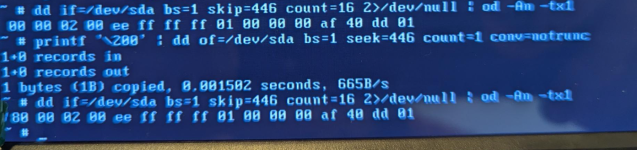
1789082592812.png
Then remove the stick and reboot. The server should boot from the hard drive, and the PBS dashboard should show "Boot Mode: Legacy BIOS".
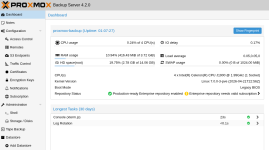
1789082829482.png

Hope this helps..
Lubos

