Dear all,
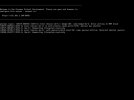
Yesterday I performed a clean installation of Proxmox within a Supermicro server for a small business. I created a simple Ubuntu LXC container and set up an OpenVPN Server in it for remote access. Today I noticed I was no longer able to log into the Proxmox web server ui. I remoted into the Supermicro IPMI to find the error shown in the attached image and no form of input. I decided to reboot the server but now I am taken directly to shell, so my assumption is the OS is gone. What happened? I don't mind performing a new install but I would like to know how to avoid this in the future. Any help would be appreciated.
Best regards
Yesterday I performed a clean installation of Proxmox within a Supermicro server for a small business. I created a simple Ubuntu LXC container and set up an OpenVPN Server in it for remote access. Today I noticed I was no longer able to log into the Proxmox web server ui. I remoted into the Supermicro IPMI to find the error shown in the attached image and no form of input. I decided to reboot the server but now I am taken directly to shell, so my assumption is the OS is gone. What happened? I don't mind performing a new install but I would like to know how to avoid this in the future. Any help would be appreciated.
Best regards