

Hello,
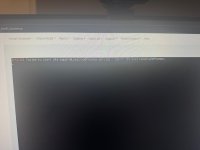
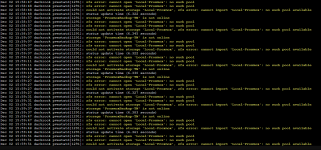
I recently updated my Proxmox PVE to 8.4 from 8.3. After the update I rebooted my Proxmox node, but after the reboot my VMs and LXC containers are not loading. It looks like my pool that has the location of my VMs and LXC, along with their backups are not mounting. During the boot, I am getting this error as shown here:
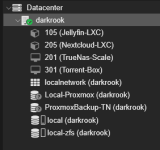
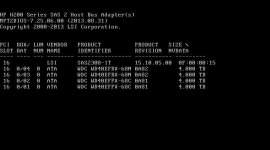
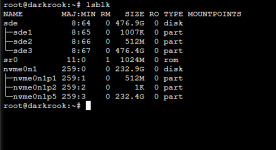
'Local-Proxmox' is the pool with the VMs and LXC containers. 'ProxmoxBackup-TN' contain backups of the VMs and LXC containers. Both 'Local-Proxmox' and 'ProxmoxBackup-TN' are on Raid-Z1 array of four hard drives mirrored. They are connected via an HP H220 6Gbs SAS PCI-E HBA LSI card flashed in IT mode. During boot it sees the HBA LSI card, but when I run 'lsblk' I am unable to see the disks. At first I thought the kernel might have conflicted with my HBA LSI card, because last time I updated my Proxmox PVE I had to pin the kernel to '6.8.12-5-pve' for a different issue in which resolved it.
I tried following this thread as a solution, but did not have any luck.
[Solved] - Second ZFS pool failed to import on boot
Any help of guidance is much appreciated! I am happy to run through any commands/troubleshooting.
I recently updated my Proxmox PVE to 8.4 from 8.3. After the update I rebooted my Proxmox node, but after the reboot my VMs and LXC containers are not loading. It looks like my pool that has the location of my VMs and LXC, along with their backups are not mounting. During the boot, I am getting this error as shown here:
'Local-Proxmox' is the pool with the VMs and LXC containers. 'ProxmoxBackup-TN' contain backups of the VMs and LXC containers. Both 'Local-Proxmox' and 'ProxmoxBackup-TN' are on Raid-Z1 array of four hard drives mirrored. They are connected via an HP H220 6Gbs SAS PCI-E HBA LSI card flashed in IT mode. During boot it sees the HBA LSI card, but when I run 'lsblk' I am unable to see the disks. At first I thought the kernel might have conflicted with my HBA LSI card, because last time I updated my Proxmox PVE I had to pin the kernel to '6.8.12-5-pve' for a different issue in which resolved it.
I tried following this thread as a solution, but did not have any luck.
[Solved] - Second ZFS pool failed to import on boot
Any help of guidance is much appreciated! I am happy to run through any commands/troubleshooting.
Attachments
Last edited: