

Proxmox does not show console after booting

cyb9x

New Member
Apr 11, 2023
4
0
1
Hello,

I installed my proxmox on my machine a few days ago, and everything seemed to go well, but during boot it showed just a few lines, and then the display freezed. In the background, it actually works, as I have access to the WebUI console, and I can "blindly" write my username/password, and by typing "reboot" it actually reboots. But I want to have access to the console on the machine itself, not only via remote ssh.

Here are my specs:
Ryzen 9 5950x
ASUS TUF x570 PRO WIFI II
NVidia RTX 3060 x2
Kingston KSM32ED8 x4

I've tried adding "nomodeset" to /etc/default/grub, but it didn't change a thing.
I'm quite a beginner so I'd appreciate any ideas that can solve this issue.

Thanks!
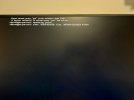
WhatsApp Image 2023-04-11 at 19.28.31.jpeg
 
Last edited:
Unfortunately, this didn't work

Something I forgot to add is that I passed through my (then single) GPU to a Windows VM. And as Ryzen 5950x doesn't have integrated graphics to render the proxmox console, is this a possible reason why this happens? I also have another RTX 3060 which I wanted to pass through to another VM, but can it be used to display the console first?

I'm not sure if I understand what happens with the video output of proxmox when I don't have a dedicated gpu for it..
 
Did you use the work-around for passing through the boot/single GPU?
Yes, I had to use the fix_gpu_pass.sh script from that thread with crontab.

Bash:
#!/bin/bash
echo 1 > /sys/bus/pci/devices/0000\:09\:00.0/remove # 0000:09:00.0 GPU in my case
echo 1 > /sys/bus/pci/rescan

Previously, in my /etc/default/grub, I had:
Bash:
GRUB_CMDLINE_LINUX_DEFAULT="quiet amd_iommu=on iommu=pt nomodeset video=vesafb:off video=efifb:off"

But then I started to remove parameters, as I was trying to debug this issue. Now all all I have left is the script + this grub:
Bash:
GRUB_CMDLINE_LINUX_DEFAULT="quiet amd_iommu=on"
For which the GPU is passed through beautifully, but the console is still missing..
 
Last edited:
any updates on this? I'm on the same boat
I've disabled autostart on all my VM's, and removed any PCI passthrough I had for the VMs
But the console still doesn't show on my host
 
I had a similar problem where the host shell became invisible after I did something. It probably has nothing to do with your situation though but I though I'd share anyway.

I also had a black screen after the boot process with no prompt but I could login and type commands blindly.
This happened after I wanted to try gnome-shell on the host (I only wanted to use it on demand for VNCing into guest VMs).
But then I uninstalled gnome-shell and its dependecies. The issue then started when I rebooted.
I could ssh and find no particular issue until I looked at /var/log/boot.log and the last lines showed that plymouth was trying to start.
It's a graphical boot screen process and since I removed gdm, gnome-session, etc., it couldn't display anything I guess. I removed it, rebooted and it was fixed.

TLDR : I forgot to remove plymouth.
 
  • Like
Reactions: leesteken
nano /etc/fstab

Can you check if there is an unused or old disk mount? Disable the invalid disk mount by placing a # in front of it and test it. Does it open?
Thx.
I found the reason, I have added the gpu to /etc/modprobe.d/vfio.conf.
Delete it and "update-initramfs -u", it works.