proxmox 8 - how migrate vm without shared storage ?

carnyx.io

Active Member
Dec 5, 2020
29
5
43
59
Hello community
I have a cluster with several nodes and different storages.
I want to migrate a VM (preferably online, otherwise offline) from on node to another node, but there is no shared storage between the 2 nodes.

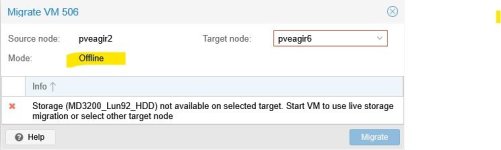
I think it is possible at least if the VM is down, but i have an error.


So my question is : how migrate vm without shared storage ?

the storage are Dell MD 3200 SAS LUN mounted as LVM


Best regards all
GE
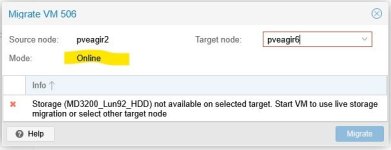
 

Attachments

  • promox 8 - online migration.jpg
    promox 8 - online migration.jpg
    24.7 KB · Views: 10
  • promox 8 - offline migration.jpg
    promox 8 - offline migration.jpg
    23.2 KB · Views: 10
  • promox 8 - storage.jpg
    promox 8 - storage.jpg
    76.2 KB · Views: 10
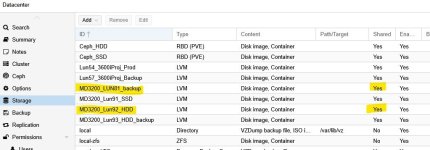
Hi @carnyx.io , you stated that you do NOT have shared storage, yet the screenshot is showing that all storage pools are marked as Shared.
As shown in the screenshot the PVE is told by current configuration that it should expect the same storage pool to be available across at least some nodes, perhaps all.

Can you clarify?


Blockbridge : Ultra low latency all-NVME shared storage for Proxmox - https://www.blockbridge.com/proxmox
 
Last edited:
shown in the screenshot the PVE is told by current configura
hello bbgeek17

I have 6 pve on this cluster.

pve 1, 2, 4 are connected physically on MD3200_Lun92_HDD storage, and can use VMs stored on it.
pve 3 and 6 are connected physically on MD3200_LUN81_HDD storage, and can use VMs stored on it.


I want to move some VMs from pve 2 to pve 6 , so from MD3200_Lun92_HDD to MD3200_LUN81_HDD
Perhaps I misunderstand the use of "shared" for storage. From what I understand, it's for sharing the same LUN simultaneously across multiple PvE.
 
If you mark a storage pool as shared, PVE will assume its available on all nodes by default (there is an option to limit to specific nodes, but you need to set those)

If a "shared" pool doesnt exist on the destination, the migration will naturally fail.

mark the shared lun for access by pve1,2, and 4, and further migrations into pve3 or 6 will ask for a target store.
 
  • Like
Reactions: Johannes S
Perhaps I misunderstand the use of "shared" for storage. From what I understand, it's for sharing the same LUN simultaneously across multiple PvE.
Your understanding is correct. @alexskysilk covered the "node" restriction that I think is missing in your case.
If you have proper shared storage that is available to nodeA and nodeB - migration is an act of moving VM state and re-assigning control of the underlying storage.
In your case you do not have shared storage between node2 and node6, as such the migration will involve a full copy of data across the storage backends. PVE will attempt to do last sync and VM state move. It should keep your VM online.


Blockbridge : Ultra low latency all-NVME shared storage for Proxmox - https://www.blockbridge.com/proxmox
 
  • Like
Reactions: Johannes S
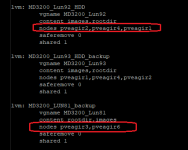
I'm not sure I understand correctly. Here's an excerpt from my /etc/pve/storage.cfg

1768323123609.png

What must i do to transfer a VM from pve 2 to 6 ? I cant connect the same bay on pve 2 and 6
 
You are running an OLD (unsupported) version of PVE. In fact, as of today Proxmox dropped the repository to support Buster.

The code that generated the error you provided is different, improved, in newer versions. (pve-manager/js/pvemanagerlib.js)


You can try to use CLI to force the migration. Look at "man qm".

When you migrate from pve2 to 6, you will need to specify store on the destination
Does not seem like he has that option, perhaps PVE6 limitation.
why do you limit node access when all 5 nodes can see the storage
They don't. Based on OP's description he has SAS storage where limited hosts have access to storage.


Blockbridge : Ultra low latency all-NVME shared storage for Proxmox - https://www.blockbridge.com/proxmox
 
Last edited:
  • Like
Reactions: Johannes S
hello world :)

Funny that my thread interested you


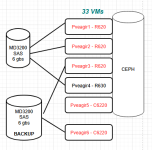
The cluster has effectively 6 pve nodes and i try to migrate some VMs from node 2 to node 6, which i named previously "pve2" and "pve6" to simplify.

The real names are "pveagir1" to "pveagir6" as you can see in the storage.cfg file


Exclude Ceph storage which is not concerned by this thread, i have 2 physicals SAN Bay (SAS attached) on this cluster.


The first SAN MD3200_Lun92_HDD is physically connected to nodes pveagir1, pveagir2 and pveagir4

The second SAN MD3200_LUN81_backup is only physically connected to nodes pveagir3 and pveagir6


Perhaps i misunderstood something about "shared" storage option, but i think i need it to allow HA groups (first : pveagir1, pveagir2 and pveagir4) and (second : pveagir3 and pveagir6)

Thank you in advance for your suggestions.


PS:
I never speak about pveagir5 because it only concerned by Ceph storage.

1768332204584.png
 
and i try to migrate some VMs from node 2 to node 6,
Have you tried to use PVE CLI yet?
qm migrate <vmid> <target> [OPTIONS]


Code:
       qm migrate <vmid> <target> [OPTIONS]

       Migrate virtual machine. Creates a new migration task.

       <vmid>: <integer> (100 - 999999999)
           The (unique) ID of the VM.

       <target>: <string>
           Target node.

       --bwlimit <integer> (0 - N) (default = migrate limit from datacenter or storage config)
           Override I/O bandwidth limit (in KiB/s).

       --force <boolean>
           Allow to migrate VMs which use local devices. Only root may use this option.

       --migration_network <string>
           CIDR of the (sub) network that is used for migration.

       --migration_type <insecure | secure>
           Migration traffic is encrypted using an SSH tunnel by default. On secure, completely private networks this can be disabled to increase performance.

       --online <boolean>
           Use online/live migration if VM is running. Ignored if VM is stopped.

       --targetstorage <string>
           Mapping from source to target storages. Providing only a single storage ID maps all source storages to that storage. Providing the special value 1 will map each source storage to itself.

       --with-conntrack-state <boolean> (default = 0)
           Whether to migrate conntrack entries for running VMs.

       --with-local-disks <boolean>
           Enable live storage migration for local disk


Blockbridge : Ultra low latency all-NVME shared storage for Proxmox - https://www.blockbridge.com/proxmox
 
Perhaps i misunderstood something about "shared" storage option, but i think i need it to allow HA groups (first : pveagir1, pveagir2 and pveagir4) and (second : pveagir3 and pveagir6)
I suppose the real question is- why are you migrating a VM from your "production" group members to the "backup" group?

if its for backup, you can and should use PBS for the purpose.

If you were interested in actually running that workload on a member of the backup group, there is nothing stopping you from attaching your production md3200 to the node in question (pveagir6.) you still has sas ports available :) a node can belong in two separate HA groups.