Problems on Windows VM due to TPM .qcow2

ThomasLA

New Member
Mar 12, 2026
6
0
1
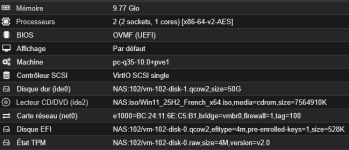
Hello, I have several Windows Server VMs, and the older ones with TPM in .raw format have no problems. Since the update, I wanted to try machines with TPM in .qcow2 format to take snapshots.
Unfortunately, after a while, these VMs have a problem when restarting and can no longer boot up.
When I turn on the VM, the start boot menu with the Proxmxo logo appears, followed by ‘Preparing for automatic recovery,’ and then the VM shuts down. It is impossible to start. I think it's because of .qcow2, as .raw files don't have any problems and two VMs in .qcow2 caused me the problem.

Any ideas? Thank you.
 
Last edited:
Hi ThomasLA,

VM doesn't know where data is physically stored (RAW/qcow2/Ceph/...). Even more if you have problem with TPM, BitLocker should during the boot ask for disk decrypting password. There should be no issue with boot itself. For me it looks more like system disk corruption by some event.

Do you use BitLocker?

I expect the problem is on another place. Where are qcow2 images stored? What cache mode you have setted on each disk in VM configuration?

R.
 
Hi ThomasLA,

VM doesn't know where data is physically stored (RAW/qcow2/Ceph/...). Even more if you have problem with TPM, BitLocker should during the boot ask for disk decrypting password. There should be no issue with boot itself. For me it looks more like system disk corruption by some event.

Do you use BitLocker?

I expect the problem is on another place. Where are qcow2 images stored? What cache mode you have setted on each disk in VM configuration?

R.
Hello kosnar,
Thank you for your reply. I do not use BitLocker.
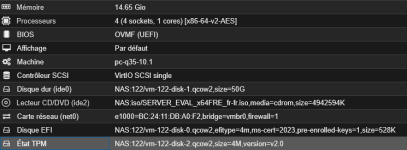
The qcow2 images are stored on a Synology NAS mounted in Proxmox.
I repeat, but I only had this problem on all Windows machines with TPM in qcow2, but not on those in raw.
1773389209062.png
 
Your problem may be related with load generated by qcow2 - NAS or network overload.
RAW -> simply writes bytes to some position
qcow2 -> look for free space in image and expand image file if needed, write new bytes and update the metadata tables to new address of physical location (COW functionality)
So qcow2 do more IOps per write.

The unaffected VM's have all disk in RAW format or only the TPM/EFI are RAW and system is qcow2?
The Synology NAS is connected via CIFS or NFS? Did you check NAS HW, its drives and Packet loss?

Did you checked all qcow2 integrity?
$ qemu-img check -r all /mnt/pve/NAS/images/122/vm-122-disk-0.qcow2
$ qemu-img check -r all /mnt/pve/NAS/images/122/vm-122-disk-1.qcow2
$ qemu-img check -r all /mnt/pve/NAS/images/122/vm-122-disk-2.qcow2

You can remove TMP State drive and create another one. But I expect this won't fix the Windows boot process.
Click on "TMP State" and remove -> a unused disk appear and remove this unused disk. Then Add new hardware and select "TPM State".

I found another thread related with Synology NAS with qcow2 corruption: https://forum.proxmox.com/threads/qcow-disk-corruption.63308/

R.
 
Your problem may be related with load generated by qcow2 - NAS or network overload.
RAW -> simply writes bytes to some position
qcow2 -> look for free space in image and expand image file if needed, write new bytes and update the metadata tables to new address of physical location (COW functionality)
So qcow2 do more IOps per write.

The unaffected VM's have all disk in RAW format or only the TPM/EFI are RAW and system is qcow2?
The Synology NAS is connected via CIFS or NFS? Did you check NAS HW, its drives and Packet loss?

Did you checked all qcow2 integrity?
$ qemu-img check -r all /mnt/pve/NAS/images/122/vm-122-disk-0.qcow2
$ qemu-img check -r all /mnt/pve/NAS/images/122/vm-122-disk-1.qcow2
$ qemu-img check -r all /mnt/pve/NAS/images/122/vm-122-disk-2.qcow2

You can remove TMP State drive and create another one. But I expect this won't fix the Windows boot process.
Click on "TMP State" and remove -> a unused disk appear and remove this unused disk. Then Add new hardware and select "TPM State".

I found another thread related with Synology NAS with qcow2 corruption: https://forum.proxmox.com/threads/qcow-disk-corruption.63308/

R.
Thank you for your reply.
My NAS is connected via NFS. My NAS has no problems; it is a bit old but does not suffer from slowness or any other issues.

All disks have no integrity issues according to the command.

I already tried to delete the TPM State, but I got an error message saying that it was affected by certain snapshots. So I wanted to delete all the snapshots from the machine, but one of them was blocking it. When I tried to delete it, I got an error message that I unfortunately can't remember, and then the VM locked up.

Below is the configuration of a similar VM that has never had this problem.

Thank you for the thread. I had the same problem when I restarted my VM, so I will take a closer look at it.
1773395354555.png
 
Hi,
please share the output of the following:
Code:
pveversion -v
cat /etc/pve/storage.cfg
grep '' /run/qemu-server/*-swtpm.log
This might be a bit difficult to remember, but is there a VM where the issues started occurring only after create snapshot operations or was there always a delete snapshot operation involved?
 
Hello Fiona,

# pveversion -v
proxmox-ve: 9.1.0 (running kernel: 6.17.13-1-pve)
pve-manager: 9.1.6 (running version: 9.1.6/71482d1833ded40a)
proxmox-kernel-helper: 9.0.4
proxmox-kernel-6.17: 6.17.13-1
proxmox-kernel-6.17.13-1-pve-signed: 6.17.13-1
proxmox-kernel-6.17.9-1-pve-signed: 6.17.9-1
proxmox-kernel-6.17.4-2-pve-signed: 6.17.4-2
proxmox-kernel-6.17.4-1-pve-signed: 6.17.4-1
proxmox-kernel-6.17.2-2-pve-signed: 6.17.2-2
proxmox-kernel-6.17.2-1-pve-signed: 6.17.2-1
proxmox-kernel-6.14.11-5-pve-signed: 6.14.11-5
proxmox-kernel-6.14: 6.14.11-5
proxmox-kernel-6.14.11-4-pve-signed: 6.14.11-4
proxmox-kernel-6.14.11-3-pve-signed: 6.14.11-3
proxmox-kernel-6.14.8-2-pve-signed: 6.14.8-2
ceph-fuse: 19.2.3-pve1
corosync: 3.1.10-pve1
criu: 4.1.1-1
frr-pythontools: 10.4.1-1+pve1
ifupdown2: 3.3.0-1+pmx12
intel-microcode: 3.20251111.1~deb13u1
ksm-control-daemon: 1.5-1
libjs-extjs: 7.0.0-5
libproxmox-acme-perl: 1.7.0
libproxmox-backup-qemu0: 2.0.2
libproxmox-rs-perl: 0.4.1
libpve-access-control: 9.0.5
libpve-apiclient-perl: 3.4.2
libpve-cluster-api-perl: 9.0.7
libpve-cluster-perl: 9.0.7
libpve-common-perl: 9.1.7
libpve-guest-common-perl: 6.0.2
libpve-http-server-perl: 6.0.5
libpve-network-perl: 1.2.5
libpve-rs-perl: 0.11.4
libpve-storage-perl: 9.1.0
libspice-server1: 0.15.2-1+b1
lvm2: 2.03.31-2+pmx1
lxc-pve: 6.0.5-4
lxcfs: 6.0.4-pve1
novnc-pve: 1.6.0-3
proxmox-backup-client: 4.1.4-1
proxmox-backup-file-restore: 4.1.4-1
proxmox-backup-restore-image: 1.0.0
proxmox-firewall: 1.2.1
proxmox-kernel-helper: 9.0.4
proxmox-mail-forward: 1.0.2
proxmox-mini-journalreader: 1.6
proxmox-offline-mirror-helper: 0.7.3
proxmox-widget-toolkit: 5.1.8
pve-cluster: 9.0.7
pve-container: 6.1.2
pve-docs: 9.1.2
pve-edk2-firmware: 4.2025.05-2
pve-esxi-import-tools: 1.0.1
pve-firewall: 6.0.4
pve-firmware: 3.18-1
pve-ha-manager: 5.1.1
pve-i18n: 3.6.6
pve-qemu-kvm: 10.1.2-7
pve-xtermjs: 5.5.0-3
qemu-server: 9.1.4
smartmontools: 7.4-pve1
spiceterm: 3.4.1
swtpm: 0.8.0+pve3
vncterm: 1.9.1
zfsutils-linux: 2.4.0-pve1
 
Last edited:
# cat /etc/pve/storage.cfg
dir: local
path /var/lib/vz
content backup,iso,vztmpl

lvmthin: local-lvm
thinpool data
vgname pve
content images,rootdir

nfs: NAS
export /volume1/proxmox-vm
path /mnt/pve/NAS
server 10.X.X.150
content vztmpl,images,iso,backup
prune-backups keep-all=1

pbs: pve-backup
datastore Local
server 10.X.X.15
content backup
fingerprint eb:88:9c:b1:88:6c:8f:09:4c:80:5b:b7:c9:16:46:bb:2c:XX:XX:XX:XX:XX:60:27:98:33:e2:0f:7f:10:11:da
prune-backups keep-all=1
username root@pam

nfs: backup
export /volume2/backup
path /mnt/pve/backup
server 10.X.X.150
content iso,vztmpl,snippets,images,backup,rootdir,import
prune-backups keep-all=1
 
# grep '' /run/qemu-server/*-swtpm.log
/run/qemu-server/106-swtpm.log:[id=1773062629] Data client disconnected
/run/qemu-server/106-swtpm.log:[id=1773323217] Data client disconnected
/run/qemu-server/106-swtpm.log:[id=1773323238] Data client disconnected
/run/qemu-server/106-swtpm.log:[id=1773323259] Data client disconnected
/run/qemu-server/106-swtpm.log:[id=1773323279] Data client disconnected
/run/qemu-server/106-swtpm.log:[id=1773323299] Data client disconnected
/run/qemu-server/106-swtpm.log:[id=1773323320] Data client disconnected
/run/qemu-server/106-swtpm.log:[id=1773323350] Data client disconnected
/run/qemu-server/106-swtpm.log:[id=1773323369] Data client disconnected
/run/qemu-server/106-swtpm.log:[id=1773323389] Data client disconnected
/run/qemu-server/106-swtpm.log:[id=1773323409] Data client disconnected
/run/qemu-server/106-swtpm.log:[id=1773323429] Data client disconnected
/run/qemu-server/106-swtpm.log:[id=1773323450] Data client disconnected
/run/qemu-server/106-swtpm.log:[id=1773323470] Data client disconnected
/run/qemu-server/106-swtpm.log:[id=1773323490] Data client disconnected
/run/qemu-server/106-swtpm.log:[id=1773323519] Data client disconnected
/run/qemu-server/106-swtpm.log:[id=1773323553] Data client disconnected
/run/qemu-server/106-swtpm.log:[id=1773323573] Data client disconnected
/run/qemu-server/106-swtpm.log:[id=1773323594] Data client disconnected
/run/qemu-server/106-swtpm.log:[id=1773323623] Data client disconnected
/run/qemu-server/106-swtpm.log:[id=1773323643] Data client disconnected
/run/qemu-server/106-swtpm.log:[id=1773323673] Data client disconnected
/run/qemu-server/106-swtpm.log:[id=1773323693] Data client disconnected
/run/qemu-server/106-swtpm.log:[id=1773323723] Data client disconnected
/run/qemu-server/106-swtpm.log:[id=1773323744] Data client disconnected
/run/qemu-server/106-swtpm.log:[id=1773323784] Data client disconnected
/run/qemu-server/106-swtpm.log:[id=1773323804] Data client disconnected
/run/qemu-server/106-swtpm.log:[id=1773323824] Data client disconnected
/run/qemu-server/106-swtpm.log:[id=1773323845] Data client disconnected
/run/qemu-server/106-swtpm.log:[id=1773323874] Data client disconnected
/run/qemu-server/106-swtpm.log:[id=1773323894] Data client disconnected
/run/qemu-server/106-swtpm.log:[id=1773323914] Data client disconnected
/run/qemu-server/106-swtpm.log:[id=1773323934] Data client disconnected
/run/qemu-server/106-swtpm.log:[id=1773323954] Data client disconnected
/run/qemu-server/106-swtpm.log:[id=1773323984] Data client disconnected
/run/qemu-server/106-swtpm.log:[id=1773324015] Data client disconnected
/run/qemu-server/106-swtpm.log:[id=1773324223] Data client disconnected
/run/qemu-server/106-swtpm.log:[id=1773324365] Data client disconnected
/run/qemu-server/106-swtpm.log:[id=1773324432] Data client disconnected
/run/qemu-server/106-swtpm.log:[id=1773324462] Data client disconnected
/run/qemu-server/106-swtpm.log:[id=1773324598] Data client disconnected
/run/qemu-server/106-swtpm.log:[id=1773324791] Data client disconnected
/run/qemu-server/106-swtpm.log:[id=1773324819] Data client disconnected