Hello,
I've installed the current PBS on a dedicated server in a datacenter (OVH).
AMD EPYC 9135 16-Core Processor (1 Socket)
128 GB RAM
2x 1TB NVME SSD mirror for OS/PBS
6x 8TB NVME SSD (Samsung MZWL67T6HBLC-00AW7)
LAN is 25GBit
Installed native from ISO
I created a ZFS with the 6 SSDs with striping and RAIDZ.
I need abount 40 TB of capacity. So I can' use mirror.
https://semiconductor.samsung.com/ssd/datacenter-ssd/pm9d3a/mzwl67t6hblc-00aw7-bw7/
PCIe 5.0x4, 6800 MB/s write, 12000 MB/s read, 2000K IOPS random read
I create Backups from 3 PM VE Servers.
There is a Windows VM with mailstore. There is one disc 5 TB size.
There is no way to use a more parallel approach.
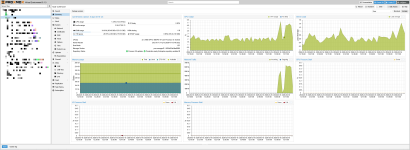
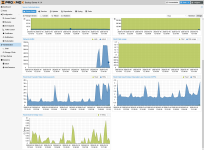
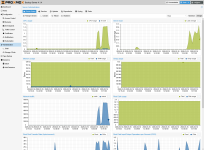
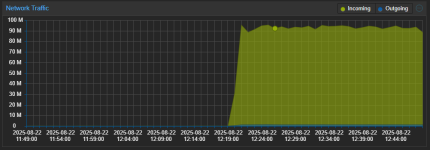
When I verify localy it or restore it I can't get past 800 MB/Sek.
CPU is about 2%
The disc should reach 3 GB/Sek easy
2026-03-14T17:17:10+00:00: verify data0:vm/100707102/2026-03-12T01:03:51Z
2026-03-14T17:17:10+00:00: check qemu-server.conf.blob
2026-03-14T17:17:10+00:00: check drive-tpmstate0-backup.img.fidx
2026-03-14T17:17:10+00:00: verified 0.01/4.00 MiB in 0.00 seconds, speed 9.53/5766.13 MiB/s (0 errors)
2026-03-14T17:17:10+00:00: check drive-scsi2.img.fidx
2026-03-14T17:18:25+00:00: verified 58744.30/59388.00 MiB in 74.76 seconds, speed 785.72/794.33 MiB/s (0 errors)
2026-03-14T17:18:25+00:00: check drive-scsi0.img.fidx
I get 400 MB/Sek with 24 TB HDDs in Raid5.
I know pbs works with many small chunks, for deduplication and these needs to be put togehter again.
What am I doing wrong?
Or what need I to do to increaese restore speed?
I've described it here in german: https://administrator.de/forum/proxmox-pbs-storage-performance-677340.html
Thanks
Stefan
I've installed the current PBS on a dedicated server in a datacenter (OVH).
AMD EPYC 9135 16-Core Processor (1 Socket)
128 GB RAM
2x 1TB NVME SSD mirror for OS/PBS
6x 8TB NVME SSD (Samsung MZWL67T6HBLC-00AW7)
LAN is 25GBit
Installed native from ISO
I created a ZFS with the 6 SSDs with striping and RAIDZ.
I need abount 40 TB of capacity. So I can' use mirror.
https://semiconductor.samsung.com/ssd/datacenter-ssd/pm9d3a/mzwl67t6hblc-00aw7-bw7/
PCIe 5.0x4, 6800 MB/s write, 12000 MB/s read, 2000K IOPS random read
I create Backups from 3 PM VE Servers.
There is a Windows VM with mailstore. There is one disc 5 TB size.
There is no way to use a more parallel approach.
When I verify localy it or restore it I can't get past 800 MB/Sek.
CPU is about 2%
The disc should reach 3 GB/Sek easy
2026-03-14T17:17:10+00:00: verify data0:vm/100707102/2026-03-12T01:03:51Z
2026-03-14T17:17:10+00:00: check qemu-server.conf.blob
2026-03-14T17:17:10+00:00: check drive-tpmstate0-backup.img.fidx
2026-03-14T17:17:10+00:00: verified 0.01/4.00 MiB in 0.00 seconds, speed 9.53/5766.13 MiB/s (0 errors)
2026-03-14T17:17:10+00:00: check drive-scsi2.img.fidx
2026-03-14T17:18:25+00:00: verified 58744.30/59388.00 MiB in 74.76 seconds, speed 785.72/794.33 MiB/s (0 errors)
2026-03-14T17:18:25+00:00: check drive-scsi0.img.fidx
I get 400 MB/Sek with 24 TB HDDs in Raid5.
I know pbs works with many small chunks, for deduplication and these needs to be put togehter again.
What am I doing wrong?
Or what need I to do to increaese restore speed?
I've described it here in german: https://administrator.de/forum/proxmox-pbs-storage-performance-677340.html
Thanks
Stefan