PBS pull sync job slows down about x20 after a while.

rahman

Renowned Member
Nov 1, 2010
75
1
73
Hi,

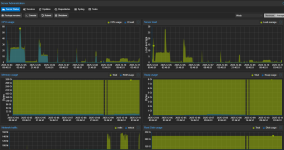
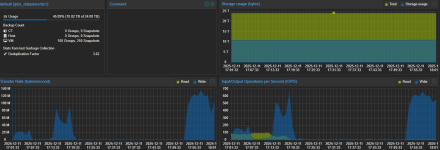
We have 2 PBS servers on same LAN different buildings, connected with 10Gbit fiber. PVE servers backup directly to one PBS and other PBS pull/sync (last 2 snapshots) from this PBS. We have about 10 TiB backup data to sync to remote PBS. The problem is, when I start the sync job it transfers data with about 800 mbit/s to 1.4gbit/s speed rates. Which is OK for us for the initial sync. But after a few hours passes the sync job speed crawls down to 50 - 100 mbit/s. When I stop the sync job and immediately start it again I see speed is normal (800 - 1400 mbit/s) for a couple of hours but eventually it slows down again. This is happening for 3 days now. The job should finished in about full day but after 3 days it's still could not finished with 3-4 TiB data remaining.

So why it stuck in such a slow speed for hours until I intervene (stop/start)? Any idea?

See the attached screenshots:
1: start of sync job
2: when it slowed down and stay at that speed
3: I wonder why it id not finished jet and see its too slow for hours. Then I stop and start the job again
4: It slows down again and stays at that speed
5: I check the job status and stop/start it again.

The job is running at 800-1300 mbit/s for now.

Here is some info About PBS servers.
primary PBS server:
16 x Intel(R) Xeon(R) CPU E5620 @ 2.40GHz (2 Sockets) / 192 GB RAM
single datastore, ZFS RaidZ2 with 10x8TB 7200 rpm Sata HDD + mirrored special device SSD + mirrored slog SSD

second PBS server:
32 x Intel(R) Xeon(R) CPU E5-2650 0 @ 2.00GHz (2 Sockets / 320 GB RAM
Dell Perc H710P/1G/BBU Raid10 with 6x8TB 7200 rpm sata HDD.
 

Attachments
  • PBS-1.png
    PBS-1.png
    184 KB · Views: 4
  • PBS2.png
    PBS2.png
    133.3 KB · Views: 4
Last edited:
It can be a problem of network congestion (packet loss/retransmissions), high latency or a problem with the buffers of your network equipment. If these problems occurs, then the TCP window size will be reduced.
How are the MTU settings?
Try to do a ping check with large packet size before and after the problem occurs to check packet loss.
Some network equipment has a little buffer, and when this buffer is not able to process the packets quickly, the TCP window will be reduced.
 
It can be a problem of network congestion (packet loss/retransmissions), high latency or a problem with the buffers of your network equipment. If these problems occurs, then the TCP window size will be reduced.
How are the MTU settings?
Try to do a ping check with large packet size before and after the problem occurs to check packet loss.
Some network equipment has a little buffer, and when this buffer is not able to process the packets quickly, the TCP window will be reduced.

This is local network with 0.1-0.2 ms ping latency, All MTU's are default 1500 and iperf can consume 10Gbit/s between two PBS.
 
This is local network with 0.1-0.2 ms ping latency, All MTU's are default 1500 and iperf can consume 10Gbit/s between two PBS.
iperf show performance in a short time, but as i told, if the buffers of the network equipment collapse the speed will be reduced. Also will be a reduced time if the destination PBS cannot write so fast.
I experienced the buffer collapse with mikrotik switches a few weeks ago with a customer
 
OK, But the stable speed continued for about 4-5 hours then 8-9 hours second time without a problem as seen in the graphs. So I'm not sure if this is about network buffers.
 
could you post `proxmox-backup-manager versions --verbose` for both sides, and the sync task log?
 
could you post `proxmox-backup-manager versions --verbose` for both sides, and the sync task log?
Sure.

This is syncing side PBS
Code:
:~# proxmox-backup-manager versions --verbose
proxmox-backup                      4.0.0         running kernel: 6.17.2-2-pve
proxmox-backup-server               4.1.0-1       running version: 4.1.0
proxmox-kernel-helper               9.0.4
proxmox-kernel-6.17.2-2-pve-signed  6.17.2-2
proxmox-kernel-6.17                 6.17.2-2
proxmox-kernel-6.17.2-1-pve-signed  6.17.2-1
proxmox-kernel-6.14.11-4-pve-signed 6.14.11-4
proxmox-kernel-6.14                 6.14.11-4
proxmox-kernel-6.2.16-20-pve        6.2.16-20
proxmox-kernel-6.2                  6.2.16-20
pve-kernel-6.2.16-3-pve             6.2.16-3
ifupdown2                           3.3.0-1+pmx11
libjs-extjs                         7.0.0-5
proxmox-backup-docs                 4.1.0-1
proxmox-backup-client               4.1.0-1
proxmox-mail-forward                1.0.2
proxmox-mini-journalreader          1.6
proxmox-offline-mirror-helper       unknown
proxmox-widget-toolkit              5.1.2
pve-xtermjs                         5.5.0-3
smartmontools                       7.4-pve1
zfsutils-linux                      2.3.4-pve1

This is primary PBS
Code:
:~# proxmox-backup-manager versions --verbose
proxmox-backup                      4.0.0         running kernel: 6.17.2-1-pve
proxmox-backup-server               4.1.0-1       running version: 4.1.0
proxmox-kernel-helper               9.0.4
pve-kernel-5.15                     7.4-4
proxmox-kernel-6.17.2-1-pve-signed  6.17.2-1
proxmox-kernel-6.17                 6.17.2-2
proxmox-kernel-6.14.11-4-pve-signed 6.14.11-4
proxmox-kernel-6.14                 6.14.11-4
proxmox-kernel-6.14.11-1-pve-signed 6.14.11-1
proxmox-kernel-6.8.12-13-pve-signed 6.8.12-13
proxmox-kernel-6.8                  6.8.12-13
pve-kernel-5.15.108-1-pve           5.15.108-1
pve-kernel-5.15.74-1-pve            5.15.74-1
ifupdown2                           3.3.0-1+pmx11
libjs-extjs                         7.0.0-5
proxmox-backup-docs                 4.1.0-1
proxmox-backup-client               4.1.0-1
proxmox-mail-forward                1.0.2
proxmox-mini-journalreader          1.6
proxmox-offline-mirror-helper       unknown
proxmox-widget-toolkit              5.1.2
pve-xtermjs                         5.5.0-3
smartmontools                       7.4-pve1
zfsutils-linux                      2.3.4-pve1

Edit: Added Sync job logs.
 

Attachments

Last edited:
could you try booting both ends with the 6.14 kernel? there is a known regression that seems to affect some PBS setups and the 6.17 kernels:

 
could you try booting both ends with the 6.14 kernel? there is a known regression that seems to affect some PBS setups and the 6.17 kernels:

Thanks for the hint, I am going to read it. As this is initial sync, I can delete all contents of the datastore, change the kernels and start syncing from scratch for testing.
 
@fabian Ok, I downgraded both kernels to 6.14 with "proxmox-boot-tool kernel pin 6.14.11-4-pve --next-boot", rebooted the servers, "uname -a" to be sure its correct kernels booted. It's multiple times bad with 6.14 kernels, iftop show 0kb - 150 kb traffic, it's like single chunk is transferred per minutes :/. No other job is running.

Edit: Also stopping sync job does not seems to stop it. I see the log in journalctl but GUI shows it's still running:

Code:
Dec 11 16:12:53 pbs1 proxmox-backup-proxy[1339]: received abort request ...

Edit: Fix wrong mention :)
 
Last edited:
Rebooted both servers with default 6.17 kernels but it's still problematic :/ 0 to 30 mbit/s.
 
okay, so this must be a different issue then!

stopping the sync job does work here, FWIW. does the slow down happen at specific groups/snapshots?
 
okay, so this must be a different issue then!

stopping the sync job does work here, FWIW. does the slow down happen at specific groups/snapshots?
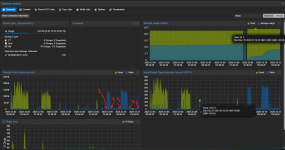
It does not seem to happen on the same snapshot. See the attached screenshot. It is from last job status that started again after rebooting with default kernel on both PBS. Graph does not show the job start but it started at 16:38 with KBit/sec speeds . It seems from the graph, it somehow recovered and speed up around at 17:00, then stalled to kbit/s speeds at around 17:20. Then speed up at around 17:50, then stalled again at around 18:01 but this time not to kbit/s but steady 50-70 mbit/s speeds.

I did not start from scratch while testing 6.14 kernel BTW. I re-run the sync job so it skipped the snapshots that it synced already. I can test with an empty datastore if you think it should make any difference.

Edit: It seems I can't stop the sync job when it seems its stalled. I can cancel it when It speeds up. When it slows down and I press stop button, I see abort request in journalctl logs but job seems to continue pulling chunks at a very very slow speeds. Don't know maybe its the chunks that already requested that it waits to finish.
 

Attachments

  • pbs-3.png
    pbs-3.png
    77 KB · Views: 2
Last edited: