Opt-in Linux 7.0 Kernel for Proxmox VE 9 available on test and no-subscription

Updated Proxmox VE yesterday, N100 PC with GPU passthrough starts but Debian VM doesn't start anymore.

TASK ERROR: start failed: command '/usr/bin/kvm -id 101 -name 'Debian-WZPC-VGA,debug-threads=on' -no-shutdown -chardev 'socket,id=qmp,path=/var/run/qemu-server/101.qmp,server=on,wait=off' -mon 'chardev=qmp,mode=control' -chardev 'socket,id=qmp-event,path=/var/run/qmeventd.sock,reconnect-ms=5000' -mon 'chardev=qmp-event,mode=control' -pidfile /var/run/qemu-server/101.pid -daemonize -smbios 'type=1,uuid=e0bc4a03-4a1f-49f4-9124-fb07194c63b7' -object '{"id":"throttle-drive-efidisk0","limits":{},"qom-type":"throttle-group"}' -blockdev '{"driver":"raw","file":{"driver":"file","filename":"/usr/share/pve-edk2-firmware//OVMF_CODE_4M.secboot.fd"},"node-name":"pflash0","read-only":true}' -blockdev '{"detect-zeroes":"on","discard":"ignore","driver":"throttle","file":{"cache":{"direct":false,"no-flush":false},"detect-zeroes":"on","discard":"ignore","driver":"raw","file":{"aio":"io_uring","cache":{"direct":false,"no-flush":false},"detect-zeroes":"on","discard":"ignore","driver":"host_device","filename":"/dev/pve/vm-101-disk-0","node-name":"e87a2aa6652ea62bd93951c12e78daa","read-only":false},"node-name":"f87a2aa6652ea62bd93951c12e78daa","read-only":false,"size":540672},"node-name":"drive-efidisk0","read-only":false,"throttle-group":"throttle-drive-efidisk0"}' -smp '4,sockets=1,cores=4,maxcpus=4' -nodefaults -boot 'menu=on,strict=on,reboot-timeout=1000,splash=/usr/share/qemu-server/bootsplash.jpg' -vga none -nographic -cpu 'host,kvm=off,+kvm_pv_eoi,+kvm_pv_unhalt' -m 13700 -object 'iothread,id=iothread-virtioscsi0' -object '{"id":"throttle-drive-scsi0","limits":{},"qom-type":"throttle-group"}' -global 'ICH9-LPC.disable_s3=1' -global 'ICH9-LPC.disable_s4=1' -readconfig /usr/share/qemu-server/pve-q35-4.0.cfg -device 'vmgenid,guid=4eeb9889-b48c-49da-a4fa-1c4815ff590a' -device 'qemu-xhci,p2=15,p3=15,id=xhci,bus=pci.1,addr=0x1b' -device 'usb-tablet,id=tablet,bus=ehci.0,port=1' -device 'vfio-pci,host=0000:00:02.0,id=hostpci0,bus=ich9-pcie-port-1,addr=0x0' -device 'vfio-pci,host=0000:00:1f.0,id=hostpci1.0,bus=ich9-pcie-port-2,addr=0x0.0,multifunction=on' -device 'vfio-pci,host=0000:00:1f.3,id=hostpci1.1,bus=ich9-pcie-port-2,addr=0x0.1' -device 'vfio-pci,host=0000:00:1f.4,id=hostpci1.2,bus=ich9-pcie-port-2,addr=0x0.2' -device 'vfio-pci,host=0000:00:1f.5,id=hostpci1.3,bus=ich9-pcie-port-2,addr=0x0.3' -device 'usb-host,bus=xhci.0,port=1,vendorid=0x046d,productid=0xc52b,id=usb0' -device 'usb-host,bus=xhci.0,port=2,vendorid=0x0bda,productid=0xb85b,id=usb1' -device 'usb-host,bus=xhci.0,port=3,vendorid=0x0573,productid=0x1573,id=usb2' -device 'usb-host,bus=xhci.0,port=4,hostbus=2,hostport=1,id=usb3' -device 'usb-host,bus=xhci.0,port=5,hostbus=2,hostport=2,id=usb4' -device 'usb-host,bus=xhci.0,port=6,vendorid=0x0951,productid=0x1666,id=usb5' -device 'usb-host,bus=xhci.0,port=7,hostbus=1,hostport=2,id=usb6' -chardev 'socket,path=/var/run/qemu-server/101.qga,server=on,wait=off,id=qga0' -device 'virtio-serial,id=qga0,bus=pci.0,addr=0x8' -device 'virtserialport,chardev=qga0,name=org.qemu.guest_agent.0' -iscsi 'initiator-name=iqn.1993-08.org.debian:01:4b8f59e19341' -device 'ide-cd,bus=ide.1,unit=0,id=ide2,bootindex=100' -device 'virtio-scsi-pci,id=virtioscsi0,bus=pci.3,addr=0x1,iothread=iothread-virtioscsi0' -blockdev '{"detect-zeroes":"unmap","discard":"unmap","driver":"throttle","file":{"cache":{"direct":true,"no-flush":false},"detect-zeroes":"unmap","discard":"unmap","driver":"raw","file":{"aio":"io_uring","cache":{"direct":true,"no-flush":false},"detect-zeroes":"unmap","discard":"unmap","driver":"host_device","filename":"/dev/pve/vm-101-disk-1","node-name":"ecc3349bc3205b243b6648d93195561","read-only":false},"node-name":"fcc3349bc3205b243b6648d93195561","read-only":false},"node-name":"drive-scsi0","read-only":false,"throttle-group":"throttle-drive-scsi0"}' -device 'scsi-hd,bus=virtioscsi0.0,channel=0,scsi-id=0,lun=0,drive=drive-scsi0,id=scsi0,device_id=drive-scsi0,rotation_rate=1,bootindex=101,write-cache=on' -netdev 'type=tap,id=net0,ifname=tap101i0,script=/usr/libexec/qemu-server/pve-bridge,downscript=/usr/libexec/qemu-server/pve-bridgedown,vhost=on' -device 'virtio-net-pci,mac=BC:24:11:C5:8A:EB,netdev=net0,bus=pci.0,addr=0x12,id=net0,rx_queue_size=1024,tx_queue_size=256,bootindex=102,host_mtu=1500' -machine 'pflash0=pflash0,pflash1=drive-efidisk0,hpet=off,type=q35+pve0'' failed: got timeout

/etc/default/grub

GRUB_DEFAULT=0
GRUB_TIMEOUT=2
GRUB_DISTRIBUTOR=`( . /etc/os-release && echo ${NAME} )`
GRUB_CMDLINE_LINUX_DEFAULT="quiet intel_iommu=on iommu=pt pcie_acs_override=downstream,multifunction initcall_blacklist=sysfb_init video=simplefb:off video=vesafb:off video=efifb:off video=vesa:off disable_vga=1 vfio_iommu_type1.allow_unsafe_interrupts=1 kvm.ignore_msrs=1 modprobe.blacklist=radeon,nouveau,nvidia,nvidiafb,nvidia-gpu,snd_hda_intel,snd_hda_codec_hdmi,i915,btusb pcie_aspm=force nvme_core.default_ps_max_latency_us=5500"
GRUB_CMDLINE_LINUX=""
....

With Kernel 6.xxx it runs perfectly. Rolled back.

Can you please put the outputs into code blocks? It's, at least for me, really exhausting to read.
 
Since the Upgrade to Kernel 7.0 and PVE 9.1.9, my VMs randomly hard shut down (aka they just switch off hard).
E.g. in my Mailserver-VM I see the following errors in dmesg:
Code:
[   28.293199] ata9.00: Read log 0x10 page 0x00 failed, Emask 0x1
[   28.293286] ata9: failed to read log page 10h (errno=-5)
[   28.293343] ata9.00: exception Emask 0x1 SAct 0xc000 SErr 0x0 action 0x0
[   28.293409] ata9.00: irq_stat 0x41000000
[   28.293474] ata9.00: failed command: WRITE FPDMA QUEUED
[   28.293514] ata9.00: cmd 61/40:70:f8:2a:ca/05:00:03:00:00/40 tag 14 ncq dma 688128 out
                        res 50/00:00:00:00:00/00:00:00:00:00/00 Emask 0x1 (device error)
[   28.293621] ata9.00: status: { DRDY }
[   28.293674] ata9.00: failed command: WRITE FPDMA QUEUED
[   28.293716] ata9.00: cmd 61/28:78:38:30:ca/04:00:03:00:00/40 tag 15 ncq dma 544768 out
                        res 50/00:00:00:00:00/00:00:00:00:00/00 Emask 0x1 (device error)
[   28.293803] ata9.00: status: { DRDY }
[   28.294261] ata9.00: LPM support broken, forcing max_power
[   28.294589] ata9.00: LPM support broken, forcing max_power
[   28.294598] ata9.00: configured for UDMA/100

ProxMox Host is a X10DRUi+ with 2x Xeon E5-2640 v4 and 256GB of RAM.
The mission critical VMs reside on a WD Red M.2 SSD which shows no errors in Proxmox.
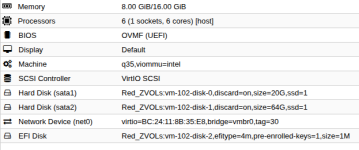
This particular VM has also nothing fancy, just some CPUs, RAM and a virtual disk:
1777804506859.png
Guest OS is Debian Trixie.

//Edith:
Just switched back to 6.17.13-6 t osee if its the kernel or something else...

//Edit2:
Same with 6.17.13-6, this time another VM disappeared, but around the time the VM crashed, host dmesg shows:
Code:
[  230.433795] ------------[ cut here ]------------
[  230.433801] WARNING: CPU: 19 PID: 5328 at ./include/linux/rwsem.h:85 remap_pfn_range_internal+0x48d/0x580
[  230.433812] Modules linked in: rpcsec_gss_krb5 auth_rpcgss nfsv4 nfs lockd grace netfs ebtable_filter ebtables ip_set ip6table_raw iptable_raw ip6table_filter ip6_tables iptable_filter nf_tables 8021q garp mrp ixgbevf softdog sunrpc binfmt_misc bonding tls nfnetlink_log nvidia_vgpu_vfio(OE) intel_rapl_msr intel_rapl_common intel_uncore_frequency intel_uncore_frequency_common nvidia(POE) sch_fq_codel sb_edac x86_pkg_temp_thermal intel_powerclamp ipmi_ssif kvm_intel kvm acpi_power_meter polyval_clmulni ghash_clmulni_intel ipmi_si acpi_ipmi aesni_intel ast joydev mei_me ipmi_devintf ses rapl input_leds intel_cstate pcspkr i2c_algo_bit enclosure mdev mei ipmi_msghandler acpi_pad mac_hid zfs(PO) spl(O) vhost_net vhost vhost_iotlb tap vfio_pci vfio_pci_core irqbypass vfio_iommu_type1 vfio iommufd coretemp efi_pstore nfnetlink dmi_sysfs ip_tables x_tables autofs4 btrfs blake2b_generic xor raid6_pq hid_generic usbkbd usbmouse usbhid hid dm_thin_pool dm_persistent_data dm_bio_prison dm_bufio mpt3sas nvme xhci_pci i2c_i801
[  230.433944]  raid_class ixgbe nvme_core scsi_transport_sas i2c_mux ehci_pci ahci xhci_hcd xfrm_algo ioatdma i2c_smbus lpc_ich nvme_keyring ehci_hcd libahci mdio nvme_auth dca wmi
[  230.433973] CPU: 19 UID: 0 PID: 5328 Comm: CPU 0/KVM Tainted: P           OE       6.17.13-6-pve #1 PREEMPT(voluntary)
[  230.433980] Tainted: [P]=PROPRIETARY_MODULE, [O]=OOT_MODULE, [E]=UNSIGNED_MODULE
[  230.433982] Hardware name: Supermicro Super Server/X10DRU-i+, BIOS 3.5 04/27/2022
[  230.433986] RIP: 0010:remap_pfn_range_internal+0x48d/0x580
[  230.433992] Code: 45 31 d2 45 31 db c3 cc cc cc cc 48 8b 7d b8 48 89 c6 e8 d6 91 ff ff 85 c0 0f 84 87 fe ff ff eb a7 0f 0b bb ea ff ff ff eb a3 <0f> 0b e9 00 fc ff ff 0f 0b 48 8b 7d b8 4c 89 fa 4c 89 ee 4c 89 55
[  230.433996] RSP: 0018:ffffcd734dc132c8 EFLAGS: 00010246
[  230.434000] RAX: 00000000280200bb RBX: ffff89e6b896e0c0 RCX: 0000000000001000
[  230.434003] RDX: 0000000000000000 RSI: ffff89e6b73a3c00 RDI: ffff89e6b896e0c0
[  230.434005] RBP: ffffcd734dc13378 R08: 8000000000000037 R09: 0000000000000000
[  230.434006] R10: 0000000000000000 R11: 0000000000000000 R12: 0000000383fefdf1
[  230.434008] R13: 00007c065fe01000 R14: 8000000000000037 R15: 00007c065fe00000
[  230.434010] FS:  00007c16cf9b66c0(0000) GS:ffff8a0666403000(0000) knlGS:0000000000000000
[  230.434013] CS:  0010 DS: 0000 ES: 0000 CR0: 0000000080050033
[  230.434015] CR2: 00007f2ae718c640 CR3: 00000020b68c2004 CR4: 00000000003726f0
[  230.434017] Call Trace:
[  230.434019]  <TASK>
[  230.434023]  ? pat_pagerange_is_ram+0x78/0xa0
[  230.434030]  ? lookup_memtype+0xd1/0xf0
[  230.434036]  remap_pfn_range+0x6c/0x200
[  230.434041]  ? up+0x6b/0xc0
[  230.434049]  vgpu_mmio_fault_wrapper+0x1f1/0x2e0 [nvidia_vgpu_vfio]
[  230.434064]  __do_fault+0x3d/0x190
[  230.434069]  do_fault+0x129/0x550
[  230.434072]  ? sched_balance_find_src_group+0x52/0x620
[  230.434081]  __handle_mm_fault+0x95b/0xfd0
[  230.434088]  handle_mm_fault+0x119/0x370
[  230.434093]  __get_user_pages+0x77d/0x1200
[  230.434098]  get_user_pages_unlocked+0xec/0x330
[  230.434102]  hva_to_pfn+0x371/0x4f0 [kvm]
[  230.434198]  ? emulator_write_emulated+0x15/0x30 [kvm]
[  230.434282]  kvm_follow_pfn+0x91/0xf0 [kvm]
[  230.434345]  __kvm_faultin_pfn+0x5b/0x90 [kvm]
[  230.434403]  kvm_mmu_faultin_pfn+0x1ad/0x6f0 [kvm]
[  230.434503]  kvm_tdp_page_fault+0x8e/0xe0 [kvm]
[  230.434586]  kvm_mmu_do_page_fault+0x242/0x280 [kvm]
[  230.434682]  kvm_mmu_page_fault+0x85/0x630 [kvm]
[  230.434772]  ? hrtimer_cancel+0x15/0x50
[  230.434777]  ? start_hv_timer+0xbf/0x170 [kvm]
[  230.434864]  ? vmx_vmexit+0x79/0xd0 [kvm_intel]
[  230.434886]  ? vmx_vmexit+0x73/0xd0 [kvm_intel]
[  230.434916]  ? vmx_vmexit+0x99/0xd0 [kvm_intel]
[  230.434937]  handle_ept_violation+0xfe/0x450 [kvm_intel]
[  230.434956]  vmx_handle_exit+0x1e8/0x960 [kvm_intel]
[  230.434972]  vt_handle_exit+0x1a/0x40 [kvm_intel]
[  230.434986]  kvm_arch_vcpu_ioctl_run+0x7d9/0x18c0 [kvm]
[  230.435070]  ? finish_task_switch.isra.0+0x9c/0x340
[  230.435074]  ? __schedule+0x470/0x1310
[  230.435079]  kvm_vcpu_ioctl+0x138/0xab0 [kvm]
[  230.435150]  ? try_to_wake_up+0x392/0x8a0
[  230.435155]  __x64_sys_ioctl+0xa5/0x100
[  230.435159]  x64_sys_call+0x1151/0x2330
[  230.435164]  do_syscall_64+0x80/0x9f0
[  230.435169]  ? do_futex+0x18e/0x260
[  230.435174]  ? __x64_sys_futex+0x127/0x200
[  230.435177]  ? nv_vgpu_vfio_write+0xb5/0x140 [nvidia_vgpu_vfio]
[  230.435188]  ? x64_sys_call+0x22cd/0x2330
[  230.435193]  ? do_syscall_64+0xb8/0x9f0
[  230.435198]  ? vfio_device_fops_write+0x2a/0x50 [vfio]
[  230.435209]  ? vfs_write+0xd4/0x490
[  230.435214]  ? exit_to_user_mode_loop+0xe6/0x170
[  230.435221]  ? __rseq_handle_notify_resume+0xa9/0x470
[  230.435228]  ? restore_fpregs_from_fpstate+0x3d/0xc0
[  230.435234]  ? switch_fpu_return+0x5c/0xf0
[  230.435237]  ? do_syscall_64+0x2b0/0x9f0
[  230.435240]  ? do_syscall_64+0x25b/0x9f0
[  230.435243]  ? __x64_sys_ioctl+0xbf/0x100
[  230.435246]  ? kvm_on_user_return+0x72/0xc0 [kvm]
[  230.435325]  ? fire_user_return_notifiers+0x37/0x70
[  230.435331]  ? do_syscall_64+0x2b0/0x9f0
[  230.435335]  ? fire_user_return_notifiers+0x37/0x70
[  230.435341]  ? do_syscall_64+0x2b0/0x9f0
[  230.435345]  ? irqentry_exit+0x43/0x50
[  230.435351]  entry_SYSCALL_64_after_hwframe+0x76/0x7e
[  230.435355] RIP: 0033:0x7c16d363091b
[  230.435360] Code: 00 48 89 44 24 18 31 c0 48 8d 44 24 60 c7 04 24 10 00 00 00 48 89 44 24 08 48 8d 44 24 20 48 89 44 24 10 b8 10 00 00 00 0f 05 <89> c2 3d 00 f0 ff ff 77 1c 48 8b 44 24 18 64 48 2b 04 25 28 00 00
[  230.435363] RSP: 002b:00007c16cf9b1b70 EFLAGS: 00000246 ORIG_RAX: 0000000000000010
[  230.435367] RAX: ffffffffffffffda RBX: 000000000000ae80 RCX: 00007c16d363091b
[  230.435370] RDX: 0000000000000000 RSI: 000000000000ae80 RDI: 0000000000000019
[  230.435374] RBP: 0000591910db6920 R08: 0000000000000000 R09: 0000000000000000
[  230.435377] R10: 0000000000000000 R11: 0000000000000246 R12: 0000000000000000
[  230.435380] R13: 0000000000000000 R14: 00007ffc9de3e730 R15: 00007c16cf1b6000
[  230.435386]  </TASK>
[  230.435388] ---[ end trace 0000000000000000 ]---

//Edit3:
The vGPU stack trace may not be related to the strange shutdowns of VMs...
 
Last edited:
Yes, if not explicitly noted we're normally making such statements of something becoming the default from the POV of enterprise users.
While it was less common in the past to move the kernel earlier than point release, it happened and it's actually standard procedure for all (other) packages, and the kernel would be even the one package to downgrade much easier, as the previous version is still available and can be even (temporary) pinned, if needed.


Can you please share some details here, I could not find any reports about that in this thread here, nor did I find any obvious post - including from your side - about that in another thread. The PVE VM config would be at least nice to have to be able trying to reproduce this.
This is the roughest upgrade yet since I have been using PVE, and I am reading similar reports here from many others. I think that is a valid observation of pain points the community is arising. It is valid for the community to express this.
 
As a data point, this new v7.0 kernel doesn't play nicely with CUDA 13.1. :(

The compilation of DKMS modules for this kernel version seems busted:
Code:
run-parts: executing /etc/kernel/postinst.d/dkms 7.0.0-3-pve /boot/vmlinuz-7.0.0-3-pve
Sign command: /lib/modules/7.0.0-3-pve/build/scripts/sign-file
Signing key: /var/lib/dkms/mok.key
Public certificate (MOK): /var/lib/dkms/mok.pub

Autoinstall of module nvidia/590.44.01 for kernel 7.0.0-3-pve (x86_64)
Building module(s)..............(bad exit status: 2)
Failed command:
'make' -j32 KERNEL_UNAME=7.0.0-3-pve IGNORE_PREEMPT_RT_PRESENCE=1 IGNORE_XEN_PRESENCE=1 modules

Error! Bad return status for module build on kernel: 7.0.0-3-pve (x86_64)
Consult /var/lib/dkms/nvidia/590.44.01/build/make.log for more information.

Autoinstall on 7.0.0-3-pve failed for module(s) nvidia(10).

The make.log output shows things like this:
Code:
nvidia/nv-dma.c: In function ‘nv_dma_use_map_resource’:
nvidia/nv-dma.c:732:16: error: ‘const struct dma_map_ops’ has no member named ‘map_resource’
  732 |     return (ops->map_resource != NULL);
      |                ^~
nvidia/nv-pci.c: In function ‘nv_resize_pcie_bars’:
nvidia/nv-pci.c:247:9: error: too few arguments to function ‘pci_resize_resource’
  247 |     r = pci_resize_resource(pci_dev, NV_GPU_BAR1, requested_size);
      |         ^~~~~~~~~~~~~~~~~~~
make[5]: *** [/usr/src/linux-headers-7.0.0-3-pve/scripts/Makefile.build:289: nvidia/nv-ipc-soc.o] Error 1

Will probably just pin to the older v6.x kernel, as upgrading CUDA on this particular box is likely to be a pain in the butt. Lots of software on it compiled against the installed CUDA.
 
I found the reason why my VMs die randomly:
Code:
May 04 00:52:13 px1 QEMU[5503]: kvm: ahci: PRDT length for NCQ command (0x0) is smaller than the requested size (0x400000)
.
.
.
May 04 00:53:13 px1 QEMU[5503]: kvm: ../hw/ide/core.c:934: ide_dma_cb: Assertion `prep_size >= 0 && prep_size <= n * 512' failed.
May 04 00:53:13 px1 kernel: vmbr0: port 14(tap304i0) entered disabled state
May 04 00:53:13 px1 kernel: tap304i0 (unregistering): left allmulticast mode
May 04 00:53:13 px1 kernel: vmbr0: port 14(tap304i0) entered disabled state
May 04 00:53:13 px1 kernel:  zd672: p1 p2 p3
May 04 00:53:13 px1 lvm[516820]: /dev/zd672p3 excluded: device is rejected by filter config.
May 04 00:53:14 px1 systemd[1]: 304.scope: Deactivated successfully.
May 04 00:53:14 px1 systemd[1]: 304.scope: Consumed 3h 26min 55.501s CPU time, 4.1G memory peak.
May 04 00:53:14 px1 qmeventd[516804]: Starting cleanup for 304
May 04 00:53:14 px1 qmeventd[516804]: Finished cleanup for 304

//Edith:
Looks like some strange problem in SATA emulation, i changed all disks from sata to virtio and no chrashes since...
 
Last edited:
Since the update to kernel 7.0.0-3, my VMs that used ppp do not work anymore in LXC containers (privileged). I was using openfortinet and since upgrade I get:
```
Couldn't set tty to PPP discipline: Operation not permitted
ERROR: read: Input/output error
```
Tried both with adding capabilities and also setting up the passthrough via interface. If I boot the previous kernel it just works.
I don't think it was a good idea to force the upgrade to 7.0.
 
Since the update to kernel 7.0.0-3, my VMs that used ppp do not work anymore in LXC containers (privileged). I was using openfortinet and since upgrade I get:
```
Couldn't set tty to PPP discipline: Operation not permitted
ERROR: read: Input/output error
```
Tried both with adding capabilities and also setting up the passthrough via interface. If I boot the previous kernel it just works.
I don't think it was a good idea to force the upgrade to 7.0.

You can move back to the prior kernel (and keep on kernel 6.x) by doing this (this is from memory though, so be careful with it):

1. Create the APT preferences file (/etc/apt/preferences.d/proxmox-default-kernel) which instructs apt to keep on the 6x series kernel:

Code:
Package: proxmox-default-kernel
Pin: version 2.0.2
Pin-Priority: 1000

2. Install the matching "proxmox-default-kernel" package (version should match the above preferences file):

Code:
sudo apt install proxmox-default-kernel=2.0.2

3. Mark the kernel 6.17 headers as installed, as you want to keep them

Code:
sudo apt install proxmox-headers-6.17

4. Remove the installed version 7.x kernel(s)

Code:
sudo apt remove proxmox-kernel-7.*-pve-signed proxmox-kernel-7*

5. Make sure none of the above throws any errors, then reboot

If some kind of error does show up from the above commands though, then it's probably best to ask here first rather than rebooting, just in case. :)
 
  • Like
Reactions: Johannes S
Since the update to kernel 7.0.0-3, my VMs that used ppp do not work anymore in LXC containers (privileged). I was using openfortinet and since upgrade I get:
```
Couldn't set tty to PPP discipline: Operation not permitted
ERROR: read: Input/output error
```
Tried both with adding capabilities and also setting up the passthrough via interface. If I boot the previous kernel it just works.
I don't think it was a good idea to force the upgrade to 7.0.
please open a new thread and include:
- pveversion -v
- container config
- pct start XXX --debug on the working and non-working kernel versions
- journal for both container starts
 
Hi,
I found the reason why my VMs die randomly:
Code:
May 04 00:52:13 px1 QEMU[5503]: kvm: ahci: PRDT length for NCQ command (0x0) is smaller than the requested size (0x400000)
.
.
.
May 04 00:53:13 px1 QEMU[5503]: kvm: ../hw/ide/core.c:934: ide_dma_cb: Assertion `prep_size >= 0 && prep_size <= n * 512' failed.
May 04 00:53:13 px1 kernel: vmbr0: port 14(tap304i0) entered disabled state
May 04 00:53:13 px1 kernel: tap304i0 (unregistering): left allmulticast mode
May 04 00:53:13 px1 kernel: vmbr0: port 14(tap304i0) entered disabled state
May 04 00:53:13 px1 kernel:  zd672: p1 p2 p3
May 04 00:53:13 px1 lvm[516820]: /dev/zd672p3 excluded: device is rejected by filter config.
May 04 00:53:14 px1 systemd[1]: 304.scope: Deactivated successfully.
May 04 00:53:14 px1 systemd[1]: 304.scope: Consumed 3h 26min 55.501s CPU time, 4.1G memory peak.
May 04 00:53:14 px1 qmeventd[516804]: Starting cleanup for 304
May 04 00:53:14 px1 qmeventd[516804]: Finished cleanup for 304

//Edith:
Looks like some strange problem in SATA emulation, i changed all disks from sata to virtio and no chrashes since...
please share the VM configuration qm config 102 (it's fine if already changed, the disk config can be seen in the screenshot) and output of pveversion -v. What kernel/OS/workload is running within the guest?
 
VM Config (already on virtio, disks were previously on sata):
Code:
agent: 1,fstrim_cloned_disks=1
args: -k de
balloon: 8192
bios: ovmf
boot: order=virtio0
cores: 6
cpu: host
efidisk0: Red_ZVOLs:vm-102-disk-2,efitype=4m,pre-enrolled-keys=1,size=1M
machine: q35,viommu=intel
memory: 16384
name: MailCOW2.0
net0: virtio=BC:24:11:8B:35:E8,bridge=vmbr0,tag=30
numa: 0
onboot: 1
ostype: l26
scsihw: virtio-scsi-pci
smbios1: uuid=882d83c1-b6ca-4698-a1b2-0fadb8faf527
sockets: 1
startup: order=3,up=5
virtio0: Red_ZVOLs:vm-102-disk-0,cache=writeback,discard=on,iothread=1,size=20G
virtio1: Red_ZVOLs:vm-102-disk-1,cache=writeback,discard=on,iothread=1,size=64G
vmgenid: b3b8e3cf-0274-42cb-85a4-8bf84289b789

pveversion:
Code:
proxmox-ve: 9.1.0 (running kernel: 7.0.0-3-pve)
pve-manager: 9.1.9 (running version: 9.1.9/ee7bad0a3d1546c9)
proxmox-kernel-helper: 9.0.4
proxmox-kernel-7.0: 7.0.0-3
proxmox-kernel-7.0.0-3-pve-signed: 7.0.0-3
proxmox-kernel-6.17: 6.17.13-6
proxmox-kernel-6.17.13-6-pve-signed: 6.17.13-6
ceph-fuse: 19.2.3-pve4
corosync: 3.1.10-pve2
criu: 4.1.1-1
frr-pythontools: 10.4.1-1+pve1
ifupdown2: 3.3.0-1+pmx12
intel-microcode: 3.20250512.1~deb12u1
ksm-control-daemon: 1.5-1
libjs-extjs: 7.0.0-5
libproxmox-acme-perl: 1.7.1
libproxmox-backup-qemu0: 2.0.2
libproxmox-rs-perl: 0.4.1
libpve-access-control: 9.0.7
libpve-apiclient-perl: 3.4.2
libpve-cluster-api-perl: 9.1.2
libpve-cluster-perl: 9.1.2
libpve-common-perl: 9.1.11
libpve-guest-common-perl: 6.0.2
libpve-http-server-perl: 6.0.5
libpve-network-perl: 1.3.0
libpve-notify-perl: 9.1.2
libpve-rs-perl: 0.13.0
libpve-storage-perl: 9.1.2
libspice-server1: 0.15.2-1+b1
lvm2: 2.03.31-2+pmx1
lxc-pve: 6.0.5-4
lxcfs: 6.0.4-pve1
novnc-pve: 1.6.0-4
proxmox-backup-client: 4.2.0-1
proxmox-backup-file-restore: 4.2.0-1
proxmox-backup-restore-image: 1.0.0
proxmox-firewall: 1.2.2
proxmox-kernel-helper: 9.0.4
proxmox-mail-forward: 1.0.3
proxmox-mini-journalreader: 1.6
proxmox-offline-mirror-helper: 0.7.3
proxmox-widget-toolkit: 5.1.9
pve-cluster: 9.1.2
pve-container: 6.1.5
pve-docs: 9.1.2
pve-edk2-firmware: 4.2025.05-2
pve-esxi-import-tools: 1.0.1
pve-firewall: 6.0.4
pve-firmware: 3.18-3
pve-ha-manager: 5.2.0
pve-i18n: 3.7.1
pve-qemu-kvm: 10.1.2-7
pve-xtermjs: 5.5.0-3
qemu-server: 9.1.9
smartmontools: 7.4-pve1
spiceterm: 3.4.2
swtpm: 0.8.0+pve3
vncterm: 1.9.2
zfsutils-linux: 2.4.1-pve1

VM Guest is Debian Trixie.
Linux VM-MailCOW 6.12.85+deb13-amd64 #1 SMP PREEMPT_DYNAMIC Debian 6.12.85-1 (2026-04-30) x86_64 GNU/Linux
Running mailcow-dockerized inside docker.
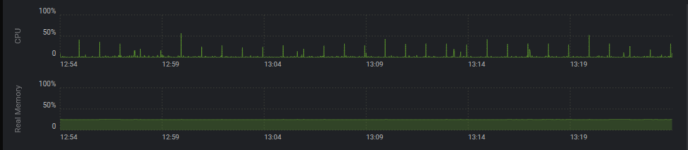
Workload is about nothing, as its my private mailserver:
1777980275139.png
But thats only one of the affected VMs, about all running (Linux) VMs using SATA as disk emulation randomly crash with the above error.
Didn't try Windows VMs yet, because they only run limited times...
 
You can move back to the prior kernel (and keep on kernel 6.x) by doing this (this is from memory though, so be careful with it):

1. Create the APT preferences file (/etc/apt/preferences.d/proxmox-default-kernel) which instructs apt to keep on the 6x series kernel:

Code:
Package: proxmox-default-kernel
Pin: version 2.0.2
Pin-Priority: 1000

2. Install the matching "proxmox-default-kernel" package (version should match the above preferences file):

Code:
sudo apt install proxmox-default-kernel=2.0.2

3. Mark the kernel 6.17 headers as installed, as you want to keep them

Code:
sudo apt install proxmox-headers-6.17

4. Remove the installed version 7.x kernel(s)

Code:
sudo apt remove proxmox-kernel-7.*-pve-signed proxmox-kernel-7*

5. Make sure none of the above throws any errors, then reboot

If some kind of error does show up from the above commands though, then it's probably best to ask here first rather than rebooting, just in case. :)
Hello justinclift,

Can this procedure be used on a case where an upgrade from 8.4.x to 9 (latest) will be done? Doing the procedure after dist-upgrade?

We want to upgrade but not use 7.0.x kernel for now.

Best regards
 
Can this procedure be used on a case where an upgrade from 8.4.x to 9 (latest) will be done? Doing the procedure after dist-upgrade?

I would highly recommend to do this AFTER the upgrade if at all since the upgrade procedure wasn' tested to work with apt pinning (see also https://wiki.debian.org/AptConfiguration and https://wiki.debian.org/DontBreakDebian ). It's also not really needed because you could first do an upgrade and before the reboot pin the kernel with the proxmox-boot-tool: https://pve.proxmox.com/wiki/Host_Bootloader#sysboot_kernel_pin

1. Create the APT preferences file (/etc/apt/preferences.d/proxmox-default-kernel) which instructs apt to keep on the 6x series kernel:

It's not even needed because the proxmox-boot-tool allows to pin the kernel to a certain version, even just for one boot (so somebody could test a certain version and if it doesn't work it will return to the previous kernel after the reboot).
 
It's not even needed because the proxmox-boot-tool allows to pin the kernel to a certain version
Hmmmm, they're not strictly the same thing, though for most people it's probably "good enough" (and a lot easier") to do the proxmox-boot-tool kernel pinning like you said.

To me, the difference is that the proxmox-boot-tool pins _an exact, specific kernel_ to the boot. Whereas using the more complicated `proxmox-default-kernel` approach above is more "keep on kernel series x.y" (ie 6.17). So it'll automatically use any further 6.17 kernels that are still released for whatever reason (security, bug fixes, etc).
 
Can this procedure be used on a case where an upgrade from 8.4.x to 9 (latest) will be done? Doing the procedure after dist-upgrade?
In theory, it should work reliably if you pick the correct part of the upgrade process to add those steps into. I haven't tried it as part of the process though, so I'd personally test it out in a VM or on a spare host first if you want to be sure before hand.

We all know that "in theory" sometimes has unexpected surprises when done in reality. :)
 
To me, the difference is that the proxmox-boot-tool pins _an exact, specific kernel_ to the boot. Whereas using the more complicated `proxmox-default-kernel` approach above is more "keep on kernel series x.y" (ie 6.17). So it'll automatically use any further 6.17 kernels that are still released for whatever reason (security, bug fixes, etc).
Imho you don't get much that way because at some point the kernel 6.17 won't get this updates anymore. So imho pinning proxmox-default-kernel gives a kind of wrong security feel. But to be honest in the end it boils down to personal preference. Personally I wouldn't do but use the newest proxmox-default-kernel for the reasons outlined by kernel developer Greg Koah-Hartman:
The best solution for almost all Linux users is to just use the kernel from your favorite Linux distribution. Personally, I prefer the community based Linux distributions that constantly roll along with the latest updated kernel and it is supported by that developer community. Distributions in this category are Fedora, openSUSE, Arch, Gentoo, CoreOS, and others.

All of these distributions use the latest stable upstream kernel release and make sure that any needed bugfixes are applied on a regular basis. That is the one of the most solid and best kernel that you can use when it comes to having the latest fixes (remember all fixes are security fixes) in it.

http://kroah.com/log/blog/2018/08/24/what-stable-kernel-should-i-use/

So: If you don't have a specific reason to use an older kernel (due to some breakage in the new kernel) I would always go with the newest kernel provided by the distribution, so proxmox-default-kernel aka Linux 7 at the moment. And even if I had some reason to stick with the old kernel this would just be an workaround, I would expect that at some point a newer proxmox-default-kernel fixes the breaking change.
 
Last edited:
  • Like
Reactions: UdoB and gfngfn256
...and nvidia is like: Hold my beer!

Really, the kernel pinning is a must with some "older" GPUs *cough* Pascal, Volta *cough*.
Their 16.12 Enterprise drivers did not compile with 6.17.
Their 16.13 Enterprise drivers did not compile with 6.17.
What do you do then?
Stop all VMs with vGPUs for months? -> Hooray for the customers.

Personally, I prefer Arch on desktop too, b.c. of their fast and latest Upgrades, but in terms of servers I prefer well hung software which just works.
 
Last edited:
Running a tailscale subnet router on a VM and after upgrading the download speed tanked to ~0.2 Mbps from normal ~100Mbps.
Weirdly the upload speed was fine.
Tested using openspeedtest on another VM and both of them are up to date Debian trixie installs.
VM:s have no iptables and tailscale gets a direct connection according to tailscale status.

@Gnosh - I've hit this as well - specifically Tailscale traffic leaving my LXC (also via direct connection) that basically stops with kernel 7.0 - reverting to 6.17 (and no other changes) is an instant fix. No problems connecting, but if I then try transfer files or stream video, it just stops. Same with iperf3 - in other other direction a solid 90mbit/s but 0 in this direction.

Have you made any progress with this and kernel 7.0 at all? I'm currently away so reverting was by best bet as I could not retrieve files from home, but plan to dig in on this in the next few days once I am back and near the server.

I am using a Mellanox ConnectX-4 25g SFP28 NIC - I suspect it's some sort of TCP offloading issue....
 
@Gnosh - I've hit this as well - specifically Tailscale traffic leaving my LXC (also via direct connection) that basically stops with kernel 7.0 - reverting to 6.17 (and no other changes) is an instant fix. No problems connecting, but if I then try transfer files or stream video, it just stops. Same with iperf3 - in other other direction a solid 90mbit/s but 0 in this direction.

Have you made any progress with this and kernel 7.0 at all? I'm currently away so reverting was by best bet as I could not retrieve files from home, but plan to dig in on this in the next few days once I am back and near the server.

I am using a Mellanox ConnectX-4 25g SFP28 NIC - I suspect it's some sort of TCP offloading issue....
Unfortunately not. I had an extra NIC on the motherboard so I put that on passthrough for the VM which hides the problem.
Problem NIC is a AQtion AQC113CS.

Would love an actual fix.
 
Just updated PVE from 9.1.6 to 9.1.9 and to kernel 7.0.0.3 and got kernel panic.

I pinned the kernel to 6.17.13-2-pve for now and I'm back to business.

I'm happy to provide details to help to debug .Just tell me you need.
 
Last edited: