Opt-in Linux 7.0 Kernel for Proxmox VE 9 available on test and no-subscription

Although it seems that today, I'm on Proxmox VE 9.19 & the 7.0.0-3 kernel is available as the "default" on the non-enterprise repo.

I guess your statement only applies to the enterprise repo?
Yes, if not explicitly noted we're normally making such statements of something becoming the default from the POV of enterprise users.
While it was less common in the past to move the kernel earlier than point release, it happened and it's actually standard procedure for all (other) packages, and the kernel would be even the one package to downgrade much easier, as the previous version is still available and can be even (temporary) pinned, if needed.

and yet it breaks the networking on Ubuntu 25.10 VM. 24.04 LTS is not effected. I haven't done extensive testing, but the Network Manager is failing to start on boot (will start up manually).
Can you please share some details here, I could not find any reports about that in this thread here, nor did I find any obvious post - including from your side - about that in another thread. The PVE VM config would be at least nice to have to be able trying to reproduce this.
 
Dear all,

Looks like pve-manager will be soon of version 9.2

We have 5 hosts and 2 PBS, all with subscriptions and everything is working fine, very happy after moving out of VMware.
Though I have a request for "UI change" if possible:
Instead of running in CLI: ha-manager crm-command node-maintenance enable (or disable) <node name>, can we have this as a right-click option in the node itself?

Thank you
 
Though I have a request for "UI change" if possible:
Instead of running in CLI: ha-manager crm-command node-maintenance enable (or disable) <node name>, can we have this as a right-click option in the node itself?
for enhancement requests use: https://bugzilla.proxmox.com
(this way it will not get lost in a comment in an unrelated thread).
 
Can you please share some details here, I could not find any reports about that in this thread here, nor did I find any obvious post - including from your side - about that in another thread. The PVE VM config would be at least nice to have to be able trying to reproduce this.
The Proxmox node is a fully updated cluster member, guests are mostly CTs and with a single Ubuntu 25.10 desktop, accessed via RDP. It's the only 25.10 desktop I have in the cluster, but another Ubuntu server 24.04 LTS doesn't seem to be effected (only 1 updated so far).

After the upgrade, the Ubuntu guest boots OK with no errors displayed, but the IP addressing info was not shown from the guest agent. On the Guest itself the network are available but displaying 'down' under # ip a, but the Network Manager service is not running, so no connectivity at all. Manually starting the Network Manager does return connectivity, but upon host reboot the same occurred. I suspect that it's not effecting 'Netplan' which is the default on Ubuntu Server. I didn't have time to investigate further, so I just pinned the 6.17 kernel to get the system up and running again.

I too, am surprised about the error, I read through the entire thread before starting the upgrade process, in fact I was following from the start, so I was surprised that the kernel was auto presented as an upgrade on the no-subscription repository. I understood that it was optional.
 
Last edited:
  • Like
Reactions: reinob
Staff, I have a question: For those in pve-no-subscription who don't want to install kernel 7 yet, which of those is the recommended method to stay at 6.17 without having to pin it every kernel upgrade?

Bash:
# Method 1: install the latest 6.17 default kernel and headers, then pin it in apt.
apt install --only-upgrade proxmox-default-kernel=2.0.2 proxmox-default-headers=2.0.2
apt-mark hold proxmox-default-headers proxmox-default-kernel

# Method 2: set 6.17 kernel and headers as "[installed]" instead of "[installed,automatic]" and removing default-kernel and default-headers
apt install proxmox-kernel-6.17 proxmox-headers-6.17
apt remove proxmox-default-headers proxmox-default-kernel
# EDIT: it also removes proxmox-ve, so method 2 is a no-no.
 
Last edited:
Staff, I have a question: For those in pve-no-subscription who don't want to install kernel 7 yet, which of those is the recommended method to stay at 6.17 without having to pin it every kernel upgrade?

See: https://pve.proxmox.com/pve-docs/chapter-sysadmin.html#sysboot_kernel_pin
by "pinning" the kernel with proxmox-boot-tool - you tell the boot-loader which kernel to boot, you can then install/upgrade the packages, and the pinned kernel would still be booted (and excluded from removal with `apt autoremove`)

But if kernel 7.0 runs on your hardware without issues - I'd use that going forward.
 
  • Like
Reactions: Johannes S
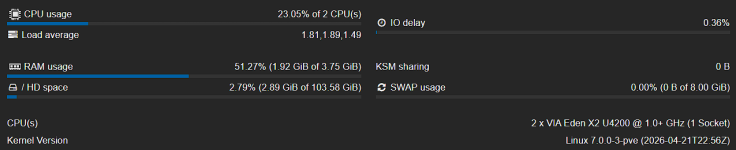
Running Proxmox VE 9.1.9 with kernel 7.0.0-3-pve on HP Blade BL-460c without and issues.

Hardware:
CPU: 2x Intel(R) Xeon(R) CPU E5-2660
NIC: 2 x Hewlett-Packard Company NC554FLB 10Gb 2-port
FC: 2 x Emulex Corporation LPe12000
With local RAID controller: Hewlett-Packard Company P220i

Will monitor it for few days more
 
Just upgraded today; 7.0.0-3-pve and corresponding 'current' versions of things in the no-subscription repo.
I'm seeing a Host Managed network LXC warn me upon start that DHCP fails - however, the CT properly has an IP address.

After rebooting I'm noticing that my singular LXC with 'Host Controlled' networking enabled, for DHCP, is running into this WARN upon startup - regardless of waiting 30 seconds, or an entire 2 minutes, after the OpenWRT VM starts up that provides it dhcp.

Code:
WARN: DHCP failed - command 'lxc-attach -n 202 -s 'NETWORK|UTSNAME' -- aa-exec -p unconfined /sbin/dhclient -1 -6 -pf /var/lib/lxc/202/hook/dhclient6-eth0.pid -lf /var/lib/lxc/202/hook/dhclient6-eth0.leases -e 'ROOTFS=/proc/11615/root' -sf /usr/share/lxc/hooks/dhclient-script eth0' failed: exit code 1
TASK WARNINGS: 1

The container still gets proper IPs from OpenWRT however.
Code:
2: eth0@if37: <BROADCAST,MULTICAST,UP,LOWER_UP,M-DOWN> mtu 1500 qdisc noqueue state UP qlen 1000
    link/ether aa:44:ea:df:ee:d1 brd ff:ff:ff:ff:ff:ff
    inet 10.10.2.202/24 brd 10.10.2.255 scope global eth0
       valid_lft forever preferred_lft forever
    inet6 2001:470:x:x:x:x:x:x/64 scope global dynamic flags 100
valid_lft 5239sec preferred_lft 2539sec

It is however missing the ::202 ipv6 address it usually got from DHCPv6.

Why is it giving me a warning?
 
Last edited:
I updated to Kernel 7.0.0.3 I have the Problem when 2 VMS with UEFI and Mapped PCIE devices are start the 2nd VM will kill the first one. Meanwhile other vms can be started and run without problems. I reverted to 6.17 and all went fine again. II attached the log with the 7.0.0.3 kernel - its seems to be a repeating pattern.

I see some memory limit error but with 6.17. I still have over 30GB ram free and 700GB on the SSD

I am using:
AMD Epyc 8434P
ASRock Mainboard SIENAD8-2L2T
Broadcom HBA 9500-8i
 

Attachments

Last edited: