Opt-in Linux 7.0 Kernel for Proxmox VE 9 available on test and no-subscription

  • Like
Reactions: bbgeek17
A new kernel with a patch for copy.fail will be available ? perhaps the version 7 of the kernel isn't impacted.
 
I updated my Proxmox machine today and the default kernel was updated to Linux 7.0.0-3-pve. Everything appears to be working correctly, however my idle power usage has significantly increased. As this is a home lab environment running Nextcloud, HomeAssistant, etc. an idle power increase from ~15W to ~21W is an increase of 40%.

Are other people noticing this behaviour?
Have not really noticed that - if anything maybe 1-2 watts LOWER power draw on the newer kernel. Really to early to comment- I only upgraded yesterday. All this will really be HW dependent.
 
Last edited:
  • Like
Reactions: pxmxfan
I updated my Proxmox machine today and the default kernel was updated to Linux 7.0.0-3-pve. Everything appears to be working correctly, however my idle power usage has significantly increased. As this is a home lab environment running Nextcloud, HomeAssistant, etc. an idle power increase from ~15W to ~21W is an increase of 40%.

Are other people noticing this behaviour?
I think I met the same isseu like yours, all VMs are running with maximum cpu, then make host run with maximum cpu, it make the pve machine unstable, I have to pin 6.17 as boot kernel.

And I have another pve machine with 3090 GPU, the GPU cannot be detected on kernel 7.0, with the same driver installation switching to 6.17, then GPU is running well.

I have 5 pve machines which have upgraded to kernel 7.0, above 2 meet those issues, another 3 are good.
 
I think I met the same isseu like yours, all VMs are running with maximum cpu, then make host run with maximum cpu, it make the pve machine unstable, I have to pin 6.17 as boot kernel.

And I have another pve machine with 3090 GPU, the GPU cannot be detected on kernel 7.0, with the same driver installation switching to 6.17, then GPU is running well.

I have 5 pve machines which have upgraded to kernel 7.0, above 2 meet those issues, another 3 are good.
I also have 3090s and nvidia MIT drivers 580.159.03 and neither of them are recognized with 7.0.0-3-pve Revert to 6.17.13-6-pve and its working fine.

Side note for anyone who may stumble on this. I had nvidia drivers 580.105.08 installed when updating and the update failed and booting 7.0.0-3-pve had a panic. I had to boot the 6.17.13-6-pve and update to 580.159.03 to even get 7.0.0-3-pve to boot. Afterwards, no GPU...
 
  • Like
Reactions: ezelkow1
I also have 3090s and nvidia MIT drivers 580.159.03 and neither of them are recognized with 7.0.0-3-pve Revert to 6.17.13-6-pve and its working fine.

Side note for anyone who may stumble on this. I had nvidia drivers 580.105.08 installed when updating and the update failed and booting 7.0.0-3-pve had a panic. I had to boot the 6.17.13-6-pve and update to 580.159.03 to even get 7.0.0-3-pve to boot. Afterwards, no GPU...
This has happened to me every time I upgraded my kernel (it happened both when I upgraded from 6.14 to 6.17 months ago and yesterday from 6.17 to 7.0).

If you've registered the NVIDIA drivers to use DKMS, the drivers are compiled for each kernel change. If compilation fails for some kernel versions, the process aborts and an initramfs is not created for that kernel.

In effect, that kernel is unbootable on the next boot, but unfortunately, the Proxmox procedures activate it anyway for the next one, which will fail due to lack of access to the rootfs.

Solution 1:
Before rebooting, if you see a driver compilation error, uninstall the NVIDIA drivers and then force a rebuild of the latest kernel's boot image (often "apt autoremove" is enough).
If you've already rebooted, power cycle your computer and then boot the previous kernel via the Grub menu, where you'll need to uninstall the drivers again.

Solution 2 (preventive): Do not enable the DKMS feature and then manually compile the drivers each time you switch kernels, only after a successful boot.

I don't know if there are already NVidia drivers compatible with the 7.0 kernel, but the 2025 versions certainly aren't.

I was using a 535 version (v16.12, the latest being 16.14, released a few weeks ago), which theoretically only supports kernel 6.14, but someone had published a patch to make it work under 6.17 (and it did).

Unfortunately, the patch isn't enough for the 7.0 kernel, so for now I'm going back to 6.17.

EDIT: I was able to personally test version R535 v16.14 and can say that it compiles and runs under the 6.17 kernel without needing the patch. Even more interestingly, it also compiles under the 7.0 kernel.

So, I assume the same will be true for the R580 v19.5 (580.159) version, which was also released recently, but I haven't tested it.
Although I see you say 19.5 doesn't work under 7.0
 
Last edited:
I am seeing a regression regarding memory allocation/reservation speed with a (Linux-)VM with PCIe-passthrough on a dual Intel 6144 with 384 GB RAM.
The VM has 256 GB assigned and the start task took every time around one minute with kernel 6.17 on a freshly booted up host. Now with kernel 7.0, I only (re-)started the host three times until now, the start task took around three minutes once (the second start of the host) and around five minutes the other two times; also on a freshly booted up host, respectively. (That VM is the very first one that gets started; despite order=2.)
Bash:
agent: 1
bios: ovmf
boot: order=scsi0;net0
cores: 8
cpu: host
description: ...
efidisk0: local-zfs:vm-1101-disk-0,efitype=4m,ms-cert=2023k,pre-enrolled-keys=1,size=1M
hostpci0: 0000:d8:00,pcie=1
machine: q35
memory: 262144
meta: creation-qemu=9.2.0,ctime=1742331754
name: truenas-backup
net0: virtio=...,bridge=vmbr0
numa: 1
onboot: 1
ostype: l26
scsi0: local-zfs:vm-1101-disk-1,discard=on,iothread=1,size=16G,ssd=1
scsihw: virtio-scsi-single
smbios1: uuid=...
sockets: 2
startup: order=2,up=150
vmgenid: ...
Bash:
proxmox-ve: 9.1.0 (running kernel: 7.0.0-3-pve)
pve-manager: 9.1.9 (running version: 9.1.9/ee7bad0a3d1546c9)
proxmox-kernel-helper: 9.0.4
proxmox-kernel-7.0: 7.0.0-3
proxmox-kernel-7.0.0-3-pve-signed: 7.0.0-3
proxmox-kernel-7.0.0-2-pve-signed: 7.0.0-2
ceph-fuse: 20.2.1-pve1
corosync: 3.1.10-pve2
criu: 4.1.1-1
dnsmasq: 2.91-1
frr-pythontools: 10.4.1-1+pve1
ifupdown2: 3.3.0-1+pmx12
intel-microcode: 3.20251111.1~deb13u1
ksm-control-daemon: 1.5-1
libjs-extjs: 7.0.0-5
libproxmox-acme-perl: 1.7.1
libproxmox-backup-qemu0: 2.0.2
libproxmox-rs-perl: 0.4.1
libpve-access-control: 9.0.7
libpve-apiclient-perl: 3.4.2
libpve-cluster-api-perl: 9.1.2
libpve-cluster-perl: 9.1.2
libpve-common-perl: 9.1.11
libpve-guest-common-perl: 6.0.2
libpve-http-server-perl: 6.0.5
libpve-network-perl: 1.3.0
libpve-notify-perl: 9.1.2
libpve-rs-perl: 0.13.0
libpve-storage-perl: 9.1.2
libspice-server1: 0.15.2-1+b1
lvm2: 2.03.31-2+pmx1
lxc-pve: 6.0.5-4
lxcfs: 6.0.4-pve1
novnc-pve: 1.6.0-4
proxmox-backup-client: 4.2.0-1
proxmox-backup-file-restore: 4.2.0-1
proxmox-backup-restore-image: 1.0.0
proxmox-firewall: 1.2.2
proxmox-kernel-helper: 9.0.4
proxmox-mail-forward: 1.0.3
proxmox-mini-journalreader: 1.6
proxmox-offline-mirror-helper: 0.7.3
proxmox-widget-toolkit: 5.1.9
pve-cluster: 9.1.2
pve-container: 6.1.5
pve-docs: 9.1.2
pve-edk2-firmware: 4.2025.05-2
pve-esxi-import-tools: 1.0.1
pve-firewall: 6.0.4
pve-firmware: 3.18-3
pve-ha-manager: 5.2.0
pve-i18n: 3.7.1
pve-qemu-kvm: 10.1.2-7
pve-xtermjs: 5.5.0-3
qemu-server: 9.1.9
smartmontools: 7.4-pve1
spiceterm: 3.4.2
swtpm: 0.8.0+pve3
vncterm: 1.9.2
zfsutils-linux: 2.4.1-pve1

I am not seeing that regression on a similar (also Linux-)VM with PCIe-passthrough on a single Intel D-1736NT with 256 GB RAM and 128 GB assigned to the VM.
Bash:
agent: 1
bios: ovmf
boot: order=scsi0;net0
cores: 8
cpu: host
description: ...
efidisk0: local-zfs:vm-201-disk-0,efitype=4m,ms-cert=2023k,pre-enrolled-keys=1,size=1M
hostpci0: 0000:16:00,pcie=1
machine: q35
memory: 131072
meta: creation-qemu=8.1.5,ctime=1714481909
name: truenas
net0: virtio=...,bridge=vmbr0
numa: 0
onboot: 1
ostype: l26
scsi0: local-zfs:vm-201-disk-1,discard=on,iothread=1,size=16G,ssd=1
scsihw: virtio-scsi-single
smbios1: uuid=...
sockets: 1
startup: order=2,up=150
tags: 24-7;pve2
vmgenid: ...
pveversion -v is the same as above.
 
I am seeing a regression regarding memory allocation/reservation speed with a (Linux-)VM with PCIe-passthrough on a dual Intel 6144 with 384 GB RAM.
The VM has 256 GB assigned and the start task took every time around one minute with kernel 6.17 on a freshly booted up host. Now with kernel 7.0, I only (re-)started the host three times until now, the start task took around three minutes once (the second start of the host) and around five minutes the other two times; also on a freshly booted up host, respectively. (That VM is the very first one that gets started; despite order=2.)
Bash:
agent: 1
bios: ovmf
boot: order=scsi0;net0
cores: 8
cpu: host
description: ...
efidisk0: local-zfs:vm-1101-disk-0,efitype=4m,ms-cert=2023k,pre-enrolled-keys=1,size=1M
hostpci0: 0000:d8:00,pcie=1
machine: q35
memory: 262144
meta: creation-qemu=9.2.0,ctime=1742331754
name: truenas-backup
net0: virtio=...,bridge=vmbr0
numa: 1
onboot: 1
ostype: l26
scsi0: local-zfs:vm-1101-disk-1,discard=on,iothread=1,size=16G,ssd=1
scsihw: virtio-scsi-single
smbios1: uuid=...
sockets: 2
startup: order=2,up=150
vmgenid: ...
Bash:
proxmox-ve: 9.1.0 (running kernel: 7.0.0-3-pve)
pve-manager: 9.1.9 (running version: 9.1.9/ee7bad0a3d1546c9)
proxmox-kernel-helper: 9.0.4
proxmox-kernel-7.0: 7.0.0-3
proxmox-kernel-7.0.0-3-pve-signed: 7.0.0-3
proxmox-kernel-7.0.0-2-pve-signed: 7.0.0-2
ceph-fuse: 20.2.1-pve1
corosync: 3.1.10-pve2
criu: 4.1.1-1
dnsmasq: 2.91-1
frr-pythontools: 10.4.1-1+pve1
ifupdown2: 3.3.0-1+pmx12
intel-microcode: 3.20251111.1~deb13u1
ksm-control-daemon: 1.5-1
libjs-extjs: 7.0.0-5
libproxmox-acme-perl: 1.7.1
libproxmox-backup-qemu0: 2.0.2
libproxmox-rs-perl: 0.4.1
libpve-access-control: 9.0.7
libpve-apiclient-perl: 3.4.2
libpve-cluster-api-perl: 9.1.2
libpve-cluster-perl: 9.1.2
libpve-common-perl: 9.1.11
libpve-guest-common-perl: 6.0.2
libpve-http-server-perl: 6.0.5
libpve-network-perl: 1.3.0
libpve-notify-perl: 9.1.2
libpve-rs-perl: 0.13.0
libpve-storage-perl: 9.1.2
libspice-server1: 0.15.2-1+b1
lvm2: 2.03.31-2+pmx1
lxc-pve: 6.0.5-4
lxcfs: 6.0.4-pve1
novnc-pve: 1.6.0-4
proxmox-backup-client: 4.2.0-1
proxmox-backup-file-restore: 4.2.0-1
proxmox-backup-restore-image: 1.0.0
proxmox-firewall: 1.2.2
proxmox-kernel-helper: 9.0.4
proxmox-mail-forward: 1.0.3
proxmox-mini-journalreader: 1.6
proxmox-offline-mirror-helper: 0.7.3
proxmox-widget-toolkit: 5.1.9
pve-cluster: 9.1.2
pve-container: 6.1.5
pve-docs: 9.1.2
pve-edk2-firmware: 4.2025.05-2
pve-esxi-import-tools: 1.0.1
pve-firewall: 6.0.4
pve-firmware: 3.18-3
pve-ha-manager: 5.2.0
pve-i18n: 3.7.1
pve-qemu-kvm: 10.1.2-7
pve-xtermjs: 5.5.0-3
qemu-server: 9.1.9
smartmontools: 7.4-pve1
spiceterm: 3.4.2
swtpm: 0.8.0+pve3
vncterm: 1.9.2
zfsutils-linux: 2.4.1-pve1

I am not seeing that regression on a similar (also Linux-)VM with PCIe-passthrough on a single Intel D-1736NT with 256 GB RAM and 128 GB assigned to the VM.
Bash:
agent: 1
bios: ovmf
boot: order=scsi0;net0
cores: 8
cpu: host
description: ...
efidisk0: local-zfs:vm-201-disk-0,efitype=4m,ms-cert=2023k,pre-enrolled-keys=1,size=1M
hostpci0: 0000:16:00,pcie=1
machine: q35
memory: 131072
meta: creation-qemu=8.1.5,ctime=1714481909
name: truenas
net0: virtio=...,bridge=vmbr0
numa: 0
onboot: 1
ostype: l26
scsi0: local-zfs:vm-201-disk-1,discard=on,iothread=1,size=16G,ssd=1
scsihw: virtio-scsi-single
smbios1: uuid=...
sockets: 1
startup: order=2,up=150
tags: 24-7;pve2
vmgenid: ...
pveversion -v is the same as above.
Not that it matters w.r.t. this being a potential regression, but do you use (1 GiB) hugepages? That can makes a ton of difference.
 
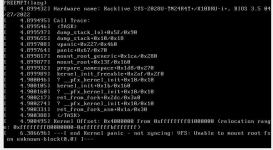
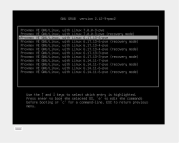
Kernel 7.0.0-3 failing to boot. 6.17.13-6 boots fine.

1777716283101.png\
1777717001429.png
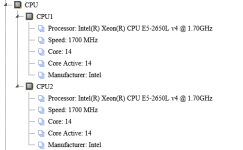
X10DRU-i +

1777716449353.png

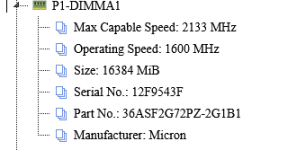
512gb DDR4 ECC 2133 operating at 1600Mhz: all DIMM's are the same style and test fine.

1777716921089.png

Grub Conf

Code:
GRUB_DEFAULT=0

GRUB_TIMEOUT=5

GRUB_DISTRIBUTOR=`( . /etc/os-release && echo ${NAME} )`

GRUB_CMDLINE_LINUX_DEFAULT="quiet default_hugepagesz=1G hugepagesz=1G hugepages=200"

GRUB_CMDLINE_LINUX=""

hugepages settings have no impact on 6.17.13-6 and 7.0.0-3 fails with it removed.

Nvidia Kernel driver NVIDIA-Linux-x86_64-580.105.08.run installed for lxc container pass-thru
 
Last edited:
Very high CPU load after upgrading to 7.0.0-3-pve. Even small vms only running NTP have 30-40% cpu usage.
Tried rebooting several times.

Downgraded to 6.17.13-6-pve and all is normal again.

CPU: AMD Ryzen 3 PRO 2200GE
 
Last edited:
  • Like
Reactions: SingKS8
Since the reported issue does not occur when using pve-kernel-7.0.0-3-pve on Zen4, I would like to know the results of testing whether switching to pve-kernel-7.0.0-2-pve on Zen⁺ (Ryzen 3 PRO 2200GE) resolves the problem.
 
Kernel 7.0.0-3 failing to boot. 6.17.13-6 boots fine.

View attachment 97440\
View attachment 97443
X10DRU-i +

View attachment 97441

512gb DDR4 ECC 2133 operating at 1600Mhz: all DIMM's are the same style and test fine.

View attachment 97442

Grub Conf

Code:
GRUB_DEFAULT=0

GRUB_TIMEOUT=5

GRUB_DISTRIBUTOR=`( . /etc/os-release && echo ${NAME} )`

GRUB_CMDLINE_LINUX_DEFAULT="quiet default_hugepagesz=1G hugepagesz=1G hugepages=200"

GRUB_CMDLINE_LINUX=""

hugepages settings have no impact on 6.17.13-6 and 7.0.0-3 fails with it removed.

Nvidia Kernel driver NVIDIA-Linux-x86_64-580.105.08.run installed for lxc container pass-thru
What file system are you using for the Proxmox VE host root? As the error here is that the initrd could not find the actual root FS to continue booting. And how are the disks attached to the system, through some HBA, sata/nvme directly, ...?

And while this might be kernel specific regression, it could also an installation or maybe even a configuration issue.
As you got quite a few kernels installed: is there enough space left, especially on the efi system partition? Might be worth to purge all proxmox-kernel-6.14 kernels
 
Since the reported issue does not occur when using pve-kernel-7.0.0-3-pve on Zen4, I would like to know the results of testing whether switching to pve-kernel-7.0.0-2-pve on Zen⁺ (Ryzen 3 PRO 2200GE) resolves the problem.
Update: Root cause found — HPET clocksource, not kernel 7.0

After further investigation, the high CPU usage was not caused by kernel 7.0 itself, but by the HPET (High Precision Event Timer) being used as the system clocksource.

Using perf top we identified that read_hpet was consuming ~60% of kernel CPU time. HPET is an older hardware timer that is expensive to read, and with multiple VMs polling the clocksource constantly (especially chronyd/NTP and PFSense), the kernel was overwhelmed with HPET reads.

The underlying issue was that TSC (Time Stamp Counter) was being flagged as unstable and the kernel fell back to HPET. This was confirmed by:

cat /sys/devices/system/clocksource/clocksource0/current_clocksource
hpet

The fix was to force TSC as reliable in /etc/kernel/cmdline:

root=ZFS=rpool/ROOT/pve-1 boot=zfs tsc=reliable

Followed by running proxmox-boot-tool kernel pin 7.0.0-3-pve

After rebooting with TSC as the active clocksource, CPU usage dropped from ~85% system time to ~7% system time, and kernel 7.0.0-3-pve is now running perfectly with all VMs at normal CPU levels.

Hardware: AMD Ryzen 3 PRO 2200GE
Note: This issue was present on kernel 6.17 as well, but kernel 7.0 made it significantly worse, which is what triggered the investigation.
 
Last edited:
Kernel 7.0.0-3-pve spams the log with error so i reverted to 6.17.13-6-pve

(Using no-subscription repo)
PC Specs: Minisforum MS-02 Ultra
Intel Core Ultra 9 285HX
Crucial SODIMM DDR5-@4400MHz - 96GB (2x48GB)
Proxmox Drive - Crucial T500 4TB

Errors are about thunderbolt and pcieport
I have no thunderbolt devices connected,but in pcie slots i have
1. MINISFORUM ENPBA PCIe To 2x 25G(SFP28) + 2x NVME (Using one of the sfp ports for 10gbe)
2. Sparkle Intel Arc A310 ECO 4GB GDDR6

Attached lspci and the log spam
 

Attachments

Last edited:
Not that it matters w.r.t. this being a potential regression, but do you use (1 GiB) hugepages? That can makes a ton of difference.

No. I did not use them again since that problem: [1] back then.
But I took the opportunity now you mentioned it to test with them and started that host and interestingly the start task for the VM in question took under one minute this time. Without any changes, I rebooted the host and unfortunately the start task was back to almost five minutes again.
So I enabled 1 GiB hugepages on the VM and the start task is indeed back to a little over one minute. Tested it five times so far.

Personally, I would be fine to leave it at that; especially since I seem to be the only one observing this. The hugepages mitigate it, at least in my five test reboots and even if it would take five minutes again, it would not be that of a big deal.
I mainly posted it in case it might be, at least ever so slightly, another data point / hint regarding the other memory related observations in this thread.


A little side-question, if you don't mind:
Does NUMA still need to be enabled on a VM for hugepages to work at all (no matter the actual physical hardware)?:


[1] https://forum.proxmox.com/threads/v...re-with-pve-kernel-6-5-and-root-on-zfs.136741
 
Updated Proxmox VE yesterday, N100 PC with GPU passthrough starts but Debian VM doesn't start anymore.

Code:
TASK ERROR: start failed: command '/usr/bin/kvm -id 101 -name 'Debian-WZPC-VGA,debug-threads=on' -no-shutdown -chardev 'socket,id=qmp,path=/var/run/qemu-server/101.qmp,server=on,wait=off' -mon 'chardev=qmp,mode=control' -chardev 'socket,id=qmp-event,path=/var/run/qmeventd.sock,reconnect-ms=5000' -mon 'chardev=qmp-event,mode=control' -pidfile /var/run/qemu-server/101.pid -daemonize -smbios 'type=1,uuid=e0bc4a03-4a1f-49f4-9124-fb07194c63b7' -object '{"id":"throttle-drive-efidisk0","limits":{},"qom-type":"throttle-group"}' -blockdev '{"driver":"raw","file":{"driver":"file","filename":"/usr/share/pve-edk2-firmware//OVMF_CODE_4M.secboot.fd"},"node-name":"pflash0","read-only":true}' -blockdev '{"detect-zeroes":"on","discard":"ignore","driver":"throttle","file":{"cache":{"direct":false,"no-flush":false},"detect-zeroes":"on","discard":"ignore","driver":"raw","file":{"aio":"io_uring","cache":{"direct":false,"no-flush":false},"detect-zeroes":"on","discard":"ignore","driver":"host_device","filename":"/dev/pve/vm-101-disk-0","node-name":"e87a2aa6652ea62bd93951c12e78daa","read-only":false},"node-name":"f87a2aa6652ea62bd93951c12e78daa","read-only":false,"size":540672},"node-name":"drive-efidisk0","read-only":false,"throttle-group":"throttle-drive-efidisk0"}' -smp '4,sockets=1,cores=4,maxcpus=4' -nodefaults -boot 'menu=on,strict=on,reboot-timeout=1000,splash=/usr/share/qemu-server/bootsplash.jpg' -vga none -nographic -cpu 'host,kvm=off,+kvm_pv_eoi,+kvm_pv_unhalt' -m 13700 -object 'iothread,id=iothread-virtioscsi0' -object '{"id":"throttle-drive-scsi0","limits":{},"qom-type":"throttle-group"}' -global 'ICH9-LPC.disable_s3=1' -global 'ICH9-LPC.disable_s4=1' -readconfig /usr/share/qemu-server/pve-q35-4.0.cfg -device 'vmgenid,guid=4eeb9889-b48c-49da-a4fa-1c4815ff590a' -device 'qemu-xhci,p2=15,p3=15,id=xhci,bus=pci.1,addr=0x1b' -device 'usb-tablet,id=tablet,bus=ehci.0,port=1' -device 'vfio-pci,host=0000:00:02.0,id=hostpci0,bus=ich9-pcie-port-1,addr=0x0' -device 'vfio-pci,host=0000:00:1f.0,id=hostpci1.0,bus=ich9-pcie-port-2,addr=0x0.0,multifunction=on' -device 'vfio-pci,host=0000:00:1f.3,id=hostpci1.1,bus=ich9-pcie-port-2,addr=0x0.1' -device 'vfio-pci,host=0000:00:1f.4,id=hostpci1.2,bus=ich9-pcie-port-2,addr=0x0.2' -device 'vfio-pci,host=0000:00:1f.5,id=hostpci1.3,bus=ich9-pcie-port-2,addr=0x0.3' -device 'usb-host,bus=xhci.0,port=1,vendorid=0x046d,productid=0xc52b,id=usb0' -device 'usb-host,bus=xhci.0,port=2,vendorid=0x0bda,productid=0xb85b,id=usb1' -device 'usb-host,bus=xhci.0,port=3,vendorid=0x0573,productid=0x1573,id=usb2' -device 'usb-host,bus=xhci.0,port=4,hostbus=2,hostport=1,id=usb3' -device 'usb-host,bus=xhci.0,port=5,hostbus=2,hostport=2,id=usb4' -device 'usb-host,bus=xhci.0,port=6,vendorid=0x0951,productid=0x1666,id=usb5' -device 'usb-host,bus=xhci.0,port=7,hostbus=1,hostport=2,id=usb6' -chardev 'socket,path=/var/run/qemu-server/101.qga,server=on,wait=off,id=qga0' -device 'virtio-serial,id=qga0,bus=pci.0,addr=0x8' -device 'virtserialport,chardev=qga0,name=org.qemu.guest_agent.0' -iscsi 'initiator-name=iqn.1993-08.org.debian:01:4b8f59e19341' -device 'ide-cd,bus=ide.1,unit=0,id=ide2,bootindex=100' -device 'virtio-scsi-pci,id=virtioscsi0,bus=pci.3,addr=0x1,iothread=iothread-virtioscsi0' -blockdev '{"detect-zeroes":"unmap","discard":"unmap","driver":"throttle","file":{"cache":{"direct":true,"no-flush":false},"detect-zeroes":"unmap","discard":"unmap","driver":"raw","file":{"aio":"io_uring","cache":{"direct":true,"no-flush":false},"detect-zeroes":"unmap","discard":"unmap","driver":"host_device","filename":"/dev/pve/vm-101-disk-1","node-name":"ecc3349bc3205b243b6648d93195561","read-only":false},"node-name":"fcc3349bc3205b243b6648d93195561","read-only":false},"node-name":"drive-scsi0","read-only":false,"throttle-group":"throttle-drive-scsi0"}' -device 'scsi-hd,bus=virtioscsi0.0,channel=0,scsi-id=0,lun=0,drive=drive-scsi0,id=scsi0,device_id=drive-scsi0,rotation_rate=1,bootindex=101,write-cache=on' -netdev 'type=tap,id=net0,ifname=tap101i0,script=/usr/libexec/qemu-server/pve-bridge,downscript=/usr/libexec/qemu-server/pve-bridgedown,vhost=on' -device 'virtio-net-pci,mac=BC:24:11:C5:8A:EB,netdev=net0,bus=pci.0,addr=0x12,id=net0,rx_queue_size=1024,tx_queue_size=256,bootindex=102,host_mtu=1500' -machine 'pflash0=pflash0,pflash1=drive-efidisk0,hpet=off,type=q35+pve0'' failed: got timeout


/etc/default/grub
Code:
GRUB_DEFAULT=0
GRUB_TIMEOUT=2
GRUB_DISTRIBUTOR=`( . /etc/os-release && echo ${NAME} )`
GRUB_CMDLINE_LINUX_DEFAULT="quiet intel_iommu=on iommu=pt pcie_acs_override=downstream,multifunction initcall_blacklist=sysfb_init video=simplefb:off video=vesafb:off video=efifb:off video=vesa:off disable_vga=1 vfio_iommu_type1.allow_unsafe_interrupts=1 kvm.ignore_msrs=1 modprobe.blacklist=radeon,nouveau,nvidia,nvidiafb,nvidia-gpu,snd_hda_intel,snd_hda_codec_hdmi,i915,btusb pcie_aspm=force nvme_core.default_ps_max_latency_us=5500"
GRUB_CMDLINE_LINUX=""
....

With Kernel 6.xxx it runs perfectly. Rolled back.
 
Last edited: