

Opt-in Linux 6.17 Kernel for Proxmox VE 9 available on test & no-subscription
- Thread starter t.lamprecht
- Start date
You are using an out of date browser. It may not display this or other websites correctly.
You should upgrade or use an alternative browser.
You should upgrade or use an alternative browser.
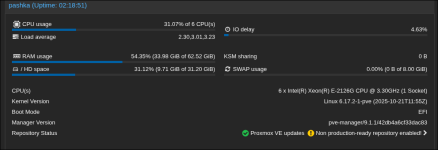

Please open a new thread for this and post more details about your HW, e.g. the server vendor and model.The latest kernel update is very unstable on my machine(s) (see attached journalctl.log). The older kernel 6.14.11-4, and 6.14.8-2 don't have this issue.
View attachment 93239
This might be related to your CPU not implementing VT-d correctly, and, e.g., the newer kernel exposing some feature that was previously not used or just not detected that it was wrong. If you do not rely on PCI pass-through you can try adding disabling the IOMMU, e.g by adding the
intel_iommu=off as kernel parameter.
Today I upgraded 2 nodes to 9.1-6.17 of my 3 node cluster and both failed to boot with the 6.17 kernel into a bootloop.
I therefore booted the 6.14 kernel again
- It boots into grub and after selecting the 6.17 kernel the machine just reboots
- For some reason `systemd-boot-efi` seems to be installed, but also seems to be on my last 6.14 node left.
- Both servers are identical Dell R630 (see fastfetch below)
- They are booted in BIOS.
- Systemd-boot is NOT installed.
- Using ZFS AND Ceph
- All 3 nodes have already been upgraded from Proxmox 8 if that is relevant.
- Myself would exclude any bios/efi issues, since it boots into grub.
- Once i select the 6.17 kernel in grub using the iDRAC remote viewer i get a blackscreen with an "_" in the character location (0,0) and then it reboots. I struggle giving any more clues.
I therefore booted the 6.14 kernel again
root@triton:~# fastfetch .://:` `://:. root@triton `hMMMMMMd/ /dMMMMMMh` ----------- `sMMMMMMMd: :mMMMMMMMs` OS: Proxmox VE 9.1.1 x86_64`-/+oo+/:`.yMMMMMMMh- -hMMMMMMMy.`:/+oo+/-` Host: PowerEdge R630`:oooooooo/`-hMMMMMMMyyMMMMMMMh-`/oooooooo:` Kernel: Linux 6.14.11-4-pve `/oooooooo:`:mMMMMMMMMMMMMm:`:oooooooo/` Uptime: 22 mins ./ooooooo+- +NMMMMMMMMN+ -+ooooooo/. Packages: 890 (dpkg) .+ooooooo+-`oNMMMMNo`-+ooooooo+. Shell: bash 5.2.37 -+ooooooo/.`sMMs`./ooooooo+- Display (VGA-1): 1024x768 @ 60 Hz :oooooooo/`..`/oooooooo: Terminal: /dev/pts/0 :oooooooo/`..`/oooooooo: CPU: Intel(R) Xeon(R) E5-2643 v3 (12) @ 3.70 GHz -+ooooooo/.`sMMs`./ooooooo+- GPU: Matrox Electronics Systems Ltd. G200eR2 .+ooooooo+-`oNMMMMNo`-+ooooooo+. Memory: 3.86 GiB / 31.25 GiB (12%) ./ooooooo+- +NMMMMMMMMN+ -+ooooooo/. Swap: 0 B / 8.00 GiB (0%) `/oooooooo:`:mMMMMMMMMMMMMm:`:oooooooo/` Disk (/): 96.65 GiB / 641.23 GiB (15%) - zfs`:oooooooo/`-hMMMMMMMyyMMMMMMMh-`/oooooooo:` Disk (/rpool): 128.00 KiB / 544.58 GiB (0%) - zfs`-/+oo+/:`.yMMMMMMMh- -hMMMMMMMy.`:/+oo+/-` Local IP (vmbr0): 192.168.180.100/24 `sMMMMMMMm: :dMMMMMMMs` Locale: en_US.UTF-8 `hMMMMMMd/ /dMMMMMMh` `://:` `://:` 
see the known issues for PVE 9.1:Both servers are identical Dell R630 (see fastfetch below)
https://pve.proxmox.com/wiki/Roadmap#9.1-known-issues
and other posts in this thread - some Dell servers (my guess would be depending on the BIOS version) don't boot with kernel 6.17 if SR-IOV and I/O ATDMA is not enabled in the BIOS
I hope this helps!
Yes!!! I am not crazy, or the only one that has had this happen to! I have a LXC container that I have to compile the kernel with my patch in it. Here is how to do it. Create a Debian 13 container, and then paste the steps into it,I'm also running Podman in LXC and ran into this issue and can't use 6.17 therefore. It's good that there's a fix but you didn't report this anywhere but here yet @jaminmc?
Bash:
# 1. Update base system
apt update && apt upgrade -y

# 2. Add Proxmox repo and key
wget -q https://enterprise.proxmox.com/debian/proxmox-release-trixie.gpg \
    -O /etc/apt/trusted.gpg.d/proxmox-release-trixie.gpg

cat > /etc/apt/sources.list.d/pve-src.sources <<EOF
Types: deb
URIs: http://download.proxmox.com/debian/pve
Suites: trixie
Components: pve-no-subscription
Signed-By: /etc/apt/trusted.gpg.d/proxmox-release-trixie.gpg
EOF

# 3. Append Debian deb-src if missing
if ! grep -q "deb-src" /etc/apt/sources.list.d/debian.sources 2>/dev/null; then
    cat >> /etc/apt/sources.list.d/debian.sources <<EOF

Types: deb-src
URIs: http://deb.debian.org/debian
Suites: trixie trixie-updates
Components: main contrib non-free non-free-firmware
Signed-By: /usr/share/keyrings/debian-archive-keyring.gpg

Types: deb-src
URIs: http://security.debian.org/debian-security
Suites: trixie-security
Components: main contrib non-free non-free-firmware
Signed-By: /usr/share/keyrings/debian-archive-keyring.gpg
EOF
fi

# 4. Update
apt update

# 5. Install build tools
apt install -y build-essential git git-email debhelper devscripts fakeroot \
    libncurses-dev bison flex libssl-dev libelf-dev bc cpio kmod pahole dwarves \
    rsync python3 python3-pip pve-doc-generator python-is-python3 dh-python \
    sphinx-common quilt libtraceevent-dev libunwind-dev libzstd-dev pkg-config equivs

# 6. Clone and prepare repo
git clone https://git.proxmox.com/git/pve-kernel.git
cd pve-kernel
git checkout master  # Latest kernel + patches

# 7. Prep and deps
make distclean
make build-dir-fresh

cd proxmox-kernel-*/ ; mk-build-deps -i -r -t "apt-get -o Debug::pkgProblemResolver=yes --no-install-recommends -y" debian/control ; cd ..

# 8. Add patch
cat >> patches/kernel/0014-apparmor-fix-NULL-pointer-dereference-in-aa_file.patch <<'EOF'
diff --git a/security/apparmor/file.c b/security/apparmor/file.c
--- a/security/apparmor/file.c
+++ b/security/apparmor/file.c
@@ -777,6 +777,9 @@ static bool __unix_needs_revalidation(struct file *file, struct aa_label *label
         return false;
     if (request & NET_PEER_MASK)
         return false;
+    /* sock and sock->sk can be NULL for sockets being set up or torn down */
+    if (!sock || !sock->sk)
+        return false;
     if (sock->sk->sk_family == PF_UNIX) {
         struct aa_sk_ctx *ctx = aa_sock(sock->sk);
EOF
make build-dir-fresh

# 9. Build
make

echo "=== BUILD COMPLETE ==="
ls -lh *.deb


# For updates,
git reset --hard HEAD
git clean -df
git pull
git submodule update --init --recursive
# Then do Step 8 & 9apt --reinstall install /rpool/data/subvol-114-disk-0/root/pve-kernel/proxmox-{kernel,headers}-6.17.2-1-pve_6.17.2-1*.debreplace 114 with your container number. That will reinstall the kernel with the patched one. Or scp the created deb files to your proxmox servers, and then install them from there.
Check https://git.proxmox.com/?p=pve-kernel.git;a=summary for kernel updates
Last edited:
Thanks but compiling is not the issue. I'd rather have this issue fixed upstream so I don't have compile every new version after 6.14 from now on but for that it'd need to be reported or you just upstream your patch?Yes!!! I am not crazy, or the only one that has had this happen to! I have a LXC container that I have to compile the kernel with my patch in it. Here is how to do it. Create a Debian 13 container, and then paste the steps into it,
After it is all built, on my proxmox since the container is on ZFS, I just run this on my proxmox to update the kernel with the one I compiled:Bash:# 1. Update base system apt update && apt upgrade -y # 2. Add Proxmox repo and key wget -q https://enterprise.proxmox.com/debian/proxmox-release-trixie.gpg \ -O /etc/apt/trusted.gpg.d/proxmox-release-trixie.gpg cat > /etc/apt/sources.list.d/pve-src.sources <<EOF Types: deb URIs: http://download.proxmox.com/debian/pve Suites: trixie Components: pve-no-subscription Signed-By: /etc/apt/trusted.gpg.d/proxmox-release-trixie.gpg EOF # 3. Append Debian deb-src if missing if ! grep -q "deb-src" /etc/apt/sources.list.d/debian.sources 2>/dev/null; then cat >> /etc/apt/sources.list.d/debian.sources <<EOF Types: deb-src URIs: http://deb.debian.org/debian Suites: trixie trixie-updates Components: main contrib non-free non-free-firmware Signed-By: /usr/share/keyrings/debian-archive-keyring.gpg Types: deb-src URIs: http://security.debian.org/debian-security Suites: trixie-security Components: main contrib non-free non-free-firmware Signed-By: /usr/share/keyrings/debian-archive-keyring.gpg EOF fi # 4. Update apt update # 5. Install build tools apt install -y build-essential git git-email debhelper devscripts fakeroot \ libncurses-dev bison flex libssl-dev libelf-dev bc cpio kmod pahole dwarves \ rsync python3 python3-pip pve-doc-generator python-is-python3 dh-python \ sphinx-common quilt libtraceevent-dev libunwind-dev libzstd-dev pkg-config equivs # 6. Clone and prepare repo git clone https://git.proxmox.com/git/pve-kernel.git cd pve-kernel git checkout master # Latest kernel + patches # 7. Prep and deps make distclean make build-dir-fresh cd proxmox-kernel-*/ ; mk-build-deps -i -r -t "apt-get -o Debug::pkgProblemResolver=yes --no-install-recommends -y" debian/control ; cd .. # 8. Add patch cat >> patches/kernel/0014-apparmor-fix-NULL-pointer-dereference-in-aa_file.patch <<'EOF' diff --git a/security/apparmor/file.c b/security/apparmor/file.c --- a/security/apparmor/file.c +++ b/security/apparmor/file.c @@ -777,6 +777,9 @@ static bool __unix_needs_revalidation(struct file *file, struct aa_label *label return false; if (request & NET_PEER_MASK) return false; + /* sock and sock->sk can be NULL for sockets being set up or torn down */ + if (!sock || !sock->sk) + return false; if (sock->sk->sk_family == PF_UNIX) { struct aa_sk_ctx *ctx = aa_sock(sock->sk); EOF make build-dir-fresh # 9. Build make echo "=== BUILD COMPLETE ===" ls -lh *.deb # For updates, git reset --hard HEAD git clean -df git pull git submodule update --init --recursive # Then do Step 8 & 9
apt --reinstall install /rpool/data/subvol-114-disk-0/root/pve-kernel/proxmox-{kernel,headers}-6.17.2-1-pve_6.17.2-1*.deb
replace 114 with your container number. That will reinstall the kernel with the patched one. Or scp the created deb files to your proxmox servers, and then install them from there.
Check https://git.proxmox.com/?p=pve-kernel.git;a=summary for kernel updates
Prior to the release of 6.17, I raised this issue with the developers. Fiona even suggested that I submit the patches to https://bugzilla.proxmox.com/. However, in the subsequent post, it was mentioned that since I used Cursor for debugging and my 2nd patch in that post was fixable with an AppArmor change instead of the kernel level. But the main patch that I have been using cannot be fixed at the user level, and a NULL should not be able to takedown a whole system. Consequently, the issue has been ignored. I assume that @fiona is the same individual as https://git.proxmox.com/?p=pve-kernel.git;a=search;s=Fiona+Ebner;st=author in the git repository. I have recently submitted a bug report: https://bugzilla.proxmox.com/show_bug.cgi?id=7083, so hopefully it will get the attention needed.Thanks but compiling is not the issue. I'd rather have this issue fixed upstream so I don't have compile every new version after 6.14 from now on but for that it'd need to be reported or you just upstream your patch?
Podman should be a better alternative to run Docker/OCI containers than just running them in a container. It also allows for Docker-compose which the LXC OCI template cannot do. With a Debian 13 container being the same OS Proxmox is based on, it should be the fully compatible. Especially since PodMan is made to run rootless.
Despite raising this issue repeatedly after each new release of Kernel 6.17, Podman on a Debian 13 LXC on ZFS consistently causes a severe kernel panic, rendering the entire system unresponsive and requiring a manual reset to reboot the server. This should never occur at the kernel level. The fix is a straightforward two-line code change. So I have been compiling the Kernel with the fix, until it gets fixed officially.
Last edited:

Yes, thank you for this! Having clear reproducer steps and the issue filed stand-alone goes a long way. Like this, it's clear that it's not related to the other issue. And other developers that don't stumble upon it by chance in the forum will be aware of it too. Personally, I had too much other things to look at in the context of the Proxmox VE 9.1 release. AFAIK no other user has reported the same issue as of yet.I have recently submitted a bug report: https://bugzilla.proxmox.com/show_bug.cgi?id=7083, so hopefully it will get the attention needed.
That was FAST! and the patch that Fabian Grünbichler came up with was only one line change, so I guess it is more efficientYes, thank you for this! Having clear reproducer steps and the issue filed stand-alone goes a long way. Like this, it's clear that it's not related to the other issue. And other developers that don't stumble upon it by chance in the forum will be aware of it too. Personally, I had too much other things to look at in the context of the Proxmox VE 9.1 release. AFAIK no other user has reported the same issue as of yet.
 There is a 6.17.2-2-pve in the Proxmox Testing repo. I installed it and Podman is humming along now! Now I no longer have to compile the kernel myself to get Podman to work on my system.
@sambuka will be happy to see this!
So the new Kernel in the Test repo passes on my end.
Any chance we could get the extra PCI IDs for Alder Lake EDAC from https://lore.kernel.org/all/20250819161739.3241152-1-kyle@kylemanna.com/ backported in the next kernel release? I opened an issue on Ubuntu for it a while ago but it looks like they're not gonna do it https://bugs.launchpad.net/ubuntu/+source/linux-meta/+bug/2127919
If you want to try it out yourself, then follow this post https://forum.proxmox.com/threads/o...le-on-test-no-subscription.173920/post-819545. But for step 8, do:Any chance we could get the extra PCI IDs for Alder Lake EDAC from https://lore.kernel.org/all/20250819161739.3241152-1-kyle@kylemanna.com/ backported in the next kernel release? I opened an issue on Ubuntu for it a while ago but it looks like they're not gonna do it https://bugs.launchpad.net/ubuntu/+source/linux-meta/+bug/2127919
Bash:
# 8. Add patch
cat >> patches/kernel/0014-alder-lake-more-EDAC-pci-ids.patch <<'EOF'

diff --git a/drivers/edac/ie31200_edac.c b/drivers/edac/ie31200_edac.c
index 5c1fa1c0d12e..5a080ab65476 100644
--- a/drivers/edac/ie31200_edac.c
+++ b/drivers/edac/ie31200_edac.c
@@ -99,6 +99,8 @@

 /* Alder Lake-S */
 #define PCI_DEVICE_ID_INTEL_IE31200_ADL_S_1    0x4660
+#define PCI_DEVICE_ID_INTEL_IE31200_ADL_S_2    0x4668    /* 8P+4E, e.g. i7-12700K */
+#define PCI_DEVICE_ID_INTEL_IE31200_ADL_S_3    0x4648    /* 6P+4E, e.g. i5-12600K */

 /* Bartlett Lake-S */
 #define PCI_DEVICE_ID_INTEL_IE31200_BTL_S_1    0x4639
@@ -761,6 +763,8 @@ static const struct pci_device_id ie31200_pci_tbl[] = {
     { PCI_VDEVICE(INTEL, PCI_DEVICE_ID_INTEL_IE31200_RPL_S_6), (kernel_ulong_t)&rpl_s_cfg},
     { PCI_VDEVICE(INTEL, PCI_DEVICE_ID_INTEL_IE31200_RPL_HX_1), (kernel_ulong_t)&rpl_s_cfg},
     { PCI_VDEVICE(INTEL, PCI_DEVICE_ID_INTEL_IE31200_ADL_S_1), (kernel_ulong_t)&rpl_s_cfg},
+    { PCI_VDEVICE(INTEL, PCI_DEVICE_ID_INTEL_IE31200_ADL_S_2), (kernel_ulong_t)&rpl_s_cfg},
+    { PCI_VDEVICE(INTEL, PCI_DEVICE_ID_INTEL_IE31200_ADL_S_3), (kernel_ulong_t)&rpl_s_cfg},
     { PCI_VDEVICE(INTEL, PCI_DEVICE_ID_INTEL_IE31200_BTL_S_1), (kernel_ulong_t)&rpl_s_cfg},
     { PCI_VDEVICE(INTEL, PCI_DEVICE_ID_INTEL_IE31200_BTL_S_2), (kernel_ulong_t)&rpl_s_cfg},
     { PCI_VDEVICE(INTEL, PCI_DEVICE_ID_INTEL_IE31200_BTL_S_3), (kernel_ulong_t)&rpl_s_cfg},
--
2.50.1

EOF
make build-dir-fresh
Then install that kernel, instead of the current Proxmox kernel.
If it works, then goto https://bugzilla.proxmox.com/enter_bug.cgi?product=pve, and file it as an enhancement. and make sure you include the link https://lore.kernel.org/all/20250819161739.3241152-1-kyle@kylemanna.com/ for the backport. Also let them know you tested it, and give info on your hardware in the post there.
Developers don't hang out here for ideas. I complained here about a bug in the 6.17 kernel for a month, but once I filled out a bugzilla for Proxmox, it was fixed in less than 12 hours!
Yea, I'd already built custom kernels with it and it works, opened an issue at https://bugzilla.proxmox.com/show_bug.cgi?id=7097
What does the panic log say - where does it occur? (if possible as test - else as screenshot)Brand new HP Proliant Gen 11,
INTEL(R) XEON(R) SILVER 4514Y, megaraid_sas LSI MegaRAID 12GSAS/PCIe Secure SAS39xx.
With 6.17 kernel, immediately a kernel panic only doing a simple proxmox-boot-tool refresh.
Serious matter.
is running `proxmox-boot-tool refresh` enough - or is the panic the result after rebooting?
Thanks!
sd 0:2:1:0: [sda] tag#4057 page boundary ptr_sgl: 0x00000000ba1fad69[ 28.571202] BUG: unable to handle page fault for address: ff72bd070403c000[ 28.571210] #PF: supervisor write access in kernel mode[ 28.571216] #PF: error_code(0x0002) - not-present page[ 28.571222] PGD 100000067 P4D 100304067 PUD 100305067 PMD 12ddba067 PTE 0[ 28.571232] Oops: Oops: 0002 [#1] SMP NOPTI[ 28.571240] CPU: 5 UID: 0 PID: 1205 Comm: kworker/u128:4 Tainted: P O 6.17.2-2-pve #1 PREEMPT(voluntary) [ 28.571250] Tainted: [P]=PROPRIETARY_MODULE, [O]=OOT_MODULE[ 28.571256] Hardware name: HPE ProLiant DL380 Gen11/ProLiant DL380 Gen11, BIOS 2.70 10/31/2025[ 28.571264] Workqueue: writeback wb_workfn (flush-8:0)[ 28.571273] RIP: 0010:megasas_build_and_issue_cmd_fusion+0xeaa/0x1870 [megaraid_sas][ 28.571290] Code: 20 48 89 d1 48 83 e1 fc 83 e2 01 48 0f 45 d9 4c 8b 73 10 44 8b 6b 18 4c 89 f9 4c 8d 79 08 45 85 fa 0f 84 fd 03 00 00 45 29 cc <4c> 89 31 48 83 c0 08 41 83 c0 01 45 29 cd 45 85 e4 7f ab 44 89 c0[ 28.571305] RSP: 0018:ff72bd07242d72f0 EFLAGS: 00010206[ 28.571310] RAX: 00000000fe027000 RBX: ff14955a6f46ac40 RCX: ff72bd070403c000[ 28.571317] RDX: ff72bd070403c008 RSI: ff14955a6f46ab08 RDI: 0000000000000000[ 28.571324] RBP: ff72bd07242d73c0 R08: 0000000000000200 R09: 0000000000001000[ 28.571331] R10: 0000000000000fff R11: 0000000000001000 R12: 00000000001ff000[ 28.571338] R13: 0000000000200000 R14: 00000000e6600000 R15: ff72bd070403c008[ 28.571345] FS: 0000000000000000(0000) GS:ff149579b3e06000(0000) knlGS:0000000000000000[ 28.571353] CS: 0010 DS: 0000 ES: 0000 CR0: 0000000080050033[ 28.571359] CR2: ff72bd070403c000 CR3: 0000000a6403a003 CR4: 0000000000f73ef0[ 28.571366] PKRU: 55555554[ 28.571369] Call Trace:[ 28.571374] <TASK>[ 28.571379] megasas_queue_command+0x122/0x1d0 [megaraid_sas][ 28.571390] scsi_queue_rq+0x409/0xcc0[ 28.571398] blk_mq_dispatch_rq_list+0x121/0x740[ 28.571405] ? sbitmap_get+0x73/0x180[ 28.571411] ? sbitmap_get+0x73/0x180[ 28.571415] __blk_mq_sched_dispatch_requests+0x408/0x600[ 28.571422] blk_mq_sched_dispatch_requests+0x2d/0x80[ 28.571428] blk_mq_run_hw_queue+0x2c3/0x330[ 28.571434] blk_mq_dispatch_list+0x13e/0x460[ 28.571440] blk_mq_flush_plug_list+0x62/0x1e0[ 28.571445] blk_add_rq_to_plug+0xfc/0x1c0[ 28.571451] blk_mq_submit_bio+0x5e6/0x820[ 28.571457] __submit_bio+0x74/0x290[ 28.571462] submit_bio_noacct_nocheck+0x30f/0x3e0[ 28.571469] submit_bio_noacct+0x17f/0x580[ 28.571474] submit_bio+0xb1/0x110[ 28.571479] mpage_write_folio+0x538/0x7c0[ 28.571485] ? mod_memcg_lruvec_state+0xd3/0x1f0[ 28.571492] mpage_writepages+0x87/0x110[ 28.571497] ? __pfx_fat_get_block+0x10/0x10[ 28.571504] fat_writepages+0x15/0x30[ 28.571509] do_writepages+0xc1/0x180[ 28.571514] __writeback_single_inode+0x44/0x350[ 28.571521] writeback_sb_inodes+0x24e/0x550[ 28.571756] wb_writeback+0x98/0x330[ 28.571991] wb_workfn+0xb6/0x410[ 28.572198] process_one_work+0x188/0x370[ 28.572394] worker_thread+0x33a/0x480[ 28.572595] ? __pfx_worker_thread+0x10/0x10[ 28.572793] kthread+0x108/0x220[ 28.572983] ? __pfx_kthread+0x10/0x10[ 28.573173] ret_from_fork+0x205/0x240[ 28.573363] ? __pfx_kthread+0x10/0x10[ 28.573553] ret_from_fork_asm+0x1a/0x30[ 28.573748] </TASK>[ 28.573928] Modules linked in: rpcsec_gss_krb5 auth_rpcgss nfsv4 nfs lockd grace netfs xt_nat iptable_mangle xt_tcpudp xt_conntrack xt_mark ebtable_filter ebtables ip_set ip6table_raw iptable_raw ip6table_filter ip6_tables iptable_nat xt_MASQUERADE nf_nat nf_conntrack nf_defrag_ipv6 nf_defrag_ipv4 iptable_filter wireguard curve25519_x86_64 libcurve25519_generic ip6_udp_tunnel udp_tunnel nf_tables softdog sunrpc binfmt_misc bonding tls nfnetlink_log intel_rapl_msr intel_rapl_common intel_uncore_frequency intel_uncore_frequency_common intel_ifs skx_edac_common nfit x86_pkg_temp_thermal intel_powerclamp coretemp ipmi_ssif kvm_intel pmt_telemetry pmt_discovery kvm intel_sdsi pmt_class irqbypass polyval_clmulni ghash_clmulni_intel aesni_intel cmdlinepart dax_hmem rapl isst_if_mbox_pci isst_if_mmio cxl_acpi ses intel_cstate pcspkr spi_nor cxl_port mei_me iaa_crypto enclosure mgag200 isst_if_common intel_vsec scsi_transport_sas mtd mei i2c_algo_bit hpilo acpi_power_meter ipmi_si cxl_core acpi_ipmi acpi_tad input_leds[ 28.573981] ipmi_devintf fwctl ipmi_msghandler einj mac_hid sch_fq_codel msr vhost_net vhost vhost_iotlb tap efi_pstore nfnetlink dmi_sysfs ip_tables x_tables autofs4 zfs(PO) spl(O) hid_generic usbkbd usbhid hid btrfs blake2b_generic xor raid6_pq xhci_pci idxd bnxt_en ehci_pci megaraid_sas idxd_bus xhci_hcd spi_intel_pci ehci_hcd spi_intel wmi[ 28.576144] CR2: ff72bd070403c000[ 28.576374] ---[ end trace 0000000000000000 ]---[ 28.671356] RIP: 0010:megasas_build_and_issue_cmd_fusion+0xeaa/0x1870 [megaraid_sas][ 28.671723] Code: 20 48 89 d1 48 83 e1 fc 83 e2 01 48 0f 45 d9 4c 8b 73 10 44 8b 6b 18 4c 89 f9 4c 8d 79 08 45 85 fa 0f 84 fd 03 00 00 45 29 cc <4c> 89 31 48 83 c0 08 41 83 c0 01 45 29 cd 45 85 e4 7f ab 44 89 c0[ 28.672260] RSP: 0018:ff72bd07242d72f0 EFLAGS: 00010206[ 28.672508] RAX: 00000000fe027000 RBX: ff14955a6f46ac40 RCX: ff72bd070403c000[ 28.672745] RDX: ff72bd070403c008 RSI: ff14955a6f46ab08 RDI: 0000000000000000[ 28.672981] RBP: ff72bd07242d73c0 R08: 0000000000000200 R09: 0000000000001000[ 28.673217] R10: 0000000000000fff R11: 0000000000001000 R12: 00000000001ff000[ 28.673452] R13: 0000000000200000 R14: 00000000e6600000 R15: ff72bd070403c008[ 28.673688] FS: 0000000000000000(0000) GS:ff149579b3e06000(0000) knlGS:0000000000000000[ 28.673926] CS: 0010 DS: 0000 ES: 0000 CR0: 0000000080050033[ 28.674162] CR2: ff72bd070403c000 CR3: 0000000a6403a003 CR4: 0000000000f73ef0[ 28.674400] PKRU: 55555554[ 28.674634] note: kworker/u128:4[1205] exited with irqs disabled[ 28.674898] ------------[ cut here ]------------[ 28.675070] WARNING: CPU: 5 PID: 1205 at kernel/exit.c:898 do_exit+0x7d6/0xa20[ 28.675251] Modules linked in: rpcsec_gss_krb5 auth_rpcgss nfsv4 nfs lockd grace netfs xt_nat iptable_mangle xt_tcpudp xt_conntrack xt_mark ebtable_filter ebtables ip_set ip6table_raw iptable_raw ip6table_filter ip6_tables iptable_nat xt_MASQUERADE nf_nat nf_conntrack nf_defrag_ipv6 nf_defrag_ipv4 iptable_filter wireguard curve25519_x86_64 libcurve25519_generic ip6_udp_tunnel udp_tunnel nf_tables softdog sunrpc binfmt_misc bonding tls nfnetlink_log intel_rapl_msr intel_rapl_common intel_uncore_frequency intel_uncore_frequency_common intel_ifs skx_edac_common nfit x86_pkg_temp_thermal intel_powerclamp coretemp ipmi_ssif kvm_intel pmt_telemetry pmt_discovery kvm intel_sdsi pmt_class irqbypass polyval_clmulni ghash_clmulni_intel aesni_intel cmdlinepart dax_hmem rapl isst_if_mbox_pci isst_if_mmio cxl_acpi ses intel_cstate pcspkr spi_nor cxl_port mei_me iaa_crypto enclosure mgag200 isst_if_common intel_vsec scsi_transport_sas mtd mei i2c_algo_bit hpilo acpi_power_meter ipmi_si cxl_core acpi_ipmi acpi_tad input_leds[ 28.675294] ipmi_devintf fwctl ipmi_msghandler einj mac_hid sch_fq_codel msr vhost_net vhost vhost_iotlb tap efi_pstore nfnetlink dmi_sysfs ip_tables x_tables autofs4 zfs(PO) spl(O) hid_generic usbkbd usbhid hid btrfs blake2b_generic xor raid6_pq xhci_pci idxd bnxt_en ehci_pci megaraid_sas idxd_bus xhci_hcd spi_intel_pci ehci_hcd spi_intel wmi[ 28.677862] CPU: 5 UID: 0 PID: 1205 Comm: kworker/u128:4 Tainted: P D O 6.17.2-2-pve #1 PREEMPT(voluntary) [ 28.678085] Tainted: [P]=PROPRIETARY_MODULE, [D]=DIE, [O]=OOT_MODULE[ 28.678305] Hardware name: HPE ProLiant DL380 Gen11/ProLiant DL380 Gen11, BIOS 2.70 10/31/2025[ 28.678529] Workqueue: writeback wb_workfn (flush-8:0)[ 28.678856] RIP: 0010:do_exit+0x7d6/0xa20[ 28.679101] Code: 4c 89 ab f0 0a 00 00 48 89 45 c0 48 8b 83 10 0d 00 00 e9 33 fe ff ff 48 8b bb d0 0a 00 00 31 f6 e8 2f e2 ff ff e9 e6 fd ff ff <0f> 0b e9 6d f8 ff ff 4c 89 e6 bf 05 06 00 00 e8 d6 41 01 00 e9 a6[ 28.679590] RSP: 0018:ff72bd07242d7ec0 EFLAGS: 00010282[ 28.679933] RAX: 0000000000000286 RBX: ff14955a817db080 RCX: 0000000000000000[ 28.680171] RDX: 000000000000270f RSI: 0000000000002710 RDI: 0000000000000009[ 28.680409] RBP: ff72bd07242d7f10 R08: 0000000000000000 R09: 0000000000000000[ 28.680684] R10: 0000000000000000 R11: 0000000000000000 R12: 0000000000000009[ 28.680924] R13: 0000000000000001 R14: ff14955a817db080 R15: 0000000000000000[ 28.681162] FS: 0000000000000000(0000) GS:ff149579b3e06000(0000) knlGS:0000000000000000[ 28.681403] CS: 0010 DS: 0000 ES: 0000 CR0: 0000000080050033[ 28.681683] CR2: ff72bd070403c000 CR3: 0000000a6403a003 CR4: 0000000000f73ef0[ 28.681948] PKRU: 55555554[ 28.682212] Call Trace:[ 28.682460] <TASK>[ 28.682762] make_task_dead+0x93/0xa0[ 28.683005] rewind_stack_and_make_dead+0x16/0x20[ 28.683250] </TASK>[ 28.683491] ---[ end trace 0000000000000000 ]---
uname -aLinux pve-greenproject 6.17.2-2-pve #1 SMP PREEMPT_DYNAMIC PMX 6.17.2-2 (2025-11-26T12:33Z) x86_64 GNU/Linuxmodinfo megaraid_sas | sed -n '1,20p'filename: /lib/modules/6.17.2-2-pve/kernel/drivers/scsi/megaraid/megaraid_sas.kodescription: Broadcom MegaRAID SAS Driverauthor: megaraidlinux.pdl@broadcom.comversion: 07.734.00.00-rc1license: GPLsrcversion: CC6402304736389522AE5D3alias: pci:v00001000d000010E7sv*sd*bc*sc*i*alias: pci:v00001000d000010E4sv*sd*bc*sc*i*alias: pci:v00001000d000010E3sv*sd*bc*sc*i*alias: pci:v00001000d000010E0sv*sd*bc*sc*i*alias: pci:v00001000d000010E6sv*sd*bc*sc*i*alias: pci:v00001000d000010E5sv*sd*bc*sc*i*alias: pci:v00001000d000010E2sv*sd*bc*sc*i*alias: pci:v00001000d000010E1sv*sd*bc*sc*i*alias: pci:v00001000d0000001Csv*sd*bc*sc*i*alias: pci:v00001000d0000001Bsv*sd*bc*sc*i*alias: pci:v00001000d00000017sv*sd*bc*sc*i*alias: pci:v00001000d00000016sv*sd*bc*sc*i*alias: pci:v00001000d00000015sv*sd*bc*sc*i*alias: pci:v00001000d00000014sv*sd*bc*sc*i*lspci -nnk | grep -iA6 -i megaraid6d:00.0 RAID bus controller [0104]: Broadcom / LSI MegaRAID 12GSAS/PCIe Secure SAS39xx [1000:10e2] Subsystem: Hewlett Packard Enterprise Device [1590:03c8] Kernel driver in use: megaraid_sas Kernel modules: megaraid_sas98:00.0 System peripheral [0880]: Intel Corporation Ice Lake Memory Map/VT-d [8086:09a2] (rev 20) Subsystem: Hewlett Packard Enterprise Device [1590:0000]98:00.1 System peripheral [0880]: Intel Corporation Ice Lake Mesh 2 PCIe [8086:09a4] (rev 20) Subsystem: Intel Corporation Device [8086:0000]98:00.2 System peripheral [0880]: Intel Corporation Ice Lake RAS [8086:09a3] (rev 20) Subsystem: Hewlett Packard Enterprise Device [1590:0000]
I can confirm this: BOSS-S1 controllers with Intel SSDs do not work with the 6.17 kernel. In contrast, BOSS-S1/2 controllers with Micron SSDs work without any issues. Same behavior as described.Seeing I/O errors after upgrading from 6.14 to 6.17 on one Dell R740XD out of three identical units.
All three have Dell BOSS-S1 cards with two nVME drives in RAID1 configuration. The two units that do not have issues have Micron MTFDDAV480T drives and the one unit with errors has Intel SSDSCKKB480G8 drives installed.
The problematic machine works just fine on 6.14 and the drive diagnostics all pass.
Anybody else seeing this or just me?
143.971830] ata15.00: NCQ disabled due to excessive errors
143.971841] ata15.00: exception Emask 0x0 SAct 0x400 SErr 0x0 action 0x6 frozen
143.971854] ata15.00: failed command: READ FPDMA QUEUED
143.971860] ata15.00: cmd 60/00:50:20:d0:92/20:00:01:00:00/40 tag 10 ncq dma 4194304 in
res 40/00:00:00:00:00/00:00:00:00:00/00 Emask 0x4 (timeout)
143.971877] ata15.00: status: { DRDY }
143.971888] ata15: hard resetting link
145.007739] ata15: SATA link up 6.0 Gbps (SStatus 133 SControl 300)
145.007925] ata15.00: Security Log not supported
145.008074] ata15.00: Security Log not supported
145.008083] ata15.00: configured for UDMA/133
145.008113] sd 14:0:0:0: [sda] tag#10 FAILED Result: hostbyte=DID_OK driverbyte=DRIVER_OK cmd_age=31s
145.008124] sd 14:0:0:0: [sda] tag#10 Sense Key : Aborted Command [current]
sd 14:0:0:0: [sda] tag#10 Add. Sense: No additional sense information
sd 14:0:0:0: [sda] tag#10 CDB: Read(10) 28 00 01 92 d0 20 00 20 00 00
145.008144] 1/0 error, dev sda, sector 26398752 op 0x0: (READ) flags 0x84700 phys_seg 65 prio class 2
145.008230] ata15: EH complete
185.954538] ata15.00: exception Emask 0x0 SAct 0x0 SErr 0x0 action 0x6 frozen
185.954555] ata15.00: failed command: READ DMA EXT
185.954561] ata15.00: cmd 25/00:00:f8:21:38/00:20:01:00:00/e0 tag 3 dma 4194304 in
res 40/00:00:00:00:00/00:00:00:00:00/00 Emask 0x4 (timeout)
185.954579] ata15.00: status: { DRDY }
185.954592] ata15: hard resetting link
ata15: SATA link up 6.0 Gbps (SStatus 133 SControl 300)
186.985727] ata15.00: Security Log not supported
186.985876] ata15.00: Security Log not supported
186.985885] ata15.00: configured for UDMA/133
186.985919] sd 14:0:0:0: [sda] tag#3 FAILED Result: hostbyte=DID_OK driverbyte=DRIVER_OK cmd_age=31s
186.985930] sd 14:0:0:0: [sda] tag#3 Sense Key : Aborted Command [current]
186.985936] sd 14:0:0:0: [sda] tag#3 Add. Sense: No additional sense information
186.985944] sd 14:0:0:0: [sda] tag#3 CDB: Read(10) 28 00 01 38 21 f8 00 20 00 00
186.985949] 1/0 error, dev sda, sector 20455928 op 0x0: (READ) flags 0x84700 phys_seg 99 prio class 2
I can confirm this: BOSS-S1 controllers with Intel SSDs do not work with the 6.17 kernel. In contrast, BOSS-S1/2 controllers with Micron SSDs work without any issues. Same behavior as described.on 6.17.2-1-pve My system looks to boot normally but I see disk errors in dmesg and the system never seems to come online for network traffic(at least, not for proxmox. Ping works fine as does ssh, although login is generally not working due to random disk errors), and randomly allows login via console, although most of the time it refuses login. rebooting back into 6.14.11-4-pve the system boots normally, shows no disk errors, and goes right back into the ceph cluster as if no hardware issues existed. Of note, I also am using dell BOSS cards on my systems as was reported earlier in this thread. I suspect there is something in the kernel that is not playing nice with that storage controller.
Edit:
I updated one of my other nodes to test. It is a Dell C6420 with the same BOSS S1 card as the other node. It booted up on the newer kernel just fine. No errors or issues. The server that I had issues with is a R640. The R640 has Intel ssds in the BOSS card and the c6420 has sk hynix drives. Not sure where the issue lies at this point as I noticed the dmesg errors I was seeing were for other ssds connected to the HBA330. The c6420 uses an S140 controller.