[SOLVED] No WEB GUI access to fresh instalation

jameswrz

New Member
Nov 25, 2022
5
0
1
Dear All - Please support.
I'm all over similar threads without any luck/success.

Fresh miniPC beeline INTEL 5905/ 16GB RAM / 256GBm.2SATA / LAN,WiFi

I have instaled 7.3 then 7.1 now 6.4, all had/have same issue - no respone over WWW https://****:8006/

The latest instal without attempt of fixing, with installation issue resolved by: https://forum.proxmox.com/threads/installer-failure-installation-aborted-unable-to-continue.88460/

disconected WiFI module from motherboard.

ISSUE: PING - ok, SSH access - OK, web browser does not load the WEB UI
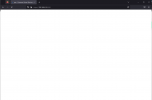
It is checking the page, it reads the page title, and stayss blank...
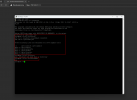
// see screen1.png

checked on 2 different IP assigned, from 2 different PC's (WIN 10 and WIN 11), chrome, edge, IE, cach clearing, restarting etc...

I have now clean instalation with IP of 192.168.2.5
DHCP 192.168.2.10 - 192.168.2.100
static device - one in network 192.168.2.2

CHECKS:
Code:
/etc/hosts
/etc/hostname
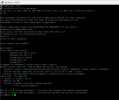
screen2.png

Code:
/etc/network/interfaces
systemctl status pve-cluster.service
screen3.png
Code:
BASH

root@pve:~# ip a
1: lo: <LOOPBACK,UP,LOWER_UP> mtu 65536 qdisc noqueue state UNKNOWN group default qlen 1000
    link/loopback 00:00:00:00:00:00 brd 00:00:00:00:00:00
    inet 127.0.0.1/8 scope host lo
       valid_lft forever preferred_lft forever
    inet6 ::1/128 scope host
       valid_lft forever preferred_lft forever
2: enp2s0: <BROADCAST,MULTICAST,UP,LOWER_UP> mtu 1500 qdisc pfifo_fast master vmbr0 state UP group default qlen 1000
    link/ether 7c:83:34:b5:09:b2 brd ff:ff:ff:ff:ff:ff
3: wlp1s0: <BROADCAST,MULTICAST> mtu 1500 qdisc noop state DOWN group default qlen 1000
    link/ether ec:63:d7:f2:0c:79 brd ff:ff:ff:ff:ff:ff
4: vmbr0: <BROADCAST,MULTICAST,UP,LOWER_UP> mtu 1500 qdisc noqueue state UP group default qlen 1000
    link/ether 7c:83:34:b5:09:b2 brd ff:ff:ff:ff:ff:ff
    inet 192.168.2.5/24 brd 192.168.2.255 scope global vmbr0
       valid_lft forever preferred_lft forever
    inet6 fe80::7e83:34ff:feb5:9b2/64 scope link
       valid_lft forever preferred_lft forever

PLEASE - help me find what is wrong.
 

Attachments
  • screen1.png
    screen1.png
    50.9 KB · Views: 49
  • screen2.png
    screen2.png
    88 KB · Views: 48
  • screen3.png
    screen3.png
    59.8 KB · Views: 48
Last edited:
The warning icon and the horizon line through htttps makes me think that your browser does not accept the self-signed certificate of the default Proxmox installation. Maybe you can add a security exception or change some other setting in your browser or try another browser like Firefox?
 
thanks for the reply, but I have already tried Chrome / Edge / Internet Explorer.
I also did Firefox. - same issue - see screen.
:(
 

Attachments

  • screen4.png
    screen4.png
    20.1 KB · Views: 31
Code:
BASH


root@pve:~# curl -ks https://localhost:8006
<!DOCTYPE html>
<html>
  <head>
    <meta http-equiv="Content-Type" content="text/html; charset=utf-8" />
    <meta http-equiv="X-UA-Compatible" content="IE=edge">
    <meta name="viewport" content="width=device-width, initial-scale=1, maximum-                                                                                                            scale=1, user-scalable=no">
    <title>pve - Proxmox Virtual Environment</title>
    <link rel="icon" sizes="128x128" href="/pve2/images/logo-128.png" />
    <link rel="apple-touch-icon" sizes="128x128" href="/pve2/images/logo-128.png                                                                                                            " />
    <link rel="stylesheet" type="text/css" href="/pve2/ext6/theme-crisp/resource                                                                                                            s/theme-crisp-all.css" />
    <link rel="stylesheet" type="text/css" href="/pve2/ext6/crisp/resources/char                                                                                                            ts-all.css" />
    <link rel="stylesheet" type="text/css" href="/pve2/fa/css/font-awesome.css"                                                                                                             />
    <link rel="stylesheet" type="text/css" href="/pve2/css/ext6-pve.css?ver=6.4-                                                                                                            4" />
    <link rel="stylesheet" type="text/css" href="/pwt/css/ext6-pmx.css?ver=2.5-3                                                                                                            " />

    <script type='text/javascript'>function gettext(buf) { return buf; }</script                                                                                                            >

    <script type="text/javascript" src="/pve2/ext6/ext-all.js"></script>
    <script type="text/javascript" src="/pve2/ext6/charts.js"></script>

    <script type="text/javascript" src="/pve2/js/u2f-api.js"></script>
    <script type="text/javascript" src="/pve2/js/qrcode.min.js"></script>
    <script type="text/javascript">
    Proxmox = {
        Setup: { auth_cookie_name: 'PVEAuthCookie' },
        defaultLang: 'en',
        UserName: '',
        CSRFPreventionToken: 'null'
    };
    </script>
    <script type="text/javascript" src="/proxmoxlib.js?ver=2.5-3"></script>
    <script type="text/javascript" src="/pve2/js/pvemanagerlib.js?ver=6.4-4"></s                                                                                                            cript>
    <script type="text/javascript" src="/pve2/ext6/locale/locale-en.js"></script                                                                                                            >

    <script type="text/javascript">
    if (typeof(PVE) === 'undefined') PVE = {};
    Ext.History.fieldid = 'x-history-field';
    Ext.onReady(function() { Ext.create('PVE.StdWorkspace');});
    </script>

  </head>
  <body>
    <!-- Fields required for history management -->
    <form id="history-form" class="x-hidden">
    <input type="hidden" id="x-history-field"/>
    </form>
  </body>
</html>
 
Amazingly, easiest idea came to my mind, that I checked everyting, switched browsers PC, etc...
but never changed the place where the PVE was connected.

Once I tried SSH the command above, I waited long time on putty - which got me thinking...

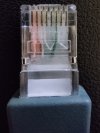
Ethernet Cable.

I'm speachless - new patchcord unpacked for this device - factory fresh - see the screen.
4 out of 8 lines - how is it even possible :O

Thanks for suggestions anyway.
 

Attachments

  • IMG_20221126_173134.jpg
    IMG_20221126_173134.jpg
    325.5 KB · Views: 47