NFS server side copy stopped working

keeka

Renowned Member
Dec 8, 2019
253
41
68
I have successfully been using a privileged lxc to export NFS shares for quite a while. Each share exports a separate ZFS dastaset. Mounting those shares on a Debian 13 desktop system, all file operations worked apparently flawlessly. My client fstab specified NFS vers=4 but I believe v4.2 was in effect and cross-share SSC appeared to be working.
Today, I have had to downgrade the mount to explicit vers=4.1, otherwise a cp or mv from one share to another (and hence between ZFS datasets) resulted in a blocked process, and a zero byte destination file created.
I know this kind of lxc NFS setup is frowned upon but I would like to understand what's changed recently (I estimate within the last month's updates) that stopped NFS 4.2 x-share server side copy working. The LXC NFS server has not been updated for many months and is Debian 12. Desktop is up to date Debian 13 and host is PVE 9 up to date. The latter two have both received numerous updates recently, hence my question.
BTW I asked gemini AI and it started coming up with non-existent mount options and kernel module parameters!
Many thanks.
 
Last edited:
Hi keeka,

Could you confirm with uname -r on the host that it runs 7.0.14-20-pve?

I could reproduce this in a lab with a setup like yours: a privileged Debian 12 CT exporting two ZFS datasets, and a Debian 13 client mounting with vers=4. With the host on 7.0.14-17 or 7.0.14-19 the copy between the two exports works. On 7.0.14-20 it hangs every time, with a 0 byte destination file, exactly as you describe.

Your container is not the cause. In a privileged CT the NFS server is the host kernel's nfsd; the CT only provides the configuration tools. So the host kernel update is what changed.

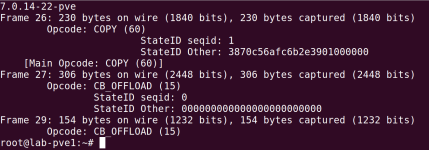
What happens: with NFS 4.2 the client asks the server to do the copy itself (COPY). The server does it in the background, returns an ID for the copy, and calls the client back when it is done (CB_OFFLOAD). On 7.0.14-20 that callback carries an all-zero ID, so the client cannot match it to its copy and keeps waiting. The data does reach the server; the client is just never told. A packet capture shows it clearly.

I have reported it here, with the capture: https://bugzilla.proxmox.com/show_bug.cgi?id=8121

Workarounds until a fixed kernel is available:
  • keep vers=4.1 on the client, as you do now (4.1 has no server-side copy, so the client copies the data itself)
  • or boot the previous kernel on the host (needs a host reboot):
    Code:
    proxmox-boot-tool kernel pin 7.0.14-19-pve
    and once a fixed kernel is out:
    Code:
    proxmox-boot-tool kernel unpin

Lubos
 
  • Like
Reactions: deebsr and keeka
@lubosr Thanks.

I'm currently running kernel 7.0.14-20-pve. I will stick with NFS4.1 and I also disabled NFS4.2 on the lxc based server for the time being.

Re your bug report. I wondered if this issue only surfaces with that kernel and LXC or if it manifests with same/similar kernel running NFS server on bare metal or VM?
 
Last edited:
@keeka I tested both questions.

Bare metal: yes, same problem. I ran the NFS server directly on the PVE node (nfs-kernel-server on the host, exporting the same two ZFS datasets, no container). The copy between the exports hangs the same way. The container plays no part; it is the host kernel's nfsd either way.

Client side of that test: both mounts come from the node (10.110.0.11), and cp has been waiting in nfs42_proc_copy for over 11 minutes. In this run the client already showed the full file size, but cp never returned:

1791325287356.png

VM: an NFS server inside a VM runs on the VM's own kernel, so the PVE host kernel does not matter there. It would only be affected if the guest kernel carries the same change. I have not tested other distributions' kernels.

@deebsr 7.0.14-22 from the test repository does not fix it. Same hang, and a packet capture shows the same all-zero stateid in CB_OFFLOAD. The changelogs of -21 and -22 do not mention a fix either. I added this to the bug report: https://bugzilla.proxmox.com/show_bug.cgi?id=8121#c1

Frame 26 is the server's COPY reply carrying the ID of the copy. Frame 27 is the server's "copy done" callback, with an all-zero ID. Frame 29 is only the client's answer to that callback:

1791325183106.png

Disabling NFS 4.2 on the server, as you did, is a good way to cover all clients until a fixed kernel is available.

Hope this helps

Lubos