Network Drops-out Randomly

oztech74l

New Member
May 19, 2025
2
3
3
Hey guys, long time lurker here and now decided to join after trying to figure out myself and finding a solution for this problem. I searched the forum posts and although almost similar to the issue I'm having but yet unable to find a solution.

Basically, I am having a random network drops out from a few days to everyday or a couple of hours. I mean, at first I thought the only solution is to do a hard reboot on the proxmox machine as I am unable to bring it back to life via ssh (headless server) and then a couple of weeks ago I just realized that it is the network that keeps dropping out and not the server hanging. I am able to regain control and access the GUI and SSH once I "reset" the network by unplugging the network cable and plugging it back in. Since then and until now while investigating and finding a solution, I unplug the cable to regain connection.

I did a lot of changes such as downgrading the kernel, making sure that the ethernet doesn't go to sleep or anything by turning of EEE (Energy Efficiency of the Ethernet), ensuring that it connects at 1gbe... typical solution from chatgpt (yeah I know... but I am in dire needs of fixing this issue).

I also investigate any problem that may show in the log on my managed network switch, rebooting my switch, changing with a known working ethernet cable, to no avail.
The last piece of troubleshooting I did was to use one of my HP Prodesk SFF PC and install the latest Proxmox 8.4 and restore all of my LXC containers and the single VM from Proxmox Backup Server. The original proxmox server I'm having issues with have the 8.3 version in it. -- BOTH are manifesting the same problem.

A couple of other test that I have done so far is to shutdown some of the LXC containers but alas it wasn't that either. I also did some NMAP and ARP checked to see if there is a IP conflict or similar MAC address but not that I could see that are identical.

If this could help, I am attaching the previous journal log of proxmox. If anyone can identify the issue please as I am at lost here. Many thanks!

PS: I will try to reply as soon as I can for any questions that you may have for me in order to fix the problem.
 

Attachments

I'm running an HP Elitedesk 800 G4 and have configured my system like TechHut's latest series on "the ULTIMATE Home Server Setup".

I'm running into the exact same issue as you and have also taken similar steps to try and resolve things, no luck so far either.

I have tried using different Ethernet cables, I've made sure that the network drivers were up-to-date, have disabled EEE, etc.

I think I read that there may be a known issue related to Intel network adapters using the e1000e driver. Would adding a cheap and reliable Intel i210 PCIe NIC work? Who knows, but I'm willing to try anything at this point.

Would appreciate some more insight into this as well.
 
Last edited:
I'm running an HP Elitedesk 800 G4 and have configured my system like TechHut's latest series on "the ULTIMATE Home Server Setup".

I'm running into the exact same issue as you and have also taken similar steps to try and resolve things, no luck so far either.

I have tried using different Ethernet cables, I've made sure that the network drivers were up-to-date, have disabled EEE, etc.

I think I read that there may be a known issue related to Intel network adapters using the e1000e driver. Would adding a cheap and reliable Intel i210 PCIe NIC work? Who knows, but I'm willing to try anything at this point.

Would appreciate some more insight into this as well.
Hi there, I have tried so many command pertaining to networking like disabling EEE and updating network driver but so far this is the one command that looks like fixed my issue (no dropouts for the last couple of days... knock on wood)
Bash:
pre-up ethtool -K eno1 tx off rx off tso off gso off gro off

Basically, you have to add it into your /etc/network/interfaces by using
Code:
nano /etc/network/interfaces

Example context:
Code:
auto eno1
iface eno1 inet manual
    pre-up ethtool -K eno1 tx off rx off tso off gso off gro off

auto vmbr0
iface vmbr0 inet static
    address 192.168.1.100
    netmask 255.255.255.0
    gateway 192.168.1.1
    bridge_ports eno1
    bridge_stp off
    bridge_fd 0

You can restart the bridge by typing: ifdown vmbr0 && ifup vmbr0
And confirm that the fixed is working by typing: ethtool -k eno1 | grep -E 'tx-checksumming|rx-checksumming|tso|gso|gro'

Your output should look like this:

Code:
tx-checksumming: off
rx-checksumming: off
tcp-segmentation-offload: off
generic-segmentation-offload: off
generic-receive-offload: off

Let me know if this worked for you. Cheers!
 
Last edited:
Hi there, I have tried so many command pertaining to networking like disabling EEE and updating network driver but so far this is the one command that looks like fixed my issue (no dropouts for the last couple of days... knock on wood)
Bash:
pre-up ethtool -K eno1 tx off rx off tso off gso off gro off

Basically, you have to add it into your /etc/network/interfaces by using
Code:
nano /etc/network/interfaces

Example context:
Code:
auto eno1
iface eno1 inet manual
    pre-up ethtool -K eno1 tx off rx off tso off gso off gro off

auto vmbr0
iface vmbr0 inet static
    address 192.168.1.100
    netmask 255.255.255.0
    gateway 192.168.1.1
    bridge_ports eno1
    bridge_stp off
    bridge_fd 0

You can restart the bridge by typing: ifdown vmbr0 && ifup vmbr0
And confirm that the fixed is working by typing: ethtool -k eno1 | grep -E 'tx-checksumming|rx-checksumming|tso|gso|gro'

Your output should look like this:

Code:
tx-checksumming: off
rx-checksumming: off
tcp-segmentation-offload: off
generic-segmentation-offload: off
generic-receive-offload: off

Let me know if this worked for you. Cheers!
its work for me too. almost week without any drop.
thanks alot!
 
Hi there, I have tried so many command pertaining to networking like disabling EEE and updating network driver but so far this is the one command that looks like fixed my issue (no dropouts for the last couple of days... knock on wood)
Bash:
pre-up ethtool -K eno1 tx off rx off tso off gso off gro off

Basically, you have to add it into your /etc/network/interfaces by using
Code:
nano /etc/network/interfaces

Example context:
Code:
auto eno1
iface eno1 inet manual
    pre-up ethtool -K eno1 tx off rx off tso off gso off gro off

auto vmbr0
iface vmbr0 inet static
    address 192.168.1.100
    netmask 255.255.255.0
    gateway 192.168.1.1
    bridge_ports eno1
    bridge_stp off
    bridge_fd 0

You can restart the bridge by typing: ifdown vmbr0 && ifup vmbr0
And confirm that the fixed is working by typing: ethtool -k eno1 | grep -E 'tx-checksumming|rx-checksumming|tso|gso|gro'

Your output should look like this:

Code:
tx-checksumming: off
rx-checksumming: off
tcp-segmentation-offload: off
generic-segmentation-offload: off
generic-receive-offload: off

Let me know if this worked for you. Cheers!
I'm giving this a go on my cluster, 3 x HP ProDesk 800 Mini G4. The systems seem to be going offline anywhere between 30mins to a few hours. Found unplugging and reconnectiong power seem to allow the machine to come backonline. However, looking for a stable solution, lets try this one, I'll get back to you if it's successful.
 
Hi there, I have tried so many command pertaining to networking like disabling EEE and updating network driver but so far this is the one command that looks like fixed my issue (no dropouts for the last couple of days... knock on wood)
Bash:
pre-up ethtool -K eno1 tx off rx off tso off gso off gro off

Basically, you have to add it into your /etc/network/interfaces by using
Code:
nano /etc/network/interfaces

Example context:
Code:
auto eno1
iface eno1 inet manual
    pre-up ethtool -K eno1 tx off rx off tso off gso off gro off

auto vmbr0
iface vmbr0 inet static
    address 192.168.1.100
    netmask 255.255.255.0
    gateway 192.168.1.1
    bridge_ports eno1
    bridge_stp off
    bridge_fd 0

You can restart the bridge by typing: ifdown vmbr0 && ifup vmbr0
And confirm that the fixed is working by typing: ethtool -k eno1 | grep -E 'tx-checksumming|rx-checksumming|tso|gso|gro'

Your output should look like this:

Code:
tx-checksumming: off
rx-checksumming: off
tcp-segmentation-offload: off
generic-segmentation-offload: off
generic-receive-offload: off

Let me know if this worked for you. Cheers!
I'm giving this a go on my cluster, 3 x HP ProDesk 800 Mini G4. The systems seem to be going offline anywhere between 30mins to a few hours. Found unplugging and reconnectiong power seem to allow the machine to come backonline. However, looking for a stable solution, lets try this one, I'll get back to you if it's successful.
 
I'm giving this a go on my cluster, 3 x HP ProDesk 800 Mini G4. The systems seem to be going offline anywhere between 30mins to a few hours. Found unplugging and reconnectiong power seem to allow the machine to come backonline. However, looking for a stable solution, lets try this one, I'll get back to you if it's successful.
Just getting back to this, I applied the change last night and so far, it's stable. So, looks like it's fixed now!
 
Hello,
I have the same kind of problem on my Proxmox server.

I lose access to the VMs, and the only way to regain access is a hard reboot of my server.

I don't have extensive knowledge of Linux networking.

Could you help me?

Here is the output of an "ip -a" command.
Code:
1: lo: <LOOPBACK,UP,LOWER_UP> mtu 65536 qdisc noqueue state UNKNOWN group default qlen 1000
    link/loopback 00:00:00:00:00:00 brd 00:00:00:00:00:00
    inet 127.0.0.1/8 scope host lo
       valid_lft forever preferred_lft forever
    inet6 ::1/128 scope host noprefixroute
       valid_lft forever preferred_lft forever
2: enp0s31f6: <BROADCAST,MULTICAST,UP,LOWER_UP> mtu 1500 qdisc fq_codel master vmbr0 state UP group default qlen 1000
    link/ether c0:25:a5:cb:0f:66 brd ff:ff:ff:ff:ff:ff
    altname enxc025a5cb0f66
3: wlp0s20f3: <BROADCAST,MULTICAST> mtu 1500 qdisc noop state DOWN group default qlen 1000
    link/ether b0:3c:dc:38:6b:c5 brd ff:ff:ff:ff:ff:ff
    altname wlxb03cdc386bc5
4: vmbr0: <BROADCAST,MULTICAST,UP,LOWER_UP> mtu 1500 qdisc noqueue state UP group default qlen 1000
    link/ether c0:25:a5:cb:0f:66 brd ff:ff:ff:ff:ff:ff
    inet 192.168.1.201/24 scope global vmbr0
       valid_lft forever preferred_lft forever
    inet6 fe80::c225:a5ff:fecb:f66/64 scope link proto kernel_ll
       valid_lft forever preferred_lft forever
5: tap100i0: <BROADCAST,MULTICAST,PROMISC,UP,LOWER_UP> mtu 1500 qdisc fq_codel master vmbr0 state UNKNOWN group default qlen 1000
    link/ether 4a:6c:69:4e:8d:17 brd ff:ff:ff:ff:ff:ff
6: veth104i0@if2: <BROADCAST,MULTICAST,UP,LOWER_UP> mtu 1500 qdisc noqueue master vmbr0 state UP group default qlen 1000
    link/ether fe:4f:75:22:b4:47 brd ff:ff:ff:ff:ff:ff link-netnsid 2
7: veth108i0@if2: <BROADCAST,MULTICAST,UP,LOWER_UP> mtu 1500 qdisc noqueue master vmbr0 state UP group default qlen 1000
    link/ether fe:40:e8:8a:b3:85 brd ff:ff:ff:ff:ff:ff link-netnsid 0
9: veth102i0@if2: <BROADCAST,MULTICAST,UP,LOWER_UP> mtu 1500 qdisc noqueue master vmbr0 state UP group default qlen 1000
    link/ether fe:d6:eb:aa:25:78 brd ff:ff:ff:ff:ff:ff link-netnsid 3
10: veth109i0@if2: <BROADCAST,MULTICAST,UP,LOWER_UP> mtu 1500 qdisc noqueue master vmbr0 state UP group default qlen 1000
    link/ether fe:f5:7e:a2:1d:84 brd ff:ff:ff:ff:ff:ff link-netnsid 4

I only have one network interface on the server.

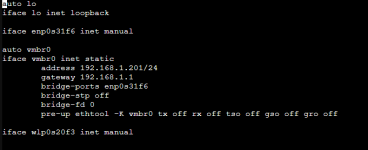
Is the modification to /etc/network/interfaces correct?
Code:
auto lo
iface lo inet loopback

iface enp0s31f6 inet manual

auto vmbr0
iface vmbr0 inet static
        address 192.168.1.201/24
        gateway 192.168.1.1
        bridge-ports enp0s31f6
        bridge-stp off
        bridge-fd 0
        pre-up ethtool -K vmbr0 tx off rx off tso off gso off gro o>

iface wlp0s20f3 inet manual

Thanks :)
 
Is the modification to /etc/network/interfaces correct?
pre-up ethtool -K vmbr0 tx off rx off tso off gso off gro o>
The end of that line "o>" is bogus...