My ZFS Throws an Error on Boot

welcome2.themachine

New Member
Oct 15, 2023
2
0
1
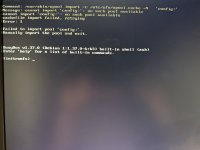
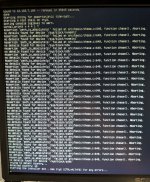
I upgraded to 9 - and managed to break my zpool imports. There seems to be some kind of error in the cache, but despite removing and recreating the cache, nothing fixes the error and allows the system to boot. I've been able to boot via chroot on the proxmox installer. Anybody have any suggestions?

 

Attachments

  • error2-small.jpg
    error2-small.jpg
    70.7 KB · Views: 19
  • error1-small.jpg
    error1-small.jpg
    361.6 KB · Views: 18
please provide the kernel cmdline the failed boot (in the initrd shell, do `cat /proc/cmdline`)
 
please provide the kernel cmdline the failed boot (in the initrd shell, do `cat /proc/cmdline`)
cat /proc/cmdline yeilds:

Code:
initrd=\EFI\proxmox\6.14.8-2-pve\initrd.img-6.14.8-2pve #root=ZFS=rpool/ROOT/pve-1 boot=zfs quiet amd_iommu=on pci=noaer iommu=pt pcie_acs_override=downstream,multifunction
 
could you try removing the cache file, and then running "update-initramfs -u -k all"?