

Hey everyone! I've got a small home lab server running PVE but ran into an odd problem (almost certainly of my own making) after replacing a hard drive I was using for some smaller VMs with an SSD.
The core problem is that I've lost the ability to take snapshots on all but one VM (my sole Windows one). On the other 3 VMs, I get the message "The current guest configuration does not support taking new snapshots." This used to work.
Right now, this server (which is really just a consumer desktop) has an NVME drive and a SATA SSD. When I first installed Proxmox, that SATA SSD was instead a SATA HDD. I went with the storage configuration Proxmox recommended during initial setup and both volumes were configured as LVM volumes. Or at least, that's what I thought. Here's what the LVM and LVM-Thin screens from my management console say:
LVM

LVM-Thin

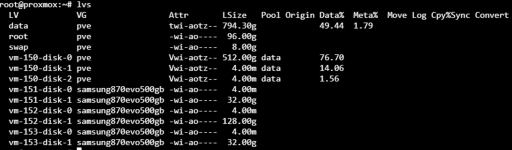
This is the output of the lvs command on my Proxmox host:
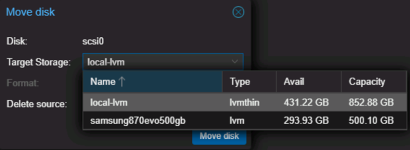
I tried to relocate one of my other VMs disks back to the NVME for testing and it claims that volume is thin:
There is juuuust enough room on the NVME to hold my other 3 VMs temporarily so I'm guessing what I need to do is move all my VMs back to the NVME and reinitialize the SATA SSD as a thin volume. After that point, snapshots should work again if I move the VMs back?
I just want to confirm I'm on the right track before I go through with it. Also, can someone help me understand what the Storage interface is telling me in those screenshots above? At first glance, it appears to be indicating that both volume are thick provisioned but that doesn't seem to be the case.
Thanks all!
The core problem is that I've lost the ability to take snapshots on all but one VM (my sole Windows one). On the other 3 VMs, I get the message "The current guest configuration does not support taking new snapshots." This used to work.
Right now, this server (which is really just a consumer desktop) has an NVME drive and a SATA SSD. When I first installed Proxmox, that SATA SSD was instead a SATA HDD. I went with the storage configuration Proxmox recommended during initial setup and both volumes were configured as LVM volumes. Or at least, that's what I thought. Here's what the LVM and LVM-Thin screens from my management console say:
LVM
LVM-Thin
This is the output of the lvs command on my Proxmox host:
I tried to relocate one of my other VMs disks back to the NVME for testing and it claims that volume is thin:
There is juuuust enough room on the NVME to hold my other 3 VMs temporarily so I'm guessing what I need to do is move all my VMs back to the NVME and reinitialize the SATA SSD as a thin volume. After that point, snapshots should work again if I move the VMs back?
I just want to confirm I'm on the right track before I go through with it. Also, can someone help me understand what the Storage interface is telling me in those screenshots above? At first glance, it appears to be indicating that both volume are thick provisioned but that doesn't seem to be the case.
Thanks all!

