

Local storage is filled during a full backup

JeanPhil

New Member
Nov 11, 2024
8
1
3
Hi all,

I have a Proxmox VE 8.2.2 with few VM and a Nakivo v11 Trial that support Proxmox platform. This Nakivo makes backups of the main VM which is a Windows Server.

This morning i found the Windows VM stuck in I\O error state. Impossible to stop or start the VM. After a forced reboot of the host i checked disks and space utilization and everything it's ok.

I investigated further and noticed that during the Nakivo full backup of saturday night, the "local" storage has reached maximum capacity. One week before 95GB out of 100GB. The I\O error of the VM it is due to the full space on "local" i think so.

Nakivo backup send data to an external storage (NAS).

I need to understand why the "local" has filled up, so which log should I look at?
 

Attachments

  • local storage full.JPG
    local storage full.JPG
    100.2 KB · Views: 9
  • Like
Reactions: dgsnb
Hi,

This Nakivo makes backups of the main VM which is a Windows Server.
while I'm not familiar with this software - but it seems to the backups by itself, not using any built-in facilities from Proxmox VE, judging from a quick look.
This means you have to talk with the software vendor directly, as it doesn't have anything to do with Proxmox VE.
On a hunch, I guess it does something similar to "backup fleecing" that features with Proxmox Backup Server, as in using a temporary file during the backup process to better handle I/O - but a bad implementation which does not limit size.
 
Hi,

my mistake because when i add Proxmox in the Nakivo inventory, it ask also about the "Temporary file location"... default value is "/tmp", so temporary files goes in the "local" for that reason I deduce.

The description of this field is:
The specified path will be used for creating temporary overlay files for raw disk images.
The temporary overlay files are created to guarantee the backup is consistent (source disk is not modified when the backup is in progress).
Temporary overlay files of QEMU images will be created in the QEMU image location.Please make sure there is sufficient free space in the specified location.


Is there a way to get everything to end up in a tmp in local-lvm? Or better to expand "local" storage?
 
Actually you can edit the NAKIVO Inventory and change the location of the temporary file location to a new location which has enough free space.
Hi,

yes Nakivo support team said the same thing.

So, if the default temp location when adding Proxmox in Nakivo is "/tmp", and "local" storage will be used for the backup process, how can I indicate to use "local-lvm" storage? Which is the same as where the VM disks reside.
 
Hi,

yes Nakivo support team said the same thing.

So, if the default temp location when adding Proxmox in Nakivo is "/tmp", and "local" storage will be used for the backup process, how can I indicate to use "local-lvm" storage? Which is the same as where the VM disks reside.
Are you sure this will work? Because local-lvm can only contain only container and vm data, maybe Nakivo need something else? Do I understand you correctly that you want to change the default temp location of Nakivos backup? Shouldn't that be explained in Nakivos documentation?

Regards, Johannes.
 
local-lvm - as the name implies - is an LVM storage, not a directory. so unless nakivo has native support to create and use LVs as overlay images, then that cannot work. you could create an LV, format it and mount it somewhere and configure that as tempdir

https://pve.proxmox.com/pve-docs/pve-admin-guide.html#chapter_lvm contains some pointers if you want to go down that route
 
local-lvm - as the name implies - is an LVM storage, not a directory. so unless nakivo has native support to create and use LVs as overlay images, then that cannot work. you could create an LV, format it and mount it somewhere and configure that as tempdir

https://pve.proxmox.com/pve-docs/pve-admin-guide.html#chapter_lvm contains some pointers if you want to go down that route
Hi Fabian,

i understand, thank you for the explanation.

I have two questions more.

1) Can i expand "local" storage?

2) If i have to create an LV, can i do it with actual storage config? I attach the current status of pve disks. Because i think i have to reduce sda3 to have the space needed for a new LV.

Thank you in advance
 

Attachments

  • pve disks.JPG
    pve disks.JPG
    43.3 KB · Views: 9
Hi Fabian,

i understand, thank you for the explanation.

I have two questions more.

1) Can i expand "local" storage?

2) If i have to create an LV, can i do it with actual storage config? I attach the current status of pve disks. Because i think i have to reduce sda3 to have the space needed for a new LV.

Thank you in advance
that depends how your storage is configured at the moment ;) maybe you can send the output/contents of
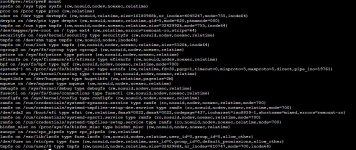
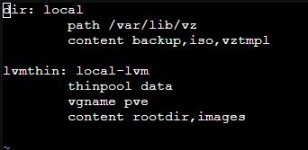
- /etc/pve/storage.cfg
- mount
- vgs
- lvs

?
 
that depends how your storage is configured at the moment ;) maybe you can send the output/contents of
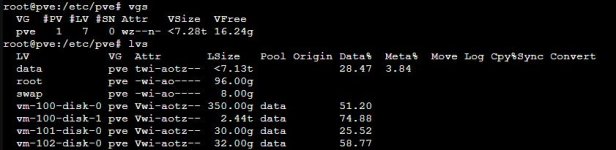
- /etc/pve/storage.cfg
- mount
- vgs
- lvs

?
Thank you for support!

I attach the contents.
 

Attachments

  • mount.JPG
    mount.JPG
    209.1 KB · Views: 15
  • storage.cfg.JPG
    storage.cfg.JPG
    17.7 KB · Views: 15
  • vgs-lvs.JPG
    vgs-lvs.JPG
    42.1 KB · Views: 15
okay. you can either follow the steps I linked earlier to move /var/lib/vz (the "local" storage) to an LV, or create an LV for a different path and use that as tempdir just for narkivo. the LV needs to be created on the thin pool (pve/data).
 
okay. you can either follow the steps I linked earlier to move /var/lib/vz (the "local" storage) to an LV, or create an LV for a different path and use that as tempdir just for narkivo. the LV needs to be created on the thin pool (pve/data).
Ok Fabian,

I created a new LV named "nkvtemp", 1TB size. Then I've created filesystem ext4 on it.

I need to mount it true? And also i have to add it to fstab file? Can you help me with that. I don't want to make mistakes :)

And so, in Nakivo, what will be the path to use it?
 

Attachments

  • lvs.JPG
    lvs.JPG
    38.6 KB · Views: 6
yes, you need to mount it and either add a mount unit or an fstab entry. that will control the path where it gets mounted, which you can then configure in narkivo
 
  • Like
Reactions: dgsnb
yes, you need to mount it and either add a mount unit or an fstab entry. that will control the path where it gets mounted, which you can then configure in narkivo
Helo Fabian,

ok mounted the new LV in /mnt/nkvtemp and added it to fstab. This night Nakivo did a full backup, using the new LV as temp location. Everything went well!

Is there a way to add this path to Proxmox web console? like other storage. so as to have the summary like local and local-lvm storages.
 
Is there a way to add this path to Proxmox web console? like other storage. so as to have the summary like local and local-lvm storages.
datacenter -> storage -> add directory -> use the path you setup as path ;)
 
  • Like
Reactions: dgsnb

