[SOLVED] Local-lvm filling up

MintyLoae

New Member
Dec 21, 2024
2
0
1
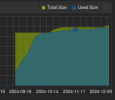
The local-lvm:
lvm.png

I believe the source of most of the data is the TrueNAS vm boot disk but when I looked into it, I couldn't find the source of the 40G+ data.
lvs:
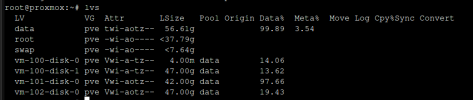
lvs.png

Inside the TrueNAS vm:
TrueNas.png

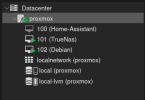
My overall VM setup:
vms.png

Any help in identifying where my storage is actually going is appreciated.
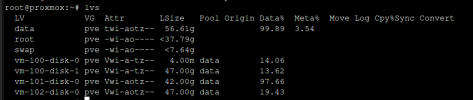
 

Attachments

  • lvs.png
    lvs.png
    20.2 KB · Views: 3
If there is no effective overuse, the most likely alternative causes are:
- trim/discard not enabled in the vms (to deallocate the free space)
- too many snapshots and/or from too long ago and/or with very large differences
 
  • Like
Reactions: MintyLoae
If there is no effective overuse, the most likely alternative causes are:
- trim/discard not enabled in the vms (to deallocate the free space)
- too many snapshots and/or from too long ago and/or with very large differences
I just reduced my local-lvm data from 60GB to 24GB by running this in TrueNAS
Bash:
zpool trim boot-pool
I had read the other threads on this and did fstrim on all my other vms and saw no change but I didn't bother with TrueNAS before because I thought it had auto trim on but I realized thats for the storage pool, not the boot pool. But is there any reason why I would need to trim the boot pool? It shouldn't really be gaining any data right? Anyhow, I will run the trim on a cronjob if it keeps taking up space later. Thanks a lot.