Local-LVM disk lost

Olda31

New Member
Sep 8, 2020
5
0
1
26
Hello,


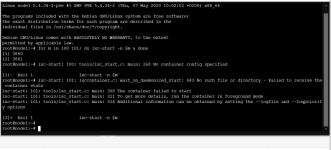
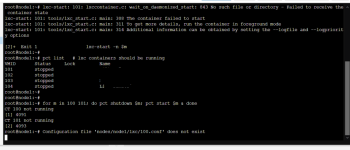
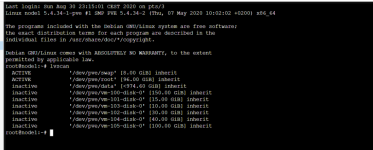
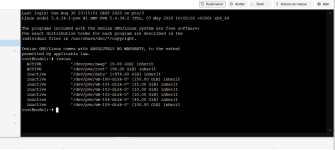
After having a power cut, all the data from the LXC & KVM VMs disappeared and I really don't know why, here are some screens:

1599524206377.png

1599524322807.png

1599524387733.png

1599524431010.png

I would like your help, I have too much data, thank you.

sorry if I am explaining it badly.
 

Attachments

  • 1599524255588.png
    1599524255588.png
    98.5 KB · Views: 46
  • 1599524406963.png
    1599524406963.png
    113.1 KB · Views: 38
Hey,

could you check what LVM has to say with
Code:
pvscan
vgscan
vgcfgrestore --list <your volume group>

Have you tried to activate them with lvm vgchange -ay /dev/pve/...? What does it output?
 
Hi,

Thanks for your reply, I see this:

Code:
root@node1:~# pvscan
  PV /dev/sda3   VG pve             lvm2 [<1.09 TiB / <16.00 GiB free]
  Total: 1 [<1.09 TiB] / in use: 1 [<1.09 TiB] / in no VG: 0 [0   ]
root@node1:~# vgscan
  Reading all physical volumes.  This may take a while...
  Found volume group "pve" using metadata type lvm2
root@node1:~# vgcfgrestore --list pve
  
  File:         /etc/lvm/archive/pve_00000-630724376.vg
  Couldn't find device with uuid Szokvm-YmvL-mV7K-9zSq-P5D1-jLFQ-XWxW9w.
  VG name:      pve
  Description:  Created *before* executing 'pvscan --cache --activate ay 8:3'
  Backup Time:  Wed Aug 26 19:03:14 2020

  
  File:         /etc/lvm/archive/pve_00001-1479909991.vg
  VG name:      pve
  Description:  Created *before* executing '/sbin/lvcreate -aly -V 157286400k --name vm-100-disk-0 --thinpool pve/data'
  Backup Time:  Thu Aug 27 20:19:39 2020

  
  File:         /etc/lvm/archive/pve_00002-1522221752.vg
  VG name:      pve
  Description:  Created *before* executing '/sbin/lvcreate -aly -V 15728640k --name vm-101-disk-0 --thinpool pve/data'
  Backup Time:  Thu Aug 27 22:09:24 2020

  
  File:         /etc/lvm/archive/pve_00003-2080527411.vg
  VG name:      pve
  Description:  Created *before* executing '/sbin/lvcreate -aly -V 31457280k --name vm-102-disk-0 --thinpool pve/data'
  Backup Time:  Thu Aug 27 22:14:04 2020

  
  File:         /etc/lvm/archive/pve_00004-220023468.vg
  VG name:      pve
  Description:  Created *before* executing '/sbin/lvcreate -aly -V 10485760k --name vm-103-disk-0 --thinpool pve/data'
  Backup Time:  Thu Aug 27 22:17:04 2020

  
  File:         /etc/lvm/archive/pve_00005-33791041.vg
  VG name:      pve
  Description:  Created *before* executing '/sbin/lvremove -f pve/vm-102-disk-0'
  Backup Time:  Thu Aug 27 22:49:12 2020

  
  File:         /etc/lvm/archive/pve_00006-938242041.vg
  VG name:      pve
  Description:  Created *before* executing '/sbin/vgs --separator : --noheadings --units b --unbuffered --nosuffix --options vg_name,vg_size,vg_free,lv_count'
  Backup Time:  Thu Aug 27 22:49:12 2020

  
  File:         /etc/lvm/archive/pve_00007-1358231476.vg
  VG name:      pve
  Description:  Created *before* executing '/sbin/vgs --separator : --noheadings --units b --unbuffered --nosuffix --options vg_name,vg_size,vg_free,lv_count'
  Backup Time:  Thu Aug 27 22:49:12 2020

  
  File:         /etc/lvm/archive/pve_00008-1040163859.vg
  VG name:      pve
  Description:  Created *before* executing '/sbin/vgs --separator : --noheadings --units b --unbuffered --nosuffix --options vg_name,vg_size,vg_free,lv_count'
  Backup Time:  Thu Aug 27 22:49:22 2020

  
  File:         /etc/lvm/archive/pve_00009-1401868355.vg
  VG name:      pve
  Description:  Created *before* executing '/sbin/vgs --separator : --noheadings --units b --unbuffered --nosuffix --options vg_name,vg_size,vg_free,lv_count'
  Backup Time:  Thu Aug 27 22:49:22 2020

  
  File:         /etc/lvm/archive/pve_00010-70074952.vg
  VG name:      pve
  Description:  Created *before* executing '/sbin/lvcreate -aly -V 31457280k --name vm-102-disk-0 --thinpool pve/data'
  Backup Time:  Thu Aug 27 22:59:09 2020

  
  File:         /etc/lvm/archive/pve_00011-1646948599.vg
  VG name:      pve
  Description:  Created *before* executing '/sbin/lvcreate -aly -V 41943040k --name vm-104-disk-0 --thinpool pve/data'
  Backup Time:  Fri Aug 28 21:07:33 2020

  
  File:         /etc/lvm/archive/pve_00012-881056269.vg
  VG name:      pve
  Description:  Created *before* executing '/sbin/lvcreate -aly -V 104857600k --name vm-105-disk-0 --thinpool pve/data'
  Backup Time:  Fri Aug 28 21:24:35 2020

  
  File:         /etc/lvm/archive/pve_00013-1214387385.vg
  VG name:      pve
  Description:  Created *before* executing '/sbin/lvcreate -n snap_vm-101-disk-0_vzdump -pr -s pve/vm-101-disk-0'
  Backup Time:  Wed Sep  2 22:46:38 2020

  
  File:         /etc/lvm/archive/pve_00014-1204837423.vg
  VG name:      pve
  Description:  Created *before* executing '/sbin/lvremove -f pve/snap_vm-101-disk-0_vzdump'
  Backup Time:  Wed Sep  2 22:47:27 2020

  
  File:         /etc/lvm/backup/pve
  VG name:      pve
  Description:  Created *after* executing '/sbin/lvremove -f pve/snap_vm-101-disk-0_vzdump'
  Backup Time:  Wed Sep  2 22:47:27 2020

root@node1:~# lvm vgchange -ay /dev/pve/data
  Invalid volume group name pve/data.
  Run `vgchange --help' for more information.

 
vgcfgrestore pve --test
if this works you can remove the --test, it will restore metadata for the pve volumegroup from the most recent backup (Wed Sep 2 22:47:27 2020).

Than you can try lvm lvchange -ay /dev/pve/vm-<id>... for the VMs and data.
 
I have an error


Code:
root@node1:/dev/pve# vgcfgrestore pve --test
  TEST MODE: Metadata will NOT be updated and volumes will not be (de)activated.
  Volume group pve has active volume: swap.
  Volume group pve has active volume: root.
  WARNING: Found 2 active volume(s) in volume group "pve".
  Restoring VG with active LVs, may cause mismatch with its metadata.
Do you really want to proceed with restore of volume group "pve", while 2 volume(s) are active? [y/n]: y
  Consider using option --force to restore Volume Group pve with thin volumes.
  Restore failed.
root@node1:/dev/pve# lvm lvchange -ay /dev/pve/dev/pve/vm-100-disk-0
  "pve/dev/pve/vm-100-disk-0": Invalid path for Logical Volume.
root@node1:/dev/pve# lvm lvchange -ay /dev/pve/vm-100-disk-0
  Check of pool pve/data failed (status:1). Manual repair required!
root@node1:/dev/pve# lvm lvchange -ay /dev/pve/vm-103-disk-0
  Check of pool pve/data failed (status:1). Manual repair required!
 
I have this error with the command lvconvert --repair pve/data

Code:
  WARNING: LV pve/data_meta0 holds a backup of the unrepaired metadata. Use lvremove when no longer required.
 
lvresize --poolmetadatasize +1G pve/data will increase the space for metadata, since it is possible that it's full.

Could you try to run vgcfgrestore pve --test(and if it works, without --test) from a live OS with chroot into your installation.
 
I still have errors :(

Code:
root@node1:~# lvresize --poolmetadatasize +1G pve/data
  Size of logical volume pve/data_tmeta changed from <9.95 GiB (2546 extents) to <10.95 GiB (2802 extents).
  Logical volume pve/data_tmeta successfully resized.
root@node1:~# lvconvert --repair pve/data
  Volume group "pve" has insufficient free space (1037 extents): 2802 required.
  WARNING: LV pve/data_meta1 holds a backup of the unrepaired metadata. Use lvremove when no longer required.
root@node1:~# vgcfgrestore pve --test
  TEST MODE: Metadata will NOT be updated and volumes will not be (de)activated.
  Volume group pve has active volume: swap.
  Volume group pve has active volume: root.
  WARNING: Found 2 active volume(s) in volume group "pve".
  Restoring VG with active LVs, may cause mismatch with its metadata.
Do you really want to proceed with restore of volume group "pve", while 2 volume(s) are active? [y/n]: y
  Consider using option --force to restore Volume Group pve with thin volumes.
  Restore failed.
 
What live CD did you use? It is important that everything in the pve-pool is inactive, so make sure you check that before you run any of the commands. vgchange -a n pve should set all lv's to inactive, you can verify that with lvscan.
 
Hallo,
ich hänge mich mal hier an, paast wohl besser, da das Problem ähnlich zu sein scheint.
Nach einem Stromausfall habe ich das Problem, dass mein Home Assistant, der in PVE102 liegt, nicht mehr startet. Ich habe die Google-KI zu Rate gezogen und herausgefunden, dass es ein backup von vor dem Ausfall vom November gibt.

root@pve:~# ls -l /etc/lvm/archive/


total 68


-rw------- 1 root root 3432 Apr 25 2024 pve_00001-2129874085.vg


-rw------- 1 root root 3878 Apr 25 2024 pve_00002-116758980.vg


-rw------- 1 root root 3825 Apr 25 2024 pve_00003-1673338862.vg


-rw------- 1 root root 4271 Apr 25 2024 pve_00004-774651390.vg


-rw------- 1 root root 4218 Nov 11 2024 pve_00005-818278080.vg


-rw------- 1 root root 4660 Nov 11 2024 pve_00006-64565414.vg


-rw------- 1 root root 4612 Nov 11 2024 pve_00007-1770594714.vg


-rw------- 1 root root 5058 Nov 11 2024 pve_00008-1613253925.vg


-rw------- 1 root root 4960 Jan 10 16:35 pve_00009-312487179.vg


-rw------- 1 root root 5372 Jan 10 16:35 pve_00010-1255992563.vg


root@pve:~#

Beim Versuch, mittels
vgcfgrestore <VolumeGroupName> -f /etc/lvm/archive/myvg_00001.vg
die Datei vom 11.November zu restoren, kam dann die Fehlermeldung: Warning: Found 2 active Volumes in volume group "pve". Restoring VG with active LVs, may cause mismatch with its metadata.
Da habe ich lieber mal abgebrochen und versuche, hier nochmal richtigen Rat zu bekommen, was ich tun kann. Leider kenne ich mich in Linux un dauch mit Proxmox nicht so genau aus, lief halt bis jetzt.

Kann mir hier jemand helfen?