[SOLVED] Is Intel SSD DC P3600 PCI-e supported?

LiSergey

Active Member
Mar 1, 2016
51
4
28
I'm considering purchase of

SSD INTEL DC P3600 SSDPEDME800G401 800GB, PCI-E AIC (add-in-card), PCI-E x4

Does anybody know if this piece of wonder does work correctly in ProxmoxVE 3.4 or 4.2??

Does it give speeds close to as announced
read up to 2600 MB/s, write up to 1000 MB/s
?
 
We have tested Intel 750 NVMe with success, so I assume also the one you post here should work.
 
yes, this wunderpiece works with 2.6.32-46-pve

kern.log:
Code:
kernel: nvme 0000:0c:00.0: PCI INT A -> GSI 26 (level, low) -> IRQ 26
kernel: nvme 0000:0c:00.0: setting latency timer to 64
kernel: IRQ 26/nvme0q0: IRQF_DISABLED is not guaranteed on shared IRQs

Code:
# ls -l /dev/nvme0*
crw------- 1 root root 248, 0 Jun 14 08:50 /dev/nvme0
brw-rw---T 1 root disk 259, 0 Jun 14 08:50 /dev/nvme0n1
 
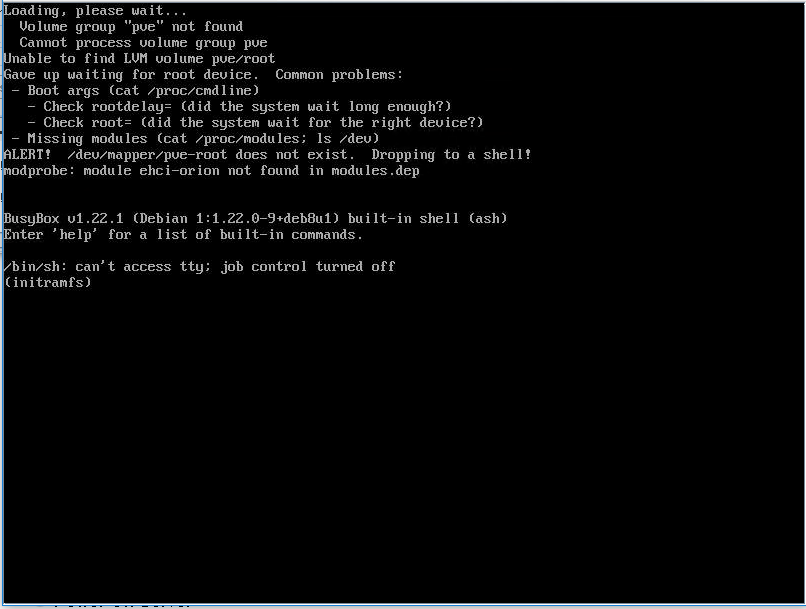
hey Tom, I'm struggling to get e Proxmox 4.2 to boot correctly from a Intel 750 nvme drive. I wonder if you could provide some pointers please...
Intel X9SRL-f motherboard, 1.2TB Intel 750, partitioned as ext4 during install, AHCI boot. System boots but fails to find the LVM volume pve/root - see screenshot attached.
Im guessing it shouldn't be this hard!
 

Attachments

  • boot750.png
    boot750.png
    52.8 KB · Views: 14
Hi,
which iso do you used?
Only the proxmox-ve_4.2-725d76f0-28.iso will work!
 
hey Tom, I'm struggling to get e Proxmox 4.2 to boot correctly from a Intel 750 nvme drive. I wonder if you could provide some pointers please...
Intel X9SRL-f motherboard, 1.2TB Intel 750, partitioned as ext4 during install, AHCI boot. System boots but fails to find the LVM volume pve/root - see screenshot attached.
Im guessing it shouldn't be this hard!

I have the same issue,

disk Intel 750 1.2TB
Proxmox 4.3
UEFI BIOS

1481291734.png


@tom @dietmar
 
Ok, solved:

When the server is booting and showing the grub selector, press "e" to edit options, and edit the line:

linux /boot/vmlinuz-4.4.13-1-pve root=/dev/mapper/pve-root ro quiet intel_iommu=on rootdelay=15

Then press F10 to save, and boot is ok
 
I found 15 was too short a delay and sometimes would fail to initialise correctly - I reverted to 30 and its been 100% reliable since.