Hello,
I have a problem on several VMs running with Windows (Windows Server 2022 or Windows 10) regarding IPv6 connectivity in my Proxmox VE 7.3.4.
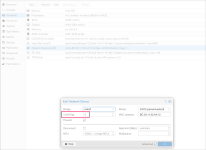
Indeed, on each VM I have a network device in model VirtIO (paravirtualized).
The guest agent (virtio-win-0.1.173-2) is installed on Windows.
When I define in Windows an IPv4 and IPv6 address, no problem with the IPv4 connectivity, but with IPv6 I have strange phenomena : I can't ping the gateway. I have to shut down the VM, change the network card model from VirtIO to Intel E1000, restart the VM, reconfigure the IPv6 address, then I ping successful the gateway (and internet), then I have to stop the VM, change the model of the network card again from Intel E1000 to VirtIO, and then no more problem: IPv6 works.
I had this same problem on several Windows VMs and therefore both Windows Server 2022 and Windows 10.
However, it happens after a few days that I sometimes have IPv6 disconnections with VirtIO and then it works again afterwards.
It therefore seems that there are stability issues with VirtIO, IPv6 and Windows VMs.
Has anyone seen this problem before?
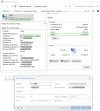
Also: I'm surprised (but maybe it's normal), that my VirtIO network card shows 10Gbps connectivity while I'm on 1Gbps (please see the screenshot in attach) ?
thanks
Fabien
I have a problem on several VMs running with Windows (Windows Server 2022 or Windows 10) regarding IPv6 connectivity in my Proxmox VE 7.3.4.
Indeed, on each VM I have a network device in model VirtIO (paravirtualized).
The guest agent (virtio-win-0.1.173-2) is installed on Windows.
When I define in Windows an IPv4 and IPv6 address, no problem with the IPv4 connectivity, but with IPv6 I have strange phenomena : I can't ping the gateway. I have to shut down the VM, change the network card model from VirtIO to Intel E1000, restart the VM, reconfigure the IPv6 address, then I ping successful the gateway (and internet), then I have to stop the VM, change the model of the network card again from Intel E1000 to VirtIO, and then no more problem: IPv6 works.
I had this same problem on several Windows VMs and therefore both Windows Server 2022 and Windows 10.
However, it happens after a few days that I sometimes have IPv6 disconnections with VirtIO and then it works again afterwards.
It therefore seems that there are stability issues with VirtIO, IPv6 and Windows VMs.
Has anyone seen this problem before?
Also: I'm surprised (but maybe it's normal), that my VirtIO network card shows 10Gbps connectivity while I'm on 1Gbps (please see the screenshot in attach) ?
thanks
Fabien