i915 mediated device split passthrough iGPU GVT-g on i7-8700 configuration

pszkotak

New Member
Dec 19, 2024
2
0
1
Hello,
I'm struggling for a long time to configure the iGPU split passthrough.

Platform:
Proxmox 8.3.1
HP Elitedesk 800 G4 SFF with i7-8700
latest BIOS (02.29.01 Rev.A, October 2024)

Configuration:

Not sure which one should I edit, and if should execute 'update-grub' or 'proxmox-boot-tool refresh', so doing both just in case.
/etc/default/grub
Code:
GRUB_CMDLINE_LINUX_DEFAULT="quiet intel_iommu=on i915.enable_gvt=1 iommu=pt pcie_acs_override=downstream,multifunction video=efifb:off video=vesa:off vfio_iommu_type1.allow_unsafe_interrupts=1 kvm.ignore_msrs=1 modprobe.blacklist=radeon,nouveau,nvidia,nvidiafb,nvidia-gpu"

/etc/kernel/cmdline
Code:
root=ZFS=rpool/ROOT/pve-1 boot=zfs intel_iommu=on i915.enable_gvt=1 iommu=pt pcie_acs_override=downstream,multifunction video=efifb:off video=vesa:off vfio_iommu_type1.allow_unsafe_interrupts=1 kvm.ignore_msrs=1 modprobe.blacklist=radeon,nouveau,nvidia,nvidiafb,nvidia-gpu>

/etc/modprobe.d/i915.conf
Code:
options i915 enable_gvt=1 enable_guc=0 enable_sagv=0

/etc/modules
Code:
# Modules required for PCI passthrough
vfio
vfio_iommu_type1
vfio_pci
vfio_virqfd

# Modules required for Intel GVT
kvmgt
intel_gvt
exngt
vfio_mdev
i915
mdev

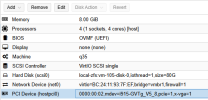
I am able to add the MDev to the Ubuntu VM, selecting V5_8 here.
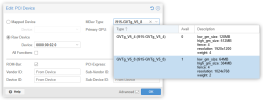
1734620726494.png

1734620807756.png

I see it on the VM:
Code:
piter@containers:~$ lsb_release -a
No LSB modules are available.
Distributor ID: Ubuntu
Description:    Ubuntu 24.04.1 LTS
Release:        24.04
Codename:       noble
piter@containers:~$ lspci | grep VGA
01:00.0 VGA compatible controller: Intel Corporation CoffeeLake-S GT2 [UHD Graphics 630]
piter@containers:~$ modinfo i915 | grep -i version
srcversion:     96F5B446D0A3A6FFF79D40D
vermagic:       6.8.0-51-generic SMP preempt mod_unload modversions
parm:           invert_brightness:Invert backlight brightness (-1 force normal, 0 machine defaults, 1 force inversion), please report PCI device ID, subsystem vendor and subsystem device ID to dri-devel@lists.freedesktop.org, if your machine needs it. It will then be included in an upcoming module version. (int)

Problem:

In the dmesg on the VM I see error messages and crashes of the i915 driver.
Those looking suspicious to me:
i915 0000:01:00.0: [drm] Failed to find VBIOS tables (VBT)
i915 0000:01:00.0: [drm] *ERROR* Failed to disable SAGV (-110)
i915 0000:01:00.0: Platform does not support port F
i915 0000:01:00.0: [drm] *ERROR* [CRTC:51:pipe A] flip_done timed out


Crashes on:
intel_sagv_init+0x270/0x320
assert_port_valid+0x79/0xa0
drm_wait_one_vblank+0x1f1/0x210

Full log:
https://pastebin.com/54vgZuT1

What would you do at this point? I guess I'm missing something. All hints are appreciated, as I've already burned more than 40h on it.

Best Regards,
Piotr
 
Add it as a mediated device.

What I did was only these steps, on each node of my cluster:

/etc/modules, add:

kvmgt

then run
update-initramfs -u -k all


/etc/default/grub, add to line:

GRUB_CMDLINE_LINUX_DEFAULT="quiet intel_iommu=on iommu=pt i915.enable_gvt=1"

then run
update-grub


reboot the nodes, and verify (on each):

ls /sys/bus/pci/devices/0000:00:02.0/mdev_supported_types
(should list something similar to i915-GVTg_V5_4 i915-GVTg_V5_8)


In the UI go to Datacenter > Resource Mappings > PCI Devices > Add
give a name, choose the first node, and check "Use with mediated devices", then select the detected GPU, press Create

In the PCI devices list, click on the "+" icon next to the mediated entry you added, and add the same device from the rest of the nodes.
When done, should see a green checkmark in the Status column for each.

Then go to your VM > Hardware > Add > PCI Device and from the Mapped devices list choose your mediated device added above.
Select the GPU consuming the smallest resources as listed, so you can use the rest of the capacity for other VMs too.
 
  • Like
Reactions: pszkotak
Add it as a mediated device.

What I did was only these steps, on each node of my cluster:

/etc/modules, add:

kvmgt

then run
update-initramfs -u -k all


/etc/default/grub, add to line:

GRUB_CMDLINE_LINUX_DEFAULT="quiet intel_iommu=on iommu=pt i915.enable_gvt=1"

then run
update-grub


reboot the nodes, and verify (on each):

ls /sys/bus/pci/devices/0000:00:02.0/mdev_supported_types
(should list something similar to i915-GVTg_V5_4 i915-GVTg_V5_8)


In the UI go to Datacenter > Resource Mappings > PCI Devices > Add
give a name, choose the first node, and check "Use with mediated devices", then select the detected GPU, press Create

In the PCI devices list, click on the "+" icon next to the mediated entry you added, and add the same device from the rest of the nodes.
When done, should see a green checkmark in the Status column for each.

Then go to your VM > Hardware > Add > PCI Device and from the Mapped devices list choose your mediated device added above.
Select the GPU consuming the smallest resources as listed, so you can use the rest of the capacity for other VMs too.

Does adding the GPU consuming the smallest resources affect anything about the GPU? For example I am building a Plex VM and want to mediate my iGPU, with the goal of using hardware transcoding. I mostly transcode 1080p videos, but I do use the occasional 4K video. Does using the GPU with the smaller resources affect the transcode ability?
 
No idea because I don't use it for that. I use it to run 3D CAD software with remote access to the VM and that works just fine.
 
  • Like
Reactions: spetrillo
Add it as a mediated device.

What I did was only these steps, on each node of my cluster:

/etc/modules, add:

kvmgt

then run
update-initramfs -u -k all


/etc/default/grub, add to line:

GRUB_CMDLINE_LINUX_DEFAULT="quiet intel_iommu=on iommu=pt i915.enable_gvt=1"

then run
update-grub


reboot the nodes, and verify (on each):

ls /sys/bus/pci/devices/0000:00:02.0/mdev_supported_types
(should list something similar to i915-GVTg_V5_4 i915-GVTg_V5_8)


In the UI go to Datacenter > Resource Mappings > PCI Devices > Add
give a name, choose the first node, and check "Use with mediated devices", then select the detected GPU, press Create

In the PCI devices list, click on the "+" icon next to the mediated entry you added, and add the same device from the rest of the nodes.
When done, should see a green checkmark in the Status column for each.

Then go to your VM > Hardware > Add > PCI Device and from the Mapped devices list choose your mediated device added above.
Select the GPU consuming the smallest resources as listed, so you can use the rest of the capacity for other VMs too.
This is exactly what I did.
Since that time I managed to move forward.
The change that I made was switching from ubuntu to debian guest OS.
No clue what is the difference and why it worked.

Does adding the GPU consuming the smallest resources affect anything about the GPU? For example I am building a Plex VM and want to mediate my iGPU, with the goal of using hardware transcoding. I mostly transcode 1080p videos, but I do use the occasional 4K video. Does using the GPU with the smaller resources affect the transcode ability?
Very good question.
I guess that it does. There is a difference whether I pass 5_4 or 5_8 version of the mediated device.
Also, I am not able to transcode down the 4k 10-bit HEVC (h265) in real time (if I remember correctly, when testing with ffmpeg I got below 20fps transcoding speed). If I'm not mistaken the GPU integrated in my i7-8700 should easily do it.

In the end it may turn out that this GPU is not powerful enough to split it and it would be better to host a single VM/LXC with jellyfin, frigate and everything else that requires the GPU. But I need to test more to confirm this.
 
This is exactly what I did.
Since that time I managed to move forward.
The change that I made was switching from ubuntu to debian guest OS.
No clue what is the difference and why it worked.


Very good question.
I guess that it does. There is a difference whether I pass 5_4 or 5_8 version of the mediated device.
Also, I am not able to transcode down the 4k 10-bit HEVC (h265) in real time (if I remember correctly, when testing with ffmpeg I got below 20fps transcoding speed). If I'm not mistaken the GPU integrated in my i7-8700 should easily do it.

In the end it may turn out that this GPU is not powerful enough to split it and it would be better to host a single VM/LXC with jellyfin, frigate and everything else that requires the GPU. But I need to test more to confirm this.
Did you ever find a fix for this? I'm getting the same error on my i5-8400.


For me, ffmpeg still works fine despite the error, so I'm not sure if it's a real issue or something we can just ignore.