[SOLVED] Hung startup sequence

mvarst

New Member
Feb 23, 2026
5
1
3
20260604_143106.jpg
Startup suddenly stopped working.
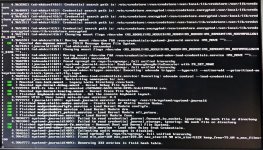
This is the output when i delete quiet on startup.
It gets hung here every time and for an hour+.

I did edit the fstab but when i have made fstab mistakes in the past it would just go into emergency mode where i could just fix the mistake, it's different this time.

I've looked around and a lot of people mention PCIe pass through which i have setup but did not make any changes prior to this issue, i simply edited fstab and rebooted the system (through the web UI)

The last couple of lines don't really make sense to me and i'm not sure where the error is.

Is there a way to force it to move on somehow?
 
Last edited:
20260604_172025.jpg
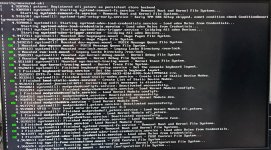
This is with debug:
Also i've tried with IOMMU=off and also tried with "Intel Virtualization" turned off in bios settings.
System is running Intel CPU and nvidia GPU
 
Last edited:
I suppose you can try with other additional boot args as well. Perhaps one of these works for you
Bash:
debug nomodeset rescue
debug nomodeset init=/bin/bash
debug rescue
debug init=/bin/bash
You might also have to run mount -o remount / to be able to edit the file. I don't really expect this behavior from edits to fstab either so I'm not quite sure what's going on.
 
Last edited:
  • Like
Reactions: mvarst
So I was able to get in with emergency mode, did mount -o remount / and was able to edit the fstab back to what it was before, it took a while but it booted!

I'm gonna have to investigate why this behavior happened from a simple fstab mistake. I'm using mergerfs to merge some of my drives for a media server and i changed the method it uses to determine what drive to put a given file on, not a wrong method just a different one, maybe i'll go ask in their community why it would be an issue.
 
Glad to hear. I'm curious what you added/removed from the fstab exactly. And if you could resolve it with their help perhaps a conclusion :)
 
Last edited:
This is my current/old fstab (the one that works):
Code:
# <file system>   <mount point>                <type>     <options>  <dump>  <pass>
#  Data Drives
   LABEL=ZXA1F80V  /mnt/data/hdd/24T-ZXA1F80V   ext4       defaults   0       2
   LABEL=ZR165GER  /mnt/data/hdd/8T-ZR165GER    ext4       defaults   0       2
   LABEL=ZR164F0Q  /mnt/data/hdd/8T-ZR164F0Q    ext4       defaults   0       2

#  MergerFS Setup
   /mnt/data/hdd/*  /data   mergerfs   cache.files=off,category.create=lfs,func.getattr=newest,dropcacheonclose=false,minfreespace=64G   0   0

And my change was from category.create=lfs to category.create=lup
lfs (least free space) just filled up one drive and didn't use the others so i changed it to lup (least used percentage) because the drives are of different size and i want them to fill up sort of the same.
The full list of modes and explanations can be found in their docs.
 
  • Like
Reactions: Impact