How to resize /home hdd space?

KingTChoka

Member
Sep 4, 2021
39
2
13
29
My original VM had 200 Gb of hdd space allocated to it. Then I ran the command `qm resize <vmid> <disk> <size>` to add 200 more Gb.

When I run `lsblk`, we can see the total space is indeed 400 Gb

Code:
NAME              MAJ:MIN RM   SIZE RO TYPE MOUNTPOINT
sda                 8:0    0   400G  0 disk
├─sda1              8:1    0     1G  0 part /boot
└─sda2              8:2    0   199G  0 part
  ├─rl_rocky-root 253:0    0    70G  0 lvm  /
  ├─rl_rocky-swap 253:1    0   9.6G  0 lvm  [SWAP]
  └─rl_rocky-home 253:2    0 119.4G  0 lvm  /home

but `df -h` still doesn't show an increase in the `/home` directory. It is still stuck at 95% full with 120G size max. How can I add more hdd to the /home directory?

Code:
Filesystem                 Size  Used Avail Use% Mounted on
devtmpfs                   9.5G     0  9.5G   0% /dev
tmpfs                      9.5G   84K  9.5G   1% /dev/shm
tmpfs                      9.5G  8.8M  9.5G   1% /run
tmpfs                      9.5G     0  9.5G   0% /sys/fs/cgroup
/dev/mapper/rl_rocky-root   70G   31G   40G  43% /
/dev/mapper/rl_rocky-home  120G  113G  6.5G  95% /home
/dev/sda1                 1014M  239M  776M  24% /boot
tmpfs                      1.9G  1.2M  1.9G   1% /run/user/42
tmpfs                      1.9G  204K  1.9G   1% /run/user/1000

Thanks!

EDIT: Nevermind, this is not a Proxmox issue and I found this helpful guide. Not sure how to close this issue.
 
Last edited:
As /home seems to be a logical volume of a LVM in your case, you should be able to use the lvresize command.
See it's man-page (also online available) for some docs, there are also quite some tutorials online.

For resizing a LV, and it's underlying FS such that the total FS size is increased by 10 GiB you'd do:

Code:
lvresize --size +10G --resizefs rl_rocky/home
# or using the mapped LV path directly

lvresize --size +10G --resizefs /dev/mapper/rl_rocky-home

A few notes to above:
  • note that the size param supports additive (+ prefix) subtractive (- prefix) and absolute size (no prefix) values
  • increasing is most often easy to do, but decreasing is often not supported by the filesystem on the LV, so only increase as much as you actually want
  • As you can see from the manpage, -L and --size are the same thing, as is -r and --resizefs (short vs. long options). Just noting in case you read a how-to with the shorter, but less expressive notation.
  • triple check the command and its parameters before you execute it, having tested backups is always a good idea.
 
As /home seems to be a logical volume of a LVM in your case, you should be able to use the lvresize command.
See it's man-page (also online available) for some docs, there are also quite some tutorials online.

For resizing a LV, and it's underlying FS such that the total FS size is increased by 10 GiB you'd do:

Code:
lvresize --size +10G --resizefs rl_rocky/home
# or using the mapped LV path directly

lvresize --size +10G --resizefs /dev/mapper/rl_rocky-home

A few notes to above:
  • note that the size param supports additive (+ prefix) subtractive (- prefix) and absolute size (no prefix) values
  • increasing is most often easy to do, but decreasing is often not supported by the filesystem on the LV, so only increase as much as you actually want
  • As you can see from the manpage, -L and --size are the same thing, as is -r and --resizefs (short vs. long options). Just noting in case you read a how-to with the shorter, but less expressive notation.
  • triple check the command and its parameters before you execute it, having tested backups is always a good idea.
Got the following error when trying;
Code:
$ sudo lvresize --size +200G --resizefs /dev/mapper/rl_rocky-home
  Insufficient free space: 51200 extents needed, but only 0 available

I also tried the tutorial I posted but still no luck :/
 
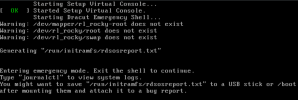
Welp, I re-followed the blog instructions I posted, and after re-partitioning (using `fstab`) I can't boot anymore probably because the UUID of the partitions have changed... 1631604311684.pngGuess I'll just re-create the vm from scratch... fml

EDIT: I just tried removing the VM from the console and nothing is happening.... how to forcefully remove a VM???