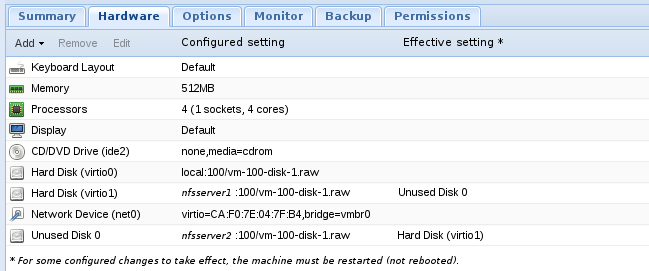
When I remove a virtio .raw disk from a VM, it still appears in /dev/vdb in the VM. In my case, this disk is on an NFS server. Is this expected? What should I do to actually remove it?
"qm monitor 100" followed by "info blocK" lists the disk, but "qm config 100" does not list the disk anymore. (see code block below)
Issuing "shutdown -r now" does not remove the disk either, but using the proxmox gui to kill the vm, or "shutdown -h now" and starting again removes the disk. Anyone know if this is normal? What formats are you using, and does hot pulling disks work for you?
"qm monitor 100" followed by "info blocK" lists the disk, but "qm config 100" does not list the disk anymore. (see code block below)
Issuing "shutdown -r now" does not remove the disk either, but using the proxmox gui to kill the vm, or "shutdown -h now" and starting again removes the disk. Anyone know if this is normal? What formats are you using, and does hot pulling disks work for you?
Code:
$ qm config 100
bootdisk: virtio0
cores: 4
ide2: none,media=cdrom
memory: 512
name: test
net0: virtio=CA:F0:7E:04:7F:B4,bridge=vmbr0
ostype: l26
sockets: 1
unused0: nfsserver:100/vm-100-disk-1.raw
virtio0: local:100/vm-100-disk-1.raw

$ qm monitor 100
Entering Qemu Monitor for VM 100 - type 'help' for help
qm> info block
drive-virtio1: removable=0 io-status=ok file=/mnt/pve/nfsserver/images/100/vm-100-disk-1.raw ro=0 drv=raw encrypted=0 bps=0 bps_rd=0 bps_wr=0 iops=0 iops_rd=0 iops_wr=0
drive-ide2: removable=1 locked=0 tray-open=0 io-status=ok [not inserted]
drive-virtio0: removable=0 io-status=ok file=/var/lib/vz/images/100/vm-100-disk-1.raw ro=0 drv=raw encrypted=0 bps=0 bps_rd=0 bps_wr=0 iops=0 iops_rd=0 iops_wr=0

(at this point I shut down the vm with "shutdown -h now")
qm> info block
ERROR: VM 100 not running

qm> info block
drive-ide2: removable=1 locked=0 tray-open=0 io-status=ok [not inserted]
drive-virtio0: removable=0 io-status=ok file=/var/lib/vz/images/100/vm-100-disk-1.raw ro=0 drv=raw encrypted=0 bps=0 bps_rd=0 bps_wr=0 iops=0 iops_rd=0 iops_wr=0
qm>