[SOLVED] Host unable to connect to internet/LAN after power outage

dbHA

New Member
Jun 15, 2026
5
0
1
After a power outage (tripped circuit breaker) my mini-pc won't connect to the internet or the local network.

I noticed that the RJ45 port on the Minisforum is not lighting up. I tested both the ethernet cable and internet connection, that's not the issue. I also plugged in a RJ45 USB-C dongle and it lit up solid orange but the machine still doesn't have access. Restart does not help.

I am tech savvy enough to have set all this up, but I am not knowledgable in networking or coding. I'm hoping a kind user can help me troubleshoot or point me in the right direction. Is it a driver issue? Is the machine fried? Is it a naming misconfiguration? Firewall? A BIOS setting?

My proxmox GUI was previously accessible from https://192.168.7.94:8006. Thanks for any help.

COMMAND RESULTS:
Kernel: 6.14.8-2-pve
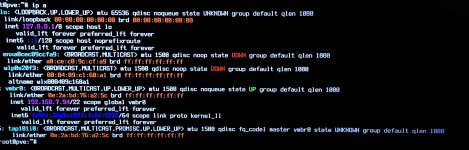
ipa.jpg
enxa0cec89ccfa9 is the USB dongle. The ethernet cable was plugged into it for this photo.
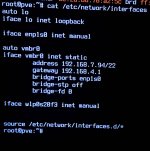
cat etc network interfaces.jpg
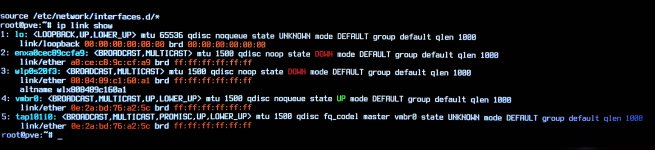
ip link show.jpg
enxa0cec89ccfa9 is the USB dongle. The ethernet cable was plugged into it for this photo.
ls sys class net.jpg
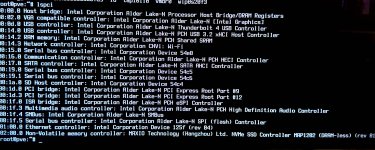
lspci.jpg
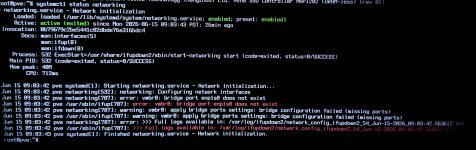
systemctl status networking.jpg
 
Hi @dbHA , welcome to the forum.

As you can see from your /etc/network/interfaces the VMBR0 port is backed by enp1s0. However, as your "ip link" shows this interface name no longer exists.
Most likely you had pending Kernel update that got applied on reboot and the naming of the interfaces has changed.

Interestingly, your vmbr0 is up with an IP, however the bridge-port that seems to feed it is tap101i0, indicating some additional complexity that may be located in /etc/network/interfaces.d/*

In short, your vmbr0 may not have an appropriate physical interface linkage.

Good luck


Blockbridge : Ultra low latency all-NVME shared storage for Proxmox - https://www.blockbridge.com/proxmox
 
  • Like
Reactions: dbHA
If the onboard RJ45 has no link LED at all, I would separate two things: first check BIOS/firmware and the switch port/cable once more, because no carrier usually points below Proxmox. For the USB-C dongle, it will probably have a different interface name, so vmbr0 will not use it until /etc/network/interfaces is adjusted. `ip -br link` and `ethtool <new-interface>` are useful to see which NIC has carrier; then change `bridge-ports` from the old enp1s0 name to the working interface and apply with `ifreload -a` or reboot from console.
 
If the onboard RJ45 has no link LED at all, I would separate two things: first check BIOS/firmware and the switch port/cable once more, because no carrier usually points below Proxmox. For the USB-C dongle, it will probably have a different interface name, so vmbr0 will not use it until /etc/network/interfaces is adjusted. `ip -br link` and `ethtool <new-interface>` are useful to see which NIC has carrier; then change `bridge-ports` from the old enp1s0 name to the working interface and apply with `ifreload -a` or reboot from console.
Thanks. I tested with a laptop and the cable and dongle both work. What should I look into the BIOS/Firmware for?

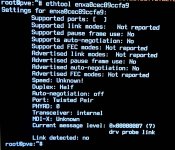
The USB-C dongle's name is enxa0cec89ccfa9. I ran ethtool enxa0cec89ccfa9 and it returned
ethtool.jpg
To use the dongle, would I replace enp1s0 with enxa0cec89ccfa9 in /etc/network/interfaces?
 
Last edited:
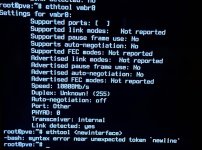
Interestingly, the ethtool vmbr0 does detect a link:
ethtool link.jpg
Unfortunately I only have one USB-C port on the machine, would need to go get a different normal USB dongle.
 
I just realized I do have another dongle option, I have a UGREEN Docking station for my Steam Deck.

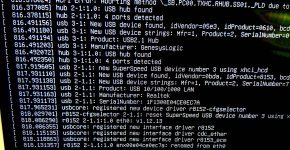
I've plugged it into the machine and it seems to register with a new realtek driver renaming from eth0. My web GUI is still inaccessible. vmbr0 is still pointed to enp1s0 and otherwise unchanged.


steam deck dock.jpg
 
Yes. Do that (with the current NIC's name) and then run ifreload -a.
Thank you! This worked. I was able to get the dongle to work and connect. I ordered a new dongle that will exist there permanently now and follow the same steps of replacing the nic with its name.

I really appreciate you all taking the time to help someone out of their depths and sharing your knowledge.
 
I recall Minisforum PCs had similar issues before. I think there is a way to do an "hard reset", which might bring the NIC back or it might be necessary to change the BIOS battery which has a tendency to die early with side effects like this.