

Hi everyone,
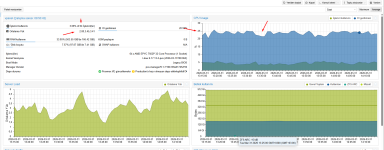
I am experiencing a persistent high IO Delay (20-25%) on my Proxmox VE 9.1.7 node, even when the system is not under extreme load. I have recently reinstalled the OS multiple times (tried ZFS, BTRFS, and currently LVM-Thin) but the issue persists.
Results:
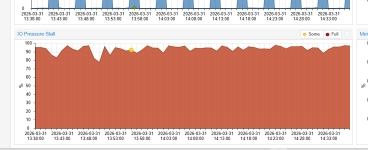
root@vpanel:~# cat /proc/pressure/io
some avg10=83.85 avg60=82.52 avg300=82.86 total=28486275210
full avg10=80.85 avg60=79.49 avg300=79.74 total=27151355683
root@vpanel:~#
This issue started suddenly 2 days ago without any manual configuration changes on the host. Before that, the system was running perfectly with near-zero IO Delay.
I've tried multiple Proxmox reinstalls (ZFS, LVM, Btrfs), and the same 20% delay appears immediately after restoring the VMs.
Thanks in advance!
I am experiencing a persistent high IO Delay (20-25%) on my Proxmox VE 9.1.7 node, even when the system is not under extreme load. I have recently reinstalled the OS multiple times (tried ZFS, BTRFS, and currently LVM-Thin) but the issue persists.
System Specs:
- CPU: AMD EPYC 7502P 32-Core Processor (1 Socket)
- Motherboard: Tyan S8050
- RAM: 512GB DDR4
- Storage: 2 x 3.84TB NVMe SSDs (Configured as individual LVM-Thin pools: NVMe-SSD-1 and NVMe-SSD-2)
- Kernel: Linux 6.17.13-2-pve
The Issue:
The Proxmox dashboard consistently shows an IO Delay between 17% and 25%.- I checked iotop and pidstat, and while some VMs (like Plesk/Windows) show moderate read/write activity, nothing seems to justify this level of delay.
- One specific VM (ID 108) had a disk at 100% capacity, but even after stopping it, the delay did not drop significantly.
Benchmarks (FIO inside a VM):
I ran an FIO test inside one of the Guest VMs (AlmaLinux) to see if there is a hardware bottleneck:fio --name=vm_disk_test --ioengine=libaio --rw=write --bs=1M --size=2G --direct=1 --group_reportingResults:
- WRITE: bw=1943MiB/s (2037MB/s)
- IOPS=1943
- Average Latency (clat): 452.59 usec
What I've Checked/Tried:
- Temperatures: NVMe drives are running cool at 37°C - 44°C.
- IOMMU: Enabled (Default domain type: Translated).
- LVM Metadata: NVMe-SSD-1 has a small metadata size (112MB, 14% used), while SSD-2 has 15GB (2% used). Moving VMs between pools didn't solve the reported delay.
- CPU Governor: Set to performance.
- Discard: Ran fstrim -av on the host.
Questions:
- Why would Proxmox report 20% IO Delay when disk benchmarks show very low latency (450us) and high throughput?
- Is there a specific BIOS setting (ASPM, PCIe Power Management) or Kernel parameter (iommu=pt, etc.) recommended for AMD EPYC / Tyan boards to reduce this overhead?
- Could this be a reporting artifact or a specific interaction between LVM-Thin metadata and the 6.17 kernel?
root@vpanel:~# cat /proc/pressure/io
some avg10=83.85 avg60=82.52 avg300=82.86 total=28486275210
full avg10=80.85 avg60=79.49 avg300=79.74 total=27151355683
root@vpanel:~#
This issue started suddenly 2 days ago without any manual configuration changes on the host. Before that, the system was running perfectly with near-zero IO Delay.
I've tried multiple Proxmox reinstalls (ZFS, LVM, Btrfs), and the same 20% delay appears immediately after restoring the VMs.
Thanks in advance!
Code:
proxmox-ve: 9.1.0 (running kernel: 6.17.13-2-pve)
pve-manager: 9.1.7 (running version: 9.1.7/16b139a017452f16)
proxmox-kernel-helper: 9.0.4
proxmox-kernel-6.17: 6.17.13-2
proxmox-kernel-6.17.13-2-pve-signed: 6.17.13-2
proxmox-kernel-6.17.2-1-pve-signed: 6.17.2-1
amd64-microcode: 3.20251202.1~bpo13+1
ceph-fuse: 19.2.3-pve2
corosync: 3.1.10-pve1
criu: 4.1.1-1
frr-pythontools: 10.4.1-1+pve1
ifupdown2: 3.3.0-1+pmx12
ksm-control-daemon: 1.5-1
libjs-extjs: 7.0.0-5
libproxmox-acme-perl: 1.7.0
libproxmox-backup-qemu0: 2.0.2
libproxmox-rs-perl: 0.4.1
libpve-access-control: 9.0.5
libpve-apiclient-perl: 3.4.2
libpve-cluster-api-perl: 9.1.1
libpve-cluster-perl: 9.1.1
libpve-common-perl: 9.1.9
libpve-guest-common-perl: 6.0.2
libpve-http-server-perl: 6.0.5
libpve-network-perl: 1.2.5
libpve-rs-perl: 0.11.4
libpve-storage-perl: 9.1.1
libspice-server1: 0.15.2-1+b1
lvm2: 2.03.31-2+pmx1
lxc-pve: 6.0.5-4
lxcfs: 6.0.4-pve1
novnc-pve: 1.6.0-3
proxmox-backup-client: 4.1.5-1
proxmox-backup-file-restore: 4.1.5-1
proxmox-backup-restore-image: 1.0.0
proxmox-firewall: 1.2.1
proxmox-kernel-helper: 9.0.4
proxmox-mail-forward: 1.0.2
proxmox-mini-journalreader: 1.6
proxmox-offline-mirror-helper: 0.7.3
proxmox-widget-toolkit: 5.1.8
pve-cluster: 9.1.1
pve-container: 6.1.2
pve-docs: 9.1.2
pve-edk2-firmware: 4.2025.05-2
pve-esxi-import-tools: 1.0.1
pve-firewall: 6.0.4
pve-firmware: 3.18-2
pve-ha-manager: 5.1.3
pve-i18n: 3.6.6
pve-qemu-kvm: 10.2.1-1
pve-xtermjs: 5.5.0-3
qemu-server: 9.1.6
smartmontools: 7.4-pve1
spiceterm: 3.4.1
swtpm: 0.8.0+pve3
vncterm: 1.9.1
zfsutils-linux: 2.4.1-pve1
Last edited:

