
I thought the problem was the QEMU support for glusterfs ? You'd need to raise this with the QEMU devs and not proxmox afaik, I think...


Again, I will refer you to the problems with EC ceph that the guy from 45Drives highlights, in their video.Ceph's erasure-coded pools typically incur higher write amplification and network overhead because data and parity are distributed across multiple OSDs. A 6+2 profile has 8 participating nodes vs a 3-way replicated pool, increasing latency and reducing small-write performance. However, for larger objects that you would see in modern workloads, this difference is minimal. Hence we store boot disks on 3-way and large data disks on a 4+2 erasure pools. By default, it will rely less on things like filesystem caches and wants the client to handle that.
...at the expense of speed. (again, cf. the dev's page about performance issues with EC ceph) Unless, of course, you want to argue that the ceph devs are wrong about their own documentation about EC ceph's performance issues.but Ceph provides strong guarantees around data integrity, failure recovery, and behavior at large scale.
Ceph is faster than Gluster today
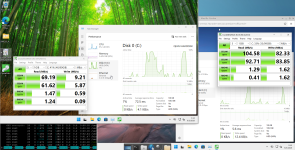 ceph on the left, gluster on the right.
Modern Ceph uses BlueStore and has modern CPU optimizations, and it can scale because it uses an algorithm to determine object placement without expensive metadata lookups.
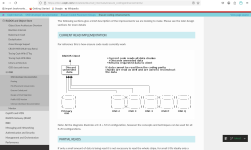
Again, as the screenshot above patently shows - this is quite literally and easily proven to be demonstrably false.Recovery is object-based and deterministic, while Gluster relies heavily on background healing and filesystem operations.
On modern NVMe and 25G+ networks, the CPU cost of checksums and erasure coding is negligible, Ceph will today outperform Gluster even in relatively small clusters while providing stronger integrity and recovery guarantees.
Still no data.Comparing GlusterFS and Ceph on 15yo hardware is like running a VW Beetle, then transferring that engine into a modern car and comparing how fast they go. Sure, the Beetle will beat the new car in a speed race, but it will kill its occupants in a crash and be overall much less safe on the road today, and the Beetle still can't compare to the performance of your average modern car.
Still no data.If you want a technical discussion, you need to do it on technical terms.
Your original statement/quote said nothing about random[/i] throughput.There is not a single spinning hard drive in the world that can sustain a random pattern uncached 100MB/s.
Show me, where, in your original statement;That alone tells me something is wrong with your benchmark.
Again, the data shows/tells you, from CrystalDiskMark that gluster random I/O performance is 1.69 MB/s, which is well in line with your expectations.8-10MB/s for uncached data 4K read/writes on spinning rust sounds more accurate, true random read/write 4K would top out somewhere around 0.5MB/s. You need to do something like 1-4MB chunks sequential to get to 100MB/s on 7200RPM.
I never said that EC pools are about throughput.EC pools are not about throughput, they’re about space optimization.
I don't know how many times I am able to explain that if your drive is capable of 12 GB/s reads and you're only getting 600 MB/s - 600 MB/s divided by 12000 MB/s = 0.05.There is always a trade off. NVMe is much better than spinning disks for IOPS, but I don’t get where you get 5% usage.
As it has already been stated, my network is 100 Gbps IB.There are various tradeoffs but if your network fabric is 100GbE
Not really.you will never be able to push more than 100Gb whereas a single NVMe today can push multiples of that, the benefit of buying a better NVMe is lower latency, potentially better write endurance.
1.15 Tbps / 120 Tbps = 0.0096.Ceph is probably close to 80-90% of theoretical performance in real world scenarios. I have synthetic benchmarks for my EC pool to 1.15Tbps cluster-wide which is near 98% of line speed for this particular cluster. Sure in theory my SSD can provide close to 120Tbps in aggregate,
The most telling part about all of this is the answer to the question "what do you run, in your own personal homelab where you (often) don't have a multi-million dollar IT budget?"spinning disks are slower, consume more power, take up more space. Cheaper SSD are also slower, consume more power etc, the difference between 100ns latency and 2 millisecond latency is profound. The overhead of SAS/SATA vs NVMe is noticeable. Being able to sustain 50k IOPS under load vs a consumer SSD crashing down to 500 IOPS after the cache is full, those are all issues I think about.
Read through the ceph EC performance enhancements docs authored by the ceph devs more closely. Again, they explicitly tell you that in the current read implementation, it reads all of the chunks from all OSDs.Ceph EC has no exponentially increasing synchronization overhead like MPI, the CRUSH algorithm will only select n+k nodes for each block. It doesn’t have to synchronize to all nodes because the client knows exactly where the data is located based on its object id and the map.
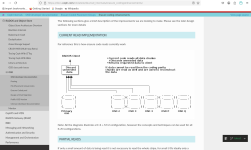 (Again, the ceph devs literally and explicitly tell you that they read all data chunks from all OSDs. It's not conjecture. The ceph devs literally tell you that, as shown in the screenshot from their docs above.)
Cuz you were complaining about the results and methodology.As to whether I should test Gluster again, I ask why.
no data.it doesn’t perform well on modern hardware and is outperformed by Ceph.


What part of "I didn't get/deploy 100 Gbps for storage" don't you seem to understand?But your fabric is still 100Gb. You don't seem to understand that you cannot, regardless of method, go beyond that metric. Gluster can't replicate your data faster than your fabric, neither can Ceph and that is REGARDLESS of whether you use EC or replicated pools, it doesn't matter, you can't have a client write faster than the link to its storage. And with modern CPU, EC is about as fast as a replicated pool if properly architected.
This has already been answered.If Gluster is pushing 100MB/s on a spinning drive, it's physically impossible it is committing that to 3 or 5 other disks across a gigabit network. You show benchmarks indicating a full gigabit network, are you comparing Gluster on your IB with a gigabit replicated Ceph and surprised they don't go equally fast?
[/s]Right. Again, this is why I tested both, on the same physical box and with six HDDs rather than just three.The problem is the variables, hardware, software, user experience, the list goes on and on.
Sorry to hear about that man.PS. I'm in a bad mood, I got my cooling script wrong and lost a 15tb nvme due to heat overload, it was the last drive in 2u server front vertical 2.5 slots and just didnt get the ideal airflow during a recent heat wave. Now I'm angry at myself for being so complacent because 15tb nvmes aren't exactly cheap. The good news is that its all backed up!
Sorry to hear about that man.
That really sucks!
(If you ever need me to run the CFD studies for you, just hit me up. I've already studied the optimal placements for thermal pads (on NVMe SSDs), using CFD. (It's better if you place individual thermal pads on the individual NAND flash chips, in terms of thermal conduction, than if you placed one long, continous thermal across all of the chips simultaneously. By cutting the thermal pads and placing them on the individual chips, you are limiting how much planar heat conduction is happening, within the thermal pad, and instead, promote orthogonal heat conduction, and thus, more of the heat goes into your heatsink rather than being "spread across" (planar conduction) said one long, continuous thermal pad.)
No problem.Thats good to know! Thanks! I've always just ran a strip of thermal across the lot.
No, but again, mass manufacturing means that they probably can't take the time to cut the thermal pads and place it on the individual chips as that'll just take too long for them to do so.Although in this case it is a U.3 drive, so not really something you think about regarding opening and re-padding, plus with it being a Samsung pm1733, they do run crazy hot as it is.
Short answer?No idea why all the other manufacturers effectively seal their drives, and some only having a tiny orifice at the front and at the port end.

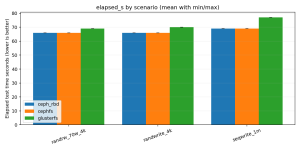 Hmm, what is happening here, the test should take 65s, oh, setup time. Yes, fio pre-writes its test files. Gluster has problem scaling, when you write a file, all nodes have to be made aware, during that time each node was spending 50% of CPU just keeping data in sync for the folder, because Gluster wasn't built around SSDs the glusterfsd has a hard time keeping up with parallelism. The setup time takes almost twice as long on Gluster. Hence why I had to limit the network to 400Mbps - https://github.com/gluster/glusterfs/issues/4028 and https://github.com/gluster/glusterfs/issues/4085 - under heavy load, a cluster split-brains, and there are reports going back years, nobody has fixed that, not even Red Hat did, that's likely why they abandoned it around the time SSD became commonplace. Basically you have to throttle the ingress of data, once the gluster daemon has a backlog of things to process (and it's single threaded apparently), it seems the cluster thinks the brick has gone offline.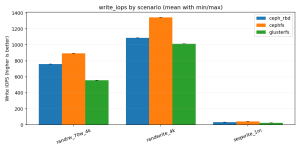
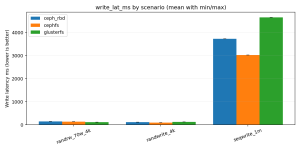
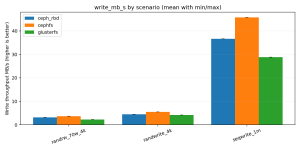
PG autoscale=on- how many PG do you have on your ceph cluster ? (new pool on empty storage are setting low number of PG by default with target ratio is not configured on the pool, and this can give very low write speed).
No idea.- do you have enable writeback on your vm ? (for ceph, it's really helping for small sequential write)
1) Does this apply to EC pools as well?- also,for read, try to enable:
"rbd config pool set POOLNAME rbd_read_from_replica_policy localize"
(with this, in hypeconverged , the vm will read by default on the local node instead, like gluster)
data-pool option, within PVE storage (read: /etc/pve/storage.cfg that you can tell it that the data-pool is a data pool other than your replicate pool?What are the specs of the host system? Whch Ubuntu version are you using/running? Why aren't you testing with a Win11 VM as the client? (if you want to mimick an enterprise Win11 VM workload? (unless you don't want to mimick an enterprise Win11 VM workload :shrug: )All systems use the exact same boot image
Why did you provision the Ubuntu VM through Vagrant?running Ubuntu provisioned through Vagrant
No mention of how many nodes you're running in total and whether they're physical nodes or virtualised nodes. No mention of the hardware specs for each of the nodes.1 dedicated drive per node for the servers and 1 client.
Vagrant is installed in Proxmox "out of the box"? (If it isn't, then it really isn't truly "out of the box" now, is it"?)The software is 'out of the box'
So...I'm confused. Are you testing it with an Ubuntu VM client, or are you testing the host?and then mounted a file system of an EXT4 partition on Ceph RBD (to emulate what a VM would do)
I'm confused.All the settings for fio are identical, queue depth of 32, 4 threads reading 128 files (512 total files being created per run), 4MB for sequential, 4kB for the others, 5s warmup time (that will avoid spikes due to things like TCP windowing adjustments).
If you had provisioned a VM, and it was running the post-install updates, wouldn't that kinda take care of this pretty much automatically for you so that you don't need to worry about read caching?I tested random data writes to avoid ANY (accusation of) read caches.
CrystalDiskMark does the same thing.Yes, fio pre-writes its test files
I have no idea how many nodes you're running your tests with.Gluster has problem scaling, when you write a file, all nodes have to be made aware
Nor the configuration specs for each node (How many CPU cores? CPU model? Is it using kvm64 as the node CPU model/type? How much RAM does each node have? etc.)during that time each node was spending 50% of CPU just keeping data in sync for the folder
No idea what kind of SSDs you're using here, for your tests.Gluster wasn't built around SSDs
So...what I am gathering here is that I can try deploying multiple Win11 VMs in my test cluster, to see if I would be able to push gluster to its limits, on my system (because I don't have new/fancy toys like you do at home. Kids college fund is more important than me buying toys (I sysadmin because I have to, to support my CAE habits, and not because I want to.)The setup time takes almost twice as long on Gluster. Hence why I had to limit the network to 400Mbps - https://github.com/gluster/glusterfs/issues/4028 and https://github.com/gluster/glusterfs/issues/4085 - under heavy load, a cluster split-brains, and there are reports going back years, nobody has fixed that, not even Red Hat did, that's likely why they abandoned it around the time SSD became commonplace. Basically you have to throttle the ingress of data, once the gluster daemon has a backlog of things to process (and it's single threaded apparently), it seems the cluster thinks the brick has gone offline.
iodepth=32, numjobs=4, nrfiles=128 workload concurrently/in parallel.Are you using a separate network for the storage I/O traffic or is it all just through one network?Hence why I had to limit the network to 400Mbps - https://github.com/gluster/glusterfs/issues/4028 and https://github.com/gluster/glusterfs/issues/4085 - under heavy load, a cluster split-brains, and there are reports going back years, nobody has fixed that, not even Red Hat did, that's likely why they abandoned it around the time SSD became commonplace. Basically you have to throttle the ingress of data, once the gluster daemon has a backlog of things to process (and it's single threaded apparently), it seems the cluster thinks the brick has gone offline.
iodepth=32, numjobs=4, nrfiles=128 workload, although to be fair, if your numjobs=4, then it would be like if you only had 4 VMs running anyways.If you're creating an ext4 FS on ceph RBD, then why would CephFS be faster than ceph RBD?Now, there are ways of making Gluster (and Ceph too) go faster than its network pipe, which is enabling write-back cache. But that is a ticket to data corruption.
virtio-nic so that the network wouldn't be a bottleneck, and it was running it just fine. Granted, I don't know/think that a Win11 VM, even with HDDs would be able to generate much of a queue depth, across i number of files, but I don't know/think that an Ubuntu VM would generate much of a queue depth across j number of files neither, in any practical, nominal usage scenario.)numjobs=4 (e.g. you're only running 4 VMs).This has nothing to do with the question whether gluster is dead or not. Debian ships a lot of packages which hasn't seen much or any upstream activity for years as long as somebody volunteers for maintaining it. They also don't ship some packages with high upstream activity because up to now nobody bothered to package and maintain it. This doesn't change qemus deprecation of gluster though but that's the thing that matters. If you want continueing gluster support in Päqemu and ProxmoxVE: Volunteer as maintainer or get funding for it e.g. via crowdfunding. If you can't do this you can still use glusterfs as directory based storage similiar to ocfs2. I wouldn't do this in a business oroduction Environment though since it's not covered by Proxmox support subscriptions.Another data point (not performance, but gluster-isnt-dead) - Debian is shipping glusterfs 11.2 in forky:
Both of the links that you've provided refers/talks about GlusterFS 11.x.Hence why I had to limit the network to 400Mbps - https://github.com/gluster/glusterfs/issues/4028 and https://github.com/gluster/glusterfs/issues/4085 - under heavy load, a cluster split-brains, and there are reports going back years
We use essential cookies to make this site work, and optional cookies to enhance your experience.
