Glusterfs is still maintained. Please don't drop support!

Ceph's erasure-coded pools typically incur higher write amplification and network overhead because data and parity are distributed across multiple OSDs. A 6+2 profile has 8 participating nodes vs a 3-way replicated pool, increasing latency and reducing small-write performance. However, for larger objects that you would see in modern workloads, this difference is minimal. Hence we store boot disks on 3-way and large data disks on a 4+2 erasure pools. By default, it will rely less on things like filesystem caches and wants the client to handle that.
Again, I will refer you to the problems with EC ceph that the guy from 45Drives highlights, in their video.
but Ceph provides strong guarantees around data integrity, failure recovery, and behavior at large scale.
...at the expense of speed. (again, cf. the dev's page about performance issues with EC ceph) Unless, of course, you want to argue that the ceph devs are wrong about their own documentation about EC ceph's performance issues.
Ceph is faster than Gluster today
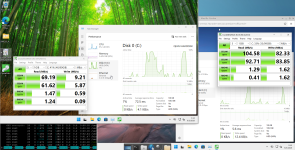
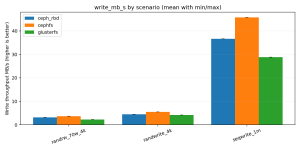
Screenshot_2026-06-03_05-12-10.pngceph on the left, gluster on the right.

But according to @guruevi, ceph is faster. I think only in guruevi's world would 9.21 MB/s be faster than 82.33 MB/s. (etc. etc. etc.)
(Where's your data?)
Modern Ceph uses BlueStore and has modern CPU optimizations, and it can scale because it uses an algorithm to determine object placement without expensive metadata lookups.
Screenshot_2026-06-03_06-59-45.png
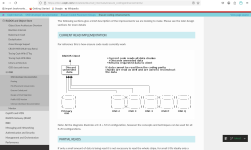
The ceph devs literally tell you that the current read implementation "Current code reads all data chunks."

Why do you make it so easy for me to disprove your statements by quoting the ceph devs themselves? Or are you saying/arguing that what the ceph devs wrote here is wrong? You really think/want to argue that what the ceph devs wrote here is wrong?

Between the ceph devs and guruevi, I wonder if guruevi thinks that he understands how ceph works better than the ceph devs.

(The ceph devs literally tell him that current read implementation "...reads all data chunks.".)
Recovery is object-based and deterministic, while Gluster relies heavily on background healing and filesystem operations.

On modern NVMe and 25G+ networks, the CPU cost of checksums and erasure coding is negligible, Ceph will today outperform Gluster even in relatively small clusters while providing stronger integrity and recovery guarantees.
Again, as the screenshot above patently shows - this is quite literally and easily proven to be demonstrably false.

(Again, where's your data?)

Still no data.
Comparing GlusterFS and Ceph on 15yo hardware is like running a VW Beetle, then transferring that engine into a modern car and comparing how fast they go. Sure, the Beetle will beat the new car in a speed race, but it will kill its occupants in a crash and be overall much less safe on the road today, and the Beetle still can't compare to the performance of your average modern car.
Still no data.

You've written a little bit, but still no data.
If you want a technical discussion, you need to do it on technical terms.
Still no data.

(Again, are you complaining about how I've predicted that complainers will always find something to complain about, whilst doing absolutely nothing about it, or are you going to run the tests the way that you think how it should have been performed/tested?

Are you going to provide data or are you just going to complain about it?
There is not a single spinning hard drive in the world that can sustain a random pattern uncached 100MB/s.
Your original statement/quote said nothing about random[/i] throughput.

Here is what you actually, originally said;

"My point was you can't push 100Gbps from a single spinning disk that gives at best 1-10Mbps of throughput (if not reading from cache)."

Note that nowhere, in that statement, did you talk about nor mention the word random in that entire statement.

Furthermore, most people talk about random I/O in terms of I/O/s rather than in terms of MB/s.

That alone tells me something is wrong with your benchmark.
Show me, where, in your original statement;

"My point was you can't push 100Gbps from a single spinning disk that gives at best 1-10Mbps of throughput (if not reading from cache)."

you wrote the word random anywhere, from this statement of yours.

The problem isn't with the benchmark. The problem is that your statement doesn't have the word random in it, anywhere (in said statement).

That's on you.


8-10MB/s for uncached data 4K read/writes on spinning rust sounds more accurate, true random read/write 4K would top out somewhere around 0.5MB/s. You need to do something like 1-4MB chunks sequential to get to 100MB/s on 7200RPM.
Again, the data shows/tells you, from CrystalDiskMark that gluster random I/O performance is 1.69 MB/s, which is well in line with your expectations.

The two statements can't be true simultaneously. The benchmark for random I/O performance can't be both true and false, at the same time. We're not talking about the Heisenberg Uncertainty Principle here (as it relates to EC ceph and distributed dispersed gluster performance).

Oh I would love to see the math as to how you figured that one out.

Again. Data.

Where is your data?

(If you're going to complain about someone else's data and/or say that someone else's data is wrong, then the least that you can do is to show up with your own data that clearly proves that said someone else's data is wrong. I've yet to see any of your data.)
 
Last edited:
EC pools are not about throughput, they’re about space optimization.
I never said that EC pools are about throughput.

EC pools gives you data redundancy, at higher levels of storage efficiency, whilst giving you some/most of the speed of a replicate pool.

It won't be quite as fast as a replicate pool for reads because you don't have the ability to parallelise your reads across multiple copies of the same data, but with the distribution of the chunks across OSDs, you'll still get some level of OSD read parallelism if it weren't for the fact that the current EC read implementation (per the ceph devs) is that it reads all of the chunks and then discards the unneeded chunks.

(Again, cf. here.)

There is always a trade off. NVMe is much better than spinning disks for IOPS, but I don’t get where you get 5% usage.
I don't know how many times I am able to explain that if your drive is capable of 12 GB/s reads and you're only getting 600 MB/s - 600 MB/s divided by 12000 MB/s = 0.05.

That's 5% of what your drive is capable of, in terms of sequential read transfer rate.

If you can't understand 600 MB/s divded by 12000 MB/s = 0.05 - I'm not sure that there's much that I can do help with you this basic arithmetic.

Maybe Prodigy Math?

Or in another example, if my HGST 1 TB SATA 3 Gbps is capable of 133.75 MB/s in terms of sequential transfer rates, then 5% of that would be

133.75 MB/s * 0.05 = 6.6875 MB/s.

But as the gluster results show, I'm getting 104.58 MB/s. But that's across three drives. 104.58 MB/s / 3 = 34.86 MB/s

34.86 MB/s / 133.75 MB/s = 0.260635514

Again, if you need further help with the arithmetic, you can check out Prodigy Math for more assistance.

There aren't very many more ways that I would be able to explain this arithmetic to you in a way that would help you understand this division problem.
 
There are various tradeoffs but if your network fabric is 100GbE
As it has already been stated, my network is 100 Gbps IB.

you will never be able to push more than 100Gb whereas a single NVMe today can push multiples of that, the benefit of buying a better NVMe is lower latency, potentially better write endurance.
Not really.

A single NVMe 5.0 x4 SSD only gets around like 12 GB/s. 12 GB/s * 8 bits/byte = 96 Gbps. So, if you're talking about multiples of 100 Gbps, then yes, in terms of 0.96 is a multiple of 100 Gbps. A fractional multiple.

Yes, NVMe has lower latency (that's like saying that water is wet).

And no, NVMe SSDs do not have better write endurance (than HDDs).

(What's the wearout percentage on your HDDs? What's the wearout on your SSDs?)


Ceph is probably close to 80-90% of theoretical performance in real world scenarios. I have synthetic benchmarks for my EC pool to 1.15Tbps cluster-wide which is near 98% of line speed for this particular cluster. Sure in theory my SSD can provide close to 120Tbps in aggregate,
1.15 Tbps / 120 Tbps = 0.0096.

There you have it.

Your own data proves my point - EC ceph sucks sucks for performance because your own data proves that you're using LESS THAN 1% of what your drives are actually capable of.

Or to put it in another way (that might help you understand it better):

If your EC pool (gluster) was capable of using 26% of your drive's capability, you'd need ~1/4 as many drives as you currently have now.

So if you have 40 drives, which gets you your 1.15 Tbps out of a possible 120 Tbps, you'd be able to buy only 10 drives and get the same throughput as you did with 40 drives.

And if each drive is say $2000 USD.

40 * $2000 USD = $80000 USD

10 * $2000 USD = $20000 USD.

$80000 USD - $20000 USD = $60000 USD.

Why buy 40 drives what you can do with 10 drives?

Your own data SHOWS that you're currently using less than 1% of your drive's capability.

Which means that if you bought 1000 drives, you could've just bought 10, and gotten the same throughput.

So, yes, you literally wasted money on drives, where you don't make use of the remaining 99% of its performance capabilities. It's literally wasting 99% of its performance capabilities for the 99% of the performance capabilities that you're not using.

(Whereas if you were using a system that used 26% of the drive's performance capabilities, you could've gotten away with ~75% fewer drives.)

If you're using 40 drives, you literally and the drives were $2000 USD each, you literally wasted $60000 USD on drives whose performance capabilities you'll never use. (And that's with my 26% drive capability utilisation).

With your LESS THAN 1%.

If you bought 1000 drives at $2000 USD each, that's $2M USD.

But you could've gotten away with 10 drives (1% of 1000 = 10). 10 drives * $2000 USD each = $20000. $2M - $20k = $1.98M.

That's literally how much money you wasted on drives that you'll never be able to make full use of the capability you paid for.

You're proving my point: EC ceph pools mask the underlying performance problem by throwing money at it to mask said underlying performance problem.

Your bottom line is 0.96%. That's how much of the drive's performance capabilities you're using.

That's how many more drives you guys bought, when, if you had studied the performance numbers better/more closely, in detail, you would've figured out that 0.96% drive performance capability utilisation is very, very, very low.

And that you could've gotten away with needing to buy fewer drives, if you used something that used more of your drive's performance capabilities.

You threw $2M at a problem that you could've solved with $20k.

This is what I mean by how production deployments of EC ceph, just throws money at it to mask the fact that EC ceph pools have very poor drive performance utilisation.
 
But your fabric is still 100Gb. You don't seem to understand that you cannot, regardless of method, go beyond that metric. Gluster can't replicate your data faster than your fabric, neither can Ceph and that is REGARDLESS of whether you use EC or replicated pools, it doesn't matter, you can't have a client write faster than the link to its storage. And with modern CPU, EC is about as fast as a replicated pool if properly architected.

If Gluster is pushing 100MB/s on a spinning drive, it's physically impossible it is committing that to 3 or 5 other disks across a gigabit network. You show benchmarks indicating a full gigabit network, are you comparing Gluster on your IB with a gigabit replicated Ceph and surprised they don't go equally fast?

What would you have done, purchased spinning disks with 10ms latencies vs NVMe with 100ns latencies? You clearly do not understand how things work. And even then, it wouldn't have cost you $20k, Enterprise SAS 2.5" 10k drives, which top out at ~1TB were roughly the same cost per GB than Enterprise NVMe SSD at the time when they were still available and consumed 10x more energy. Today you get 256TB on a single EDSFF SSD, there is not even a 3.5" drive with that density, but drives don't give you 600MB/s or even 100MB/s, they average "real commit speeds" at ~0.5-2.5MB/s.

But the latency is what matters, it is what drives your IOPS, it is what makes your Windows 11 update faster. Windows 11 isn't even supported on non-SSD systems, and there is a reason for that.

Anyway, I hope you never architect these things in a real situation, keep playing, I hope you learn something.
 
  • Like
Reactions: Johannes S
spinning disks are slower, consume more power, take up more space. Cheaper SSD are also slower, consume more power etc, the difference between 100ns latency and 2 millisecond latency is profound. The overhead of SAS/SATA vs NVMe is noticeable. Being able to sustain 50k IOPS under load vs a consumer SSD crashing down to 500 IOPS after the cache is full, those are all issues I think about.
The most telling part about all of this is the answer to the question "what do you run, in your own personal homelab where you (often) don't have a multi-million dollar IT budget?"

I'm going to go out on a limb here and surmise that what your company uses isn't going to be the same as what you're running at home, because you (often) don't have a multi-million (nor even multi-hundreds or tens of thousands of dollars) for your homelab.

So whilst you might talk a big talk in terms of what your company has spent multi-millions on, the telling part of all this is "what do you spend your money on?"

If say, you have like an aggregate total of 300 TB of raw storage capacity at home, I can pretty much guarantee you that you're not going to be spending $1000 on P4800X's, 1.5 TB at a time. (300 TB / 1.5 TB = 200. 200 * $1000 = $200,000).

I can guarantee you that you're not spending $200k on P4800X U.2 NVMe SSDs, let alone the additional costs of the systems/hardware to house said 200 U.2 NVMe SSDs, and then the networking infrastructure to tie all of those systems together.

And then because SSDs will die (finite life. SSDs are the brake pads of the computer world - the faster they are, the more you're going to want to use them, and therefore; the faster they'll wear out), that means that you then have to budget extra to replace said dead SSDs when they will, inevitably and invariably die.

The last time that I bought HGST 12 TB SAS 12 Gbps HDDs, I was able to buy them for $68.89 each. Extrapolating that out for my 300 TB raw storage --> 300 TB / 12 TB = 25. 25 * $68.89 = $1722.25.

So whilst your all NVMe solution would've been about $200k, mine, with all HDD, is less than 1% of that. (0.86% to be exact).

In other words, it's fine when you're spending someone else's money. Let's see what solution you come up with when you have capacity (and performance) targets that you're trying to accomplish when you're spending your own money.


Ceph EC has no exponentially increasing synchronization overhead like MPI, the CRUSH algorithm will only select n+k nodes for each block. It doesn’t have to synchronize to all nodes because the client knows exactly where the data is located based on its object id and the map.
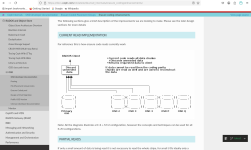
Read through the ceph EC performance enhancements docs authored by the ceph devs more closely. Again, they explicitly tell you that in the current read implementation, it reads all of the chunks from all OSDs.

If what you wrote was correct (and accurate) re: "It doesn't have to synchronize to all nodes because the client knows exactly where the data is located based on its object id and the map", then again, you're arguing that the ceph devs are wrong in that the current read implementation for erasure coding doesn't need to read all of the chunks from all OSDs to be able to read the file/data.

So, you're saying that a) you know more than the ceph devs and b) the ceph devs are wrong.

That's what you're saying.

Screenshot_2026-06-03_06-59-45.png(Again, the ceph devs literally and explicitly tell you that they read all data chunks from all OSDs. It's not conjecture. The ceph devs literally tell you that, as shown in the screenshot from their docs above.)

But you think that you know more than the ceph devs and thus, am now arguing that the ceph devs are wrong in their claim/assertion that it doesn't need to read all data chunks from all OSDs because "the client know where the data is located based on its object id and the map."

Good luck with that one.

(Think about how you would keep 300+ OSDs synchronised as a node can have more than one OSD per node. You can run two of these servers where each server node houses 6 HDDs, and thus, each server is responsible for 24 HDDs in total, and if you're running two of them, then you've got 48 HDDs spread across 8 nodes. And then with that, you can run said 48 drives where each drive is an OSD, but you're also running an EC(6,2) profile as well. And then scale it up to 300+ OSDs. It's a synchronisation issue, no different than MPI synchronisation for HPC applications. This is why you don't get linear scalability with MPI once you exceed somewhere between 512 to 2048 CPU cores (due to MPI synchronisation overhead). This is no different than that.)

In fact, gluster, every since they have said that you probably would want to make ZFS pool a gluster brick, has basically figured out the same (more or less) (akin to hybrid OpenMP/MPI that LS-DYNA can use) where instead of needing to synchronise all of the bricks, they recommend that you use a ZFS pool as a brick, and then that way, the EC (raidz(#)) can be handled internally by the brick itself (because ZFS pool) and then all gluster would need to be responsible for is internodal synchronisation which significantly reduces the synchronisation overhead because you're not dealing with disks=bricks anymore.

And this is a very similar to the idea that I have proposed for ceph where you run a ZFS pool, create, for example, and iSCSI target on it, and then export that to ceph as the OSD, and now, as far as ceph is concerned, it's just a massive OSD, but the OSD itself is backed by ZFS, where you can enjoy the advantages of ARC and it can also handle its own internal EC by way of raidz(#) since cache tiering in ceph has been depreciated since at least reef.

gluster has already figured this out.

ceph still isn't quote (officially) there yet.

(Furthermore, gluster, from what I've read, support RAM caching, whereas ceph has deprecated it.)


As to whether I should test Gluster again, I ask why.
Cuz you were complaining about the results and methodology.

If you think that others are doing it wrong, then you can show us exactly how to do it "right" and "properly" according to you.

That's why.

And if you're not going to do that, then again, you're just complaining (word that starts with a 'b') for the sake of complaining, whilst never actually going to do anything about it.

You're just going to complain about it because people who complain always need something to complain about. And that's fine, so long as there's conscious recognition that that is what you are doing (complaining for the sake of complaining rather than actually running the tests/benchmark the way you think how it should've been performed, so that you have your own set of data for us to have a technical discussion about. But you're not going to do that. And that's fine. But at least we know which camp you reside.)


it doesn’t perform well on modern hardware and is outperformed by Ceph.
no data.
 
At the end of the day, only you can know what is good for you based on what you have tested, the way you tested it, with the hardware you own and if it made you happy in the sense it performs to your expectations.

The problem is the variables, hardware, software, user experience, the list goes on and on.

Never ever fall into the trap of trying to convince others, it is as hard as explaining how strategically systematically engineered the current decline of the global economy is. (lol)


The primary issue is that the Qemu team have publicly announced deprecation for Gfs.

An obvious observation would be the fact the Proxmox team have to keep their end simple and somewhat aligned with underlying technologies (ie Qemu) to minimize ongoing workload as long as it doesn't impact their paying clientbase. Branching a codebase as large as Qemu is an enormous task which grows even larger the more you have to maintain outside the scope of the master-base.

My two pence, just do it yourself ;)

I have currently modified a number of NIC drivers, even a 5G modem driver, fixed bugs which I just couldnt be bothered to submit upstream, but I managed to add full RSS support, and multiple TX/RX channels matching larger core counts and took my networking stack to a whole new level when under maximum load, core 0 sits at 0.

One could potentially even write a GlusterFS plugin for proxmox like that NVME fabric guy has done and provides a commercial service in that regard.

PS. I'm in a bad mood, I got my cooling script wrong and lost a 15tb nvme due to heat overload, it was the last drive in 2u server front vertical 2.5 slots and just didnt get the ideal airflow during a recent heat wave. Now I'm angry at myself for being so complacent because 15tb nvmes aren't exactly cheap. The good news is that its all backed up! :D
 
But your fabric is still 100Gb. You don't seem to understand that you cannot, regardless of method, go beyond that metric. Gluster can't replicate your data faster than your fabric, neither can Ceph and that is REGARDLESS of whether you use EC or replicated pools, it doesn't matter, you can't have a client write faster than the link to its storage. And with modern CPU, EC is about as fast as a replicated pool if properly architected.
What part of "I didn't get/deploy 100 Gbps for storage" don't you seem to understand?

Again, I've stated it on the onset - I am going to test this that makes it easy for me to test because complainers always have to have something to complain about.

You're proving my point for me.

If I tested this with GbE, you'll complain about that.

If I test with 100 Gbps IB, you'll complain about that.

People who complain about stuff always have to complain about something.

(And oh BTW, if you've actually read what I've written, which is quite evident you didn't/haven't, I also wrote that the tests were conducted entirely wthin a single system, and therefore; the 100 Gbps IB doesn't even factor into said tests. But you clearly didn't read that, and thus, are still complaining about something that has no bearing on the tests that were performed. It was a trap to see if you were paying attention and you clearly weren't.)

(I do have 100 Gbps IB. But it's not a part of these current tests, and therefore; largely irrelevant that the ConnectX-4 dual port 100 Gbps IB NIC is physically installed in the system.)
If Gluster is pushing 100MB/s on a spinning drive, it's physically impossible it is committing that to 3 or 5 other disks across a gigabit network. You show benchmarks indicating a full gigabit network, are you comparing Gluster on your IB with a gigabit replicated Ceph and surprised they don't go equally fast?
This has already been answered.

Read what I've written again. (since it's quite evident that you didn't read it the first time through properly.

Read the system configuration and test setup section again. The answer to this has already been written and it's all in there.

"What would you have done, purchased spinning disks with 10ms latencies vs NVMe with 100ns latencies?"
I don't have to replace HDDs in the same way that I would need to replace NVMe SSDs, so it's HDDs for me.

(i've already burned through 7 SSDs using them as swap drives. It's NOT that hard. A single monte carlo simulation consumes about 2% wearout on a E1.S EDSFF NVMe SSD. Run 50 of said monte carlo simulations and the SSD is dead.)

"You clearly do not understand how things work."
BWAHAHAHA....

1.15 Tbps / 120 Tbps.

That's your data/number(s).

You clearly haven't thought about what a waste your system is to the tune of 99.04% is wasted/unused performance capability. At 0.96% performance capability utilisation rate, you probably bought drives that were capable of 12 GB/s sequential reads and got 115.2 MB/s and then thought proudly to yourself that you were doing pretty good, when as, my data shows, you could've gotten 104.58 MB/s out of the 115.2 MB/s that you're actually getting/using, with just three HGST 1 TB SATA 3 Gbps HDDs from 11 years ago.

And that's PER U.2 and/or E1.S EDSFF NVMe 5.0 x4 SSD that you bought.

You spent all this money on a solution that you could've spent a fraction of the money and gotten very similar results if your other solution actually had a drive utilisation rate than the solution that you actually implemented.

Clearly you weren't running the math which would've shown you what a terrible $/performance ratio this was.

Again, you spent how much money on this, what you could've accomplished with a fraction of said money, had you bothered to calculate this metric and run the math/numbers which would've shown you just how cost inefficient this solution actually, really is.

But you never did your homework/math. And that's why you went with this.

1.15 Tbps out of 120 Tbps possible. Or 0.96% drive performance capability utilisation.

Even with my crappy cluster with a 13 year old CPU, 13 year old motherboard, who knows how old my RAM is, but you can probably safely assume that it's likewise, 13 years old, and 11 year old HDDs, and I can get 26% drive performance utilisation out of 11-13 year old hardware that you can't get even 1% drive performance utilisation using the latest and greatest.

But sure, you know how things work alright. [/s]

26% drive performance utilisation with 11-13 year old stuff vs. 0.96% drive performance utilisation with your latest and greatest.

"And even then, it wouldn't have cost you $20k, Enterprise SAS 2.5" 10k drives, which top out at ~1TB were roughly the same cost per GB than Enterprise NVMe SSD at the time when they were still available and consumed 10x more energy."
You spent how much on the drives again, just to get 0.96% drive performance utilisation out of them?

I just pulled $2000 per drive outta thin air as the actual price isn't the point here. The point is that you could've gotten the same level of performance, for a lot less, if you had actually bothered to do your math homework (which you clearly didn't) (because if you did, then you would've realised what a terrible business proposition this was. 0.96% of the drive's performance utilisation. That's what all that money that you were given, bought you. And the point was that you could've achieved the same level of performance with something that could've costed you 1% of the budget that you were given, and still gotten the same actual throughput. But for a lot less money. And you would've known that, if you did your math homework to compute the drive performance utilisation metrics, which again, you clearly didn't.

You had all this money in the world to buy the latest and greatest and the best that you could muster up, with all that money in the world, was 0.96% drive performance utilisation. You were able to buy the latest and greatest of everything, and you could still only achieve 0.96% drive performance utilisation.

That's it. After all that money, that is all that you were able to accomplish.

With all that money in the world, you couldn't even crack the 1% drive performance utilisation mark.

But sure, my 26% drive performance utlisation = I don't know how things work.

If I don't know how things work, then how it is that I'm able to get 27x the performance that you were able to get with your latest and greatest??? (0.26/0.0096 = 27.083333333)

"Today you get 256TB on a single EDSFF SSD"
How much is that going to cost you?

"but drives don't give you 600MB/s or even 100MB/s, they average "real commit speeds" at ~0.5-2.5MB/s."
So what you're really saying is that the 9.21 MB/s sequential write in the Win11 VM that was running on ceph was actually, vastly slower than that, in actual reality?

I'm glad that you're willing to admit this, even if only implicitly.

(i.e. NTFS could be lying about the sequential transfer rates, but how it was lying about the 82.33 MB/s sequential write speed with gluster - it would also be lying about the 9.21 MB/s sequential write speed with ceph. Therefore; gluster could be slower in actual reality, but if the real, actual commit speed is say, 1/10th of that, then gluster would still be at 8.233 MB/s whilst ceph would still only be 0.921 MB/s. Either way, ceph is still slower, even if NTFS is lying to us, as it would lie to us in the exact same manner regardless of what I am using behind it (gluster or ceph). If the NTFS lie is a factor of 10, then it would be a factor of 10 for both gluster and ceph. Thus, 82.33 MB/s would become 8.233 MB/s on gluster, but 9.21 MB/s would become 0.921 MB/s on ceph. Either way, ceph is slower, as the data shows. NTFS wouldn't change it's lying factor just because you're using a different storage technology on the backend as the Win11 VM/NTFS would have no knowledge/awareness of what your storage backend is. It just uses it.)

"But the latency is what matters, it is what drives your IOPS, it is what makes your Windows 11 update faster."
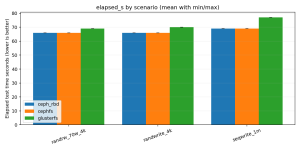
And yes, on the same CPU, same motherboard, same RAM, same HGST 1 TB SATA 3 Gbps HDDs, gluster updated significantly faster than ceph.

If latency is what matters, the drives are the same between both gluster and ceph. And yet, ceph was the only Win11 VM where it had god awful performance (both in sequential workloads as well as random workloads) whereas gluster performed significantly faster.

You can argue that NTFS lies, latency is king, whatever.

But it's the SAME physical hardware. SAME physical HGST 1 TB SATA 3 Gbps HDDs. Same everything (basically).

And therefore; since it's the SAME HGST 1 TB SATA 3 Gbps HDDs that I'm using for both (and I bought the drives, gosh, like 8 years ago, and never used them until now, so they were wiped by the eBay seller, and I haven't used them since, so as far as the system is concerned, they're "fresh" drives - ready to go).

The latency of said HGST 1 TB SATA 3 Gbps HDDs would be the same across all 6 HDDs and not a function of whether I'm running gluster or ceph on it.

Therefore; given that it's literally six of the same drives, the latency would be the same across them, but gluster clearly ran the Win11 updates significantly faster than ceph, despite the fact that all six HDDs have the same latency. Or put in another way - the drives that were used for gluster isn't suddenly going to have 8.939196526x lower latency (for the sequential write test from CrystalDiskMark) and 2.745762712x lower latency for the random write test between running said Win11 VM on gluster vs. running said Win11 VM on ceph.

Latency is a property of the physical disk, not what storage technology is being used on them.

And yet, gluster clearly ran said Win11 updates faster, by a HUGE margin, over ceph.

If latency was king, then ceph should've been able to complete the Win11 updates in the same time that it took gluster to complete the same post-install updates.

If gluster could get 82.33 MB/s sequential write and 1.62 MB/s random write, then there is no reason why ceph couldn't get the same performance. I mean, gluster demonstrated that the physical hardware was capable of it, and yet, ceph failed to get anywhere close to gluster's level of performance.

(This is why I ran both tests on the same physical box.)

"Anyway, I hope you never architect these things in a real situation, keep playing, I hope you learn something."
I hope I'll never have to architect these things for real neither. It'll put your job at risk (beacuse I'll do my math homework (as shown here) whereas you, clearly, don't/didn't.

You'd prseent your proposal. And I'd present a counter proposal that would be able to achieve your levels of performance, at a fraction of the cost. (Which I've already demonstrated here. And that's with make up costs for the drives, etc. Put in the real costs for the hardware and the difference can be even bigger.)

26% drive performance capability utilisation vs. your 0.96 drive performance utilisation or 27x difference between your proposal and mine.

If your proposal had a total cost of $1M, my proposal would've only costed around $37037.04.

So yeah - I hope that I would never have to architect something this like for real as well, because it would put you out of a job.

Even if they doubled my budget, it'd still be a fraction of the cost of your proposal.

Because I did my math homework.

And yes, I learned that ceph sucks. You can make up all the excuses in the world, but the facts still remain that even if NTFS has 10x lying factor, it's going to be the same 10x lying factor whether it's gluster or ceph.

Therefore; gluster sequential writes are almost 9x faster than ceph, and random writes are 2.7x faster with gluster than ceph.

This is what the data shows. This is what I've learned.

And you don't have any concrete numbers that proves nor demonstrates otherwise, using whatever methodology you want to employ instead of just install and run.
 
Last edited:
The problem is the variables, hardware, software, user experience, the list goes on and on.
Right. Again, this is why I tested both, on the same physical box and with six HDDs rather than just three.

That way, three can be assigned/dedicated to ceph and the other three can be assigned/dedicated to gluster so they don't "criss-cross" each other, and thus, can't interfere with each other neither.

By purposely running it within the same physical "box", it makes it so that as many of the variables that could be controlled, are controlled. I let the linux scheduler handled process/thread allocation as well (because in a real deployment, the I/O threads aren't going to have the process affinity mask set and it'll be up to the linux scheduler to figure out which I/O thread/process goes to which core, etc.)

And since ceph was so slow, I basically ended up running the gluster benchmark whilst the Win11 VM was still installing on ceph (because ceph was so slow). (And I actually started the ceph install first.)

Again, out of all of the people who have commented, @kayson and I are the only one who has provided any actual, concrete data. Other people just complained about it, but then don't bother to actually run their own tests, the way they think the tests should be executed/performed, and then publish their results data.

And that's fine. At the end of the day, the data speaks for itself. If people aren't happy that the data doesn't support their worldview, then they are more than welcome to run their own tests, in the manner of their own choosing, and present their data, but they haven't, and most likely won't.
 
  • Like
Reactions: Domino
PS. I'm in a bad mood, I got my cooling script wrong and lost a 15tb nvme due to heat overload, it was the last drive in 2u server front vertical 2.5 slots and just didnt get the ideal airflow during a recent heat wave. Now I'm angry at myself for being so complacent because 15tb nvmes aren't exactly cheap. The good news is that its all backed up! :D
Sorry to hear about that man.

That really sucks!

(If you ever need me to run the CFD studies for you, just hit me up. I've already studied the optimal placements for thermal pads (on NVMe SSDs), using CFD. (It's better if you place individual thermal pads on the individual NAND flash chips, in terms of thermal conduction, than if you placed one long, continous thermal across all of the chips simultaneously. By cutting the thermal pads and placing them on the individual chips, you are limiting how much planar heat conduction is happening, within the thermal pad, and instead, promote orthogonal heat conduction, and thus, more of the heat goes into your heatsink rather than being "spread across" (planar conduction) said one long, continuous thermal pad.)
 
  • Like
Reactions: Domino
Sorry to hear about that man.

That really sucks!

(If you ever need me to run the CFD studies for you, just hit me up. I've already studied the optimal placements for thermal pads (on NVMe SSDs), using CFD. (It's better if you place individual thermal pads on the individual NAND flash chips, in terms of thermal conduction, than if you placed one long, continous thermal across all of the chips simultaneously. By cutting the thermal pads and placing them on the individual chips, you are limiting how much planar heat conduction is happening, within the thermal pad, and instead, promote orthogonal heat conduction, and thus, more of the heat goes into your heatsink rather than being "spread across" (planar conduction) said one long, continuous thermal pad.)

Thats good to know! Thanks! I've always just ran a strip of thermal across the lot.

Although in this case it is a U.3 drive, so not really something you think about regarding opening and re-padding, plus with it being a Samsung pm1733, they do run crazy hot as it is.

My Kioxia CM6's run 10 degrees+ less! because of the so obvious design of having loads of vent-holes all around the drive! No idea why all the other manufacturers effectively seal their drives, and some only having a tiny orifice at the front and at the port end. I think going forward I will stick to buying Kioxia.
 
Thats good to know! Thanks! I've always just ran a strip of thermal across the lot.
No problem.

You're welcome.

(I got curious and figured that I could just run it in CFD to figure it out with some science behind it. And then when I was looking at the results, I could see the planar thermal conduction through the thermal pad which meant that it was keep/"trapping" the heat internal into said long, continuous thermal pad, whereas cutting it becomes a physical stop for said thermal conduction and therefore; promotes orthogonal thermal conduction rather than planar thermal conduction. And that makes sense, because that's what you want it to do - have the heat travel into the heatsink as much and as fast as possible.)


Although in this case it is a U.3 drive, so not really something you think about regarding opening and re-padding, plus with it being a Samsung pm1733, they do run crazy hot as it is.
No, but again, mass manufacturing means that they probably can't take the time to cut the thermal pads and place it on the individual chips as that'll just take too long for them to do so.

If your drives are still in warranty, I'd just leave them. That way, if there's a problem, they can't use that as an excuse to deny your warranty claim.

But once your drives are out of warranty, you can cut the thermal pad yourself where it will run every slightly cooler (depending how much forced convection you have, on/up against the heatsink).

Bottom line - there are things that you can do to help with thermal management and CFD can help test different solution proposals prior to implementation. Why guess when you can just run the CFD and get some answers?


No idea why all the other manufacturers effectively seal their drives, and some only having a tiny orifice at the front and at the port end.
Short answer?

Bean counters.

Engineering probably told them that it would be better for their product.

Manufacturing probably told them how much it would cost.

Bean counters picked the solution that cost them the fewest beans.

And as long as the product fails the day after the warranty expires, then that's your problem. And they make more beans from you, since you might buy from them again.

There are only a tiny handful of companies where they will just charge the customer the manufacturing costs for a better engineered product.

Most other people buy what's cheapest, even if it means buying a product that might be inferior, engineering-wise.

It's what businesses and customers-alike do.

(My first "take your kid to work day" in 9th grade - I didn't want to go to where my parents worked (mom was a speech-language pathologist and dad ran the computer systems at a bank), so I was placed by my high school co-op office, at one of the local car dealerships, in the service department, with the mechanics. I distinctly remember asking the mechanic back then, what was something that car companies did that was stupid and he old me (he was working on a GMC van (think like GMC Safari, but from the late 80s/early 90s) and told me that the steering column has a plastic cover on it that faces the driver. That cover used to be a two-piece injection moulded plastic cover so that if the mechanic needed to service the upper half of the steering column, he would be able to take out the two screws, take the top half of the cover off, and do whatever he needed to. As a cost-save, GM cut the cost of those two screws out and make it one single, long injection moulded piece for fractions of a penny for said two screws. Now, to service the top part of the steering column, it would take the mechanic 4x as long because the screws that hold the cover in is now mounted to the floor, and so he'd have to half-rip the floor out to be able to get to the two bottom screws, take those out, and then take off the cover. But GM would still only pay him, to do that job, the time it would've taken when it was still a two-piece cover. (So he'd only be paid, let's say 15 minutes of time, for a job that now takes an hour.) This is what companies do. And it's not limited to just GM. This was just my first exposure to this sort of stupidity from companies that said mechanic taught me and it was a lesson in how companies work that I still remember to this day. And customers buys what's cheap(est) most of the time. It's why dollar stores and Walmart exist and is a multi-billion industry/company.)
 
Last edited: