

Hello,
First i wish all of you à beautiful end of the years celebration.
i'am sorry to ask this question but after reading all post related i can't find my problem.
So i install a fresh proxmox 9.1 and can't acces GUI. i tried with two computer one on nix os et the other on windows 11
My router (freebox) is on 192.168.24.254
Proxmox is on 192.168.24.201
DHCP range is 192.168.24.2 to 192.168.24.200
(Sorry for the screen can't acces in ssh either)
On proxmox
ip a give 3 port (that's true) and for the installation just one is in use atm. nic2 (cf screen 1)
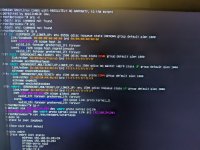
ip r give this
cat /etc/network/interfaces give this :
I can ping my router but not the two others pc.
cat /etc/hosts
curl https://192.168.24.201:8006 ok on the server
systemctl status pve* all is running with just two errors on pveproxy.service
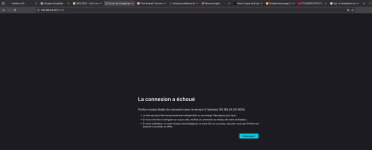
On the pcs can't acces the GUI (screen2) can't ping my server but can ping the router.
And the think i don't understand if i try arp -n i obtain this.
curl https://192.168.24.201:8006
Weird think i can't ping PC A to PC B or the reverse way.
On my router i see the proxmox on the interface (cf screen3)
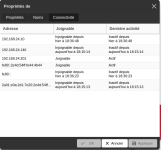
The other ip is me trying again and again ti install with different ip
Last think i reboot my switch in case ARP table is full
I'am totally lost thank you for your advice.
First i wish all of you à beautiful end of the years celebration.
i'am sorry to ask this question but after reading all post related i can't find my problem.
So i install a fresh proxmox 9.1 and can't acces GUI. i tried with two computer one on nix os et the other on windows 11
My router (freebox) is on 192.168.24.254
Proxmox is on 192.168.24.201
DHCP range is 192.168.24.2 to 192.168.24.200
(Sorry for the screen can't acces in ssh either)
On proxmox
ip a give 3 port (that's true) and for the installation just one is in use atm. nic2 (cf screen 1)
ip r give this
Code:
default via 192.168.24.254 dev vbmr0 proto kernel onlink
192.168.24.0/24 dev vbmr0 proto kernel scope link src 192.168.24.201
cat /etc/network/interfaces give this :
Code:
auto Io
iface Io inet loopback

iface nic2 inet manual

auto vbmr0
iface vbmr0 inet static
            address 192.168.24.201/24
            gateway 192.168.24.254
            bridge-ports nic2
            bridge-stp off
            bridge-fd 0

iface nic0 inet manual

iface nic1 inet manual

source /etc/network.interfaces.d/*
I can ping my router but not the two others pc.
cat /etc/hosts
Code:
127.0.0.1 localhost.localdomain localhost
192.168.24.201 proxmox.snep.local proxmox

#the following lines are desirable for IPV6 capable hosts

::1    ip6-localhost ip6-loopback
fe00::0 ip6-localnet
ff00::00 ip6-mcastprefix
ff02::1 ip6-allnodes
ff02::2 ip6-allrouters
ff02::3 ip6-allhosts
curl https://192.168.24.201:8006 ok on the server
systemctl status pve* all is running with just two errors on pveproxy.service
code_language.rust:
command 'apt-get update' failed: exit code 100
<root@pam> end task UPID:proxmox:000005F1:00000568:6950144B:aptupdate::root@pam: command 'apt-get update' failed: exit code 100
On the pcs can't acces the GUI (screen2) can't ping my server but can ping the router.
And the think i don't understand if i try arp -n i obtain this.
Code:
[xelo@GLF-OS:~]$ arp -n
Address                  HWtype  HWaddress           Flags Mask            Iface
192.168.24.201                   (incomplete)                              enp4s0
192.168.24.172                   (incomplete)                              enp4s0
192.168.24.254           ether   20:66:cf:76:48:2a   C                     enp4s0

[xelo@GLF-OS:~]$ arp
Address                  HWtype  HWaddress           Flags Mask            Iface
192.168.24.201                   (incomplete)                              enp4s0
192.168.24.172                   (incomplete)                              enp4s0
192.168.24.254           ether   20:66:cf:76:48:2a   C                     enp4s0

[xelo@GLF-OS:~]$ arp -a
? (192.168.24.201) at <incomplete> on enp4s0
? (192.168.24.172) at <incomplete> on enp4s0
? (192.168.24.254) at 20:66:cf:76:48:2a [ether] on enp4s0
curl https://192.168.24.201:8006
Code:
[xelo@GLF-OS:~]$ curl https://192.168.24.201:8006
curl: (7) Failed to connect to 192.168.24.201 port 8006 after 3088 ms: Could not connect to server
Weird think i can't ping PC A to PC B or the reverse way.
On my router i see the proxmox on the interface (cf screen3)
The other ip is me trying again and again ti install with different ip
Last think i reboot my switch in case ARP table is full
I'am totally lost thank you for your advice.
Last edited:
